
How to Study Networking for CompTIA or CCNA
Master the OSI model, subnetting, and hands-on labs with a study plan built specifically for CompTIA Network+ and Cisco CCNA exam success.
Networking certifications have a reputation, and it’s not entirely undeserved: people who are otherwise sharp, capable technical thinkers hit CompTIA Network+ or Cisco’s CCNA and suddenly find themselves stuck on subnetting math or drowning in acronyms that all sound the same. OSPF, EIGRP, VLAN, STP, ARP. It can feel like studying a foreign language where every word is also an abbreviation.
Here’s the reassuring truth: networking is one of the most learnable technical subjects out there, precisely because it’s built on a small number of core frameworks that repeat constantly. Once those frameworks are genuinely solid, rather than memorized just well enough to survive last week’s practice test, the rest of the material starts snapping into place around them. This guide covers the three things that actually move the needle: the OSI model, subnetting, and getting real hands-on lab time.
OSI Model Mastery: The Framework Behind All Networking Exam Questions
If there’s one thing you cannot afford to have shaky on exam day, it’s the OSI model. Not because you’ll get a question that says “list the seven layers” (though you might), but because nearly every other question on the exam implicitly assumes you know which layer a given technology, protocol, or device operates at.
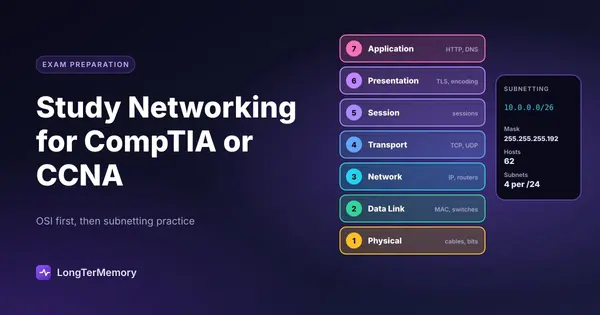
The seven layers, from bottom to top: Physical, Data Link, Network, Transport, Session, Presentation, Application. Most people memorize the mnemonic (“Please Do Not Throw Sausage Pizza Away”) and think they’re done. That’s the easy 10% of the work. The other 90% is being able to instantly place any technology you encounter into the correct layer, because that placement tells you what the technology can and can’t do.
Here’s a reference you should be able to reproduce from memory, not just recognize:
| Layer | Examples | What It Handles |
|---|---|---|
| Physical (1) | Cables, hubs, NICs | Raw bits, electrical signals |
| Data Link (2) | Switches, MAC addresses, VLANs | Frames, local delivery |
| Network (3) | Routers, IP addresses | Packets, routing between networks |
| Transport (4) | TCP, UDP | Segments, reliability, ports |
| Session (5) | Session establishment | Managing connections |
| Presentation (6) | Encryption, encoding | Data format translation |
| Application (7) | HTTP, DNS, FTP | End-user services |
The exam-relevant skill is recognizing, instantly, that “a switch operates at Layer 2 and forwards based on MAC addresses” while “a router operates at Layer 3 and forwards based on IP addresses” isn’t just trivia, it’s the reasoning you’ll need to answer troubleshooting scenario questions. If a question describes two devices on the same subnet that can’t communicate, and you know switching happens at Layer 2, you immediately know to look at cabling, port status, or VLAN assignment rather than routing tables.
Drill this actively. For every new protocol or device you encounter while studying, force yourself to answer: what layer does this operate at, and what does that tell me about what it can do? Don’t passively read a list of “Layer 3 devices.” Cover the list, try to generate it from memory, and check yourself.
Subnetting: The Calculation Skill That Requires Dedicated Practice
If the OSI model is the conceptual backbone of networking exams, subnetting is the mechanical skill that trips up the most people, and it’s the one skill on the entire exam that can’t be understood your way through. It has to be practiced, the same way you’d practice long division, until it becomes close to automatic.
Subnetting is fundamentally about dividing a block of IP addresses into smaller networks. The math itself, converting between decimal and binary, calculating subnet masks, figuring out usable host ranges, is entirely learnable, but only through repetition. Reading an explanation of how subnetting works and being able to solve a subnetting problem under time pressure are two completely different skills, and a lot of exam-day panic comes from students who understood the concept in a video but never actually drilled the calculation until it was fast.
A few things that make subnetting practice genuinely effective:
Learn the “magic number” shortcut method, not just binary math. Once you understand what’s happening conceptually, learn the shortcuts that let you calculate subnet ranges quickly (using powers of two and the increment between subnets) rather than converting every octet to binary by hand every single time. On a timed exam, speed matters as much as correctness.
Practice with a timer. Give yourself 60 to 90 seconds per subnetting problem and track how your speed improves over two or three weeks of daily practice. This isn’t busywork, it’s building the automaticity that frees up mental bandwidth for the rest of the exam.
Mix CIDR notation, subnet masks, and wildcard masks into your practice. Exams test all three formats, and getting comfortable converting between them (a /26 is 255.255.255.192, which has a wildcard mask of 0.0.0.63) prevents a nasty surprise on test day if a question uses a format you didn’t practice.
Do at least 100 practice problems before you feel “ready.” This number feels excessive to most people until they actually do it. Somewhere around problem 40 or 50, the calculation stops requiring conscious effort. That’s the point where subnetting questions stop eating your exam time and start being free points.
Lab Practice Resources for Hands-On Networking Study
Networking is fundamentally a hands-on discipline being tested through a multiple-choice format, and the gap between “I can answer a question about VLANs” and “I can actually configure a VLAN on a switch” is where a lot of theoretical knowledge falls apart under scenario-based questions, particularly on the CCNA, which leans heavily on configuration and troubleshooting scenarios.
You don’t need a rack of physical Cisco equipment in your bedroom to get this experience. Several accessible options exist at every budget level:
- Cisco Packet Tracer is free (with a Cisco NetAcad account, also free to create) and simulates entire network topologies, letting you build routers, switches, and end devices and configure them with real Cisco IOS commands. For CCNA prep specifically, this is close to essential.
- GNS3 is a free, more advanced network simulator that can run actual router and switch images for a more realistic experience than Packet Tracer, at the cost of a steeper setup process.
- Home lab with used enterprise gear is a great option if you learn best by touching physical hardware. Older Cisco switches and routers are inexpensive on the secondhand market and behave exactly like the equipment you’ll encounter professionally.
- Cloud-based lab platforms bundled with many CompTIA and Cisco prep courses give you browser-based access to preconfigured lab environments without any local setup at all.
Whichever option you choose, use labs to practice the specific tasks that show up in exam scenarios: configuring VLANs and trunking, setting up basic routing between networks, configuring access control lists, and troubleshooting connectivity issues by working through the OSI layers systematically from the bottom up. That last skill, methodically checking Layer 1 cabling and link lights before moving up to Layer 2 switching and then Layer 3 routing, is exactly the troubleshooting logic that CCNA scenario questions are testing.
Turning Networking Facts Into Long-Term Retention
Beyond the OSI model, subnetting, and lab work, both CompTIA Network+ and CCNA require memorizing a genuinely large volume of discrete facts: port numbers, protocol behaviors, cable standards, wireless frequencies, and dozens of acronyms that are easy to confuse with each other. This is exactly the kind of content that fades fast if you cram it and don’t revisit it.
Spaced repetition is the right tool for this layer of the material specifically. Facts like “DNS uses port 53” or “802.11ac operates in the 5GHz band” don’t require deep reasoning, they require durable recall, and reviewing them right before you’re about to forget them is far more efficient than re-reading a giant port-number table the night before your exam. If you’re working through a CompTIA or Cisco study guide, running your notes through LongTerMemory to auto-generate flashcards from the material and schedule them with spaced repetition keeps hundreds of small facts sharp for weeks, freeing up your active study time for subnetting drills and lab practice instead of rote memorization.
Putting It All Together
Networking certifications reward a specific mix of skills: conceptual fluency with the OSI model, mechanical speed with subnetting, real configuration experience from labs, and durable recall of the smaller facts that fill in the gaps. Treat each of those as a separate training target rather than one undifferentiated blob of “networking knowledge,” and the subject stops feeling like an overwhelming pile of acronyms and starts feeling like what it actually is: a well-structured system with rules you can genuinely master.