AI in Studying: How to Use AI Without Becoming Dependent
Learn how to use AI tools like ChatGPT for studying effectively , with the right prompts, critical verification habits, and ethical boundaries.
Table of Contents
- What AI Study Tools Are Actually Good At
- Generating Practice Questions from Your Own Materials
- Explaining Concepts in Multiple Ways
- Generating Summaries as Study Scaffolds
- Creating Spaced Repetition Decks at Scale
- Effective Prompts for Generating Exam Questions from Your Materials
- The Basic Structure
- Prompt Templates Worth Bookmarking
- Critical Verification of AI Responses: Maintaining Independent Thinking
- The Verification Habit
- The Dependency Trap
- Ethics and Rules: What Is Permitted and Prohibited
- Academic Institutions
- Professional Certification Exams
- The Practical Bottom Line
- Building an AI-Augmented Study System
- The Honest Assessment
Somewhere in the last two years, AI went from a curiosity to a genuinely useful tool in the learning toolkit , and then quickly to something that a lot of students and educators aren’t sure what to do with.
The honest reality is that AI tools are neither the academic apocalypse some fear nor the effortless study companion some hope. Like most powerful tools, they’re excellent at some things, terrible at others, and capable of quietly making you worse at learning if you use them without thinking.
This guide is practical. It’s about how to use AI to study more effectively , not how to let it study for you, which is a different (and much worse) strategy. The distinction matters both for your actual learning outcomes and for staying on the right side of the rules that increasingly govern AI use in education and professional certification.
What AI Study Tools Are Actually Good At
Let’s start with the genuine strengths, because they’re real and worth understanding.
Generating Practice Questions from Your Own Materials
This is arguably the highest-value use of AI in studying. Upload a PDF of your lecture notes, paste in a chapter summary, or describe a concept , and ask the AI to generate practice questions in a specific format.
The quality here is genuinely impressive when you guide it well. AI can produce recall questions, application scenarios, compare-and-contrast prompts, and multiple-choice items with plausible distractors. Doing this manually for 50 pages of material takes hours. With AI, it takes minutes.
Why this works: You’re still the one answering the questions. The AI generates the test; you take it. All the cognitive benefits of self-testing , retrieval practice, desirable difficulty, gap identification , are still yours. The AI just removed the bottleneck of creating the test in the first place.
Explaining Concepts in Multiple Ways
One of the most useful things about AI is its patience and its vocabulary for explanation. If a textbook’s explanation of a concept isn’t landing, you can ask the AI to explain it differently , via analogy, via a simpler version, via a real-world example, via a step-by-step breakdown.
This is particularly useful for technical material where the first three explanations you encounter all assume background knowledge you don’t quite have yet.
Generating Summaries as Study Scaffolds
Not as a replacement for reading , as a scaffold before reading. Asking the AI to generate a high-level summary of a topic before you study it in depth gives you a structural map that makes the detailed reading more coherent. You know what categories of information you’re looking for.
Creating Spaced Repetition Decks at Scale
Manual flashcard creation is the primary barrier to effective spaced repetition for most people. It’s time-consuming, requires judgment about what’s testable, and produces fatigue before you’re done. AI eliminates most of this friction , generating question-answer pairs from your materials in a format ready to import into whatever system you’re using.
The output needs editing, but editing 200 AI-generated cards takes 20 minutes. Creating those 200 cards from scratch takes 3–4 hours. That’s the kind of efficiency gain that changes whether you actually build the flashcard deck at all.
Effective Prompts for Generating Exam Questions from Your Materials
Most people who use AI for studying get mediocre results because they use mediocre prompts. The AI’s output quality is almost entirely determined by the specificity and clarity of your instructions. Here’s what actually works.
The Basic Structure
A good study prompt has four elements:
- Role: Tell the AI what it’s doing
- Material: Give it the content to work with
- Format: Specify the question type and difficulty
- Constraints: Set limits on scope, depth, or number
Weak prompt: “Give me some questions about photosynthesis.”
Strong prompt: “You are creating flashcards for a university biology student preparing for a final exam. Based on the following text, generate 15 question-answer pairs. For each question, write it as if an exam might ask it , not just definitions, but application and reasoning questions. Include 5 questions that require comparing photosynthesis in C3 vs. C4 plants. Format: Q: [question] A: [answer] [paste your text here]”
The strong version specifies difficulty level, question types, specific sub-topics, and output format. The result is flashcards you can use immediately rather than vague overviews you’d need to rewrite.
Prompt Templates Worth Bookmarking
For scenario-based practice (great for certifications and professional exams):
“Create 10 multiple-choice questions in the style of a [PMP/AWS/CFA] exam. Each question should present a realistic scenario and require applying the concept rather than recalling a definition. Include four options per question with one clearly correct answer and plausible distractors. Topic: [topic]”
For identify-the-gap sessions:
“I’m going to describe [concept] in my own words. Identify any factual errors, important omissions, or misconceptions in my explanation, and provide corrections. Here is my explanation: [your explanation]”
For elaborative questioning:
“Ask me five progressively harder questions about [topic]. Start with basic recall and move toward synthesis and application. After I answer each one, tell me what I got right, what I got wrong, and what I missed.”
For building concept maps:
“List the 10 most important concepts in [subject area] and explain how each connects to at least two others. Present it as a relationship map I can use to organize my study.”
Critical Verification of AI Responses: Maintaining Independent Thinking
This is the part of AI study advice that most guides skip, and it’s the most important part.
AI can be confidently wrong. Not occasionally , routinely. It will state incorrect facts in authoritative language. It will generate plausible-sounding exam questions with incorrect answers. It will explain concepts with subtle errors that look right to a non-expert and would be marked wrong by an examiner.
This is not a reason to avoid AI. It’s a reason to use AI the same way you’d use any source you don’t fully trust: as a starting point, not a conclusion.
The Verification Habit
For any AI-generated content you plan to study from, build in a verification step:
-
Cross-reference against your primary source. If the AI explains a concept, check that explanation against your textbook, lecture notes, or official study materials. Discrepancies exist more often than you’d expect.
-
Flag high-stakes content for extra scrutiny. Medical, legal, and technical certifications where incorrect information could cause real harm deserve extra caution. AI models may have outdated information, jurisdiction-specific errors, or simply be wrong about specialized facts.
-
Don’t study AI explanations , study your verified understanding. After you’ve read an AI explanation and verified it, put the AI away and write the concept in your own words. You’re not trying to memorize the AI’s phrasing. You’re trying to build your own understanding.
-
Treat AI practice questions as first drafts. Before adding AI-generated flashcards to your deck, read each one and confirm the answer is correct. Delete or fix the ones that aren’t. A wrong flashcard you practice repeatedly doesn’t just fail to help , it actively embeds incorrect information.
The Dependency Trap
Here’s the subtler risk: using AI so heavily that you stop developing the independent reasoning your exam (and your career) will require.
If you consistently ask AI to explain things you could work out yourself, to solve problems you could work through with effort, or to generate insights you could arrive at through engagement with the material , you’re outsourcing the cognitive work that builds actual understanding. The AI gets smarter at your subject; you don’t.
Active engagement with difficult material is the mechanism of learning. Cognitive struggle , the uncomfortable process of working through something hard before checking , is where understanding forms. If AI removes all the difficulty, it removes all the learning.
The right use of AI is to reduce logistical friction (card creation, question generation, first explanations) while preserving cognitive friction (answering questions, working problems, explaining concepts). The moment you feel AI is making the material too easy, that’s the moment to put the AI away and do the work yourself.
According to OECD research on AI in education, the most effective integration of AI in learning environments preserves student agency and critical thinking , tools that augment human reasoning produce better outcomes than tools that replace it.
Ethics and Rules: What Is Permitted and Prohibited
The regulatory landscape around AI in education and professional certification is evolving quickly, and the rules vary significantly by institution and exam body. Getting this wrong has real consequences , from academic misconduct findings to invalidated certification exams.
Academic Institutions
University and college policies on AI vary from blanket prohibition to active encouragement, with most institutions currently occupying the uncertain middle ground of “it depends on the assignment and instructor.”
A few principles that hold across most policies:
AI as a study tool (for your own learning) is almost universally permitted. Using AI to generate practice questions, explain concepts, or create flashcards from your own notes is equivalent to using a tutor or a study guide. No reasonable policy prohibits this.
AI as a writing or assessment tool is the contested territory. Submitting AI-generated text as your own work , essays, reports, analysis , violates academic integrity policies at most institutions, regardless of how the AI policy is written. The issue is not using AI; it’s misrepresenting authorship.
When in doubt, ask. If an assignment is ambiguous about AI use, ask your instructor before using it , not after. The conversation is almost always productive, and it protects you.
Professional Certification Exams
Most professional certification bodies have explicit policies on AI assistance during exams:
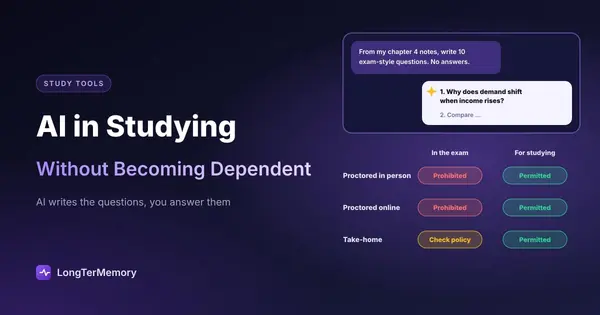
| Exam type | AI during exam | AI during study |
|---|---|---|
| Proctored in-person | Prohibited | Generally permitted |
| Proctored online | Prohibited (monitored) | Generally permitted |
| Take-home/open-book | Varies , check policy | Generally permitted |
The key rule: AI assistance during the exam itself is almost never permitted, and proctoring technology increasingly detects and flags suspicious behavior. The professional and legal consequences of exam fraud can follow you for years.
Using AI to study , to prepare , is a different matter entirely and is not prohibited by any major certification body. The distinction is preparation versus performance.
The Practical Bottom Line
Use AI aggressively to study smarter: to create practice materials, to get explanations in different formats, to build your flashcard deck at scale. Verify everything. Keep your independent reasoning sharp by doing the hard cognitive work yourself.
Don’t use AI to do the assessed work , assignments, exams, certification tests. Not just because of the rules, but because the assessed work is the mechanism through which you demonstrate (and develop) actual competence.
Building an AI-Augmented Study System
Here’s what a thoughtful, sustainable AI-integrated study workflow actually looks like:
Step 1 , Input: Read, watch, or attend lectures with normal note-taking. This part is you, unaugmented.
Step 2 , AI card generation: Paste your notes into an AI tool (or use a platform like LongTerMemory that does this natively). Generate flashcards, practice questions, and a concept summary. Spend 15–20 minutes editing and verifying.
Step 3 , Retrieval practice (you): Use the AI-generated materials to test yourself. No AI assistance during this phase. Answer questions, recall from flashcards, do practice problems. Check your answers against verified sources, not just against the AI’s version.
Step 4 , Gap analysis: For concepts you failed to recall or got wrong, ask the AI to explain them a different way , via analogy, via example, via simpler language. Then close the AI and reproduce the explanation from memory.
Step 5 , Spaced review: Your spaced repetition system handles the scheduling. You show up and do the reviews.
In this workflow, AI handles the logistics , card creation, explanation generation, scheduling , while you handle the learning. That’s the right division of labor.
The Honest Assessment
AI study tools are the most significant development in learning logistics in a decade. The ability to instantly generate quality practice materials from your own documents, get explanations on demand in any format, and automate the scheduling of your review sessions is genuinely powerful.
But they can only accelerate learning that’s actually happening. If you’re using AI to avoid cognitive effort, you’re using it wrong. If you’re letting AI think through concepts for you instead of working through them yourself, you’re trading short-term convenience for long-term deficiency.
The best version of AI-augmented studying looks a lot like the best version of non-AI studying: lots of self-testing, distributed over time, with honest assessment of what you actually know versus what you think you know. AI just makes building and running that system dramatically faster.
Use it accordingly.