How to Use Concept Tables for Structured Review
Learn how concept tables help you compare, organize, and retrieve study material faster, with practical examples for any subject.
Table of Contents
- Building Comparison Tables to Clarify Differences Between Related Concepts
- Why This Works
- A Simple Example
- How to Build One From Scratch
- How Visual Structure in Tables Aids Memory Retrieval
- Spatial Memory Is Powerful
- Pattern Recognition
- The Mobile-Friendly Advantage
- Turning Dense Textbook Sections Into Scannable Concept Tables
- Step 1: Identify the Conceptual Cluster
- Step 2: Choose Your Dimensions
- Step 3: Fill in From Memory First
- Step 4: Check and Complete
- Step 5: Use the Table for Active Recall
- Real-World Examples
- Combining Concept Tables With Other Techniques
- The Bottom Line
Most students take notes the same way: they open a notebook, start writing, and end up with pages of linear text that look almost exactly like the textbook they were trying to understand in the first place. Then, when review time comes, they re-read those notes, feel vaguely like they understand things, and move on.
Then the exam arrives, and the questions ask them to compare two concepts, or distinguish between three related processes, or explain the difference between terms that felt similar during reading, and things get messy.
Concept tables solve this problem directly. They are one of the most underused tools in any student’s arsenal, and once you start building them, you will wonder how you ever studied without them.
Building Comparison Tables to Clarify Differences Between Related Concepts
A concept table is essentially a comparison matrix. You put related concepts down one side (the rows) and comparison criteria across the top (the columns), and you fill in the cells. What comes out is a structure that makes the similarities and differences between concepts immediately visible.
Why This Works
The reason concept tables are so effective is rooted in how memory works. Your brain does not store information in isolation. It stores it in relational webs, linking new information to existing knowledge by finding connections, contrasts, and patterns. When you build a comparison table, you are literally constructing that relational structure on paper before it forms naturally in your memory. You are doing the organizational work upfront so that your brain has a clean scaffold to attach information to.
Compare this to re-reading linear notes, where you encounter each piece of information in sequence but rarely build explicit connections between related concepts. Your brain has to infer those relationships on its own, which takes more cognitive effort and produces weaker, less retrievable memories.
A Simple Example
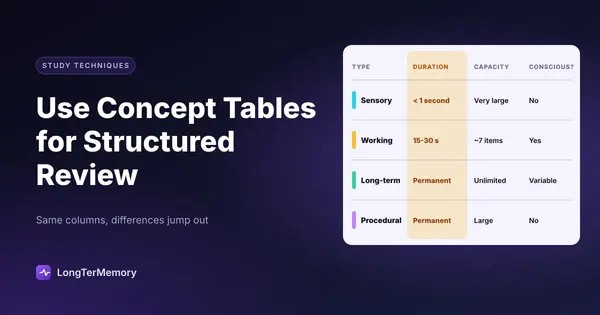
Say you are studying the major memory types in cognitive psychology. Rather than writing a paragraph about each type separately, you build a table like this:
| Memory Type | Duration | Capacity | Conscious Access? | Example |
|---|---|---|---|---|
| Sensory memory | Under 1 second | Very large | No | Afterimage of a flash |
| Working memory | 15-30 seconds | ~7 items | Yes | Holding a phone number |
| Long-term memory | Potentially permanent | Essentially unlimited | Variable | Childhood memories |
| Procedural memory | Permanent | Large | No | Riding a bike |
Now look at that table for thirty seconds and close this page. I guarantee you can answer: “What is the duration of working memory?” and “Which memory types do not involve conscious access?” with far more confidence than you could after reading two paragraphs describing each type individually.
That is the power of concept tables.
How to Build One From Scratch
Start by identifying a cluster of related concepts in your material. The sweet spot is usually three to seven concepts that share enough structure to compare. Too few and the table is not worth making. Too many and it becomes unwieldy.
Next, brainstorm the dimensions you could compare them on. What questions might an exam ask about these concepts? What are the meaningful ways in which they differ? Common dimensions include: definition, mechanism, advantages, limitations, typical use case, historical origin, and quantitative parameters.
Then build the table. Fill in what you know from memory first, then check your notes and fill in gaps. The process of trying to recall before checking is itself a form of retrieval practice that strengthens memory.
How Visual Structure in Tables Aids Memory Retrieval
There is something that happens when you arrange information spatially that does not happen when you arrange it linearly. The table format does not just organize information. It actually changes how you encode it.
Spatial Memory Is Powerful
Humans have extraordinarily good spatial memory. We can remember where something was on a page, or where a piece of furniture was in a childhood bedroom, with remarkable precision even decades later. When you put information into a table, you are giving it a spatial location. “Procedural memory is in the bottom-left corner of the table. Its capacity was… large.” That spatial anchor is a retrieval cue that prose does not provide.
Pattern Recognition
Tables also make patterns visible in a way that linear text hides. When you build your cognitive psychology memory table, you can immediately see that the two types with “No” in the conscious access column are sensory memory and procedural memory. You probably would not have noticed that so clearly from reading paragraphs about each one. The visual alignment of the “No” entries is the insight.
This matters enormously in exams. Many exam questions are essentially asking you to recognize a pattern. “Which of the following memory types do NOT involve conscious access?” If you built and studied a concept table, that question is trivially easy. If you read and re-read linear notes, it requires reconstructing the comparison on the fly under pressure.
The Mobile-Friendly Advantage
For mobile review sessions, concept tables are particularly useful because they give you a scannable, structured overview that you can review in a minute or two. Rather than scrolling through paragraphs, you can glance at a table and remind yourself of an entire conceptual landscape in seconds.
| Study Method | Time to Create | Retrieval Speed | Comparison Clarity |
|---|---|---|---|
| Linear notes | Fast | Slow (must re-read) | Low |
| Mind maps | Medium | Medium | Medium |
| Concept tables | Medium | Fast (scan) | High |
| Flashcards | Slow (if manual) | Fast (card by card) | Low (isolated) |
Turning Dense Textbook Sections Into Scannable Concept Tables
The most common objection to concept tables is that they take time to build. This is true. They take more upfront effort than passively re-reading a chapter. But they pay back that time investment many times over during review, because a good concept table can replace multiple review sessions of linear text.
Here is a practical workflow for converting textbook content into concept tables.
Step 1: Identify the Conceptual Cluster
Read through a chapter section and ask yourself: “What are the main things this section is contrasting or comparing?” If the section describes three types of chemical reactions, that is your cluster. If it describes the differences between four economic schools of thought, that is your cluster. The textbook often signals this to you with headers like “Types of X” or “The Three Approaches to Y.”
Step 2: Choose Your Dimensions
Before you start filling cells, decide on your columns. Look at what the textbook emphasizes about each concept. What does it describe in most detail? What does the professor seem to find important based on lecture emphasis? What types of questions have appeared on past exams? Those are your dimensions.
A good rule of thumb: aim for four to six columns. Fewer than four and the comparison lacks depth. More than six and the table becomes too wide to scan easily on a single screen or page.
Step 3: Fill in From Memory First
Before opening the book, try to fill in as many cells as you can from what you already understood from reading. This first attempt, imperfect as it will be, is itself a retrieval practice exercise. It activates your memory, identifies gaps, and makes you pay more focused attention when you go back to the source material to fill in what you missed.
Step 4: Check and Complete
Go back to your notes or textbook and complete any empty or uncertain cells. Pay particular attention to cells where you were not sure, because those are exactly the gaps that will trip you up on an exam.
Step 5: Use the Table for Active Recall
Once the table is built, cover one column at a time and try to fill it in from memory. Or cover one row and try to reproduce all the properties of that concept. Or close the table entirely and try to reproduce the whole thing on blank paper. Any of these approaches turns your concept table into an active recall tool rather than a passive reference.
Real-World Examples
For medical students: A concept table comparing bacterial and viral infections across dimensions like causative agent, treatment, immune response, and transmission is more useful for clinical reasoning than re-reading separate paragraphs about each.
For law students: A concept table comparing legal standards (strict scrutiny, intermediate scrutiny, rational basis) across dimensions like when applied, burden of proof, and typical outcome makes constitutional law questions much more tractable.
For business students: A comparison table of Porter’s Five Forces or different market structures lays out the competitive landscape in a way that an essay description simply cannot match.
For language learners: Concept tables work brilliantly for grammar. A table comparing past simple, present perfect, and past perfect across dimensions like when used, signal words, and example sentences is far more useful than three separate grammar pages.
Combining Concept Tables With Other Techniques
Concept tables are most powerful when used as part of a broader study system rather than in isolation.
Pair with spaced repetition: Once you have a concept table, use it as the source material for spaced repetition review. You can create flashcards from individual cells (“What is the capacity of working memory?”) and review them using a spaced repetition system like LongTerMemory or Anki.
Use before and after reading: Building a concept table before reading a chapter (based on headers and subheadings) creates a predictive framework that primes your brain to look for specific information. Filling it in after reading consolidates what you learned.
Turn tables into teaching prompts: Take a completed table and explain it out loud as if teaching someone else. “So working memory has a duration of about fifteen to thirty seconds, which is why you can hear a phone number and remember it just long enough to dial it, but if you get distracted, it disappears…”
The Bottom Line
Concept tables are a study technique that works because they align with how memory actually functions. They make relationships explicit. They use spatial encoding. They force you to identify the meaningful dimensions of comparison rather than absorbing information as a formless blob of text.
They also have a secondary benefit that is easy to overlook: building them is itself a form of deep processing. The act of deciding what the rows and columns should be, what dimensions matter, what the meaningful contrasts are, requires exactly the kind of analytical engagement that leads to genuine understanding rather than surface familiarity.
Start small. Take one set of related concepts from your current study material, spend fifteen minutes building a comparison table, and see how differently you feel about those concepts the next day.
You will be back to build more tables. That much I am confident about.