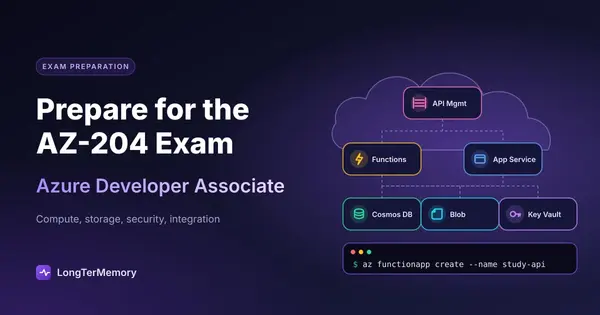
How to Prepare for the Microsoft Azure Developer (AZ-204) Exam
A practical AZ-204 study guide covering Azure compute, storage, and API services, plus hands-on labs and resources to pass the exam.
Table of Contents
- What the AZ-204 tests across Azure compute, storage, and API services
- Hands-on coding and lab requirements for Azure Developer readiness
- Practice exam strategy and study resources for AZ-204
- Retaining SDK details and configuration facts without drowning in notes
- A realistic study timeline for AZ-204
- Final thoughts
The Microsoft Azure Developer Associate exam, AZ-204, is the certification that separates developers who have read about Azure from developers who have actually shipped code to it. It is narrower than the administrator-focused AZ-104 in some ways, but it goes deeper into the areas that matter to software engineers: writing code that talks to Azure services, securing applications with managed identities, and designing event-driven architectures that hold up in production. If you are a .NET developer, a Node.js engineer, or a Python specialist looking to validate your cloud skills, this guide will keep you out of the weeds and focused on what the exam actually tests.
Unlike the administrator track, AZ-204 expects you to know how the Azure SDKs work, how to configure triggers and bindings, and how to troubleshoot code running in a distributed cloud environment. Reading documentation helps, but typing code and watching it fail is what builds the intuition this exam demands. The good news is that the preparation is straightforward if you split it into three phases: understand the domains, code the labs, and test your recall.
What the AZ-204 tests across Azure compute, storage, and API services
The exam is organized into five domains, and compute solutions, security, and integration services together account for roughly two-thirds of the questions. Microsoft publishes approximate weightings in the official exam guide, and those percentages are the best map you have for prioritizing your study time.
| Domain | Approx. weight | What it covers |
|---|---|---|
| Develop Azure compute solutions | 25-30% | App Service, Azure Functions, containerized apps, ACI, AKS, VM scale sets |
| Develop for Azure storage | 15-20% | Blob storage, Cosmos DB, Table storage, Queue storage, file shares, access tiers |
| Implement Azure security | 20-25% | Managed identities, Key Vault, Microsoft Graph, authentication, authorization, secure app configuration |
| Monitor, troubleshoot, and optimize Azure solutions | 15-20% | Application Insights, Azure Monitor, caching, CDNs, performance tuning |
| Connect to and consume Azure services and third-party services | 15-20% | API Management, Event Grid, Service Bus, Logic Apps, third-party APIs |
Three patterns stand out here. First, compute and security together make up nearly half the exam. If your background is backend development but light on identity and Key Vault, that security domain deserves extra attention. Second, no domain is negligible. Even the lightest domain can easily account for eight to twelve questions, so skipping monitoring or storage is not a viable shortcut. Third, the exam loves connected scenarios: a Function that writes to Cosmos DB, a web app that reads secrets from Key Vault, an API Management layer that routes traffic to microservices behind a firewall.
Compute is the heaviest hitter. You need to know how to deploy web apps to App Service, how to configure deployment slots, and when to choose Azure Functions over containers. The exam loves to test cold start behavior, scaling rules, and the difference between consumption plans and premium plans. It also tests container workloads, so you should understand when to use Azure Container Instances versus Azure Kubernetes Service, and how to configure continuous deployment for each.
Storage is not just about creating a blob container in the portal. You need to understand SDK-level operations: uploading with retries, handling concurrency with ETags, choosing between hot, cool, and archive tiers, and writing efficient Cosmos DB queries with proper partitioning. The exam will show you code snippets and ask what is wrong, so you need to recognize the correct class names, method signatures, and connection patterns.
Security questions often center on managed identities and Azure Key Vault. Know how a system-assigned identity differs from a user-assigned identity, and how to retrieve a secret from Key Vault inside application code without storing a single credential in a configuration file. The exam also tests Microsoft Graph integration and the difference between authentication and authorization in the context of Azure app registrations.
The monitoring and optimization domain tests whether you can instrument code. Expect questions on Application Insights SDK configuration, custom telemetry, distributed tracing, and how to correlate logs across microservices. You should also know when to use Azure Cache for Redis and how to configure a Content Delivery Network for static assets.
Finally, the integration and API services domain covers messaging and API governance. You need to know when to use Event Grid versus Service Bus, how to define API Management policies, and how to secure an API with OAuth 2.0 or managed identities. The exam frequently tests delivery guarantees, so understand the difference between at-least-once and exactly-once semantics.
Hands-on coding and lab requirements for Azure Developer readiness
You cannot pass AZ-204 by reading about code. You need to write it, debug it, and deploy it to Azure at least a dozen times before the exam feels comfortable. The questions are code-centric. You will see partial snippets in multiple-choice questions, and you will need to spot the missing using statement, the incorrect connection string format, or the wrong binding attribute. The only way to develop that eye is to build real projects.
Plan for roughly 40 to 60 hours of hands-on work. That sounds like a lot, but it is the difference between guessing on code questions and recognizing the pattern instantly. If you already write C# daily, you might land on the lower end. If you are coming from a non-Microsoft stack, give yourself the full 60 hours to get comfortable with the Azure SDK patterns and the .NET configuration ecosystem.
High-yield coding labs to build yourself:
- Build and deploy a .NET or Python web app to App Service. Configure deployment slots, set up slot settings that do not swap, and write a GitHub Actions workflow to deploy automatically. Then add a custom domain and a managed TLS certificate. This teaches you the deployment pipeline, the configuration hierarchy, and the difference between production and staging environments.
- Create Azure Functions with multiple trigger types. Build an HTTP trigger, a Blob trigger that fires on upload, and a Queue trigger that processes messages. Experiment with input and output bindings so you understand how the runtime injects connections without you writing boilerplate client code.
- Write a Cosmos DB application. Create a container with a partition key, insert documents with the SDK, and write queries that include the partition key for efficiency. Try a cross-partition query and watch the Request Unit charge jump. That cost difference is something the exam tests explicitly.
- Implement Blob storage operations in code. Upload with the v12 SDK, enable soft delete, set lifecycle policies through code or CLI, and generate a SAS token with restricted permissions. Know the difference between a service SAS, a user delegation SAS, and an account SAS.
- Secure a console app with Key Vault and managed identity. Run the app locally with your Azure CLI credentials, then deploy it to an Azure VM or App Service with a system-assigned managed identity and remove every secret from configuration. Feel the difference between connection strings and Key Vault references.
- Configure API Management. Import an OpenAPI specification, apply a rate-limit policy, and route requests to a backend Azure Function. Test the behavior with and without the subscription key. This is the kind of end-to-end scenario the exam loves.
- Build a simple event-driven flow. Use Event Grid to subscribe to Blob storage events and trigger a Function that processes new files. Then rebuild the same flow with Service Bus and feel the difference in delivery guarantees, ordering, and retry behavior.
How to keep labbing affordable:
- Use the Azure free account if you are eligible. It gives you enough credit to run meaningful labs for several weeks.
- Take advantage of free tiers. Cosmos DB, App Service, and Functions on consumption plans are nearly free for low traffic. Storage is pennies if you clean up large test files.
- Tear down expensive resources the same day. API Management and AKS clusters can burn dollars fast. Lab them once, screenshot every blade and configuration screen, and delete the resource group before you log off.
- Set a budget alert at $10 so you get a notification before anything surprises you.
Labbing is also the best preparation for any performance-based questions that appear. These small interactive tasks ask you to complete configuration or fix code in a simulated environment. They reward muscle memory, so the more SDK and portal work you have done, the faster and more confidently you will handle them.
Practice exam strategy and study resources for AZ-204
The final stretch of AZ-204 prep should be a cycle of practice tests, targeted review, and active recall so the details stick until exam day. Start with the official material to learn what Microsoft actually wants you to know, then layer on third-party explanations and practice exams to fill gaps and build exam stamina.
Official and foundational resources:
- Microsoft Learn AZ-204 learning path. This is free, module-based, and includes short sandbox labs. It is the best place to start if you are new to Azure development, and it is the most reliable source for the precise wording the exam expects.
- AZ-204 exam skills outline. Download the official PDF and use it as a checklist. Cross off each bullet only when you can explain it and, ideally, have coded it once.
- Azure documentation and architecture center. The docs for App Service, Functions, Cosmos DB, and Storage are dense, but they are the source of truth for SDK behavior and configuration nuances.
- Azure free account sandbox. Use it alongside Microsoft Learn modules so you can experiment without touching your own subscription.
Video courses for structured explanation:
- Pluralsight AZ-204 path. Excellent for .NET developers who want a coherent narrative across all five domains.
- Scott Duffy or Alan Rodrigues on Udemy. Both keep their courses current and include practice labs that mirror real exam scenarios.
- John Savill’s Azure training on YouTube. Deep, technically rich, and free. His master classes are especially useful once you have a baseline and want to fill conceptual holes.
Practice exam banks worth using:
- MeasureUp. The official practice test provider for Microsoft. The questions are harder than the real exam in useful ways, and the explanations are detailed enough to teach you new edge cases.
- Whizlabs AZ-204 practice tests. Good value, with solid explanations and a large question bank for repetition.
- Tutorials Dojo practice exams. Highly regarded for scenario-based questions that mirror the real exam style. Use these in the final two weeks.
- ExamTopics. A free community bank, but treat it cautiously. Some answers are outdated or debated, so verify anything that feels off against the official docs.
How to use practice exams effectively:
- Do your first full practice exam after you finish one pass of all five domains. The goal is diagnosis, not a score. Expect something in the 50s or 60s. That is normal.
- For every missed question, write down the why behind the correct answer and the why behind each wrong option. The exam rewards reasoning, not just recall.
- Track misses by domain. If 60 percent of your errors are in integration services because you confuse Event Grid with Event Hubs, that is where your next three study sessions go.
- Take the final practice exam two to three days before the real test. Use it to confirm readiness, not to cram new topics.
Retaining SDK details and configuration facts without drowning in notes
Here is the problem no lab or video fully solves: AZ-204 has a massive number of small but testable facts. What is the default timeout for an Azure Function on the consumption plan? Which NuGet package contains the Blob storage v12 client? What is the correct syntax for an API Management policy expression? Which Cosmos DB consistency level offers the lowest latency? These details are easy to learn and even easier to forget three weeks later.
That is where spaced repetition becomes your secret weapon. As you move through each domain, turn the granular facts into short question-answer cards. Review them daily for a few minutes. The small time investment keeps the detail layer fresh while your deeper study hours stay focused on labs and scenarios.
You could build those flashcards manually, but for an exam this dense that process can easily eat five to ten hours you should spend coding instead. A better approach is to upload your PDF study guides, lab notes, or exported documentation to LongTerMemory and let its AI turn the material into flashcards automatically. You skip the manual copying and formatting entirely, and the platform handles the scheduling logic using proven spaced repetition intervals. That means the facts you are most likely to forget surface right when you need to review them. LongTerMemory also supports ingestion from both PDFs and web content, so you can turn a Microsoft Learn module or an architecture doc into reviewable cards in minutes rather than hours. For a certification as code-heavy as AZ-204, combining hands-on labs with automated spaced repetition is the most reliable way to walk into the testing center with both intuition and recall sharp.
A realistic study timeline for AZ-204
Most developers with some Azure exposure need 6 to 10 weeks of part-time study at roughly 8 to 12 hours per week. If you already deploy to App Service at work, you might compress that to 4 weeks. If Azure is completely new, plan for 12 weeks.
| Weeks | Focus |
|---|---|
| 1-2 | Microsoft Learn AZ-204 path; SDK setup in your preferred language; build first App Service and Function apps |
| 3-4 | Storage in depth: Blob SDK operations, Cosmos DB partitioning, Table and Queue storage |
| 5-6 | Security and identity: managed identities, Key Vault, Microsoft Graph, app registrations |
| 7-8 | Integration and APIs: API Management policies, Event Grid, Service Bus, Logic Apps |
| 9-10 | Monitoring and optimization: Application Insights, caching, CDN, performance tuning |
| 11-12 | Practice exams; targeted review of weak domains; flashcard drilling; schedule the exam |
Whatever timeline you choose, front-load compute and security. Those two areas take the longest to internalize because they are less about memorizing wizards and more about understanding how code, permissions, and infrastructure interact. Storage and integration tend to click faster once you have written a few SDK calls, but do not underestimate the monitoring domain. Application Insights configuration is detail-rich and easy to confuse if you have not instrumented real code.
Also, schedule the exam while you still have momentum. Having a date on the calendar forces you to protect study time and cuts the temptation to keep reviewing indefinitely.
Final thoughts
The AZ-204 is not a trivia test, and it is not a memorization sprint. It is a certification designed to show that you can build real Azure applications that are secure, scalable, and well-integrated. That means your preparation should mirror the job: read to understand, code to internalize, test to diagnose, and repeat the facts until they stick.
Focus on the five domains in proportion to their weight. Build the labs that force you to make real decisions about compute, storage, and security. Use practice exams as feedback loops, not as score trophies. And keep the fine-grained details alive with spaced repetition so they are still there on exam day.
Pass AZ-204 and you will have more than a certification. You will have a working developer’s mental model of Azure, which is exactly what engineering teams hiring for cloud-native roles are looking for. Put in the hands-on work, trust the repetition, and the score will follow.