Best PDF to Flashcards Apps: Anki, Quizlet, and AI Tools Compared
Looking for the best PDF to flashcards app? Compare Anki, Quizlet, and AI tools that convert PDFs into exam-ready flashcards automatically.
Table of Contents
- The Core Problem with Manual Flashcard Creation from PDF
- Anki vs Quizlet vs AI-Powered Solutions: Which Fits Your Study Style to convert pdf to flashcards?
- Anki: The Gold Standard for Spaced Repetition
- Quizlet: The Accessibility Champion
- AI-Powered Solutions: The New Generation to create flashcards from pdf
- How to Convert PDF Notes into Exam Questions in Under 5 Minutes
- Step 1: Prepare Your PDF (2 minutes or less)
- Step 2: Upload and Set Parameters (1 minute)
- Step 3: Review and Cull (2 minutes per section)
- Step 4: Tag and Prioritize
- Benefits and Limitations of Artificial Intelligence in Study Workflows
- Where AI-generated Flashcards Genuinely Adds Value
- Where AI Falls Short
- PDF to Flashcards: how to Choose the Right Tool for Your Situation
- The Honest Bottom Line to create flashcards from PDF
You’ve got a 300-page PDF, an exam in three weeks, and zero interest in manually typing out a thousand flashcards. You’re not lazy , you’re rational. Flashcard creation is one of the most time-consuming parts of studying, and it’s also one of the most automatable. Which raises an obvious question: which app actually does it best?
This guide breaks down the real landscape of flashcard apps in 2025 , the classics, the modern alternatives, and the AI-powered newcomers that are genuinely changing what’s possible. We’ll look at who each tool is actually for, where they fall short, and what to consider when your study materials are sitting in a pile of PDFs.
No affiliate links. No sponsored rankings. Just a clear-eyed look at the tools.
The Core Problem with Manual Flashcard Creation from PDF
Before the comparison, it’s worth naming the thing everyone already knows: making flashcards takes forever. Research consistently shows that active recall via flashcards is one of the most effective study techniques available. The problem has never been the method , it’s the upfront cost.
A typical university course might generate 500–800 testable concepts across a semester. If it takes even 90 seconds per card to write a decent question-answer pair, that’s 12–20 hours of work before you’ve reviewed a single thing. For professionals studying for certifications like AWS, CFA, or bar exams, the numbers get even uglier.
This is why the race to automate flashcard creation matters. If a tool can turn your lecture notes or textbook PDF into a usable card deck in minutes, it doesn’t just save time , it removes the biggest barrier between students and one of the most proven study methods in cognitive science.
Anki vs Quizlet vs AI-Powered Solutions: Which Fits Your Study Style to convert pdf to flashcards?
Let’s start with the honest overview. These tools are not really competing for the same user. Understanding who each one is built for will save you from a lot of frustration.
Anki: The Gold Standard for Spaced Repetition
Anki has been around since 2006 and has a fanatically loyal user base for good reason. Its spaced repetition algorithm (SM-2, developed by Piotr Woźniak) is genuinely excellent , one of the most rigorously designed scheduling systems available in any consumer software. Medical students swear by it. Language learners swear by it. Anyone who needs to retain large volumes of factual information over a long period swears by it.
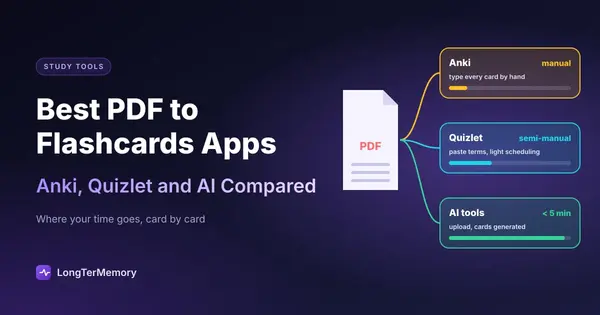
The catch is equally well-known: Anki’s interface looks like it was designed in 2006, because it was. Creating cards is entirely manual unless you use third-party plugins, and even with plugins, importing from PDFs requires several steps and a fair amount of technical tolerance. The mobile app costs money on iOS (one of the few paid iOS apps that genuinely earns the price). Syncing across devices requires a free AnkiWeb account.
Anki is best for: Students with long-term study horizons (months to years), people studying languages or medicine, users who want maximum control over their decks and scheduling, and people who don’t mind a learning curve.
Anki is not great for: Anyone who needs to get started quickly, anyone who finds its interface overwhelming, or anyone hoping for automated card generation from their own materials.
| Feature | Anki |
|---|---|
| Spaced repetition | Excellent (SM-2) |
| PDF import | Manual / plugin-dependent |
| AI generation | No (third-party only) |
| Mobile app | iOS paid, Android free |
| Learning curve | High |
| Cost | Free (desktop), ~$25 iOS |
Quizlet: The Accessibility Champion
Quizlet took everything Anki got right about flashcards and rebuilt it for mainstream users. The interface is clean, intuitive, and genuinely enjoyable to use. It has multiple study modes , traditional flashcards, multiple choice, matching games , that make reviewing feel less like a grind. And its shared deck library is enormous: there’s a decent chance someone has already made a deck covering whatever you’re studying.
The limitations are real, though. Quizlet’s free tier has become increasingly restricted over the years , features like offline access and advanced study modes require a paid subscription. More importantly for our purposes: PDF import is limited and the automatic card generation, while it exists, is basic. It works reasonably well for simple factual content but struggles with complex technical material, nuanced arguments, or anything requiring multi-sentence answers.
Quizlet also doesn’t do true spaced repetition in the Anki sense , its scheduling is less sophisticated, which matters less for short-term exam prep and more for long-term retention.
Quizlet is best for: Students who want to get started immediately, anyone preparing for standardized tests with well-defined content, or people who benefit from visual, game-like study modes.
Quizlet is not great for: Advanced technical certifications, medical or legal study where precision matters, or anyone who needs robust spaced repetition over months.
| Feature | Quizlet |
|---|---|
| Spaced repetition | Basic |
| PDF import | Limited |
| AI generation | Basic (paid) |
| Mobile app | Free (with limits) |
| Learning curve | Low |
| Cost | Free / ~$36/year |
AI-Powered Solutions: The New Generation to create flashcards from pdf
This is where things get genuinely interesting , and where the landscape is evolving fastest. A new category of tools has emerged that uses large language models to do something Anki and Quizlet weren’t built to do: understand your specific materials and generate intelligent questions from them.
The workflow typically looks like this: you upload a PDF, a set of lecture notes, or paste in text, and the AI analyzes the content and generates question-answer pairs. Not just simple definitions , good tools can generate application questions, scenario-based prompts, and conceptual explanations. The best implementations also include spaced repetition scheduling, so you get the recall optimization of Anki with the generation speed of automation.
The quality gap between tools in this category is significant. Basic implementations produce generic or shallow questions. Better ones understand context, can distinguish between core concepts and peripheral detail, and generate questions that actually reflect what an exam might ask.
The tradeoffs are different too: AI-generated cards require verification (the AI can be wrong, especially on highly technical or specialized content), and these tools are generally subscription-based. But for anyone dealing with dense, proprietary study materials , your own PDFs, your own notes , they solve the one problem Anki and Quizlet can’t: they generate the cards for you.
| Feature | AI-Powered Tools |
|---|---|
| Spaced repetition | Varies (often good) |
| PDF import | Core feature |
| AI generation | Core feature |
| Mobile app | Varies |
| Learning curve | Low |
| Cost | Subscription (~$10–20/month) |
How to Convert PDF Notes into Exam Questions in Under 5 Minutes
This is the part most comparison articles skip: the actual workflow. Here’s what a fast, effective PDF-to-flashcard process looks like when you’re using a modern AI tool.
Step 1: Prepare Your PDF (2 minutes or less)
Not all PDFs are created equal. A well-structured PDF with clear headings and clean text will produce much better results than a scanned image of handwritten notes. Before uploading, quickly check:
- Is the text selectable? If you can highlight text in the PDF, the AI can read it. Scanned image PDFs require OCR processing first.
- Are there logical sections? Tools that process PDFs chapter by chapter produce better results than those that dump everything at once.
- What’s the content type? Fact-heavy content (definitions, processes, formulas) generates better automatic questions than discursive essays or philosophical arguments.
Step 2: Upload and Set Parameters (1 minute)
Good AI tools will ask you a few questions before generating: What’s the subject? What type of questions do you want (definition, application, comparison)? How many cards per concept? Taking 60 seconds to configure this produces dramatically better output than accepting defaults.
Step 3: Review and Cull (2 minutes per section)
This is the step people want to skip and shouldn’t. AI-generated flashcards need a human pass. You’re looking for:
- Factual errors , especially in technical fields, AI can confidently generate incorrect statements
- Trivial questions , “What is the first word in Chapter 3?” type nonsense
- Duplicate concepts phrased slightly differently
- Missing nuance , complex topics that got oversimplified
A quick cull takes two or three minutes per section and dramatically improves the quality of your deck. Think of the AI as generating a first draft, not a finished product.
Step 4: Tag and Prioritize
Before you start reviewing, spend a minute tagging cards by topic or difficulty. This lets you use spaced repetition intelligently , hammering hard concepts more frequently while giving easy ones breathing room.
Benefits and Limitations of Artificial Intelligence in Study Workflows
AI in study tools is not magic, and it’s worth being clear-eyed about where it genuinely helps and where it falls short.
Where AI-generated Flashcards Genuinely Adds Value
Speed. The most obvious benefit is raw time savings. Generating 200 flashcards from a 50-page PDF that would have taken four hours manually now takes four minutes. That’s not a minor efficiency gain , it fundamentally changes the study workflow.
Coverage. Humans making flashcards tend to focus on what they already find interesting or familiar, unconsciously skipping harder material. AI processes everything equally and often surfaces concepts you would have glossed over.
Question variety. A good AI can generate multiple question types from the same content , straight recall, application scenarios, comparison prompts , without the fatigue that sets in when you’re manually generating question 300.
Iteration. Wrong answer? Most AI tools let you ask for better questions or regenerate with different parameters. This kind of rapid iteration isn’t possible with manually-made decks.
Where AI Falls Short
Technical precision. In specialized fields , medicine, law, advanced mathematics, engineering , AI can generate plausible-sounding but factually incorrect content. The models are trained on vast amounts of general text and may not have reliable knowledge in highly specialized sub-fields. Always verify AI-generated content against your source material, especially for anything you’ll be tested on in a high-stakes context.
Contextual understanding. AI can extract information but struggles with understanding what’s important in your specific course context. A professor who emphasizes a particular interpretation of a case study won’t have conveyed that emphasis in the PDF , the AI won’t know to weight it accordingly.
Complex reasoning questions. If your exam requires constructing arguments, analyzing ethical dilemmas, or demonstrating synthesis across multiple sources, flashcard-style Q&A is the wrong format regardless of who generates it. AI tools are best for knowledge recall, not complex reasoning practice.
Over-reliance risk. There’s a real danger of students reviewing AI-generated cards without ever deeply engaging with the source material. If you never read the textbook and only review flashcards the AI made from it, you’re studying someone else’s (robotic) interpretation of the material. The flashcards should support your reading, not replace it.
PDF to Flashcards: how to Choose the Right Tool for Your Situation
Here’s a practical decision framework:
Choose Anki if:
- You’re studying for years, not weeks (medical school, language learning, bar exam prep)
- You want maximum control and customization
- You’re comfortable with a steep learning curve
- You need the most rigorous spaced repetition algorithm available
Choose Quizlet if:
- You need to get started in the next ten minutes
- Your subject has a large existing deck library
- You benefit from visual and game-based study modes
- Short-term exam prep is the goal
Choose an AI-powered tool if:
- Your study materials are in PDFs or documents that you’ve created or accumulated
- Time for flashcard creation is the bottleneck
- You need to cover large amounts of proprietary material quickly
- You want spaced repetition built in without manual setup
Use a combination if:
- You’re preparing for a high-stakes exam over months (AI tool for initial generation, Anki for long-term retention)
- Different subjects call for different approaches
The research on effective learning strategies is consistent: the technique matters less than the consistency of use. The best flashcard app is the one you’ll actually open every day. If Anki’s interface makes you want to avoid studying, switch to something you’ll use.
If you want both steps in one place, LongTerMemory is built for exactly this workflow. Upload a PDF (or Word file, slides, or images of your notes), and it generates question and answer flashcards automatically, then schedules them with built in spaced repetition, with no exporting or importing between apps.
The Honest Bottom Line to create flashcards from PDF
If you’re a student or professional with a pile of PDFs and limited time, the manual flashcard workflow is broken. It’s too slow, too tedious, and too prone to human bias in what gets included.
AI-powered flashcard generation isn’t perfect , the cards still need review, and the AI can be wrong , but the workflow improvement is dramatic and real. You’re shifting from content creator to content editor, and that’s a much more efficient use of the study hours you actually have.
Anki remains the best pure spaced repetition system for long-haul learning. Quizlet remains the most accessible entry point. But for converting your own PDFs into a working flashcard deck in minutes, the AI-powered category has become genuinely compelling , and it’s improving fast.
The best studying is the studying you do. Pick the tool that minimizes friction and maximizes time actually reviewing, not building.
For a complete workflow on converting PDFs to flashcards with any AI tool, see our guide on pdf to flashcards.