Building a RAG-Powered Study App: Laravel + Python Microservices in Production
How I combined Laravel, FastAPI, Celery, Qdrant, and OpenAI into an AI study platform , what worked, what didn't.
Table of Contents
- The Architecture Decision: Why Two Languages?
- The Boring Stuff That Turned Out to Matter: Document Storage and Async Processing
- Why MinIO instead of just local Filesystem + MySQL?
- Async processing with Celery
- Why push callbacks instead of polling?
- Concurrent job prevention
- The Hardest Problem: Chunking
- Naive chunking is terrible
- Semantic chunking with LlamaIndex
- The length problem
- The `breakpoint_percentile_threshold` confusion
- Cost impact
- Making Q&A Generation Actually Good
- RAG retrieval for question generation
- What failed: whole-document generation
- Prompt engineering
- Spaced Repetition: From Theory to Schema
- Timezone-aware email notifications
- Unsubscribe links
- Running This in Production
- What I'd Do Differently
- Open Problems and What's Next
- Closing Thoughts
How I combined Laravel, FastAPI, Celery, Qdrant, and OpenAI into an AI study platform , what worked, what didn’t, and the chunking problem nobody warns you about.
A few years ago I was grinding through certification study material , thick PDFs, documentation pages, whitepapers , and I kept running into the same wall: the tools that could help me learn efficiently were either too dumb (static flashcard decks you had to write yourself), too expensive (locked proprietary ecosystems), or didn’t understand my material. What I wanted was something that could read my PDFs and generate the questions for me, then schedule those questions based on how well I actually knew them.
So I built it. LongTerMemory is a SaaS study platform that uses Retrieval-Augmented Generation (RAG) to auto-generate question-answer pairs from your uploaded materials and implements spaced repetition to move knowledge into long-term memory. This post is a technical walkthrough of the interesting engineering decisions, the mistakes I made, and specifically the one problem that took me longer to solve than anything else: chunking.
The Architecture Decision: Why Two Languages?
My first instinct was to build everything in Laravel. I’ve been writing PHP professionally for years, Laravel is excellent, and the idea of managing two runtimes, two Dockerfiles, and two test suites isn’t thrilling.
The problem is that the AI/RAG ecosystem lives in Python. LlamaIndex, LangChain, the OpenAI Python client, all of the tooling for embeddings and vector operations , it’s mature, well-documented, and under active development in Python. The PHP equivalents are either nonexistent or years behind. When I looked at what I’d need to implement (semantic splitting, embedding pipelines, Qdrant client, async document processing), trying to do that in PHP would have meant building half the infrastructure myself.
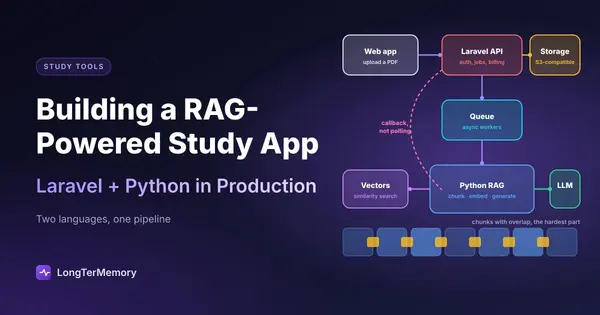
The compromise: Laravel handles everything that’s a product concern , authentication, billing, user management, the REST API the frontend talks to, email notifications, database schema. FastAPI + Celery handles everything that’s an AI concern , document ingestion, chunking, embedding generation, vector storage, Q&A generation. The two services communicate over an internal Docker network.
Here’s the rough topology:
React (5173)
    │
    ▼
Nginx → PHP-FPM (Laravel 12)      ←→  MySQL
                │                  ←→  Redis
                │
                ▼
         FastAPI (8000)
                │
         Celery Worker  ←──────────── MinIO (raw documents)
                │
         ┌──────┴──────┐
         ▼             ▼
      Qdrant        OpenAI API
   (vectors)       (embeddings + LLM)
Documents live in MinIO (S3-compatible object storage). When a user uploads a PDF, Laravel stores it in MinIO and records the metadata in MySQL. When they trigger Q&A generation, Laravel POSTs a job request to the FastAPI service with the document references. Celery picks it up, retrieves the files from MinIO, processes them, and when done, POSTs a callback to Laravel with the results.
The Boring Stuff That Turned Out to Matter: Document Storage and Async Processing
Why MinIO instead of just local Filesystem + MySQL?
Early on I debated storing documents in local filesystem and MySQL. For small files it would have worked fine. But PDFs can be tens or hundreds of megabytes, and serving binary blobs through a database adds latency, eats connection pool slots, and makes the database do work it shouldn’t be doing. MinIO is S3-compatible, runs in Docker alongside everything else, and gives you presigned URLs, proper MIME handling, and a web console out of the box. Laravel uses the S3 disk driver , the only code change from “real S3” to MinIO is the endpoint URL and path-style setting. In production, swapping to actual S3 would be a one-line environment variable change.
Async processing with Celery
Document processing is slow. A large PDF can take 30-120 seconds to fully process: extract text, chunk it semantically, generate embeddings for each chunk, store vectors in Qdrant, run the LLM to generate Q&A pairs. You can’t hold an HTTP connection open for that long.
The flow is: Laravel calls POST /api/generate-qa on the FastAPI service → FastAPI immediately returns a job_id → Celery picks up the task → when done, Celery calls back to Laravel with the results.
Why push callbacks instead of polling?
The alternative is polling: the frontend periodically calls GET /api/generate-qa/{job_id} to check status. That works, and I did implement job status polling as a fallback. But the better pattern is a push callback: when Celery finishes a job, it POSTs the results directly to Laravel.
# services/celery_tasks.py
def _notify_laravel_job_finished(
    job_id: str,
    project_id: int,
    job_data: dict,
    settings: Settings
) -> None:
    import httpx

    payload = {
        "job_id": job_id,
        "project_id": project_id,
        "status": job_data.get("status"),
        "qa_pairs": job_data.get("qa_pairs", []),
        "error": job_data.get("error"),
        "error_details": job_data.get("error_details"),
    }

    url = f"{settings.laravel_app_url}/api/job-finished"
    with httpx.Client(timeout=10.0) as client:
        response = client.post(
            url,
            json=payload,
            headers={"X-API-Key": api_key, "Accept": "application/json"}
        )
Laravel receives this at a dedicated callback endpoint:
// StudyPlansController.php
public function jobFinishedCallback(Request $request): JsonResponse
{
    if ($request->header('X-API-Key') !== config('services.rag-service.api_key')) {
        return response()->json(['error' => 'Unauthorized'], 401);
    }

    $status  = $request->input('status');
    $qaPairs = $request->input('qa_pairs', []);

    if ($status === 'completed' && !empty($qaPairs)) {
        $this->saveQaPairsInDB($projectId, $qaPairs);
        $project->user->notify(new StudyPlanIsReady($projectId));
    }

    return response()->json(['ok' => true]);
}
Push is better than polling for the same reason webhooks are better than polling: the server-side work happens exactly once, at the right time, rather than on every tick of a polling loop. It also means the Q&A pairs land in the database as soon as they’re ready, and the user gets an email notification immediately.
Concurrent job prevention
One early bug: if a user clicked “Generate Study Plan” twice quickly, they’d end up with two Celery jobs running in parallel, both writing Q&A pairs to the same project. This causes duplicate questions, double API costs, and confused state.
The fix is a Redis key per project:
# utils/job_storage.py
def set_project_active_job(self, project_id: int, job_id: str) -> None:
    key = f"project_job:{project_id}"
    self.redis_client.setex(key, self.job_ttl, job_id)

def get_project_active_job(self, project_id: int) -> Optional[str]:
    key = self._project_job_key(project_id)
    job_id = self.redis_client.get(key)
    # auto-clean stale entries if job no longer active
    ...
Before queuing a new Celery task, the API checks whether project_job:{project_id} is set. If it is, and the referenced job is still in queued or processing state, it returns HTTP 409. Laravel propagates this 409 to the frontend, which shows a “generation already in progress” message. The Redis key is cleared when the job completes, fails, or is cancelled.
The get_project_active_job auto-cleanup matters: if a job’s Redis data has expired (24-hour TTL) but the index key somehow persists, it would permanently block new generations. The cleanup check verifies the referenced job still exists and is active before returning it.
The Hardest Problem: Chunking
This is the part nobody really prepares you for when you read RAG tutorials.
Naive chunking is terrible
The obvious first approach is fixed-size chunking: split the document into 512-token windows with some overlap. Quick to implement, works on toy examples. In practice the Q&A quality was noticeably bad , questions would reference “the above equation” or “as mentioned in the previous section” with no context for either, because the split happened mid-concept.
Semantic chunking with LlamaIndex
LlamaIndex’s SemanticSplitterNodeParser uses embedding similarity between consecutive sentences to decide where to split. Instead of splitting every N tokens, it splits when the semantic distance between adjacent sentences exceeds a threshold. This keeps conceptually related content together.
My implementation uses a two-stage approach: first SentenceSplitter for structural splits on paragraph breaks (respecting the document’s own formatting), then SemanticSplitterNodeParser for semantic coherence within those structural units. The result is chunks that read like coherent paragraphs rather than arbitrary text windows.
The length problem
Here’s the thing nobody tells you: the parameters that work well for a 10-page article are completely wrong for a 300-page textbook.
With the same settings on a long document:
- You get hundreds of tiny chunks, many of them mid-sentence fragments
- The LLM generates questions that are too narrow, testing individual sentences rather than concepts
- Embedding costs scale linearly with chunk count , a 300-page book produces ~5x more chunks than you’d want
- Qdrant storage balloons
I discovered this when a user uploaded a comprehensive textbook and the generation took 8 minutes and produced 400+ Q&A pairs, most of them nearly identical questions about adjacent paragraphs.
The fix is dynamic parameter selection based on estimated content length:
# services/document_processor.py
total_tokens = estimated_total_tokens if estimated_total_tokens is not None else len(text) // 4

if total_tokens > settings.long_content_threshold:  # 10,000 tokens (~15 pages)
    stage1_chunk_size = settings.long_chunk_size      # 2048
    stage1_chunk_overlap = settings.long_chunk_overlap
    stage2_buffer_size = settings.long_buffer_size     # 3
    stage2_breakpoint_threshold = settings.long_breakpoint_threshold  # 97
else:
    stage1_chunk_size = 1024
    stage1_chunk_overlap = 200
    stage2_buffer_size = 1
    stage2_breakpoint_threshold = 95
For long content: larger chunk size (2048 vs 1024 tokens), wider semantic buffers (buffer_size=3 means comparing across a 3-sentence window rather than 1), and a higher breakpoint threshold (97th vs 95th percentile). The result is approximately 75% fewer chunks for book-length content, with each chunk containing a full concept rather than a fragment.
The breakpoint_percentile_threshold confusion
This took me an embarrassingly long time to get right. The parameter name suggests that a higher value means “more splits” (splitting at more breakpoints), but it’s the opposite. The threshold is a percentile of embedding distance values across all sentence pairs. Setting it to the 97th percentile means “only split when the distance is in the top 3% of all distances” , i.e., only the most dramatic topic shifts trigger a split. Higher = fewer splits = larger chunks.
My initial instinct was to lower the threshold for long documents to get more granular chunks. That made things worse. The correct intuition: for long documents, you want fewer, larger chunks , you’re looking for major topic boundaries, not every paragraph break.
Cost impact
Chunk count directly drives OpenAI API costs. Every chunk needs an embedding (input cost). Every chunk generates one Q&A pair (completion cost). If your 200-page textbook creates 800 chunks instead of 200, you’re paying 4x. Adaptive chunking isn’t just a quality improvement , it’s a billing concern.
Making Q&A Generation Actually Good
Once chunking is right, Q&A quality depends heavily on how you use the retrieved context and how you prompt the LLM.
RAG retrieval for question generation
The naive approach: for each chunk, ask the LLM to generate a question. The problem is that a single chunk often lacks context , it references concepts defined elsewhere in the document.
The better approach: before generating a question for a chunk, retrieve the 3 most semantically similar chunks from Qdrant (filtering out the chunk itself). Include those as “related context” in the prompt. The LLM can now generate questions that test understanding across related concepts, and answers that reference the broader material.
Configuration is exposed via the API:
enable_rag_context(default:true) , whether to do retrieval at allretrieval_top_k(default: 3) , how many related chunks to retrieveretrieval_min_score(default: 0.7) , minimum cosine similarity threshold
The 0.7 threshold matters: below it, the “related” chunks aren’t actually related, they just share common words. Including irrelevant context actively hurts question quality.
What failed: whole-document generation
Before implementing chunk-level retrieval, I tried generating questions by feeding the entire document to the LLM as a single prompt. For anything beyond a few pages, this produces hallucinated answers , the LLM generates plausible-sounding responses that aren’t grounded in the actual text. RAG with chunk-level generation and retrieval fixes this: every question is answerable from the chunks it was generated from.
Prompt engineering
The system prompt is terse and specific:
You are an expert educational content specialist designing study materials
for mastery learning through active recall and spaced repetition.
The user message template enforces constraints: the question must test conceptual understanding (not factual recall), be self-contained and answerable from the provided chunk, align with the user’s stated learning goals, and promote long-term retention. The LLM returns structured JSON with question, answer, key_concepts (array), and difficulty_level (easy/medium/hard).
Key insight: “quality over quantity” as an explicit instruction in the prompt measurably improves output. Without it, the LLM generates multiple surface-level questions (“What is X?”) instead of one deeper one (“How does X relate to Y, and what are the implications for Z?”).
The key_concepts array and difficulty_level field are stored in MySQL alongside the Q&A pair and exposed to the frontend for filtering , users can study only hard questions, or filter by concept.
Spaced Repetition: From Theory to Schema
Spaced repetition works by scheduling reviews at increasing intervals based on how well you recalled the material. The SM-2 algorithm (from the original SuperMemo software) is the most widely used variant: performance is rated 1-5, and the next review interval is computed from the previous interval, the performance score, and an ease factor that adjusts over time.
The current implementation stores Q&A pairs and their scheduling state in a single study_plans table , each row is both the content and its schedule:
CREATE TABLE study_plans (
    id              BIGINT UNSIGNED AUTO_INCREMENT PRIMARY KEY,
    project_id      BIGINT UNSIGNED NOT NULL,  -- user reached via project
    question        TEXT NOT NULL,
    answer          TEXT,
    key_concepts    VARCHAR(1000),             -- JSON array from LLM
    difficulty_level VARCHAR(255),             -- easy/medium/hard
    scheduled_at    TIMESTAMP NULL,            -- NULL = new, never reviewed
    is_strict       BOOLEAN DEFAULT FALSE,     -- strict items excluded from reminders
    completed       BOOLEAN DEFAULT FALSE,     -- session-level flag
    batch           INT,                       -- generation batch number
    session_id      BIGINT UNSIGNED,           -- FK to study_sessions
    created_at, updated_at
);
scheduled_at = NULL means the item is new and has never been studied. is_strict = false items are included in study reminders; strict items require explicit manual review. The SM-2 tracking fields (interval, performance score, ease factor) are planned for a future migration once the study session UI is built.
Timezone-aware email notifications
The SendStudyReviewNotifications artisan command runs hourly and sends a single consolidated email to users whose local time is 8 AM. Getting this right without N+1 queries required some care.
The command does two bulk queries, not N queries:
- Find candidate user IDs: a single
DB::table('users')query with an EXISTS subquery checking whether the user has any due or new study items. - Load due projects per user: a single JOIN query across
study_plansandprojects, returning a collection grouped byuser_id.
The deduplication uses an insertOrIgnore into a notification_logs table with a unique constraint on (user_id, type, sent_date). If two overlapping command runs execute concurrently (which can happen with hourly scheduling), only one email is sent , the INSERT silently fails for the duplicate.
Unsubscribe links
Every reminder email contains a signed unsubscribe URL:
URL::signedRoute('notifications.unsubscribe', ['user_id' => $user->id])The controller validates hasValidSignature() before setting notifications_enabled = false and redirecting to the frontend. If the signature is tampered, it returns 403. Users who unsubscribe and later log in again have notifications_enabled reset to true by the auth controller , logging back in is an implicit signal of renewed interest.
Running This in Production
The production Docker Compose file differs from dev in a few key ways:
- Only two ports are exposed externally: 8080 (Nginx/Laravel) and 5555 (Flower with HTTP basic auth)
- MySQL, Redis, Qdrant, MinIO, and the FastAPI service are all on an internal Docker network only
- For debugging, you SSH-tunnel into the server and forward ports locally
The Celery gotcha that everyone hits: Celery workers do not auto-reload code changes. FastAPI (via Uvicorn with --reload) picks up changes automatically. Celery doesn’t. If you change celery_tasks.py or any of the service modules it imports and don’t restart the worker, the old code keeps running. The symptom is confusing: your FastAPI endpoints reflect the new code, but background processing behaves as if nothing changed.
docker compose restart celery-workerThis is in the CLAUDE.md for the repo, in the README, and I still forget it regularly.
The test coverage is:
- Python (RAG service): 340 tests, ~7s runtime. Covers chunking, embeddings, job storage, Celery tasks, API endpoints.
- PHP (Laravel): 51 tests. Covers auth (magic link flow, OTP), document upload with plan limits, Q&A generation trigger, notification commands, unsubscribe.
The Python tests run inside the Docker container via docker compose exec -T python-rag python -m pytest tests/ -v. There’s a pytest-timeout plugin configured at 30 seconds per test , an important safeguard because early versions of the test suite had infinite loops in async tests that would hang the entire test run.
What I’d Do Differently
Start with semantic chunking from day one. I started with fixed-size chunks as a “quick first pass” and spent more time undoing that than I would have spent implementing semantic chunking correctly from the start. The LlamaIndex primitives are not complicated , the investment is small and the quality difference is large.
Adaptive chunk sizing should be a first-class concern. I didn’t think about variable document lengths until users started uploading textbooks. It’s not an edge case , PDFs range from a 2-page note to a 500-page manual, and they need fundamentally different treatment. If you’re building a document RAG system, plan for this from the beginning.
Use a proper task result store earlier. I started tracking Celery job state with ad-hoc Redis key patterns and built the JobStorage abstraction later as things grew. Starting with a clean abstraction layer for job state (create, read, update, expire, index by project) would have saved me refactoring time.
More aggressive rate limiting on generation. Q&A generation is the most expensive operation in the system , it calls the OpenAI embeddings API once per chunk (to store in Qdrant), then the completions API once per chunk to generate the Q&A pair, plus additional embedding calls during RAG retrieval. A user who triggers generation repeatedly on the same large document generates significant API costs. The concurrent job prevention handles the obvious case (two parallel jobs), but per-user rate limiting on generation frequency is still on the to-do list.
The push callback model was the right call. I’ve worked on systems that poll job status from a frontend timer. It always ends up being a source of bugs , race conditions when the poll fires just as a job is completing, extra load when many users are all polling simultaneously, delayed UX when the poll interval is too long. The callback model is simpler to reason about, cheaper to operate, and delivers results to the user faster.
Open Problems and What’s Next
Spaced repetition UI. The database schema and scheduling logic exist. The study session interface , answering questions, rating recall quality, seeing the interval adjust , is the next major frontend feature.
Multi-modal documents. PDFs with diagrams, charts, and mathematical notation are common in technical study material. Current text extraction via PyMuPDF ignores images entirely. Adding image-to-text (or image embedding support in Qdrant) would significantly improve coverage for STEM material.
Self-hosted LLM option. Some users are uncomfortable uploading sensitive professional or academic material to an OpenAI-backed system. A configuration path to use a local Ollama instance (or any OpenAI-compatible endpoint) for both embeddings and Q&A generation would address this. LlamaIndex supports provider-swapping; the main work is validating quality parity.
Chunk attribution. Q&A pairs are currently stored with no reference back to the specific chunks they were generated from. Adding a source_chunk_id (or an array of contributing chunk IDs for RAG-retrieved context) would enable “show me the source” functionality in the study interface , genuinely useful for verifying answers against the original material. This requires both a schema change and storing the Qdrant vector IDs in MySQL at generation time.
Closing Thoughts
The most interesting engineering happened at the intersection of the two services. The boundary between Laravel and FastAPI isn’t just a language split , it forced clear thinking about which concerns belong where. Auth, billing, user data: PHP. Embeddings, vectors, async AI tasks: Python. The push callback mechanism ended up being the cleanest part of the integration.
The chunking problem genuinely surprised me. I’d read a lot about RAG before building this and most resources treat chunking as a detail , pick a size, move on. In practice it’s where the most user-visible quality variation comes from, and adaptive sizing based on document length is not optional if your use case involves documents of wildly different lengths.
If you’re building something similar and want to talk through the architecture, the project is at longtermemory.app.
Architecture described reflects the state of the system as of March 2026. Some implementation details may have changed since publication.