How to Learn Complex Technical Documentation
Master dense technical manuals with active reading, concept mapping, and flashcard systems that turn specs into usable knowledge.
Table of Contents
- Why Technical Documentation Feels So Hard to Read
- Active Reading Strategies for Dense, Specification-Heavy Documents
- Building a Glossary and Concept Map from Technical Documentation
- Converting Technical Doc Study into Testable Flashcard Knowledge
- A Practical Workflow for Learning from Documentation
- Dealing with Documentation That Assumes Too Much
- How to Study for Certification Exams from Technical Manuals
- Using LongTerMemory to Speed Up Technical Study
- Common Mistakes Technical Learners Make
- Making Technical Knowledge Stick
If you have ever opened a technical manual and felt like you were reading a foreign language written by robots, you are in good company. Technical documentation is dense by design. It has to be precise. It has to cover edge cases. It has to be correct in ways that everyday language does not. But those same qualities make it exhausting to learn from, especially when you are trying to understand a new system, API, or engineering domain.
The good news is that technical documentation is not meant to be read like a novel. It is meant to be used. The people who learn from it fastest are not necessarily the smartest engineers in the room. They are the ones who have a system for turning dense specs into working knowledge.
Why Technical Documentation Feels So Hard to Read
Technical documentation is hard for three main reasons. First, it assumes background knowledge. A manual for a cloud database assumes you understand networking, storage, and distributed systems. If you do not, every sentence sends you down another rabbit hole.
Second, it is optimized for completeness, not learning. Documentation wants to tell you everything that is true. It does not care about the order in which a human brain should encounter those truths. That is why reading from page one feels so disorienting.
Third, the language is compressed. Technical writers use precise terms with specific meanings, and they often skip the examples and analogies that would make concepts intuitive. A sentence like “the service provides eventual consistency” packs an enormous amount of meaning into five words.
Efficient technical study means reading with a purpose, extracting what you need, and organizing it so your brain can actually use it.
Active Reading Strategies for Dense, Specification-Heavy Documents
The first rule of reading technical documentation is: do not read it passively. Passive reading might work for a blog post, but it is almost useless for a specification document. You need to read actively, which means interacting with the text as you go.
Start with pre-reading. Before you dive into the details, skim the table of contents, headings, and summary sections. Ask yourself what you are trying to accomplish. Are you trying to understand an architecture? Debug a problem? Prepare for a certification exam? Your goal determines what you extract.
Next, read in layers. On the first pass, ignore the fine print. Capture the big ideas: what does this system do, what are its main components, and how do they relate? On the second pass, drill into the parts that matter for your goal. On the third pass, extract specific facts, commands, limits, and exceptions.
While you read, ask questions constantly. What problem does this feature solve? What would break if this constraint were violated? How does this compare to what I already know? Questions force your brain to process the material rather than just recognize it.
Finally, summarize in your own words after each section. If you cannot explain what you just read without quoting the document, you do not understand it yet. This is the most important step, and it is the one most people skip.
Building a Glossary and Concept Map from Technical Documentation
Complex documentation is full of specialized terms, many of which are defined once and then used everywhere. Your first job is to capture those terms in a personal glossary.
A good glossary entry is not just a copy-pasted definition. It is a definition you can understand a week later. For each term, write:
- The term itself.
- A one-sentence explanation in plain language.
- Why it matters in this system.
- One example of how it is used.
For example, instead of writing “sharding: partitioning data across multiple servers,” you might write “sharding splits a big database into smaller pieces so no single server gets overwhelmed. Important because it affects how you design queries. Example: user data split by region.”
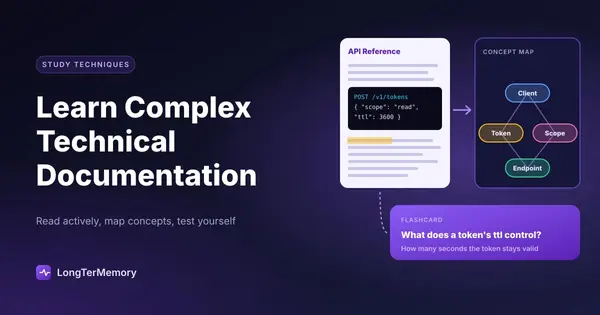
Once you have a glossary, start building a concept map. This is a visual diagram showing how the major concepts connect. You do not need fancy software. A piece of paper or a simple drawing tool works fine. The act of drawing relationships forces you to understand structure, which is exactly what technical documentation demands.
| Tool Type | Examples | Best For |
|---|---|---|
| Note-taking apps | Obsidian, Notion, OneNote | Building a searchable knowledge base |
| Diagram tools | Excalidraw, Lucidchart, Miro | Creating concept maps and architecture diagrams |
| Flashcard apps | LongTerMemory, Anki | Converting facts into active recall cards |
| Documentation browsers | Dash, Zeal, DevDocs | Offline access to API references |
Converting Technical Doc Study into Testable Flashcard Knowledge
After you understand the big picture, you need to lock in the details. This is where most technical study falls apart. People read a document, feel like they understand it, and then cannot recall specifics a week later.
The solution is to convert key facts into active recall questions as you study. Every important fact should become a question your future self will answer. The question form matters.
Weak card: “The service supports read replicas.” Strong card: “What feature does the service use to scale read traffic without affecting the primary database?”
Weak card: “Maximum payload size is 6 MB.” Strong card: “What is the maximum payload size for a single request, and what happens if you exceed it?”
Strong cards force retrieval. They test understanding, not just recognition. They also expose gaps you did not know you had.
If you are studying for a certification exam, this becomes even more important. Certification questions often test edge cases, limits, and trade-offs. You need those details available under pressure, and active recall is the most reliable way to make that happen.
A Practical Workflow for Learning from Documentation
Here is a workflow you can apply to almost any technical document:
- Define your goal. What do you need to know, and why?
- Skim for structure. Read the introduction, headings, and summaries.
- Build a glossary. Capture new terms as you encounter them.
- Read for understanding. Use questions and summaries to stay active.
- Draw the architecture. Map components and their relationships.
- Create flashcards. Convert important facts into active recall questions.
- Apply what you learned. Build something small, answer practice questions, or explain it to someone else.
This workflow scales from a ten-page API guide to a five-hundred-page platform manual. The key is that you never move to the next layer until the current one is solid.
Dealing with Documentation That Assumes Too Much
Sometimes you hit a document that is clearly written for experts, and you are not one yet. Do not try to power through from beginning to end. Instead, build the prerequisites first.
When you encounter a term or concept you do not understand, mark it and keep reading. After the section, go back and look up the most important gaps. Add them to a separate “prerequisites” list. Over time, this list becomes your personal curriculum for the domain.
This approach prevents the common trap of getting stuck on page three for three hours. It also builds a foundation that makes future documents in the same domain much easier to read.
How to Study for Certification Exams from Technical Manuals
Many professional certifications, especially in cloud computing, cybersecurity, and networking, are essentially tests of how well you know the official documentation. AWS, Azure, Google Cloud, and Cisco all publish extensive documentation, and their exams pull directly from it.
For certification prep, combine documentation study with practice questions. Read a section of the manual, then answer practice questions on that topic. The questions reveal what the exam actually cares about, which is often different from what the documentation emphasizes.
Also pay attention to service limits, pricing factors, and integration patterns. These are favorite exam topics because they test practical judgment, not just memorization.
Using LongTerMemory to Speed Up Technical Study
Technical documentation study involves a lot of extraction. You read, you highlight, you write notes, you turn notes into cards. That extraction work is valuable, but it is also time-consuming.
LongTerMemory can handle the extraction for you. Upload a PDF manual, paste a chapter, or import your notes, and it will generate active recall questions from the material. This lets you focus on understanding and applying the content instead of spending half your study time formatting flashcards.
For technical learners preparing for certifications or onboarding to new systems, this is a major advantage. The AI-generated cards are designed to test understanding, not just recall, which is exactly what complex technical content requires.
Common Mistakes Technical Learners Make
The first mistake is trying to read too much at once. Marathon reading sessions feel productive, but retention drops sharply after about forty-five minutes. Break documentation into chunks and review actively between sessions.
The second mistake is copying without understanding. It is easy to fill a note-taking app with quotes from the manual. Quotes are not knowledge. If you cannot explain a concept without reading it, you have not learned it.
The third mistake is skipping practice. Technical knowledge has to be applied. Set up a lab environment, write a small script, answer practice questions, or explain the concept to a colleague. Application is the test that tells you whether your understanding is real.
Making Technical Knowledge Stick
Complex technical documentation will never be easy reading. But it can become manageable, even enjoyable, once you have a system. Read actively, build a glossary, draw concept maps, create strong flashcards, and apply what you learn.
Consistency matters more than intensity. Thirty minutes of focused technical study a day will take you further than occasional multi-hour binges. And the more domains you learn, the easier new ones become, because you start to recognize patterns across systems.
If you want to learn technical documentation faster, start by upgrading your extraction workflow. Tools like LongTerMemory can generate review cards from your manuals automatically, so you spend less time on logistics and more time building real expertise. Try it free and see how much more technical information you can retain when active recall is built into your study process from the start.