LongTerMemory Android App Is Here: AI Flashcards Now on Google Play
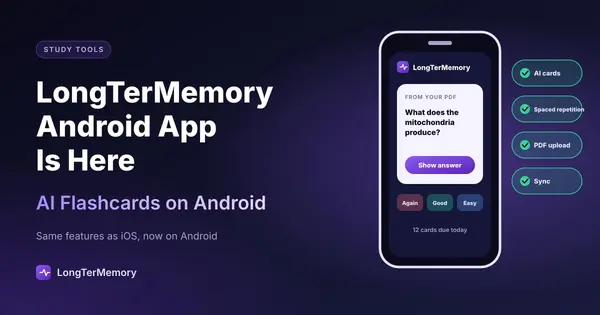
LongTerMemory's Android app is officially live on Google Play, bringing AI-generated flashcards and spaced repetition to Android alongside the iOS app.
Table of Contents
- Why This Launch Matters
- What the Android App Actually Does
- Upload Your Study Material
- AI-Generated Flashcards, Not Generic Trivia
- Spaced Repetition That Adapts to You
- Built for Quick Mobile Sessions
- Android vs iOS: The Same Core System, Now on Both
- Who Should Install This
- Android Users Who Were Stuck Using the Web App on Mobile
- Students and Professionals Studying for Exams
- Anyone Who Already Uses the iOS App or Web App
- How to Get Started on Android
- The Science Behind Why This Works
- Frequently Asked Questions
- Final Thoughts
Good news if you’ve been waiting for this: LongTerMemory is now officially available on Android. The app just went live on the Google Play Store, which means the AI-powered flashcard and spaced repetition system we’ve been talking about on this blog is no longer limited to the web and iPhone. If you carry an Android phone, you can now generate flashcards from your study material and review them on a spaced schedule, right from your pocket.
This launch follows the LongTerMemory iOS app, which has already been helping students and professionals turn PDFs, slides, and notes into study decks on iPhone. Now the same system is available to the much larger pool of Android users, no compromise required.
You can download LongTerMemory for Android on Google Play right now, for free.
Why This Launch Matters
Here’s the practical reality: Android runs on the majority of smartphones worldwide. Every week that a study tool only exists on iOS, it’s leaving out a huge share of students and professionals who simply carry a different phone. That gap has now closed.
If you’ve been using the LongTerMemory web app to upload PDFs and generate AI flashcards, but doing your actual review sessions on the go was awkward because there was no native app for your device, this solves that. You can now upload material on your laptop, and pick up your review session on your Android phone between classes, on the bus, or waiting in line for coffee.
And if you’re brand new to LongTerMemory, this is as good a starting point as any. The core idea is simple: instead of spending hours manually building flashcards, you upload your study material and let AI generate the question-answer pairs for you. Then spaced repetition scheduling shows you each card at the ideal moment to cement it in long-term memory, before you’d naturally forget it.
What the Android App Actually Does
Let’s walk through what you get when you install the app.
Upload Your Study Material
You can feed the app PDFs, slides, typed notes, and other study documents. The AI reads through the material and identifies the concepts, definitions, facts, and relationships worth turning into flashcards. You’re not starting from a blank deck. You’re starting from your own source material, already converted into testable questions.
AI-Generated Flashcards, Not Generic Trivia
The question-answer pairs are generated in the style of real exam questions, not shallow recall prompts. Rather than simplistic “define this term” cards, the AI tries to capture the kind of reasoning and application that actually shows up on certification exams, board exams, and university tests. You can review every generated card, edit anything that doesn’t look right, and add your own cards manually alongside them.
Spaced Repetition That Adapts to You
Once your deck exists, the app applies spaced repetition scheduling to it. Every time you review a card and rate how well you remembered it, the algorithm recalculates when that card should reappear. Struggle with something, and it comes back sooner. Nail it confidently, and it gets pushed further out. Over time, your review sessions become laser-focused on exactly the material you’re at risk of forgetting, instead of wasting time re-reviewing things you already know cold.
Built for Quick Mobile Sessions
The review interface is designed for the way people actually study on their phones: short, frequent sessions rather than long desk-bound blocks. See the question, think of your answer, flip the card, rate yourself, move to the next one. Five minutes between meetings is enough to make real progress.
Android vs iOS: The Same Core System, Now on Both
If you’re wondering whether the Android app is a “lite” version compared to iOS, it isn’t. Both apps connect to the same underlying LongTerMemory account and platform, so your material, your generated decks, and your review progress sync across devices no matter which one you’re holding.
| Feature | iOS App | Android App |
|---|---|---|
| AI-generated flashcards | Yes | Yes |
| Spaced repetition scheduling | Yes | Yes |
| PDF and document upload | Yes (via web sync) | Yes (via web sync) |
| Cross-device sync with web app | Yes | Yes |
| Price | Free | Free |
| Where to get it | App Store | Google Play |
The practical upshot: it no longer matters which ecosystem you’re in. Study on a Samsung, a Pixel, an iPhone, or the web app on a laptop, and your spaced repetition schedule stays perfectly consistent across all of them.
Who Should Install This
A few groups will get the most out of the Android launch specifically.
Android Users Who Were Stuck Using the Web App on Mobile
If you’ve been opening the mobile browser version of LongTerMemory out of necessity, the native app is a meaningfully better experience: faster load times, a review interface built for touch, and the ability to study offline-friendly sessions without wrestling with a browser tab.
Students and Professionals Studying for Exams
The same audience that benefits from LongTerMemory generally benefits here: university students working through dense textbooks, and professionals prepping for certifications like AWS, PMP, CFA, NCLEX, or the bar exam. Uploading a study guide and getting a deck generated in minutes, then drilling it in short mobile sessions throughout the day, is a genuinely efficient way to prepare for high-stakes tests.
Anyone Who Already Uses the iOS App or Web App
If you’re already a LongTerMemory user on another platform, installing the Android app doesn’t create a second account or a second deck to manage. It’s the same account, the same material, the same schedule. It just adds another place you can review from.
How to Get Started on Android
Getting set up takes just a few minutes:
- Install LongTerMemory from Google Play. It’s free to download.
- Sign in with your existing LongTerMemory account, or create a new one if you’re starting fresh. You can also manage your account at longtermemory.com.
- Upload a piece of study material you’re currently working through: a chapter PDF, a set of lecture slides, or your own notes.
- Review the AI-generated flashcards, tweak anything that needs adjusting, and start your first session.
- Come back the next day for your scheduled review. The spaced repetition algorithm will already know exactly what’s due.
That loop, upload, generate, review, return, is the entire system. The consistency of doing it daily, even for a few minutes, is what produces results over weeks and months.
The Science Behind Why This Works
It’s worth a quick reminder of why this approach is worth your time, wherever you’re reviewing from.
Spaced repetition is built on the spacing effect, one of the most well-replicated findings in cognitive psychology, first documented by Hermann Ebbinghaus in the 1880s. Spreading review sessions out over time, rather than cramming them together, produces dramatically stronger long-term retention. Spaced repetition software automates the math, calculating the ideal moment to show you each card based on your personal forgetting curve.
Active recall, the mechanism behind every flashcard review, is what makes the review sessions themselves effective. Trying to produce the answer from memory before flipping the card, rather than passively re-reading notes, is what actually strengthens the memory trace. This is often called the testing effect, and studies have found it can improve retention by 40 to 80 percent compared to passive review.
AI-generated questions add one more advantage: they’re written by a system that doesn’t share your blind spots. When you write your own flashcards, you tend to unconsciously skip the content you already feel confident about, which is often exactly where hidden gaps hide. AI-generated cards surface content more evenly, which means fewer surprises on exam day.
Frequently Asked Questions
Is the LongTerMemory Android app free? Yes. The app is free to download and use, and there’s no cost to get started with uploading material and generating your first set of AI flashcards.
Do I need a new account if I already use LongTerMemory on iOS or the web? No. Sign in with your existing account and your uploaded material, generated decks, and review progress will already be there, fully synced.
Will my flashcards and spaced repetition schedule stay in sync between devices? Yes. LongTerMemory syncs your account across the web app, the iOS app, and the Android app, so a review you complete on your phone updates the same schedule you’d see on your laptop.
What file types can I upload from the Android app? You can upload PDFs, slides, and typed notes, the same document types supported on the web platform, and the AI will generate question-answer pairs from them automatically.
Where can I download it? Directly from Google Play.
Final Thoughts
The launch of the LongTerMemory Android app closes a real gap. The AI-powered flashcard generation and spaced repetition scheduling that’s been available on the web and on iPhone is now available to Android users too, with the same account, the same synced decks, and the same free price tag.
If you’ve been holding off on trying LongTerMemory because there wasn’t a native app for your phone, that reason no longer applies. And if you’re already using the platform on the web or on iOS, installing the Android app just means one more convenient place to keep your review streak going.
Get LongTerMemory for Android on Google Play, or explore the full platform at longtermemory.com to get started.