LongTerMemory iOS App Review: AI Flashcards and Spaced Repetition
Honest review of the LongTerMemory iOS app: how it uses AI to turn your documents into flashcards and schedule spaced repetition reviews automatically.
Table of Contents
- What Is LongTerMemory, Exactly?
- The Core Features: What the App Actually Does
- Document Import
- AI-Powered Flashcard Generation
- Spaced Repetition Scheduling
- Mobile Review Sessions
- Who Is This App For?
- University Students with Dense Course Materials
- Professionals Pursuing Certifications
- Anyone Who Has Ever Said "I Don't Have Time to Make Flashcards"
- Honest Assessment: Strengths and Things to Know
- What Works Really Well
- Things Worth Knowing
- How LongTerMemory Fits Into a Complete Study System
- The Science Behind the App
- How to Get Started
- Final Thoughts
If you’ve spent any time on this blog, you know we talk a lot about spaced repetition, active recall, and the science of making information stick. What we haven’t talked about yet is what happens when you take those evidence-based principles and put them in your pocket.
LongTerMemory is an AI-powered study platform that I’ve been genuinely excited about, and it’s now available as a native iOS app. If you’ve been studying with the web version, the LongTerMemory iOS app brings the full workflow to your iPhone, meaning you can upload your study materials, let AI generate your flashcards, and review them on the go, all from one app.
This is an honest, detailed look at what the app does, how it works, who it’s for, and where it fits into a serious study routine.
What Is LongTerMemory, Exactly?
Before getting into the app-specific review, it’s worth understanding what LongTerMemory actually does, because it’s meaningfully different from flashcard apps you might already be familiar with.
Most flashcard apps, Anki included, are essentially digital boxes where you store cards you’ve made yourself. You write the question. You write the answer. You add the card. Then the app shows you that card on a spaced schedule. That works, but it puts the burden of card creation entirely on you. And if you’ve ever sat down to make a deck for a 300-page textbook, you know how much time that takes before you’ve even started learning.
LongTerMemory takes a different approach. You upload your material, whether that’s a PDF, a PowerPoint, a photo of handwritten notes, or typed text, and the AI reads it, understands it, and generates question-answer pairs automatically. You don’t create the cards. The platform creates them for you, from your own source material.
Then it applies spaced repetition scheduling to those cards, showing each one at the calculated optimal time to push it into long-term memory before you’d naturally forget it.
The result is that the time-intensive part of building a flashcard study system is handled automatically. You upload material, review what gets generated, and start studying. The platform handles the scheduling.
The full web application has been available for a while, supporting PDF and web content uploads with full spaced repetition functionality. The iOS app brings that same system to mobile, which is a significant practical step, because the best time to do a five-minute review session is often when you’re already on your phone, not when you’re sitting at a desk.
The Core Features: What the App Actually Does
Let me walk through the core functionality as it exists in the current version of the app.
Document Import
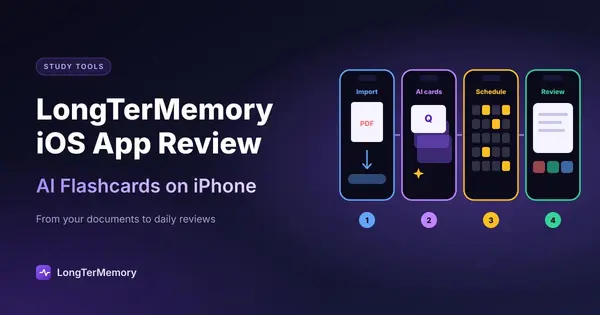
The app accepts multiple input formats: PDFs, PowerPoint files, photos of notes or textbook pages, and typed or pasted text. This is the starting point for everything else. You have a piece of study material, you feed it to the app, and it processes it.
The photo import feature is particularly useful for students who take handwritten notes. Rather than transcribing your notes into a digital format before you can study them, you point your camera at the page and the AI handles the text recognition and question generation. For anyone who prefers writing by hand but also wants the benefits of spaced repetition, this is a meaningful feature.
AI-Powered Flashcard Generation
This is the core mechanism that makes LongTerMemory different from Anki or Quizlet. Once you’ve uploaded material, the AI analyzes the content and generates question-answer pairs that cover the key concepts, definitions, processes, and facts from your material.
The questions are generated in the style of real exam questions, not trivial recall prompts. Rather than “What is the capital of France?” style cards, you get questions that test understanding of mechanisms, relationships, and application of concepts. For professional certifications, medical board prep, and academic subjects, this matters a lot.
You can review the generated cards before studying them, edit any that don’t look right, and add your own cards manually alongside the AI-generated ones. The AI does the heavy lifting, but you remain in control of your deck.
Spaced Repetition Scheduling
After generation, the app applies spaced repetition algorithms to schedule your cards. Each time you review a card and rate how well you remembered it, the algorithm calculates when to show you that card next, sooner if you struggled with it, later if you recalled it confidently.
This is what transforms a pile of flashcards into a genuine long-term memory system. Without scheduling, you review cards randomly or sequentially, which is inefficient. With spaced repetition, every review session is targeting the cards that are due based on your personal forgetting curve.
Over time, items you know well get pushed further and further apart in the schedule, so you spend less time on them. Items you struggle with get reviewed more frequently until they’re solid. The system self-optimizes based on your performance.
Mobile Review Sessions
For the iOS app specifically, the review interface is clean and optimized for quick sessions. You see the question, think of your answer, flip the card, and rate yourself. The interaction is fast and low-friction, which matters for mobile study because you’re often doing it in short windows, five minutes between meetings, ten minutes on the train, a quick review before bed.
The app is available on iPhone running iOS 15.1 or later, and also works on Mac computers with M1 chip or later through the Mac App Store. At 34.4 MB it’s not a heavy install.
Who Is This App For?
LongTerMemory is genuinely well-suited to a specific type of learner. Let me be specific about who benefits most, because no tool is right for everyone.
University Students with Dense Course Materials
If you’re working through textbooks, lecture slides, and research papers, the ability to upload a PDF and get a study deck generated in minutes is a significant time saver. Instead of spending two hours making Anki cards before you can start studying, you spend twenty minutes reviewing the AI-generated cards and correcting any that need tweaking, then you start learning.
For subjects with high factual density, medicine, law, pharmacology, biochemistry, history, economics, the AI card generation is particularly strong because there’s a lot of discrete, testable content to work with.
Professionals Pursuing Certifications
The certification exam market is one where LongTerMemory shines. If you’re studying for AWS, PMP, CFA, NCLEX, bar exam, USMLE, or any other professional certification, you’re typically dealing with official study guides, practice exam PDFs, and dense reference materials.
Uploading those materials and letting the AI generate your flashcard deck is dramatically more efficient than building one from scratch. The spaced repetition scheduling then handles the review calendar, so you don’t have to manually figure out what to study each day.
Anyone Who Has Ever Said “I Don’t Have Time to Make Flashcards”
This is honestly the biggest group. The research on spaced repetition and active recall is unambiguous: these techniques work dramatically better than re-reading and highlighting. But the adoption barrier is real. If making the flashcards takes two hours, many people won’t do it.
LongTerMemory removes that barrier. You get the benefits of a spaced repetition system without the upfront time cost of manual card creation. That’s the core value proposition, and for busy students and professionals, it’s a meaningful one.
Honest Assessment: Strengths and Things to Know
I want to give you an honest picture here, not just feature highlights.
What Works Really Well
The AI card generation is genuinely useful. For most educational materials, the questions generated are reasonable and cover the important content. You’ll occasionally get a card that’s poorly phrased or tests something trivial, but the hit rate is high enough that editing a few cards is far less work than building a deck from scratch.
The mobile experience is smooth. Review sessions are fast and intuitive. The flip interaction feels natural. Session summaries give you a clear sense of how you’re doing.
The spaced repetition implementation is solid. Cards surface at appropriate intervals. The difficulty rating system (similar to Anki’s ease ratings) adjusts scheduling based on how you actually perform, not just how confident you feel.
Cross-platform continuity. Because your data lives in your account on longtermemory.com, you can upload materials on your computer, generate cards, and then review on your iPhone. Your progress syncs across devices. This is the practical reality of how most serious students work: computer for content creation, phone for review.
Things Worth Knowing
The app is at version 1.0.1 at the time of writing, which means it’s early. The core functionality is solid, but it’s worth expecting that features will continue to be added and refined. If you look at the web application as the fuller-featured version, the iOS app is currently focused on the review experience rather than full content management.
AI card generation works best on text-dense content. For highly visual materials (diagrams, flowcharts, infographics), the AI generates cards based on the surrounding text rather than the visual content. If your study material relies heavily on diagrams, you’ll want to supplement the AI-generated cards with some manually created ones.
The app is free, which is worth highlighting. You can download it from the App Store and start studying without an upfront cost.
How LongTerMemory Fits Into a Complete Study System
One thing I want to address because I think it’s important: no single app is a complete study solution, and LongTerMemory isn’t claiming to be.
LongTerMemory is outstanding at building long-term retention of the specific content in your uploaded materials. Spaced repetition is genuinely one of the most evidence-supported learning techniques available, and having that system automated and in your pocket is a real advantage.
What it pairs well with:
- Active reading and note-taking before uploading. The better your input material (annotated notes rather than raw textbook PDFs), the more targeted your flashcard deck will be.
- Practice questions and past exams as a complement. Flashcard review builds recognition and recall of individual concepts. Practice tests build the ability to apply those concepts to novel questions under time pressure. You need both.
- Explanation and teaching. When you get a flashcard wrong, don’t just rate it “hard” and move on. Take a moment to understand why you got it wrong. The Feynman technique, explaining the concept out loud in simple terms, is a great complement to spaced repetition review.
The combination of LongTerMemory for systematic retention plus deliberate practice on application-level questions is a genuinely strong study system.
The Science Behind the App
For the learning-science enthusiasts reading this, here’s why the core approach works.
Spaced repetition exploits the spacing effect, which is one of the oldest and most replicated findings in cognitive psychology. Hermann Ebbinghaus documented it in the 1880s: distributing review sessions over time produces dramatically better long-term retention than massed practice. Modern spaced repetition software formalizes this by calculating optimal review intervals based on the forgetting curve.
Active recall, the mechanism of flashcard review, is distinct from passive recognition. Every time you read the question, produce your own answer before flipping the card, you’re engaging retrieval practice. The act of retrieval itself strengthens memory in a way that re-reading doesn’t. The “testing effect” (or “retrieval practice effect”) shows retention improvements of 40 to 80 percent compared to passive review in controlled studies.
AI-generated questions add a layer that manual card creation often misses: the questions are written by a system that doesn’t have your same gaps and assumptions. When you write your own flashcards, you unconsciously write questions for content you already partially understand. AI-generated questions surface the content in ways that can reveal gaps you didn’t know you had.
How to Get Started
If you want to try it:
- Download the LongTerMemory iOS app from the App Store. It’s free.
- Create an account (you can also access the full platform at longtermemory.com).
- Upload a piece of study material you’re actively working with, a chapter PDF, a set of lecture slides, your own notes.
- Review the generated flashcards, edit any that need adjustment, and start your first review session.
- Come back tomorrow for your next scheduled session. The spaced repetition algorithm will show you exactly what needs reviewing.
That’s the whole loop. Upload, generate, review, return. The consistency over time is what produces the results.
Final Thoughts
LongTerMemory solves the right problem. The gap between knowing that spaced repetition works and actually maintaining a spaced repetition practice has always been the friction of card creation. Having AI handle that step, while keeping you in control of your material and your review, is a genuinely useful advancement.
The iOS app makes that system mobile, which matters for real-world study habits. Most people don’t have unlimited blocks of desk time for studying. They have commutes, lunch breaks, waiting rooms, and five minutes between tasks. An app that fits into those windows and delivers evidence-based learning in that time is worth having.
Is it perfect? No, it’s version 1.0 and there will be things to improve and add. But the core function, AI-generated spaced repetition from your own materials, available on your phone, works well.
If you’re studying for anything serious and you haven’t tried a spaced repetition system yet, this is a low-friction way to start. If you’re already an Anki user who spends hours building decks, this is worth trying as an alternative for content where you just want the cards made.
Download the LongTerMemory app on the App Store and try the full web application at longtermemory.com.