How to Use Quizlet Effectively for Exam Preparation
Learn which Quizlet modes actually build memory, when to use it over other tools, and how to get the most out of your own and shared study sets.
Table of Contents
Quizlet is one of the most popular study apps in the world. Millions of students use it every day, loading up sets of terms and definitions and clicking through them before exams. And yet, for all that popularity, most people are using Quizlet in a way that gives them a fraction of the benefit it’s actually capable of delivering.
The problem isn’t Quizlet. The problem is that some of its most-used modes are essentially passive review in disguise, and students mistake the feeling of familiarity they get from flipping cards for the deeper kind of learning that actually holds up on a real test.
This guide is about using Quizlet the right way, meaning in a way that’s grounded in how memory actually works, so that your study time produces real results and not just a temporary sense of comfort.
The Quizlet Modes Explained
Quizlet offers several study modes, and they are not all created equal. Understanding the difference is the starting point for everything else.
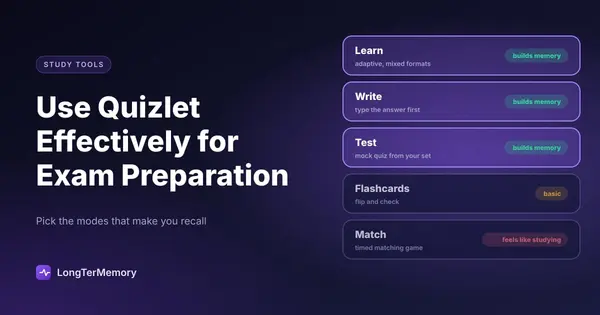
Flashcards mode is the most basic. You see one side of a card, think of the answer, and then flip to check. This can be effective, but only if you genuinely commit to an answer before flipping. If you’re flipping immediately or skimming the front and back together, this mode is just passive review.
Learn mode is Quizlet’s adaptive study mode. It presents terms in different formats, including multiple choice, typed answers, and written recall, and it tracks which ones you’re getting wrong and shows those more frequently. This is one of Quizlet’s most useful modes because it forces active retrieval across different question formats.
Write mode asks you to type out the answer before seeing the correct response. This is one of the strongest formats for memory encoding because the generation effect means that producing an answer, even when you’re wrong, strengthens memory more than recognition alone.
Test mode creates a mock quiz from your set with a mix of question types. It simulates an actual test and gives you a score at the end. This is excellent for exam preparation because it surfaces gaps across your entire set in one session.
Match mode is the timed matching game. It’s engaging and it feels like studying. Unfortunately, it’s mostly testing your ability to quickly recognize and connect terms on a single screen, which is a different (and much easier) skill than recalling information from memory with no visual cues.
Gravity is the animated flashcard game. It’s fun. It’s not particularly effective for deep learning, and you should treat it as light review at best.
The Modes That Actually Build Memory
If you want to get serious about Quizlet as a study tool, the modes worth investing your time in are Learn, Write, and Test. These three formats require genuine active recall, the kind of retrieval from memory that cognitive science consistently shows produces durable, long-lasting learning.
Learn mode is the one to use for regular daily study. Its adaptive algorithm means you’re automatically spending more time on the terms you’re weakest on, which is the right allocation of effort. If you’re only going to use one Quizlet mode as your daily study habit, make it this one.
Write mode is particularly powerful for vocabulary-heavy material, terminology, foreign language, and definitions. The act of typing out an answer forces your brain to generate the response from scratch rather than recognizing it among options. It’s slower than Match or Gravity, and that’s the point.
Test mode is your weekly check-in. Before a big exam or at the end of each study week, run a full test on your set. Look at your accuracy by section. If you’re consistently missing certain terms, that’s your study agenda for the following session.
Making Your Own Sets vs. Using Shared Sets
One of Quizlet’s biggest features, and potential pitfalls, is the massive library of shared study sets. For almost any topic, subject, or exam, someone has already made a Quizlet set. It’s tempting to just grab one of these and start studying.
The problem with shared sets is quality control. They range from excellent to wildly inaccurate. Terms can be incomplete, definitions can be wrong, and the sets may not align with your specific course or exam version. Using a bad set means reinforcing wrong information, which is worse than not studying at all.
When using shared sets:
- Always cross-reference the content against your official course material
- Look for sets created by users with high ratings and many recent reviews
- Check whether the set was built for your specific exam version, since content changes over time
- Don’t assume someone else’s set is comprehensive, it may be missing key areas
The case for making your own sets:
Creating your own flashcards is itself a powerful learning activity. The process of deciding what to put on each card, phrasing the question clearly, and choosing what to include and exclude forces you to engage with the material at a level that simply using someone else’s set doesn’t.
If you have time, making your own sets is almost always worth it, especially for complex material where the distinctions between concepts matter a lot. If you’re pressed for time, use a high-quality shared set but review it critically before relying on it.
When to Use Quizlet vs. Anki
Both Quizlet and Anki are flashcard-based study tools, but they serve different use cases, and understanding the distinction helps you choose the right tool.
Quizlet is better when:
- You need to study with shared content quickly, since the library of pre-made sets is enormous
- You want something that’s easy to set up and use across devices
- You’re studying vocabulary, definitions, or factual recall in a relatively focused subject area
- You’re not planning to study the same material for months or years
Anki is better when:
- You’re studying for a long-term commitment, like medical school or a language that you plan to maintain for years
- You want fine-grained control over your review schedule using a scientifically-calibrated spaced repetition algorithm
- You need to customize card types, add images, audio, and complex formatting
- You’re managing hundreds or thousands of cards across multiple subjects simultaneously
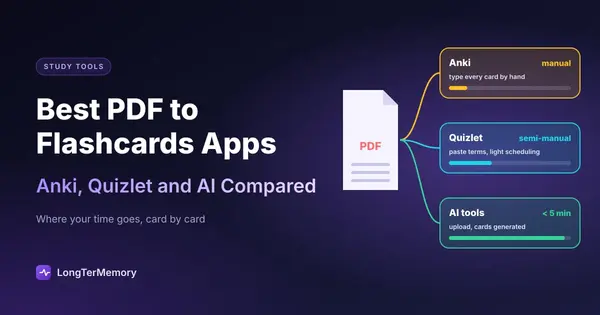
The core difference is that Anki’s spaced repetition algorithm is more powerful for long-term retention across massive card volumes. Quizlet’s Learn mode does use spaced repetition, but it’s less configurable and less optimized for multi-year retention.
For most college students studying for a semester exam, Quizlet is perfectly sufficient. For medical students building an Anki deck they’ll maintain through residency, Anki wins. Many serious students actually use both: Quizlet for quick reviews and shared sets, and Anki for their primary long-term retention system.
Advanced Quizlet Tactics That Most Users Miss
Once you’ve got the basics right, these tactics help you squeeze more value out of Quizlet without spending more time on it.
Use folders and classes to organize your sets. If you’re studying multiple subjects, keeping your sets organized in folders or Quizlet classes makes it easy to shift between subjects without losing your place in any of them.
Edit shared sets to fit your needs. When you find a good shared set, don’t just use it as-is. Copy it into your own library, remove terms that don’t apply to your exam version, add terms that are missing, and correct any errors you find. A curated set that matches your material exactly is much more valuable than a generic set.
Star the terms you’re getting wrong and drill those specifically. In Learn and Flashcard mode, you can star terms to create a smaller subset of just your problem areas. After a study session, switch to studying only starred terms for an intensive targeted drill.
Use Quizlet in combination with your actual study materials. Quizlet shouldn’t replace your notes, textbooks, or course material. Use it as an active recall layer on top of your reading, not as a substitute for understanding the material in the first place. Read a section, then make or review a Quizlet set on that content to test what actually stuck.
Avoiding the Most Common Quizlet Mistake
The most common mistake Quizlet users make is measuring study progress by time spent or cards reviewed rather than by actual performance data.
If you spend 45 minutes on Quizlet running through Match mode and feeling comfortable, but your Test mode score is 60%, you haven’t made the progress you think you have. The score is what matters, not the time or the pleasant feeling of recognition.
Track your Test mode scores over time. If you’re improving week over week, your approach is working. If scores are plateauing, you need to change something, whether that’s the modes you’re using, the depth of your card content, or the frequency of your reviews.
And if you find yourself spending a lot of study time on the same material without things sticking, the issue might be that flashcards aren’t the right format for that content. Some material, especially conceptual or procedural knowledge, is better studied through practice problems and application than through term-and-definition cards.
Building Quizlet Into a Study Routine That Works
Quizlet works best as a daily habit rather than a last-minute cramming tool. The research on spaced repetition is clear: small, frequent reviews spread over time produce far better long-term retention than a large block of studying the night before an exam.
A practical daily Quizlet routine might look like this:
- 10 to 15 minutes of Learn mode in the morning on your current set
- One full Test mode session once a week per subject
- Making new cards as you encounter new material each day
- Targeted drills on starred (weak) cards whenever you have 5 free minutes
This kind of consistent daily exposure is what Quizlet’s spaced repetition features are designed to support. The students who use Quizlet most effectively aren’t the ones who do 3-hour sessions the night before an exam. They’re the ones who do 15 minutes every single day.
If you want to take your spaced repetition practice even further, LongTerMemory lets you upload your study materials, like PDFs and notes, and automatically generates question-and-answer pairs for you. It’s a way to skip the time-consuming step of creating flashcards from scratch while still getting the benefits of active recall review.
The Bottom Line on Quizlet
Quizlet is a genuinely useful study tool when you use it intentionally. The modes that feel easiest (Match, Gravity, passive flashcard flipping) are the ones that do the least for your long-term retention. The modes that feel harder (Write, Learn, Test) are the ones that actually build memory.
Make your own sets when you can. Use shared sets critically when you can’t. Track your Test scores over time, not your feelings. And make Quizlet a daily habit rather than a last-minute refuge.
Used this way, Quizlet is a powerful part of any study system. Used carelessly, it’s a way to feel like you’re studying without doing the cognitive work that actually moves information into long-term memory.