How to Create a Spaced Repetition Deck From a Lecture Recording
Turn any recorded lecture into a powerful spaced repetition deck. Learn transcription, extraction, and card-building techniques that save hours of manual work.
Table of Contents
- Transcription Tools for Converting Lecture Recordings to Text
- Extracting Testable Concepts From Unstructured Lecture Content
- Building and Importing a Deck From Lecture-Based Material
- The Lecture-to-Deck Workflow: A Step-by-Step System
- Avoiding Common Pitakes in Lecture-to-Deck Conversion
- Using Lecture Decks Alongside Other Study Materials
- When Lecture Recordings Aren't Available
- The Time-Saving Advantage of Automated Deck Building
- The Bottom Line
Recorded lectures are one of the most underutilized resources in modern education. Whether you’re in a fully online program, a hybrid course, or you simply record your in-person lectures for review, you have access to hours of expert explanation that most students waste.
The typical pattern is depressingly familiar. You attend the lecture or watch the recording. You might take some notes. The recording sits in your course portal, theoretically available for review, but you never listen to it again. When exam time comes, you re-read your notes, which capture maybe 20% of what was actually said, and hope for the best.
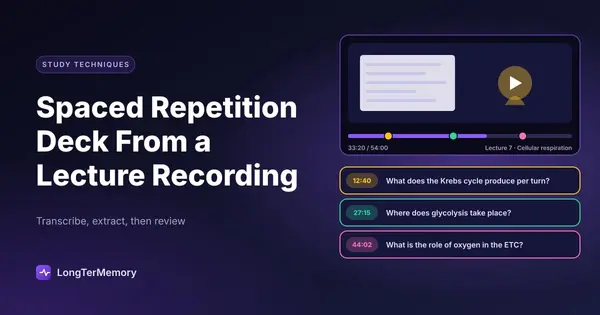
There’s a better way. You can convert a recorded lecture directly into a spaced repetition deck, and when you do it correctly, the resulting cards are often higher quality than cards built from textbooks or slide decks. Lectures contain emphasis, explanation, and context that written materials lack. Capturing that spoken content as structured flashcards gives you a review system that preserves the lecturer’s expertise in a format designed for long-term retention.
Transcription Tools for Converting Lecture Recordings to Text
The first step in building a deck from a lecture recording is getting the audio into text form. You cannot efficiently skim audio. You need text to identify testable concepts, extract key statements, and build cards at a reasonable speed.
Here are the main approaches, ranked by accuracy and convenience:
| Method | Accuracy | Cost | Best For |
|---|---|---|---|
| Native platform transcription (Zoom, Teams, Panopto) | 85-92% | Usually free | Quick first drafts of live recordings |
| Whisper by OpenAI | 95-98% | Free (self-hosted) or low API cost | High-quality transcription of any audio file |
| Otter.ai | 90-95% | Freemium | Real-time transcription during live lectures |
| Descript | 92-96% | Subscription | Transcription plus editing and collaboration |
| Manual transcription | 100% | Your time | Short clips where precision matters |
For most students, Whisper is the best balance of quality and cost. It handles technical vocabulary better than generic transcription services, it works across languages, and it can process an hour-long lecture in under ten minutes on a modern laptop. The output is a timestamped transcript that you can search, highlight, and annotate.
If you don’t want to run Whisper yourself, several web services now offer Whisper-based transcription with simple upload interfaces. Search for “Whisper transcription web app” and you’ll find multiple options that process files for free or for a few cents per minute.
One tip that will save you significant cleanup time: use the transcript as a reference, not as a final product. Even 95% accuracy means a 60-minute lecture will have dozens of transcription errors, especially with technical terms, names, and abbreviations. Don’t spend hours correcting the transcript. Use it to locate key sections, then listen to those sections directly while building your cards.
Extracting Testable Concepts From Unstructured Lecture Content
A transcript is not a study guide. It’s a verbatim record of everything said, including filler words, digressions, repetitions, and administrative announcements. The skill that separates efficient deck-builders from overwhelmed ones is the ability to quickly identify what is actually testable.
Here is a simple framework for scanning lecture content:
Listen for emphasis cues. Lecturers signal importance through vocal emphasis, pauses, and explicit statements. Phrases like “this is important,” “you’ll see this again,” “the key point here,” and “make sure you understand this” are direct instructions about what to include in your deck. In a transcript, these cues appear as capitalized words, repeated phrases, or explicit statements.
Watch for structure cues. Most well-organized lectures follow a pattern: concept introduction, explanation, example, significance. The concept and significance are usually testable. The example might be testable if it illustrates a general principle, but is usually not testable if it’s just a colorful illustration.
Identify definitions and relationships. Anytime a term is defined, that’s deck material. Anytime a causal relationship is stated, that’s deck material. Anytime a comparison is made between two concepts, that’s deck material. These are the building blocks of exam questions.
Skip the stories and digressions. Personal anecdotes, historical background that isn’t central to the concept, and administrative announcements should not become flashcards. They dilute your deck and increase review time without improving exam performance.
Focus on what wasn’t in the reading. If the lecturer spends significant time on something not covered in the textbook, that’s high-priority deck material. Exams often pull from lecture-specific content to reward attendance and attention.
A practical technique: after generating the transcript, do a first pass where you highlight or mark every sentence that meets the criteria above. Don’t build cards yet. Just mark. This gives you a filtered view of the lecture, typically reducing a 60-minute transcript from 8,000 words to 1,500 words of high-yield content.
Building and Importing a Deck From Lecture-Based Material
Once you’ve identified the testable content, the next step is converting it into flashcards. The quality of your deck depends heavily on how you structure these cards.
One concept per card. This is the cardinal rule of flashcard design, and it’s especially important for lecture-derived content because lectures often present multiple related ideas in rapid succession. If a sentence contains two distinct facts, split them into two cards. Yes, this means more cards. It also means each card is faster to review and more precisely targeted.
Use cloze deletion for definitions and lists. Cloze deletion cards, where a key term is blanked out in a sentence, are ideal for lecture content because they preserve context. Instead of a card that asks “What is the definition of X?” you have a card that presents “X is a ______ characterized by Y and Z.” The sentence context triggers memory more reliably than isolated terms.
Frame cause-effect relationships as questions. Lectures are full of causal statements. “X leads to Y because of Z.” Convert these into question-answer pairs: “Why does X lead to Y?” or “What is the result of X under condition Z?” Causal relationships are favorite exam targets, and framing them as questions forces you to retrieve the relationship, not just recognize the terms.
Include the lecturer’s examples if they’re illustrative. If the lecturer used a specific example to explain a general principle, consider including that example on the card. The example serves as a memory anchor. When you see the card, the example triggers recall of the broader concept. Just make sure the example actually illustrates the principle and isn’t just a entertaining story.
Tag cards by lecture date and topic. Organization matters for large decks. Tag each card with the lecture number, date, or topic. This allows you to review specific lectures before quizzes, filter cards by topic during final exam prep, and identify which lectures are producing the most difficult cards.
For import, most spaced repetition apps accept CSV files. Create your cards in a spreadsheet with columns for front, back, and tags, then import. If you use LongTerMemory, you can paste your extracted lecture content directly and the AI will generate exam-style Q&A cards automatically, preserving the lecturer’s emphasis and context without requiring manual card formatting.
The Lecture-to-Deck Workflow: A Step-by-Step System
Here’s a complete workflow you can implement immediately:
Step 1: Record or download the lecture. If your course doesn’t provide recordings, use a voice recorder app or screen recorder. Check your institution’s policy on recording lectures first.
Step 2: Generate a transcript. Use Whisper, Otter, or your platform’s built-in transcription. Aim for a searchable text version of the audio.
Step 3: First-pass highlighting. Read or skim the transcript and highlight every sentence that contains a definition, causal relationship, comparison, or explicit emphasis from the lecturer. Don’t build cards yet. Just mark.
Step 4: Second-pass extraction. Go through your highlights and extract the core testable fact from each. Write it as a simple statement. For example, from “The professor emphasized that in oxidative phosphorylation, the proton gradient drives ATP synthase to produce ATP, and this is the chemiosmotic theory proposed by Peter Mitchell,” extract: “The chemiosmotic theory (Peter Mitchell) states that the proton gradient drives ATP synthase.”
Step 5: Card creation. Convert each extracted statement into one or more flashcards. Use cloze deletions for definitions, question-answer pairs for relationships, and context-preserving formats where possible.
Step 6: Review within 24 hours. The first review of lecture-derived cards should happen the same day or the next day. This catches errors, clarifies ambiguous wording, and takes advantage of the recency effect while the lecture is still fresh in your memory.
Step 7: Integrate into your spaced repetition schedule. From day two onward, let the SRS algorithm handle scheduling. Trust the intervals. The whole point of spaced repetition is that you don’t need to manually decide when to review.
This entire workflow, once practiced, takes about 45-60 minutes for a 60-minute lecture. That might sound like a lot, but consider the alternative: re-watching the lecture takes 60 minutes and produces weaker retention. Reading your notes takes 15 minutes and captures less content. The upfront investment in deck creation pays dividends across weeks or months of automated review.
Avoiding Common Pitakes in Lecture-to-Deck Conversion
Even students who understand the workflow often make specific errors that weaken their decks.
Transcript dependency. Some students try to build cards directly from the transcript without listening to the audio again. This produces cards that are technically accurate but miss the lecturer’s emphasis and explanation. The transcript tells you what was said. The audio tells you how it was said, and the how often contains as much information as the what.
Over-cardification. Not every fact in a lecture needs to become a flashcard. If a concept is extremely simple, extremely intuitive, or already well known, skip it. A deck bloated with easy cards wastes review time and dilutes your focus from the genuinely challenging material.
Poor card wording. Cards copied directly from transcripts are often too long, too complex, or too context-dependent. A card that reads “As the professor mentioned in the third week, when discussing mitochondrial function, the chemiosmotic theory, which was proposed by Peter Mitchell in 1961, explains how the proton gradient…” is unusable. Edit ruthlessly. Strip context that isn’t needed for recall. The card should work on its own, without requiring memory of the lecture’s narrative structure.
Neglecting the review phase. Building the deck is not the end of the process. Many students enthusiastically create beautiful decks and then never review them. A deck that is reviewed zero times is less useful than a messy deck reviewed fifty times. The creation process has learning value, but the review process is where the long-term retention happens.
Using Lecture Decks Alongside Other Study Materials
A deck built from lectures should not exist in isolation. The most effective study systems integrate lecture decks with textbook decks, problem sets, and practice exams.
Lecture-textbook integration. When your textbook and lecture cover the same topic, compare the two sources. Does the lecture add information not in the book? Does the book explain something more clearly than the lecture? Use both to build comprehensive cards. If there’s a conflict, the lecture usually takes precedence for course exams, since the professor writes the exam.
Lecture-problem pairing. After building your lecture deck, work practice problems on the same topic. The problems reveal which lecture concepts are actually testable and how they’re likely to be framed. Use your performance on problems to identify weak areas in your deck, then add targeted cards to address those gaps.
Cross-lecture synthesis cards. As the course progresses, you’ll notice connections between lectures. Create cards that explicitly link concepts across lectures. “How does the concept from Lecture 3 relate to the mechanism described in Lecture 7?” These synthesis cards are gold for comprehensive final exams.
When Lecture Recordings Aren’t Available
Not every course provides recordings. If you’re in this situation, you have two options.
Record yourself. Use a voice recorder app during lecture. Sit near the front for better audio quality. You don’t need professional equipment, your phone is sufficient. The resulting audio won’t be as clean as a direct recording, but it’s still usable for transcription and deck building.
Build from notes and memory. If recording isn’t possible, build your deck immediately after lecture while the content is fresh. Use your notes as a skeleton and fill in details from memory. This is less comprehensive than a transcript-based approach, but it’s still far more effective than waiting a week and trying to reconstruct the lecture from sparse notes.
The Time-Saving Advantage of Automated Deck Building
Manual deck building from lectures is effective, but it is time-consuming. A 60-minute lecture might yield 40-80 cards, and creating those cards by hand takes 45-90 minutes depending on your speed and the complexity of the material.
This is where AI-powered tools become valuable. LongTerMemory can accept a lecture transcript, identify the testable concepts automatically, and generate exam-quality Q&A cards in minutes rather than hours. The resulting cards preserve the lecturer’s emphasis and context while following spaced repetition best practices.
The workflow becomes: transcribe, paste, review the generated cards for accuracy, and start studying. The time savings are substantial, especially for students with heavy course loads who need to process multiple lectures per week.
Even if you prefer manual card creation for some subjects, consider using automation for high-volume periods or for lectures where you’re primarily interested in factual retention rather than deep conceptual work. The flexibility to choose your approach based on the material and your schedule is a significant advantage.
The Bottom Line
Recorded lectures contain some of the highest-quality study material available to you. The lecturer has already done the work of selecting, organizing, and explaining the most important concepts. Converting that spoken expertise into a structured spaced repetition deck preserves that work in a format designed for long-term retention.
The process requires an upfront investment of time. Transcription, extraction, and card creation are not trivial tasks. But the alternative, passive listening and note-reading, produces weaker results across every metric that matters: retention depth, recall speed, and exam performance.
If you have lecture recordings sitting unused in your course portal, you’re sitting on a goldmine. Start extracting the value. Your future self, facing the exam, will be grateful you did.