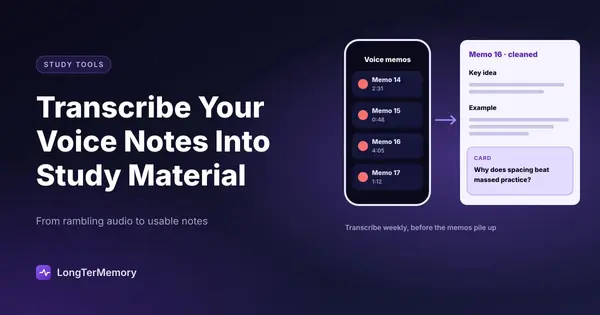
How to Transcribe Your Voice Notes into Usable Study Material
Turn your voice notes into structured study material using AI transcription tools, smart editing workflows, and flashcard conversion techniques.
Table of Contents
- Why Voice Notes Get Abandoned (And What to Do Instead)
- AI Transcription Tools That Convert Audio to Accurate Text Quickly
- Whisper (via OpenAI)
- Otter.ai
- Fireflies.ai and Fathom
- Google Voice Typing and Apple Dictation
- Choosing the Right Tool
- Cleaning and Organizing Transcribed Voice Notes for Study Use
- The Two-Pass Editing Method
- Organising by Topic, Not by Recording
- Adding a Retrieval Layer
- Turning Voice Note Transcripts into Flashcards and Review Questions
- Manual Flashcard Creation
- AI-Assisted Question Generation
- Voice Note to Flashcard: The Ideal Workflow
- Making Voice Notes Work Alongside Your Written Notes
You recorded the lecture. You dictated a stream-of-consciousness brain dump on your walk home from campus. You have a folder of voice memos that represent hours of academic thought, and you cannot remember the last time you actually listened to any of them.
Voice notes are appealing in the moment. They are fast. They do not interrupt your train of thought the way typing does. They capture something that is hard to get on paper: the way you genuinely think about a subject, including the half-formed connections and the questions that occur to you mid-thought.
The problem is that raw audio is almost useless as study material. You cannot skim it. You cannot search it. You cannot turn it into flashcards. Until you transcribe it, it is sitting there being a very efficient way to store things you have stopped learning from.
This guide is about fixing that problem, turning your voice notes into organised, searchable, revision-ready study material without making the process so painful that you just stop recording.
Why Voice Notes Get Abandoned (And What to Do Instead)
The typical voice note workflow dies at the playback step. You recorded twelve minutes of notes on the bus. When you get home and sit down to review them, twelve minutes of audio is not actually twelve minutes of study. It is twelve minutes of your own voice at normal speaking pace, including filler words, pauses, repeated ideas, and asides you no longer need.
Listening back to voice notes is slow and cognitively passive. It is just listening, which means it has all the same problems as re-reading your written notes, but with the added friction of not being able to skim.
Transcription changes this completely. A transcribed voice note can be skimmed in ninety seconds. It can be searched. It can be edited down to the essential points. It can be converted into flashcards, summary bullets, or question-and-answer pairs. Text is an almost infinitely more flexible format for study than audio.
The reason most people do not transcribe their voice notes is that they think it requires listening back to the recording and typing out what they hear. That used to be true. With current AI transcription tools, it is not anymore.
AI Transcription Tools That Convert Audio to Accurate Text Quickly
The quality of automated speech-to-text has improved dramatically over the past few years, to the point where most academic voice notes can be transcribed to 90-95% accuracy with zero manual effort. That remaining 5-10% of errors is usually easy to spot and quick to fix.
Here are the main options, depending on your needs and budget:
Whisper (via OpenAI)
OpenAI’s Whisper model is free, open-source, and exceptionally accurate. You can run it locally on your computer or access it through various apps and interfaces that wrap around the model. It handles technical vocabulary, accents, and multi-lingual content better than most commercial alternatives.
If you are comfortable with basic command-line tools, Whisper is the highest-quality free option available. If that sounds intimidating, there are several browser-based tools built on top of Whisper that require no setup.
Otter.ai
Otter is the most widely used transcription tool among students and professionals. It offers a browser extension, a mobile app, and integrations with Zoom, Google Meet, and Microsoft Teams. The free tier allows a limited number of transcription minutes per month, which is usually enough for casual voice note use.
Otter is particularly strong at transcribing real-time audio, which makes it useful not just for voice notes you recorded yourself but for transcribing lectures as they happen. It also does a reasonable job of speaker identification in multi-person audio, though this is less relevant for solo voice notes.
Fireflies.ai and Fathom
These tools are primarily designed for meeting transcription, but they work well for academic voice notes and recorded lectures. Both offer free tiers and produce clean, searchable transcripts. Fathom integrates particularly well with Zoom, which is useful if your course involves recorded video sessions.
Google Voice Typing and Apple Dictation
If you want real-time transcription rather than post-recording transcription, both Google Docs (via Voice Typing) and Apple’s built-in dictation can transcribe speech to text as you speak. This means you can dictate study notes directly into a document without the transcription step afterward. The tradeoff is that you need to be more deliberate and structured in how you speak, since you are dictating into a document rather than free-flowing into a recording.
Choosing the Right Tool
| Tool | Best For | Cost | Accuracy |
|---|---|---|---|
| Whisper | High accuracy, local processing | Free (self-hosted) | Excellent |
| Otter.ai | Mobile recording, real-time | Free tier available | Very good |
| Google Voice Typing | Real-time dictation into Docs | Free | Good |
| Fireflies.ai | Meeting/lecture transcription | Free tier available | Very good |
The best tool is the one you will actually use. If you are already on your phone when you record, Otter is probably the path of least resistance. If you prefer working on your computer and want the highest quality, Whisper is worth the minor setup effort.
Cleaning and Organizing Transcribed Voice Notes for Study Use
Raw transcripts are not study material. They are a starting point. Even a perfect transcription of a voice note will contain filler words, repetitions, incomplete thoughts, and tangential observations that have no place in a revision document.
The cleaning step is where the actual thinking happens, and it is also where you start to benefit from having transcribed in the first place.
The Two-Pass Editing Method
First pass: structural cleanup. Go through the transcript and delete everything that is not content. Filler words (“um”, “like”, “you know”), repeated sentences, self-corrections where you restated something better and the first attempt is now redundant. Also delete any section where you went off on a tangent that is not relevant to your study topic. This pass is about noise removal.
Second pass: content refinement. Now look at what is left and ask whether it is in the most useful form. Long paragraphs of dictated explanation can often be compressed into two or three bullet points without losing any information. Definitions that you dictated conversationally (“so basically X means…”) can be reformatted as clean declarative statements. Lists you mentioned verbally can be formatted as actual visual lists.
After two passes, a twelve-minute voice note might yield half a page of clean, structured, genuinely useful study content. That is the transformation you are going for.
Organising by Topic, Not by Recording
Do not keep your cleaned transcripts as separate files corresponding to individual voice notes. Instead, maintain a set of topic-based documents and paste the relevant content from each transcript into the right topic file.
This matters because the goal is integrated knowledge, not a chronological archive. When you return to study pharmacokinetics, you want one document that has everything you have said about pharmacokinetics, whether you recorded it three weeks ago or yesterday. If your notes are fragmented across dozens of individual transcript files, you will never use them effectively.
Use your course syllabus or a subject outline as the organizing structure. Create a document for each major topic area. As you clean each transcript, route its content to the right location.
Adding a Retrieval Layer
Once a topic document is populated with cleaned content, take one more step that most people skip: rewrite the content as questions.
Instead of a bullet that says “The Krebs cycle produces 3 NADH, 1 FADH2, and 1 GTP per turn,” create a card that says “How many NADH, FADH2, and GTP does one turn of the Krebs cycle produce?” This converts your cleaned notes into active recall material rather than passive reading material.
You can do this manually, or you can paste your cleaned notes into a tool that generates questions automatically.
Turning Voice Note Transcripts into Flashcards and Review Questions
The final step of the workflow is the most important from a learning perspective. Cleaned, organized notes are better than raw audio, but they are still passive material. Flashcards and review questions are active material, and active material is what actually builds durable memory.
Manual Flashcard Creation
For many students, the most reliable method is to read through a cleaned and organised transcript document and manually create flashcards as they go, using a tool like Anki, Quizlet, or any other spaced repetition system.
The conversion from “here is information” to “here is a question about this information” requires you to evaluate each piece of content and decide how it should be tested. That evaluation is itself a learning activity. By the time you have converted a document into a deck of flashcards, you have read and processed every item at least twice.
AI-Assisted Question Generation
If you have a large volume of cleaned transcript material, manually creating flashcards for everything is time-consuming. Several tools can accelerate this.
You can paste a section of cleaned notes into a language model with a prompt like “Generate ten question-and-answer flashcard pairs from this material, testing the key concepts.” The quality of what you get will depend on the quality of what you paste in, but with well-cleaned notes, the results are often very usable.
LongTerMemory takes this a step further: you can upload your study materials directly and it generates question-and-answer pairs automatically, which are then served to you through a built-in spaced repetition system. If you have cleaned and organised your voice note transcripts into a coherent document, it becomes a straightforward source to upload.
Voice Note to Flashcard: The Ideal Workflow
Here is a streamlined end-to-end workflow that balances effort with result:
-
Record freely. Dictate your notes without worrying about structure or quality. Voice is meant to be fast and natural.
-
Transcribe automatically. Use Whisper, Otter, or your preferred tool. Do not listen back to the recording; go straight to the transcript.
-
Clean in two passes. First remove noise, then refine content. Compress and reformat rather than just copy.
-
Route to topic documents. Paste the cleaned content into the right topic file in your course notes structure.
-
Convert to questions. Either manually create flashcards from the content, or use an AI tool to generate them.
-
Review through spaced repetition. The questions go into your review system. The original recording becomes irrelevant.
The whole process from transcription to usable study material should take roughly as long as the recording itself. If you recorded twelve minutes of voice notes, you should be able to produce revision-ready material from it in about fifteen minutes. That is a very reasonable return on investment.
Making Voice Notes Work Alongside Your Written Notes
Voice notes are not a replacement for written notes. They are a supplement that captures what written notes often miss.
Written notes capture what you understood at the time of writing, structured and deliberate. Voice notes capture your thinking in motion, including half-formed ideas, questions that occurred to you, and connections you were not sure about.
When you transcribe and clean a voice note and compare it to your written notes on the same topic, you will sometimes find things in the voice note that add meaningfully to the written version. A question you dictated in transit might reveal a gap in your written notes. A connection you made out loud might suggest a better way to organise your written material.
The best study systems use multiple input formats and integrate them toward the same output: a set of active review questions that you revisit on a spaced schedule. Voice notes, written notes, lecture slides, textbook chapters, and academic papers all feed into the same destination. The format of the input matters much less than the quality of the review questions you extract from it.
Voice notes, properly handled, are a genuinely powerful input. They are fast to create, they capture authentic thinking, and they transcribe easily. The only thing standing between a folder of unused recordings and a set of revision-ready flashcards is a fifteen-minute workflow.
That workflow is entirely worth building.