How to Use RemNote for Integrated Notes and Flashcards
RemNote combines note-taking and spaced repetition in one tool. Here's how to set up and why switch to LongTerMemory tool for any subject or certification.
Table of Contents
- What Is RemNote?
- The Core Concept: Notes as Flashcards
- Setting Up RemNote for a New Subject
- Create a Top-Level Page for the Subject
- Set Up a Structure That Mirrors Your Course
- Define Your Rem Types
- The RemNote Workflow: From Notes to Daily Flashcard Review
- Phase 1: Capture (Active Note-Taking)
- Phase 2: Convert (Creating Cards in Context)
- Phase 3: Review (Daily Spaced Repetition)
- Key Features That Make RemNote Worth Using
- Knowledge Graph and Bidirectional Links
- The Portals Feature
- PDF Annotation with Card Creation
- Custom Templates
- A Practical RemNote Workflow for Certification Study
- RemNote vs. Anki: Which Is Better for Studying?
- Common RemNote Mistakes to Avoid
- Creating Too Many Cards Too Fast
- Not Reviewing Daily
- Making Cards Too Broad
- Treating Notes as Drafts
- A Faster Alternative to RemNote and Anki: LongTerMemory
- What You Gain by Switching from RemNote or Anki to LongTerMemory
- RemNote vs. Anki vs. LongTerMemory at a Glance
- When RemNote or Anki Is Still the Better Choice
- The Bottom Line
Most students use two completely separate tools for studying. They take notes in one app, maybe Notion or OneNote or a paper notebook, and then, if they’re rigorous enough to build flashcards at all, they create them separately in Anki or Quizlet. The two systems don’t talk to each other. Notes pile up in one place, flashcards accumulate in another, and the connection between them is entirely in the student’s head.
RemNote solves this by collapsing note-taking and spaced repetition into a single integrated workflow. You write your notes, and as you write, you create flashcards in the same document. Review time means coming back to those same notes and being tested on what they contain. Everything stays connected.
That integration sounds simple. Its implications for how you study are significant.
One honest caveat before we dive in: RemNote removes the friction of keeping notes and flashcards in separate apps, but it does not remove the work of writing every note and manually marking up every flashcard yourself. That manual effort is the hidden cost of studying with RemNote (and even more so with Anki), and it is the main reason students abandon both tools. Later in this guide we will look at how AI-powered alternatives like LongTerMemory eliminate that work entirely. First, here is how RemNote works and how to get the most out of it.
What Is RemNote?
RemNote is a note-taking and spaced repetition application available on web, desktop (Windows and Mac), and mobile (iOS and Android). It was built specifically for students and learners, with the core insight that the notes you write and the flashcards you review should be part of the same document, not separate systems.
The app is structured around Rems, which are the basic unit of content in RemNote. A Rem is roughly equivalent to a bullet point or a paragraph. Everything you write in RemNote is a Rem, and any Rem can be turned into a flashcard with a single keyboard shortcut.
RemNote also supports bidirectional linking between Rems and pages, making it possible to build a connected knowledge graph similar to what you’d get in Roam Research or Obsidian, but with the spaced repetition system built directly in.
The Core Concept: Notes as Flashcards
The fundamental insight behind RemNote is straightforward: the best flashcards come from your own notes.
When you create flashcards from scratch in a separate app, you’re doing extra work. You’re re-processing information you already processed when you took notes. You’re also creating a disconnection: the flashcard exists without context, as a floating fact-answer pair, rather than as part of a conceptual framework.
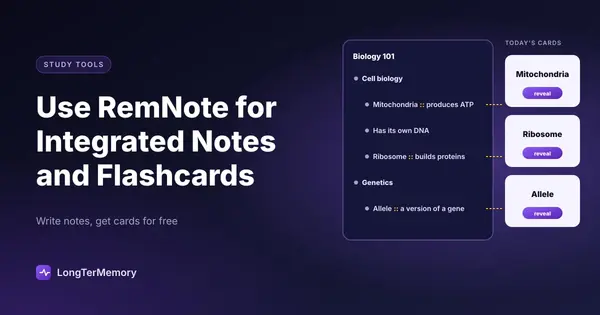
RemNote’s approach is different. You take notes normally, and within those notes, you mark certain Rems as flashcards using the :: separator (for a basic question-answer pair) or other formats. Those cards go directly into your spaced repetition queue. When you review them, you can jump back to the original note for full context. The note and the card are the same piece of content.
This means your note-taking is your flashcard creation. You’re not doing double work.
Setting Up RemNote for a New Subject
Starting a new subject in RemNote takes about five minutes to configure in a way that will serve you well for the whole course.
Create a Top-Level Page for the Subject
In RemNote, pages are like documents. Create one page per course or subject. Name it clearly: “Biochemistry” or “Contract Law” or “AWS Solutions Architect.” This becomes the home document for everything related to that subject.
Set Up a Structure That Mirrors Your Course
Within your subject page, create sub-pages for each unit, module, or major topic. If your course has 8 chapters, create 8 sub-pages. This hierarchical structure means your notes and flashcards are organized by course structure, not just chronological order.
Define Your Rem Types
RemNote allows you to create different types of flashcards:
- Basic cards (
::) - Question on front, answer on back. Best for definitions, facts, and direct recall. - Cloze cards (
{text}) - A sentence with a blank, where the missing text must be recalled. Best for completing formulas, fill-in-the-blank style content. - Multi-line answer cards - For complex answers with multiple components.
Decide early which types fit which content. Definitions: use basic cards. Formulas with context: use cloze. Conceptual explanations: consider multi-line.
The RemNote Workflow: From Notes to Daily Flashcard Review
The workflow in RemNote follows a natural pattern: capture, convert, review.
Phase 1: Capture (Active Note-Taking)
This is your normal note-taking process, but done inside RemNote. As you read a textbook, watch a lecture, or work through study material, write your notes in Rem format.
Key principle: write your notes as if you’re explaining the content to someone, not as a verbatim copy of the source. This active reformulation is itself a form of learning. If you can’t explain it clearly in your own words, you don’t understand it yet.
As you write, identify which Rems contain content that you’ll need to recall on an exam or in practice. These are your flashcard candidates.
Phase 2: Convert (Creating Cards in Context)
Converting a Rem to a flashcard is a single step: add :: after the question part and before the answer. For example:
What is the Ebbinghaus forgetting curve? :: A mathematical model showing that memory decays exponentially over time, with the steepest decline in the first 24 hours.This Rem now appears in your spaced repetition queue. The context (the surrounding notes about Ebbinghaus, memory, and spaced repetition) is one click away if you need it during review.
The key habit to develop is converting as you go, not at the end of a note-taking session. If you defer card creation, you’ll do it less consistently. The discipline of deciding “does this belong in my review queue?” in real-time also reinforces active thinking about what matters.
Phase 3: Review (Daily Spaced Repetition)
RemNote’s review mode presents your due cards from across all your subjects, sorted by the spaced repetition algorithm. You answer each card, rate your confidence (Again / Hard / Good / Easy, similar to Anki), and the algorithm schedules the next review based on your rating.
Daily review sessions in RemNote typically look like:
- Open the app
- Click “Practice” or “Due Today”
- Work through your due cards (typically 15-30 minutes per day once the system is running)
- Return to your notes for any cards you struggled with
The total review time is usually lower than you’d expect, because the algorithm prevents you from reviewing cards you already know well. You’re spending time exactly where it’s needed.
Key Features That Make RemNote Worth Using
Knowledge Graph and Bidirectional Links
Like Obsidian or Roam, RemNote supports bidirectional links between pages and Rems. If you link your “cellular respiration” Rem to your “mitochondria” page, both will show the connection. Over time, this creates a connected knowledge map where related concepts reference each other.
For subjects where understanding relationships matters as much as knowing individual facts, this is genuinely useful. Law, medicine, history, and systems-thinking subjects all benefit from being able to see how concepts connect.
The Portals Feature
RemNote’s Portals let you embed content from one page into another without copying it. If you have a definition in your core “Terminology” document that’s also relevant to your “Chapter 5” notes, you can embed it in both places. Changes in one place update everywhere.
This prevents the classic problem of maintaining duplicate notes that drift out of sync.
PDF Annotation with Card Creation
RemNote allows you to import and annotate PDFs directly. When reading a PDF, you can highlight passages and convert them directly to flashcards. This is particularly powerful for students who work heavily from textbooks or academic papers, creating a seamless pipeline from source reading to active review.
Custom Templates
For recurring note structures, like lecture notes, case study analyses, or chapter summaries, you can create templates in RemNote that pre-fill with your standard structure. This reduces the cognitive load of starting a new note and ensures consistency across your study materials.
A Practical RemNote Workflow for Certification Study
Here’s what an effective RemNote workflow looks like for a professional certification like AWS Solutions Architect or PMP:
Week 1 setup:
- Create one page per exam domain (for AWS SAA: Design Resilient Architectures, Design High-Performing Architectures, etc.)
- Create a “Master Glossary” page for key terms across domains
- Set up templates for service summary notes and scenario-based Q&A
Daily study session:
- Start with 15 minutes of due-card review
- Move to reading or video content for the day’s domain
- Take notes in the relevant domain page, converting key facts and services to flashcards as you go
- Add any confusing or unclear concepts to a “Review Later” page for deeper investigation
Weekly review:
- Check which domains have the most due cards (indicates where retention is weakest)
- Do a longer practice session with past exam questions, noting any gaps
- Link new content to existing concepts using bidirectional links
This workflow keeps your study material organized by exam structure, ensures daily review through spaced repetition, and builds a growing knowledge graph of how concepts connect.
RemNote vs. Anki: Which Is Better for Studying?
This comparison comes up often, so it’s worth addressing directly.
| Feature | RemNote | Anki |
|---|---|---|
| Note-taking integration | Excellent (built-in) | None |
| Flashcard algorithm | Good (FSRS or SM-2) | Excellent (mature, highly configurable) |
| PDF annotation | Yes | No (requires separate tool) |
| Knowledge graph | Yes | No |
| Mobile app | Yes | Yes (AnkiMobile costs $25 on iOS) |
| Free tier | Yes (limited) | Free on desktop, paid mobile |
| Community decks | Limited | Massive library |
| Customization | Moderate | Extensive |
| Learning curve | Moderate | Steep |
Choose RemNote if: You want a single tool that handles notes and flashcards together, you’re starting from scratch with a new subject, or you value a connected knowledge base.
Choose Anki if: You need access to community-made decks (especially for medical school, where pre-made Anki decks are extensive), you need maximum algorithm control, or you’re already heavily invested in the Anki ecosystem.
Many serious students use both: RemNote for active note-taking and knowledge management during a course, and Anki for high-volume review of established decks (like medical school decks) where content creation isn’t the bottleneck.
What the table above does not show is the cost both tools share: every flashcard in RemNote or Anki is written by hand, by you. If that manual work is the part that keeps derailing your study routine, there is a third option worth considering, covered in the section below.
Common RemNote Mistakes to Avoid
Creating Too Many Cards Too Fast
The most common mistake with any spaced repetition system is creating more cards than you can realistically review daily. When the review pile grows faster than you can clear it, the system breaks down. Be selective: not every fact needs a card. Focus on content that will genuinely be tested, or that you find yourself genuinely unable to recall.
Not Reviewing Daily
Spaced repetition only works if you review daily, or close to it. Missing reviews doesn’t just pause the system, it disrupts the carefully calculated intervals and reduces the algorithm’s effectiveness. A 15-minute daily review is more valuable than a 2-hour weekly session.
Making Cards Too Broad
“Explain the entire immune system” is not a good flashcard. Break complex content into atomic facts: one card per concept, one concept per card. Broad cards are difficult to rate accurately, and they don’t pinpoint specific gaps in your knowledge.
Treating Notes as Drafts
Some students use RemNote primarily as a note-taking tool and treat the flashcard creation as optional. This misses the point. The connection between notes and cards is what makes RemNote valuable. If you’re not creating cards, you’re paying for organizational overhead without getting the retention payoff.
A Faster Alternative to RemNote and Anki: LongTerMemory
If the reason you are considering RemNote or Anki is better retention with less friction, LongTerMemory is worth a serious look, because it removes the single most time-consuming step in both tools: writing the notes and flashcards by hand.
Here is the uncomfortable truth about the workflow described in this guide. RemNote’s integration is elegant, but you still have to type every note, decide which Rems deserve to become cards, and mark each one with :: syntax as you go. Anki is worse: you author every card from scratch in a separate app, disconnected from your notes. Students who track their study time consistently find that card creation eats up the majority of their sessions. That is time spent manufacturing study material instead of actually learning it, and it is the number one reason spaced repetition systems get abandoned after a few weeks.
LongTerMemory works from a different premise: your study materials already exist, so the tool should turn them into flashcards for you. You upload your PDFs, lecture slides, textbook chapters, photos of handwritten notes, or pasted text, and the AI generates exam-style question-and-answer flashcards automatically. A built-in spaced repetition engine then schedules your reviews, with no configuration required.
What You Gain by Switching from RemNote or Anki to LongTerMemory
- No manual flashcard creation. The AI extracts Q&A pairs directly from your documents. The hours you would spend writing notes-as-cards in RemNote, or typing cards into Anki’s editor, go back to actual studying.
- No note-taking overhead. You do not need to build and maintain a perfectly structured knowledge base for the system to work. Your source documents are the knowledge base.
- Exam-style questions, not just recall. The generated cards test understanding and application, the way real exams do, not just definition lookups.
- Spaced repetition built in. An adaptive SRS engine schedules every review automatically, like RemNote and Anki, but with zero setup or tuning.
- Works with what you already have. PDFs, PowerPoint slides, photos of handwritten notes, web pages, and Google Docs (via a native add-on) all become a reviewable deck in minutes.
- Study anywhere. Web and mobile apps with stable sync, no manual configuration.
RemNote vs. Anki vs. LongTerMemory at a Glance
| Feature | RemNote | Anki | LongTerMemory |
|---|---|---|---|
| Flashcard creation | Manual (:: syntax inside your notes) | Manual (dedicated card editor) | Automatic AI generation from your files |
| Note-taking required | Yes, notes are the source of every card | Yes, in a separate app | No, upload existing documents |
| Time to first study session | Hours of writing and markup | Hours of card authoring | Minutes: upload and review |
| Spaced repetition | Yes (configurable) | Yes (SM-2 / FSRS) | Yes (adaptive, fully automatic) |
| Knowledge graph | Excellent | No | Basic |
| Community decks | Limited | Massive | Not the focus |
| Input formats | Typed notes, PDF annotation | Manual text entry, imports | PDF, slides, photos, text, web pages, Google Docs |
| Learning curve | Moderate | Steep | Minimal |
When RemNote or Anki Is Still the Better Choice
A fair comparison acknowledges trade-offs. RemNote remains the better tool if your primary goal is building a permanent, deeply linked knowledge base that you will maintain for years across multiple subjects. Its bidirectional linking and knowledge graph genuinely have no equivalent in LongTerMemory. Anki remains unbeatable if your subject already has a mature community deck (the AnKing decks for medical school are the classic example), because in that case the card-creation bottleneck has been solved by someone else.
But if what you actually want is to turn your own course materials into a reviewable deck with the least possible manual work, and to spend your study time studying rather than formatting, LongTerMemory is the most direct path. Many students also combine the tools: RemNote for long-term knowledge organization, LongTerMemory for the heavy lifting of generating and scheduling flashcards from source documents.
The Bottom Line
RemNote is one of the most thoughtfully designed study tools available because it was built on a correct understanding of how learning works. Notes are most useful when they become retrieval practice material. Flashcards are most meaningful when they’re connected to the source notes that gave rise to them. Spaced repetition only works if you actually do it daily.
By integrating all three into a single workflow, RemNote removes the friction that causes most students to give up on systematic flashcard review. You don’t need to maintain two systems. You don’t need to remember to transfer notes into a separate flashcard app. You write your notes and the review system builds itself.
Set it up once, use it consistently, and you’ll have a study system that compounds over time. Your knowledge base grows, your retention improves, and you arrive at exam day with material that’s actually in your long-term memory, not just freshly skimmed from a set of notes you re-read the night before.
And if you recognize yourself in the most common failure mode, starting a RemNote or Anki system with enthusiasm and abandoning it once the manual card-writing becomes a second job, skip straight to the automated route. Upload your first PDF or set of lecture slides to LongTerMemory and you will have an exam-ready flashcard deck in minutes, with spaced repetition scheduling included. The science is the same. The difference is who does the boring work: the tool, or you.