Your Google Docs Notes Are Just the Beginning: Turn Them Into a Real Study System
Most students take great notes in Google Docs but never actually learn from them. Here's a one-click way to turn any document into active study material.
Table of Contents
- The Gap Between Having Notes and Knowing the Material
- What Makes a Good Study Question (And Why AI Can Help)
- The Add-On That Closes the Gap
- Why the Sidebar Format Actually Matters
- Where This Fits Into Different Study Workflows
- The Science Behind Why This Works
- How to Get Started in Under Five Minutes
- The Bigger Picture
Here is a scenario you have probably lived at least once. You sit through a lecture, a webinar, or a long online course, and you take meticulous notes. Everything is organized. Headings, bullet points, clear explanations in your own words. You close your laptop feeling genuinely productive. A week later, someone asks you what you learned, and you draw a blank. You know you have the notes somewhere. You just… cannot retrieve any of it.
This is not a memory problem. It is a workflow problem. And if you use Google Docs to capture your study material, there is a very specific step most people skip that makes all the difference.
The Gap Between Having Notes and Knowing the Material
Taking notes is a form of encoding. You are transforming information from one format (a lecture, a PDF, a video) into another (your own words). That process is genuinely valuable. It forces you to pay attention and make at least some sense of what you are hearing.
But encoding is only the first phase of learning. The phase that most people skip entirely is retrieval practice: actively testing yourself on the material you encoded, without looking at the source. This is where real learning happens, and it is dramatically different from re-reading your notes.
When you re-read a Google Doc full of notes, something deceptive happens. The material looks familiar. You nod along. You think: yes, I know this. That feeling of familiarity is real, but it is not the same as knowing something well enough to use it. Familiarity is recognition. What you need is recall. And recall only gets built through practice, not through reading.
Research on this distinction is not subtle. Studies consistently show that students who test themselves on material after encoding it retain 40 to 80 percent more over time than students who spend the same amount of time re-reading. The mechanism is called the testing effect, and it is one of the most replicated findings in all of cognitive psychology.
The problem is not that people are lazy. The problem is that converting a page of notes into a good set of practice questions is genuinely time-consuming and requires a kind of analytical skill that most people have not been taught.
What Makes a Good Study Question (And Why AI Can Help)
Not all questions are equal. Bad flashcard questions are basically reading comprehension in disguise: “What does the author say about X?” Those questions do not force retrieval, they just direct attention back to the source.
Good study questions test whether you can reconstruct an idea from scratch. They target the concepts most likely to matter in an exam or in actual practice. They are framed in a way that mirrors how the knowledge will actually be used, not just how it was presented in the notes.
Writing questions like that takes mental effort and domain knowledge. You have to understand the material well enough to know what the core concepts are, which details are central versus peripheral, and how ideas relate to each other.
This is where AI becomes genuinely useful. Not as a replacement for thinking, but as a first-pass that removes the mechanical work of question generation, so you can focus on reviewing and refining.
The Add-On That Closes the Gap
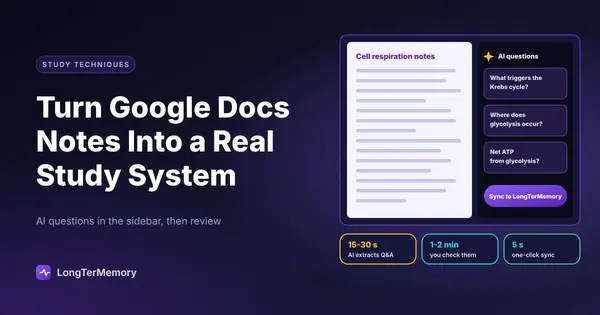
Quick Q&A Generator, a free Google Docs add-on by LongTerMemory, was built specifically to solve this problem. It installs directly into Google Docs and adds a sidebar that reads your document and generates three to five targeted question-and-answer pairs from the content.
The key difference from other tools is that you never leave your document. There is no copy-paste, no switching to a separate app, no importing and reformatting. Your notes stay in Google Docs exactly as they are. The add-on works alongside them.
Once the questions are generated, a single button syncs both the document and the Q&A pairs to your LongTerMemory dashboard, where they enter a spaced repetition schedule. From that point forward, the system surfaces them at the right moments to reinforce long-term retention, using the same SM-2-inspired algorithm that powers research-backed review tools.
The workflow looks like this:
| Step | What Happens | Time Required |
|---|---|---|
| Open document | Any Google Doc with study content | 0 seconds |
| Run the add-on | AI reads and extracts core Q&A pairs | 15 to 30 seconds |
| Review questions | Check them against your source text | 1 to 2 minutes |
| Sync to LongTerMemory | One click sends everything to your review queue | 5 seconds |
| Review sessions | Spaced repetition handles the scheduling | As scheduled |
The total overhead to go from “notes” to “active study material in a spaced repetition queue” is under three minutes. That is the gap this tool closes.
Why the Sidebar Format Actually Matters
It sounds like a small thing. But the fact that the add-on lives in a sidebar inside Google Docs is one of its more significant design decisions.
When you generate flashcards using a separate tool, you usually lose the context. You copy text, paste it somewhere else, get questions back, and by then you have no easy way to check whether a question is accurate or whether the AI missed something important. You are working blind.
With the sidebar, you can compare the generated questions directly against the source text. If a question does not reflect what your notes say, you can see that immediately. If the AI missed a critical concept, it is obvious because you are still looking at the document. You can edit, refine, or simply decide not to sync a question that is not quite right.
This makes the tool collaborative rather than automatic. You are not just delegating the work to an AI and hoping for the best. You are using the AI to do the mechanical first pass, then applying your own judgment before anything goes into your review queue. That combination tends to produce much higher-quality flashcards than either approach alone.
Where This Fits Into Different Study Workflows
The add-on is not a single-use tool. It fits into different study patterns depending on what you are learning.
If you are a student taking lecture notes, the flow is simple. After each lecture, open your Google Doc notes, run the add-on, review the questions, sync. Your review queue builds automatically across the semester, and when exam time comes, you have a complete set of practice questions covering every topic you studied, already scheduled for spaced review.
If you are preparing for a professional certification, you are probably working through a lot of dense documentation: official study guides, practice frameworks, technical specifications. These documents live naturally in Google Docs or can be pasted there. Run the add-on after each section instead of at the end. You will catch gaps earlier and avoid the cramming trap.
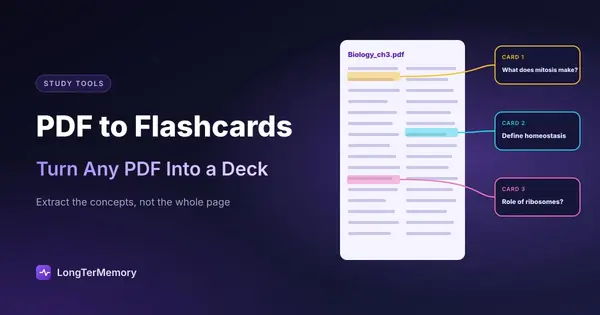
If your source material is a PDF rather than a Google Doc, the same automation works through a dedicated pdf to flashcards workflow.
If you are a professional staying current in a fast-moving field, you likely read a lot and retain less than you want to. Drop relevant articles or summaries into Google Docs, generate Q&A pairs, sync to LongTerMemory, and let spaced repetition keep that knowledge active over weeks and months. The same mechanism that helps students pass exams helps professionals hold onto knowledge they actually need.
If you are a teacher or instructor, the add-on gives you a fast first draft of quiz questions from any document you are already using. Run it on your course notes, review the output, and you have a working set of questions in minutes instead of hours.
The Science Behind Why This Works
The pairing of AI-generated questions and spaced repetition is not an arbitrary design choice. Each element addresses a specific failure mode in traditional studying.
AI question generation attacks the production bottleneck: the reason most people never build a solid flashcard deck is that creating good questions is hard and time-consuming. Remove that barrier and the deck gets built.
Spaced repetition attacks the forgetting curve: even when people do create flashcards, they often review them in inefficient ways, drilling everything repeatedly regardless of how well they know it, or forgetting to review at all. The SM-2 algorithm handles scheduling automatically, reviewing what you are about to forget at the moment it matters most.
Together they create a closed loop: capture, encode, test, review without requiring significant willpower or planning at each step. The system does the scheduling. The AI does the question drafting. You do the actual thinking: reading the questions, recalling the answers, flagging what you got wrong.
That is the loop that builds durable knowledge. And starting it from Google Docs, where most study material already lives, removes the last major friction point.
How to Get Started in Under Five Minutes
If you are already using Google Docs for notes, adding this to your workflow costs almost nothing:
- Install Quick Q&A Generator by LongTerMemory from the Google Workspace Marketplace (it is free)
- Open any Google Doc with content you want to learn
- Go to Extensions in the top menu, then select Quick Q&A Generator
- Click Generate in the sidebar and wait 15 to 30 seconds
- Review the Q&A pairs in the sidebar, comparing them against your notes
- Click Sync to push the document and questions to your LongTerMemory dashboard
From there, your review sessions are scheduled automatically. You show up when the system tells you to, work through the questions, and the algorithm adjusts based on how you do.
The best way to see whether it changes your retention is to try it with something you actually need to learn in the next few weeks. Pick a Google Doc you have been avoiding studying from and run the add-on on it today. The questions that come back will usually surprise you, not because they are wrong, but because they surface the ideas that seem obvious when you are reading but go missing when you try to recall.
That gap, between what you think you know and what you can actually produce from memory, is what this whole workflow is designed to close.
The Bigger Picture
Your notes are not the endpoint of studying. They are the raw material. The studying happens when you actively retrieve what you encoded, test yourself on it, and revisit it at intervals that force your memory to work rather than coast.
Google Docs is where most knowledge work starts. The Quick Q&A Generator add-on makes it a starting point for active learning too, without changing how you take notes or adding a complicated new step to your routine.
If you have been feeling like studying is not sticking the way it should, the problem is probably not how good your notes are. It is what you do with them afterward.
Start there.