How to Use a Master Tracker for Multi-Topic Study
Learn to build a study master tracker: a simple spreadsheet that tracks mastery per topic, guides daily study decisions, and ends multi-subject overwhelm.
Table of Contents
- What a Master Tracker Is (and What It Is Not)
- Building the Spreadsheet: Columns That Earn Their Place
- The Mastery Scale: Make the Numbers Mean Something
- Using Tracker Data to Decide Without Overthinking
- A Worked Example
- Pairing the Tracker With Tools That Do the Remembering
- Pitfalls: How Trackers Die
- Your First Tracker, Tonight, in 30 Minutes
There is a specific kind of stress that has nothing to do with the difficulty of your material. It shows up when you are preparing for anything with many moving parts, a certification with eight domains, a semester with five courses, a licensing exam with forty topics, and it sounds like this: “What should I even study today?”
You sit down, motivated and ready. Then you spend twenty minutes flipping between notes, trying to remember what you covered last week, feeling vaguely guilty about the topics you have been avoiding, and finally defaulting to reviewing the chapter you already know best, because at least that feels good. The studying was fine. The deciding was the problem.
A master tracker fixes the deciding. It is one of those tools that sounds almost too boring to matter, it is literally a spreadsheet, and then quietly transforms how you study. Let me show you how to build one and, more importantly, how to actually use it.
What a Master Tracker Is (and What It Is Not)
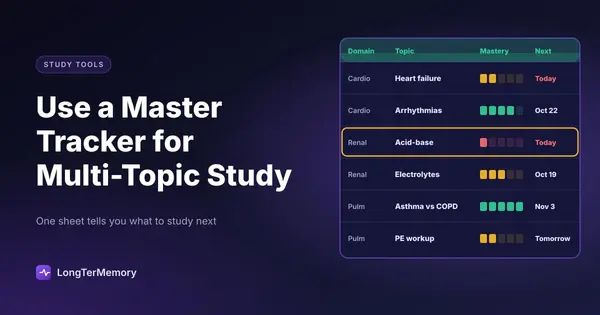
A master tracker is a single document, usually a spreadsheet, that lists every topic you need to know for your exam or program, along with your current mastery level of each and when you last touched it. That is the whole concept. One row per topic, a handful of columns, one honest look at your entire battlefield.
What it is not: a to-do list, a study calendar, or a place to log hours. Those track activity. A master tracker tracks state, specifically, the state of your knowledge. The difference matters because activity is a terrible proxy for readiness. You can log fifty hours and still be weak in the three domains that make up half the exam. The tracker keeps your attention on the thing that actually determines your score: how well you currently know each topic that will be tested.
The payoff comes from three effects:
- It kills the daily decision cost. You open the sheet, look for the ugliest cell, and study that. Zero deliberation.
- It exposes avoidance. Everyone has topics they unconsciously dodge. A tracker makes the dodge visible as a row that has not been touched in three weeks and is still red.
- It replaces anxiety with information. Vague dread (“am I behind?”) becomes a specific, answerable picture (“I am strong in 60% of topics, weak in 25%, and untouched in 15%”).
Building the Spreadsheet: Columns That Earn Their Place
Open Google Sheets, Excel, or LibreOffice. Resist the urge to build something elaborate. The best tracker is the one you will still be updating in week nine, and every extra column raises the cost of updating. Here is the core structure:
| Column | What goes in it | Why it earns a spot |
|---|---|---|
| Domain | The exam’s own top-level section | Lets you sort and see weighting |
| Topic | One specific, testable topic | The unit you actually study |
| Weight | High / Medium / Low, from the exam outline | Not all topics deserve equal effort |
| Mastery | 0 to 5 (definitions below) | The heart of the tracker |
| Last reviewed | Date of last real contact | Stale knowledge decays; this shows staleness |
| Notes | Error patterns, confusions, page refs | Your future self needs the context |
Six columns. That is all.
Where do the rows come from? Not from your textbook’s table of contents, and not from your own guesses. Use the official exam content outline or syllabus, because that document defines what “complete coverage” actually means for your exam. Every certification body publishes one (AWS exam guides, the PMP Examination Content Outline, USMLE content descriptions, bar exam subject lists). Copy its structure into your Domain and Topic columns during a single setup session. For a typical certification you will end up with 30 to 80 rows, which is exactly the scale where memory fails and a tracker shines.
Granularity check: each topic row should be something you could meaningfully review in one or two sessions. “Networking” is too big. “The difference between security groups and network ACLs” might be too small. “VPC security controls” is about right. When in doubt, match the granularity of the exam outline’s second level.
The Mastery Scale: Make the Numbers Mean Something
The mastery column only works if the levels have definitions you apply consistently. Vague numbers drift toward flattery. Here is a scale that has worked for me and for a lot of certification candidates I have compared notes with:
- 0, Untouched. Never studied it. No shame, just truth.
- 1, Seen. Read or watched something about it once. Could not explain it.
- 2, Familiar. Can follow an explanation and recognize correct answers, but cannot produce the material from memory.
- 3, Functional. Can answer straightforward practice questions from memory. Still miss edge cases.
- 4, Solid. Consistently correct on practice questions, can explain the topic out loud without notes.
- 5, Teachable. Could teach it, including the tricky parts and the why. Practice questions on this topic feel easy.
Notice the spine running through these definitions: they are all about retrieval, not exposure. Level 2 versus level 3 is exactly the line between recognition (“I know this when I see it”) and recall (“I can produce this cold”), and exams live almost entirely on the recall side of that line. Scoring yourself by whether you could answer questions, rather than whether the material feels familiar, is what keeps the tracker honest. Familiarity is the great liar of exam prep.
Update the mastery score immediately after each study session or practice set, while the evidence is fresh. Got 8 of 10 questions right on a topic? That is a 4. Blanked on the basic definitions? That is a 1, whatever the previous cell said. Scores go down as well as up, and a score that drops is the tracker doing its job, catching decay before the exam does.
Using Tracker Data to Decide Without Overthinking
Now the part that makes the whole thing worth it: turning the sheet into a decision engine so that “what should I study today?” takes thirty seconds, forever.
The core rule is almost embarrassingly simple: study the highest-weight topic with the lowest mastery score. Sort by weight, then by mastery ascending, and the top row is today’s assignment. A high-weight topic at mastery 1 is worth more points per hour than a low-weight topic at mastery 3, and both crush the value of polishing a mastery-4 topic you happen to enjoy.
Two refinements make the rule smarter:
Add a staleness trigger. Anything at mastery 3 or above that you have not reviewed in two or three weeks is suspect, knowledge decays on exactly that timescale. When its “last reviewed” date goes stale, mentally treat it as one level lower until a quick review confirms otherwise. This is, you might notice, a hand-cranked version of spaced repetition: reviews spaced out over time, triggered by predicted forgetting.
Set a session split. A good default is 70% of study time on the sorted worst topics (raising floors) and 30% on quick reviews of stale mid-level topics (maintaining what you built). All offense and your old knowledge rots; all maintenance and your weak domains never improve.
And one behavioral rule that outranks the formulas: the tracker decides, and you obey it for the first block of every session. After you have done the assigned ugly topic, study whatever you like. This little contract is what actually defeats avoidance, because avoidance negotiates hardest at the start of a session, and the tracker removes the negotiation.
A Worked Example
Say your tracker for a cloud certification shows, after sorting:
| Domain | Topic | Weight | Mastery | Last reviewed |
|---|---|---|---|---|
| Security | IAM policy evaluation | High | 1 | 12 days ago |
| Networking | VPC peering vs Transit Gateway | High | 2 | 8 days ago |
| Storage | Lifecycle policies | Medium | 2 | 15 days ago |
| Compute | Instance purchasing options | High | 4 | 20 days ago |
Today’s session writes itself: open with IAM policy evaluation (high weight, lowest mastery), then a short refresh of instance purchasing options, because a mastery-4 topic untouched for 20 days is quietly becoming a 3. Total decision time: under a minute. That is the entire product.
Pairing the Tracker With Tools That Do the Remembering
A master tracker tells you what needs attention. It does not, by itself, do anything about the forgetting that creates all that staleness in the first place. That job belongs to spaced repetition, and the two tools complement each other beautifully.
The workflow I recommend: keep the tracker as your strategic map, and put the actual review workload into a spaced repetition system. With LongTerMemory, you can upload your study materials per topic, let it auto-generate the question-answer pairs, and let its scheduler handle all the “last reviewed / due again” logic automatically at the individual question level. Your tracker then only needs to carry the topic-level picture, and its “last reviewed” column mostly takes care of itself, because the daily review queue keeps every topic in rotation. You update mastery scores from how the reviews and practice questions actually go.
Tracker for strategy, spaced repetition for memory maintenance. Spreadsheet decides the battles, software fights the forgetting.
Pitfalls: How Trackers Die
Master trackers fail in predictable ways, so let me name them upfront:
- Over-engineering. Color gradients, twelve columns, automated dashboards, a settings tab. Every feature you add makes updates slower, and update friction is what kills trackers. Six columns. Boring is durable.
- Flattering scores. If everything is a 4, the tracker is decorative. Tie scores to practice-question evidence, not vibes.
- Tracking activity instead of state. Hours logged and chapters completed feel satisfying and predict nothing. Mastery per topic predicts your score.
- Updating “later”. Later means never. The update happens in the last two minutes of the study session, every session, while the truth is fresh.
- Building it and not consulting it. The sheet only pays rent if it makes your daily decision. Open it at the start of every session, no exceptions, until that is a reflex.
Your First Tracker, Tonight, in 30 Minutes
Here is the whole setup, timed:
- Minutes 0-5: download your exam’s official content outline.
- Minutes 5-20: copy its domains and topics into the six-column sheet.
- Minutes 20-28: fill in weights from the outline’s percentages, and give every topic an honest first mastery score. Most will be 0 to 2. Good. That is your real starting line.
- Minutes 28-30: sort by weight then mastery, and write down tomorrow’s first topic.
Tomorrow, you will sit down to study and, for the first time in a long while, spend zero minutes wondering where to begin. The material is still hard. The path through it no longer is.