
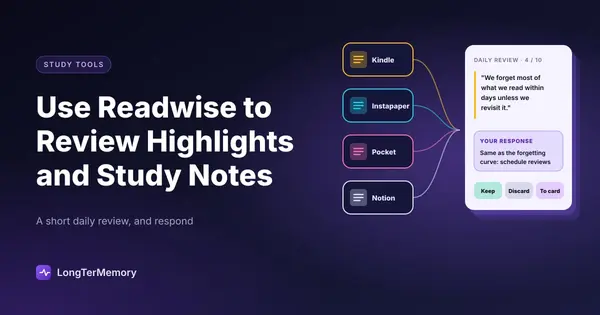
How to Use Readwise to Review Highlights and Study Notes
Learn how Readwise transforms scattered reading highlights into a daily spaced repetition habit that makes study notes actually stick.
Table of Contents
- What Is Readwise and Why Does It Work?
- Setting Up Readwise: Connecting Your Sources
- Tagging and Organizing Your Highlights
- The Daily Review: How to Actually Use It
- Don't Just Read, Respond
- Set a Consistent Time and Cap Your Session
- Combining Readwise with Anki or Obsidian
- Readwise + Anki
- Readwise + Obsidian (via Readwise Reader)
- Using Readwise Specifically for Study and Exam Prep
- Curate What You Highlight
- Use the Notes Field for Active Recall Setup
- Create Subject-Specific Review Sessions Before Exams
- Common Mistakes That Kill the Habit
- The Bigger Picture: Building a Reading System That Remembers
You’ve done the reading. You’ve underlined the important parts, left margin notes, starred the paragraphs that hit differently. And then, two weeks later, you remember basically none of it. Sound familiar?
The sad truth about highlights is that most of them die in the dark. They sit in your Kindle library, your Instapaper queue, your notebook margins, and your browser clippings, untouched and gradually forgotten. You captured the idea. You just never retrieved it.
Readwise is built specifically to fix this problem. It connects to your reading sources, pulls your highlights into one place, and resurfaces them daily using spaced repetition logic, the same science behind Anki and every other evidence-based memory tool worth using. This guide walks you through what Readwise actually is, how to set it up properly, and how to combine it with other study tools to build something genuinely powerful for long-term retention.
What Is Readwise and Why Does It Work?
At its core, Readwise is a highlight aggregator with a built-in daily review system. You connect your reading apps, your notes sync over, and every morning Readwise sends you a small batch of your own highlights to review. The selection is driven by spaced repetition: items you haven’t seen in a while get surfaced more often, while things you’ve reviewed recently drop to the back of the queue.
This matters because the forgetting curve doesn’t care how good your highlights are. Without repeated exposure over time, even the most valuable insight fades. Readwise forces the repetition that most readers skip entirely.
The other reason it works is friction reduction. There’s no deck to build, no card to format, no schedule to manage. You just read things, highlight them, and Readwise handles the rest. The cognitive cost of maintaining a review habit drops to almost nothing, which is the only way most people actually sustain one.
Setting Up Readwise: Connecting Your Sources
The first thing you want to do after creating an account is connect every reading source you use. Readwise integrates with a surprisingly long list:
| Source | What It Syncs |
|---|---|
| Kindle | All your book highlights |
| Instapaper | Article highlights and notes |
| Saved article highlights | |
| Matter | Reading highlights |
| Feedly | Article snippets |
| Obsidian, Notion, Roam | Exported notes and highlights |
| Web Clipper | Manually highlighted web pages |
| Apple Books | Book highlights via workaround |
For Kindle, the sync is seamless once you authorize your Amazon account. Your highlights import automatically and continue syncing as you add new ones. For web articles, you’ll use the Readwise browser extension, which lets you highlight any webpage and have it flow directly into your review queue.
If you use Obsidian or Notion as your main notes system, Readwise also exports highlights back into those tools, which creates a nice two-way flow we’ll talk about later.
Tagging and Organizing Your Highlights
Out of the box, Readwise will pull in everything, which can feel overwhelming if you’ve been highlighting enthusiastically for years. The fix is the tagging system. You can tag highlights inside Readwise by topic, source type, or project, and then filter your daily review to focus on specific areas.
For students, a useful setup is to tag highlights by subject or course. If you’re preparing for an accounting exam and a medical certification at the same time, you can keep those review queues separate and allocate daily review time to each independently.
The Daily Review: How to Actually Use It
The daily review is Readwise’s headline feature, and it’s worth taking five minutes to understand how to get the most from it rather than just passively reading through your highlights.
Don’t Just Read, Respond
The default Readwise experience is a reading experience: your highlights appear one at a time, you read them, you click next. This is better than nothing, but it’s closer to passive review than active recall, and passive review is the least effective form of studying available to you.
The fix is simple: before you read the highlight that appears, cover the text and ask yourself what you remember about it. What was the context? What was the argument? What did the author say that surprised you? Only then uncover the highlight and check yourself.
You can also use Readwise’s built-in mastery rating system. After reviewing a highlight, you can mark it as “mastered,” which removes it from frequent rotation, or flag it for more frequent review. Use this actively. If a highlight genuinely no longer needs rehearsal, retire it. If something keeps slipping your memory, flag it for intensive review.
Set a Consistent Time and Cap Your Session
The research on habit formation is consistent: behaviors attached to existing routines stick better than behaviors that require finding new time. The most effective Readwise users review their highlights at the same point every day, usually in the morning with coffee or at the start of a dedicated study block.
Cap your session at 10 to 15 minutes. Readwise will send you as many highlights as you want, but review fatigue is real, and quality of attention matters more than quantity of items seen. It’s better to genuinely engage with 10 highlights than to sleepwalk through 40.
Combining Readwise with Anki or Obsidian
Readwise is excellent at resurfacing highlights, but it has a ceiling when it comes to deep comprehension and application. For study purposes, the real power comes from combining it with other tools.
Readwise + Anki
Readwise has an Anki integration that lets you convert any highlight into an Anki flashcard with one click. The workflow is straightforward:
- During your daily Readwise review, when you hit a highlight that represents a testable piece of knowledge, a definition, a formula, a key concept, click “Send to Anki.”
- Readwise creates a basic card with the highlight text on the front and optional context on the back.
- The card enters your regular Anki review schedule.
The distinction between Readwise and Anki review is worth keeping clear: Readwise handles resurfacing ideas and insights, things worth remembering for their richness, while Anki handles precise facts and concepts where you need to retrieve specific answers accurately. Use both for what they’re good at.
Readwise + Obsidian (via Readwise Reader)
Readwise Reader is Readwise’s companion app for reading long-form content. You read inside Reader, highlight as you go, and everything syncs to both Readwise and, via the Obsidian plugin, directly into your notes vault.
The result is a notes system where your in-context highlights automatically flow into your knowledge base. If you’re building a permanent notes system (a Zettelkasten or any other linked-note approach), this eliminates the manual step of copying quotes from your reading into your notes, which is one of those friction points that usually means it doesn’t happen.
For the Obsidian setup: install the Readwise Official plugin, authorize your account, and choose a folder where highlights will export. Each book or article gets its own note, with your highlights listed in order. You can then link these notes to your own synthesis notes, building a web of connected knowledge over time.
Using Readwise Specifically for Study and Exam Prep
If you’re using Readwise not just for general reading but for active exam preparation, a few adjustments make it significantly more useful.
Curate What You Highlight
The daily review is only as good as what you put into it. For study purposes, be selective. Don’t highlight everything that seems important in the moment. Highlight things that represent: definitions and terms, key principles and concepts, surprising or counterintuitive findings, and anything you’d expect to see on an exam.
Vague highlights like “interesting idea” add noise to your review queue. Specific, testable highlights add value. The discipline of choosing what to highlight is itself a study skill: it forces you to distinguish what’s truly core from what’s background context.
Use the Notes Field for Active Recall Setup
Every Readwise highlight has an optional notes field. For study purposes, use this field to write a question that the highlight answers. Instead of just seeing the highlight during review, you’ll see your own question first, which converts the passive review experience into active recall.
For example, if you highlight “The Ebbinghaus forgetting curve shows that without review, 50% of new information is forgotten within an hour,” your note might read: “What does the Ebbinghaus forgetting curve tell us about retention timelines?”
Now your daily review session looks like a quiz you made for yourself, which is dramatically more effective than reading your own highlights.
Create Subject-Specific Review Sessions Before Exams
In the week before an exam, shift from your default daily review to a targeted review of highlights tagged to that subject. Readwise lets you filter by tag, so you can run a focused review of everything you highlighted for that specific course or certification domain, covering weeks or months of reading in a concentrated session.
This works particularly well when combined with active recall on the notes field and a quick Anki review of the cards you generated from key highlights. You’ve essentially built a personalized review system out of your own reading.
Common Mistakes That Kill the Habit
A few things consistently derail Readwise users before they get any benefit from it.
Importing everything at once without curating. If you’ve highlighted aggressively for years, importing all of it creates a review queue with thousands of items, many of which are no longer relevant. Before setting up your daily review, spend one session archiving or deleting highlights that no longer serve your current goals. A smaller, higher-quality queue is much more sustainable.
Passive scrolling during review. As mentioned above, reading your highlights without attempting to recall them first converts a potentially powerful tool into light entertainment. The technique of covering the text and self-testing first costs nothing extra and multiplies the value of each review session.
Treating Readwise as a replacement for active studying. Readwise is a tool for surfacing and revisiting what you’ve already read. It doesn’t replace practice tests, problem sets, or deep study sessions. Think of it as the maintenance layer of your learning system, not the core learning mechanism.
The Bigger Picture: Building a Reading System That Remembers
Most people treat reading and remembering as separate activities. You read a book. Separately, if you’re diligent, you take notes. Separately again, maybe you review the notes. The steps are disconnected and each handoff is a point of failure.
Readwise collapses this into a single system. Read with your highlighting tool of choice. Connect to Readwise. Review daily. Export key items to Anki or Obsidian for deeper processing. The whole chain runs more or less automatically once it’s set up, and it compounds over time in a way that a single reading session never could.
After six months of consistent daily review, you’ll find yourself retaining ideas from books you read a year ago in a way that feels almost unnatural compared to your pre-Readwise reading life. That’s not magic, it’s what spaced repetition looks like when it actually works.
If you want to go even further, LongTerMemory.com takes this logic a step further by letting you upload entire PDFs and course materials, then automatically generating question-answer flashcard pairs from them. Instead of manually highlighting and tagging, the system extracts the testable content for you, feeding it into a spaced repetition schedule built around your specific exam date. It’s worth trying if your study load is high enough that manual highlight curation takes more time than you have.
For now, though, if you’re not using Readwise, or using it passively, you have an easy win sitting right in front of you. Your highlights are already there. They just need someone to actually read them.