How to Use Todoist or TickTick for Study Task Management
Learn how to set up Todoist or TickTick to manage your study tasks, flashcard reviews, and exam prep schedules with clarity and consistency.
Table of Contents
- Why Generic To-Do Apps Work Better Than Specialized Study Apps
- Todoist vs. TickTick: Which Should You Use?
- Setting Up Your Study Project Structure
- Option 1: By Subject
- Option 2: By Exam Date
- Writing Study Tasks That Are Actually Useful
- Estimating Time (TickTick Has This Built In)
- Using Due Dates and Scheduling
- The Rule of Three Due Date Types
- Recurring Tasks for Daily Review
- Todoist-Specific Setup Tips
- Use Priority Flags to Triage Your Day
- The Today View and Upcoming View
- Todoist Filters for Study Sessions
- TickTick-Specific Setup Tips
- Use the Calendar View for Study Block Planning
- Use the Pomodoro Timer for Deep Work
- Habit Tracking for Study Consistency
- Managing Multiple Subjects or Certifications
- The Weekly Planning Session
- Connecting Task Management with Your Study Tools
- Making the System Stick
If you’ve ever written a long study to-do list, felt good about it for approximately twenty minutes, and then watched it become completely useless because you had no idea what to prioritize or when to do what, you already understand the problem that task management apps solve.
The issue isn’t willpower or work ethic. It’s that cognitive load from planning is a real thing. When you’re also trying to retain complex material, spending mental energy on keeping track of what needs to happen next is a genuine drain. A good task management system offloads that overhead so your brain can focus on the actual studying.
Todoist and TickTick are the two most popular apps for this purpose among serious students, and they’re both excellent. This guide will walk you through how to set each one up for a study context, what features to use and which to ignore, and how to build a system you’ll actually maintain through exam season and beyond.
Why Generic To-Do Apps Work Better Than Specialized Study Apps
You might wonder: why use a general task manager instead of a dedicated study planner? The honest answer is flexibility and longevity. Specialized study apps often force you into a particular workflow that might not match how you actually think. General-purpose apps like Todoist and TickTick are highly customizable, which means you can shape them around your study approach rather than the other way around.
They also integrate with the rest of your life. Study doesn’t exist in isolation. You have work, personal responsibilities, and other commitments that compete for the same time. Having everything in one system means your study tasks can be balanced against everything else, rather than living in a silo that you’re always ignoring.
Todoist vs. TickTick: Which Should You Use?
Both apps are excellent. Here’s a quick comparison to help you decide.
| Feature | Todoist | TickTick |
|---|---|---|
| Interface | Minimal, clean | Feature-rich, slightly busier |
| Built-in calendar view | No (requires integration) | Yes (native) |
| Built-in Pomodoro timer | No | Yes |
| Habit tracking | No | Yes |
| Spaced repetition | No | No (needs integration) |
| Free tier | Good | Very generous |
| Learning curve | Low | Medium |
| Best for | Minimalists who want clarity | All-in-one study planners |
Choose Todoist if you prefer a clean, distraction-free interface and like the idea of connecting it to calendar apps like Google Calendar or Fantastical.
Choose TickTick if you want everything in one place: tasks, calendar, Pomodoro timer, and habit tracking, without needing multiple apps.
The rest of this guide covers principles that apply to both, with specific setup tips for each.
Setting Up Your Study Project Structure
The foundation of any good task management system for studying is your project structure. Both Todoist and TickTick use projects (or lists) to organize tasks.
For study purposes, you generally want a project for each active subject or certification, plus a few meta-projects. Here’s a structure that works well:
Option 1: By Subject
Studies/
  ├── Statistics (MAT 201)
  ├── Microeconomics
  ├── Organic Chemistry
  └── [Current Certification]

Study System/
  ├── Daily Review
  ├── Weekly Planning
  └── Upcoming Exams
Option 2: By Exam Date
If you’re preparing for multiple exams at the same time, organize projects by exam date rather than subject. This keeps the most urgent preparation work visible.
Exams/
  ├── Bar Exam (March 12)
  ├── AWS Solutions Architect (April 5)
  └── Semester Finals (May 20)
Whichever structure you choose, keep it simple. The more projects you create, the higher the friction for adding new tasks. Two or three levels of nesting is the practical maximum.
Writing Study Tasks That Are Actually Useful
The single most common mistake in study task management is writing tasks that are too vague. “Study organic chemistry” is not a task. It’s a wish. When you open the app and see it, you don’t know what to do, so you avoid it.
Good study tasks are specific and completable in one sitting. Here are some examples:
| Vague Task | Specific Task |
|---|---|
| Study organic chemistry | Complete Fischer ester synthesis flashcards (Ch. 15) |
| Review economics | Read textbook pp. 145-162: Elasticity of Demand |
| Work on bar exam | 25 practice MBE questions: Real Property |
| Do flashcards | Anki deck review: Spanish irregular verbs (30 min) |
| Prepare for presentation | Draft talking points for slides 1-8 |
The rule of thumb: if you can’t tell from the task title alone what you’ll be doing and when you can stop, rewrite it.
Estimating Time (TickTick Has This Built In)
TickTick allows you to add a duration estimate to each task. Todoist doesn’t have this natively, but you can add it in the task title or description.
Time estimates are valuable because they let you plan your study blocks realistically. If you have three hours on Saturday morning and each task takes thirty to sixty minutes, you can see immediately whether your Saturday plan is actually executable.
Using Due Dates and Scheduling
Due dates are where most students either over-use or under-use their task management app.
Over-use: Every task gets a due date, most of them today. By Wednesday the entire list is red with overdue items. You feel guilty, the system stops working, and you stop using it.
Under-use: Nothing has due dates except actual exam deadlines. The app becomes a wishlist rather than a schedule.
The right approach is somewhere in the middle.
The Rule of Three Due Date Types
1. Hard deadlines (exams, submission dates, certification dates): These get exact due dates and go in a dedicated upcoming exams project.
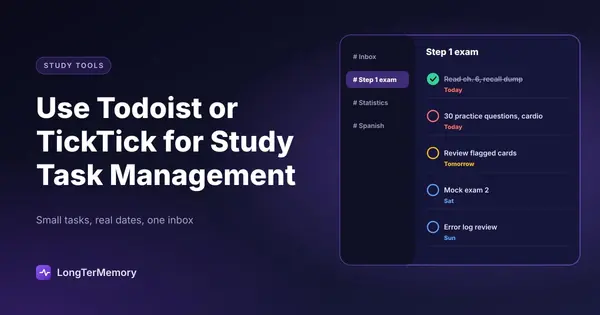
2. Scheduled tasks (specific study sessions you’ve committed to): These get a date and ideally a time. They’re tasks you’ve actually planned to do on that day, not tasks you wish you would do someday.
3. Backlog tasks (things to do eventually, no specific date): These go in an Inbox or Backlog with no due date. You review the backlog during weekly planning and promote tasks to scheduled when you’re ready to commit.
This three-tier approach prevents the overdue-task spiral and keeps your today view realistic and useful.
Recurring Tasks for Daily Review
Both Todoist and TickTick support recurring tasks, which is one of the most valuable features for study purposes. Set up a recurring daily task for your flashcard or spaced repetition review:
- “Complete daily Anki review” → every day at 8:00am
- “15-minute LongTerMemory review session” → every weekday at 7:30pm
Recurring tasks handle the scheduling for your regular review habits automatically, so you never have to decide whether to do them. The decision is already made. The task is just there.
Todoist-Specific Setup Tips
Use Priority Flags to Triage Your Day
Todoist has four priority levels (P1 through P4). A simple way to use them for studying:
- P1 (red): Exam is today or tomorrow, or final deadline
- P2 (orange): High-yield review that directly prepares for an upcoming exam
- P3 (blue): Standard study tasks that matter but aren’t urgent
- P4 (no flag): Backlog or optional review
Start each day on P1 and P2 tasks before anything else.
The Today View and Upcoming View
Todoist’s Today view shows everything due or scheduled for today across all projects. This is your daily work view. The Upcoming view (7-day forecast) helps you see whether the week ahead is realistic. If you have thirty tasks due this week and your capacity is fifteen, you need to reschedule now rather than hit Friday with everything overdue.
Todoist Filters for Study Sessions
Todoist’s filter system is powerful but underused. Create a saved filter for focused study:
today & #StatisticsThis shows only today’s Statistics tasks, which creates a focused study mode where you’re not distracted by tasks from other projects.
TickTick-Specific Setup Tips
Use the Calendar View for Study Block Planning
TickTick’s built-in calendar is one of its biggest advantages over Todoist. Switch to the Day View and you can drag tasks onto specific time slots, turning your task list into a day plan. This is close to time-blocking, which research suggests is significantly more effective for study than a generic to-do list.
Block your study sessions visually:
- 8:00-9:00am: Anki review
- 9:00-10:30am: Statistics problem sets (Chapter 7)
- 10:30-10:45am: Break
- 10:45am-12:00pm: Economics reading + recitation
Seeing your study time as blocks on a calendar makes underestimation much harder. It’s easy to write “do more economics” as a task. It’s much harder to convince yourself you can do eight hours of study in a six-hour block.
Use the Pomodoro Timer for Deep Work
TickTick has a built-in Pomodoro timer that integrates with tasks. When you start a task, you can launch a 25-minute Pomodoro session directly from the task card. Your focus sessions get logged, which builds a useful history of how much time you actually spend studying versus how much you think you do.
The Pomodoro technique, 25 minutes on, 5 minutes off, works well for dense study material because it creates a hard stop that prevents decision fatigue and mental fatigue from accumulating.
Habit Tracking for Study Consistency
TickTick’s built-in Habit Tracker is worth setting up for core study habits:
- Daily review (flashcards, SRS)
- Reading (minimum 20 pages)
- Practice questions (minimum 15 questions)
Checking off a habit creates a streak, and the visual chain of completed days is a genuinely effective motivator for maintaining consistency during long study periods. Missing one day breaks the streak, which is just uncomfortable enough to make you think twice before skipping.
Managing Multiple Subjects or Certifications
If you’re studying for multiple things simultaneously, which is common for students with full course loads or professionals pursuing certifications while working, the biggest challenge is context switching.
The research on context switching is fairly grim: switching between subjects costs cognitive overhead, especially for complex material. A task management system can help you batch by subject rather than fragmenting your day.
Here’s a simple batching approach:
- Monday/Wednesday/Friday: Subject A tasks
- Tuesday/Thursday: Subject B tasks
- Saturday morning: Mixed review (flashcards across all subjects)
- Sunday: Weekly planning and backlog review
Assign this structure in your app by giving Subject A tasks Monday/Wednesday/Friday scheduling and Subject B tasks Tuesday/Thursday scheduling. Once the structure is set, the app enforces it, and you stop having to make decisions about what to study on a given day.
The Weekly Planning Session
The most important maintenance habit for any task management system is the weekly review. This is a 15-20 minute session, ideally at the same time each week (Sunday evenings work well for most students), where you:
- Review last week: which tasks got done, which got missed, and why
- Clear the inbox: take any unorganized tasks and either schedule them, delegate them, or delete them
- Plan the week ahead: look at your upcoming exam dates and schedule specific study tasks across the week
- Check your workload: is what you’ve scheduled actually realistic given your time?
Without this weekly review, task management apps tend to accumulate clutter and become useless. With it, they stay clean and your plans stay executable.
Connecting Task Management with Your Study Tools
Task management apps work best as the hub of your study system, with other tools connected to it.
- Link your spaced repetition reviews (Anki, LongTerMemory) as recurring daily tasks
- Add study group meetings or tutoring sessions as tasks with date and time
- Create tasks triggered by external events: “After receiving practice exam score: review Domain 3 rationales”
- Use notes on tasks to store relevant resource links, page numbers, or specific questions to investigate
The goal is to get everything study-related into one trusted system, so you’re never wasting mental energy trying to remember what you’re supposed to be doing. The app holds the plan. Your job is to execute it.
Making the System Stick
The hardest part of any task management system isn’t setting it up. It’s maintaining it when you’re tired, behind schedule, or overwhelmed. A few principles that help:
Capture everything immediately. The moment a task or idea occurs to you, add it to the inbox. Processing it properly can wait. Not capturing it cannot.
Lower the bar for a “good” study day. Your minimum viable study session, even fifteen minutes of focused flashcard review, should be a task in your system. Completing something small is infinitely better than completing nothing because you didn’t have time for the full session.
When you slip, restart without guilt. The system isn’t judging you. Overdue tasks can be rescheduled. A week off from studying can be followed by a structured re-entry plan. The goal is long-term consistency, not perfection.
Study task management is one of those low-glamour skills that compounds quietly over a semester. Students who use it well don’t feel stressed about what they should be studying. They open their app, see their tasks, and start working. That clarity, that reduction in decision-making overhead, is what makes the difference between studying hard and studying smart.