Study Tools: A Reasoned Comparison Between Anki and LongTerMemory
An honest, research-backed comparison of Anki and LongTerMemory — covering Anki's real limitations and how LongTerMemory addresses each one.
Table of Contents
- What Anki Gets Right
- Anki's Genuine Weaknesses
- 1. Card Creation Is the Bottleneck — And It's a Big One
- 2. The Interface Is Dated and the Learning Curve Is Steep
- 3. No Built-In AI — And the Gap Shows
- 4. Sync Is Fragile
- 5. The iOS App Costs $25
- 6. The SM-2 Algorithm Has Real Limits
- 7. Analytics Are Minimal
- 8. No Native Content Import
- 9. Collaboration Is Absent
- How LongTerMemory Addresses Each Gap
- AI Generation That Tests Understanding, Not Just Recall
- Google Docs Integration
- Data Privacy as a First Principle
- Side-by-Side Summary
- Who Should Use Which Tool
- The Real Question Behind the Comparison
Anki is the closest thing the study world has to a gold standard. It’s free, it’s open-source, it’s backed by decades of cognitive science, and it has outlasted every “Anki killer” that came along to replace it. Medical students swear by it. Language learners build careers around it. For a flashcard tool built on a 1987 algorithm, its staying power is genuinely remarkable.
But “gold standard” is not the same as “without problems.” After years of watching students adopt Anki, struggle with Anki, and quietly abandon Anki, it has become clear that the tool’s weaknesses are real, consistent, and predictable. They are not bugs that will be patched in the next update — they are structural limitations baked into what Anki is.
This post is an honest accounting of both sides. What Anki does well (and it does some things exceptionally well). Where it genuinely falls short. And how LongTerMemory was designed specifically to address those gaps — not as a marketing exercise, but as a tool built by people who understood the friction points.
If you’re choosing between the two, you deserve a comparison that respects your time and your intelligence. Here it is.
What Anki Gets Right
Let’s start with credit where it’s due.
The algorithm is battle-tested. Anki’s original implementation runs on SM-2, the spaced repetition algorithm Piotr Woźniak published in 1987. Despite its age, SM-2 is remarkably effective: cards you know well get reviewed less often; cards you struggle with come back sooner. In 2023, Anki introduced FSRS (Free Spaced Repetition Scheduler) as its default — a more sophisticated model that reduces total review load by 20–30% while maintaining the same retention rate. The algorithmic foundation of Anki is genuinely strong.
The shared deck library is unmatched. For pre-medical students, the Anki community has produced decks like Anking — a curated, continually updated resource that covers the entire USMLE curriculum. Law students, language learners, and certification candidates have built similarly deep shared resources. If your subject is well-served by an existing community deck, Anki gives you access to thousands of hours of collective card-creation work for free.
It works offline, completely. Every card, every review session, every algorithm calculation happens on your device. There is no dependency on an external server. For students in environments with unreliable internet — or anyone who needs total control over their data locality — this matters.
It is deeply customizable. Interval modifiers, maximum intervals, custom scheduling rules, add-ons written in Python — Anki will bend to almost any workflow if you invest the time to learn its system. Power users can tune the experience to a degree that no consumer app currently matches.
It is free on desktop and Android. For students on tight budgets, “free and powerful” is hard to argue with.
These are real strengths, and a fair comparison acknowledges them. But they exist alongside limitations that are equally real.
Anki’s Genuine Weaknesses
1. Card Creation Is the Bottleneck — And It’s a Big One
Here is the fundamental tension with Anki: the science is clear that spaced repetition works, but the tool requires you to build the system from scratch before any of that science can help you.
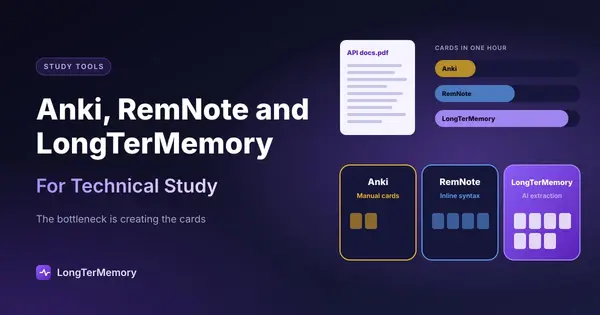
Estimate the time honestly. At a reasonable pace — perhaps 30 seconds per card — creating 1,500 cards takes 12.5 hours of focused, cognitively demanding work. That is not 12.5 hours of studying. It is 12.5 hours of card manufacturing. Students who track their Anki habits consistently report spending roughly 80% of their time creating cards and 20% actually reviewing them. The ratio has it exactly backwards.
For medical students preparing for Step 1, this problem is acute. A 50-minute lecture might require 30–60 minutes of card creation afterward just to capture the material. Before any spaced repetition benefit kicks in, you’ve spent more time processing notes into cards than attending the lecture itself.
This isn’t a quirk you can optimize away. It is the core workflow Anki requires.
2. The Interface Is Dated and the Learning Curve Is Steep
Anki’s desktop interface looks — and behaves — like software from 2006. That is not an exaggeration; the fundamental UI design has changed little since the early versions. For a first-time user, the experience is disorienting.
Before you can study a single card, you need to understand: card types, note types, field structures, deck hierarchies, ease factors, interval modifiers, lapse settings, and the distinction between notes and cards. None of this is explained by the application itself. External resources — YouTube tutorials, Reddit guides, dedicated documentation — are essentially required to get started effectively.
Anki doesn’t hold your hand. For experienced users, this is a feature. For anyone new to spaced repetition, it is a significant barrier that sends a meaningful percentage of potential adopters away before they see the tool’s real value.
3. No Built-In AI — And the Gap Shows
Anki was built before large language models existed, and its architecture reflects that. There is no native AI for generating cards from your materials, no built-in explanation when you fail a card, and no intelligent layer that can tell you why you keep missing certain concepts.
Third-party add-ons have emerged to fill this gap — AnkiAIUtils, AnkiBrain, and others allow AI-generated content within Anki. But these are community-built tools with inconsistent maintenance, compatibility issues across Anki versions, and no official support. They require additional configuration on top of an already complex base application.
For students who want AI assistance, Anki can technically accommodate it. But it was not designed for it, and the seams show.
4. Sync Is Fragile
AnkiWeb — the official sync service — works well under normal conditions. When it doesn’t, the failure modes are unpleasant.
Media sync (images, audio) is separately handled and frequently unreliable: files fail to transfer, audio won’t play until sync completes, and interruptions during sync can leave collections in inconsistent states. More seriously, structural changes — adding a field to a note type, removing a card template — cannot be merged between devices. If you make such a change on desktop and then on mobile before syncing, Anki forces a one-way sync: you must choose which device’s version to keep and discard the other. Card count mismatches between devices are a recurring complaint across Anki support forums.
For students who switch between laptop and phone — which is most students — the sync experience is a persistent low-level frustration.
5. The iOS App Costs $25
AnkiDroid (Android) is free and well-maintained. AnkiMobile for iOS is $24.99 — a deliberate pricing decision that funds Anki’s development. The price is defensible, but it creates an uneven experience: the same tool costs nothing on one platform and $25 on another. For students already paying for textbooks, subscriptions, and test prep, this is a real consideration.
6. The SM-2 Algorithm Has Real Limits
FSRS has meaningfully improved Anki’s scheduling, but it is worth understanding what the underlying SM-2 model could not do — because FSRS is still a recent addition and many users are running older settings.
Classic SM-2 applies the same memory decay model to every user. It has no per-user retention target (the algorithm assumes roughly 85% retention and cannot be configured otherwise without workarounds). It treats “barely recalled” and “instantly recalled” answers as equivalent gradations rather than as meaningfully different signals. And it over-reviews mature cards — the intervals for well-known material grow too slowly compared to what optimal spaced repetition would predict.
FSRS addresses most of these issues. But the point stands: Anki’s algorithmic power has, for most of its history, been less personalized than its reputation suggests.
7. Analytics Are Minimal
Anki shows you statistics: total cards studied, retention rate by card type, a heatmap of your review sessions. What it does not show you is anything analytically useful for exam preparation: which subjects or topics are your weakest, how your performance trends over time by category, or what your predicted retention looks like in three weeks.
You see what is scheduled. You do not get insight into why certain concepts keep failing or what that pattern means for your readiness.
8. No Native Content Import
Anki has no mechanism to accept a document and generate cards from it. You cannot upload a PDF, paste a chapter’s worth of notes, or photograph a page of handwritten material and receive a deck. Every card must be manually authored — either typed directly into Anki’s card editor, or imported from a spreadsheet you prepare yourself.
For students working from dense textbooks, lecture slides, or research papers, this is the most time-consuming limitation. The material exists. Extracting it into cards requires manual effort at scale.
9. Collaboration Is Absent
Anki is fundamentally a solo tool. The AnkiHub platform (a third-party service) allows shared deck maintenance in group settings, particularly in medical education. But this is an add-on built around Anki, not a feature of Anki itself.
If you want to build a deck collaboratively with classmates, study as a group, or maintain a shared resource across a cohort — Anki offers no native support for any of it.
How LongTerMemory Addresses Each Gap
LongTerMemory was built for the kind of learner Anki underserves: someone with a lot of their own material, limited time for card creation, and a need for a tool that works across devices without friction.
Here is how it maps onto the weaknesses above.
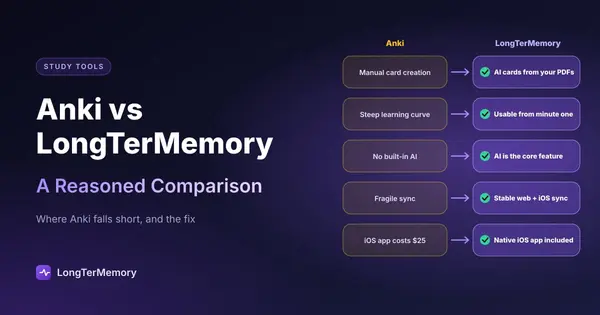
| Anki Weakness | LongTerMemory’s Approach |
|---|---|
| Manual card creation (up to 12+ hours) | AI generates Q&A cards directly from your PDFs, PPT files, photos of notes, or pasted text |
| Dated UI, steep learning curve | Modern interface designed for immediate use — no external tutorial required |
| No built-in AI | AI card generation is the core feature, not an add-on |
| Fragile sync | Cross-platform continuity across web and iOS with stable sync |
| iOS costs $25 | Native iOS app, no separate purchase |
| SM-2 limits | Optimized SRS engine that adapts review intervals to your actual performance |
| No analytics | Performance-aware scheduling that surfaces your weakest areas |
| No content import | Accepts PDFs, textbooks, PowerPoint, handwritten note photos, and typed content |
| — | — |
| No collaboration | Also primarily individual-focused (an honest note — this is not a differentiator) |
A few of these deserve more detail.
AI Generation That Tests Understanding, Not Just Recall
The card generation in LongTerMemory is not a simple summary tool. It produces exam-style questions — the kind that test whether you understand a concept, not just whether you’ve seen the words. If you upload a pharmacology chapter, the resulting cards won’t just ask “what is the mechanism of metformin?” — they’ll probe the clinical implications, contraindications, and relationships to other concepts in the material.
This distinction matters. Shallow recall questions give you false confidence. Questions that require you to apply and connect knowledge prepare you for how exams actually work.
Google Docs Integration
LongTerMemory’s Google Docs add-on (“Quick Q&A Generator”) lets you generate flashcards directly from your notes as you write them. Instead of a two-step process — write notes, then convert to cards — the card deck grows alongside your notes. For students who use Google Docs as a primary note-taking surface, this integration removes the conversion step entirely.
Data Privacy as a First Principle
LongTerMemory’s architecture isolates your materials rather than storing them in shared cloud infrastructure. For students working with licensed medical textbooks, proprietary professional training manuals, or any content where data sensitivity matters, this design is not a minor feature — it’s a prerequisite.
Most study tools store your uploaded materials in standard cloud storage with no meaningful isolation. LongTerMemory’s approach was designed specifically for learners who need to know their materials are handled carefully.
Side-by-Side Summary
| Feature | Anki | LongTerMemory |
|---|---|---|
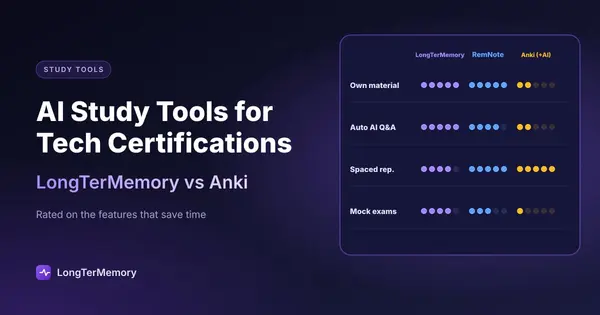
| Card creation | Manual only | AI-generated from your materials |
| Input types | Manual text entry | PDF, PPT, photos, typed text, Google Docs |
| AI integration | Via third-party add-ons | Core feature |
| Spaced repetition | SM-2 / FSRS | Optimized SRS (SM-2 based, adaptive) |
| Interface | Complex, dated | Modern, low-friction |
| Mobile | Android (free) / iOS ($24.99) | iOS app included |
| Sync | AnkiWeb (occasionally fragile) | Stable cross-platform sync |
| Shared decks | Large community library | — |
| Analytics | Basic statistics | Performance-aware scheduling |
| Data privacy | Standard cloud | Security-first, isolated architecture |
| Offline use | Full offline support | Cloud-dependent |
| Price | Free (desktop/Android) | — |
| Collaboration | Via AnkiHub (third-party) | Not a focus |
Who Should Use Which Tool
Choose Anki if:
- Your subject has a mature, well-maintained community deck (especially medicine — the Anking deck is genuinely excellent)
- You’re a power user who wants granular control over the scheduling algorithm
- You need complete offline functionality
- You have the time and inclination to invest in learning the system
Choose LongTerMemory if:
- You have your own study materials — textbooks, lecture slides, research papers, notes — and want cards generated automatically from them
- You’re new to spaced repetition and want to start studying, not configuring
- You’re preparing for a high-stakes certification or exam on a tight timeline
- You’re working with sensitive, proprietary, or licensed content and data privacy matters
- You want a single tool that handles generation, scheduling, and mobile review without friction
The Real Question Behind the Comparison
There is a version of this comparison that is really about one question: how much time can you afford to spend not studying?
Anki’s system works. The science behind spaced repetition is robust, and Anki implements it faithfully. But Anki requires you to front-load a significant amount of work — building cards, learning the interface, managing sync — before any of that science benefits you.
LongTerMemory accepts the premise that most learners can’t afford to spend half their study time on infrastructure. It handles the card-creation work so you can spend your time on the part that actually builds knowledge: reviewing, retrieving, and applying what you’ve learned.
Both tools are built on sound cognitive science. The difference is how much of the work they hand back to you.
If you’re looking for a place to start, LongTerMemory is worth trying. If you’re choosing between tools, the decision usually comes down to this: do you already have the deck you need, or do you need to build it from your own materials? The answer makes the choice straightforward.
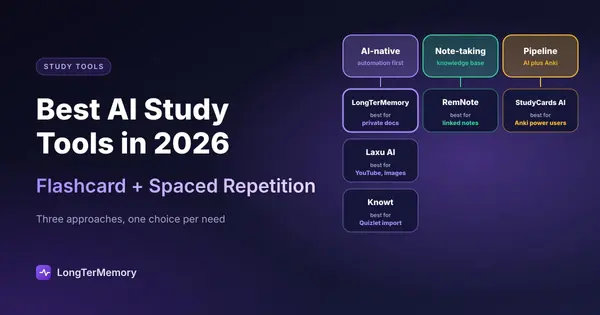
For a broader look at how LongTerMemory compares against other AI study tools on the market, see our 2026 AI Study Tools Comparison.