How to Use Color Psychology in Your Study Notes (What Works)
Does color coding help memory? See what research says, avoid the myths, and build a simple color system for notes that speeds up review and recall.
Table of Contents
- The Evidence (and Myths) Around Color and Memory
- What Research Supports
- What Is Mostly Myth
- The Key Insight
- A Practical Color-Coding System for Academic Notes
- The 5-Color Starter System
- Rules That Make It Work
- Digital vs Paper
- Mind Accessibility
- How Consistent Color Use Speeds Up Review and Recall
- Scanning for Gaps
- Color as a Retrieval Cue
- From Colored Notes to Flashcards
- Common Mistakes With Color-Coded Notes
- A Quick Experiment to Test It on Yourself
- Quick Reference: Do and Don't
- Frequently Asked Questions
- Does color coding really improve grades?
- What is the best color for studying?
- Should I use highlighters or colored pens?
- Can color help with ADHD or dyslexia?
- The Bottom Line
Color can improve how you study, but not because red wakes your brain up or blue makes you calm. The real benefit comes from using color as a consistent organizing system, so your eyes can find, sort, and retrieve information faster. Random rainbow highlighting, on the other hand, does almost nothing for memory.
If you have ever opened a notebook that looks like a unicorn exploded on it and still could not remember a thing, you already know the problem. In this guide I will separate the evidence from the myths, then give you a simple, practical color-coding system you can start using tonight.
The Evidence (and Myths) Around Color and Memory
Short answer: color helps memory mainly by adding structure and attention cues, not through magical emotional effects. Let me unpack what the research actually shows, because this topic is full of confident claims with thin support.
What Research Supports
- The von Restorff (isolation) effect. Items that stand out from their surroundings are remembered better. A single bold-colored term in a page of plain text gets noticed, and noticed things get encoded. The catch: if everything stands out, nothing does.
- Color as a signaling cue in multimedia learning. Richard Mayer’s work on multimedia learning found that cues which direct attention to key elements can improve learning outcomes, especially in diagrams and complex material.
- Categorization and chunking. Grouping related ideas under one color gives your brain a ready-made category. Chunking is one of the oldest findings in memory science, going back to George Miller’s famous 1956 paper on the limits of short-term memory.
- Faster visual search. Your eyes find a colored item among plain ones almost instantly. That makes review sessions quicker, which matters when you have hundreds of pages to scan.
What Is Mostly Myth
| Popular claim | Verdict |
|---|---|
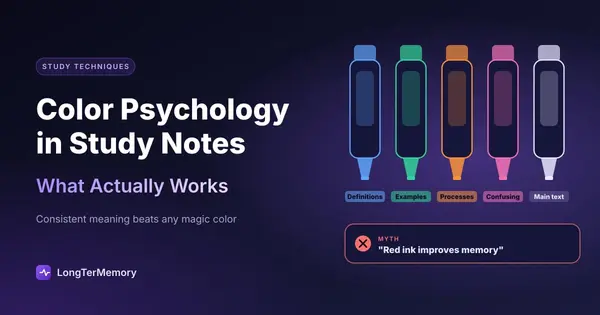
| ”Red ink improves memory” | Not supported. Red can raise alertness or stress in some contexts, but no reliable boost to learning |
| ”Blue is the best color for studying” | Mixed and weak evidence, mostly from small studies |
| ”Yellow highlighting is the best study method” | Highlighting ranked low in utility in the large 2013 review by Dunlosky and colleagues |
| ”Each person has a favorite learning color” | No evidence. It resembles the debunked “learning styles” idea |
| ”More colors means more memory” | Opposite is often true. Too many colors create clutter and extra cognitive load |
The Dunlosky review deserves special attention. It examined ten popular study techniques and rated highlighting and underlining as low utility, because people tend to mark too much and do no mental work while doing it. Color itself was never the issue. Passive coloring was.
The Key Insight
Color is a delivery mechanism, not a learning technique. It makes good strategies (organization, chunking, active recall) a little easier to apply. It cannot replace them.
A Practical Color-Coding System for Academic Notes
The best system uses 4 to 5 colors at most, each with one fixed meaning that never changes between subjects. Keep it boring and consistent. Consistency is what turns color from decoration into a language your brain reads automatically.
The 5-Color Starter System
| Color | Meaning | Example |
|---|---|---|
| Blue | Definitions and key terms | ”Homeostasis: maintaining stable internal conditions” |
| Green | Examples and applications | ”Sweating when hot is an example” |
| Orange | Processes, steps, formulas | ”Steps of mitosis” |
| Pink | Things I find confusing or keep forgetting | ”Difference between mitosis and meiosis” |
| Black | Everything else (main text) | Regular note content |
You can swap the exact colors. What matters is the one color, one meaning rule. Write the legend on the inside cover of your notebook or the top of your digital document.
Rules That Make It Work
- Cap the colors. More than five and you will forget your own code.
- Color less than 10 percent of the page. If the page is mostly colored, the effect disappears.
- Color while you think, not just while you copy. Decide a category before you grab the pen. That decision is a tiny act of processing.
- Use the same system everywhere. Notes, flashcards, diagrams, and sticky notes should all share it.
- Prefer color for structure, not decoration. Headings, labels, and categories beat random underlines.
Digital vs Paper
On paper, a set of fine-tip pens in your five colors is enough. In apps like Notion, Obsidian, or OneNote, use text color, callout blocks, or tags. Many tools let you save color styles so you apply them with a click. Whichever you choose, keep the legend visible.
Mind Accessibility
Around 1 in 12 men and 1 in 200 women have some form of color vision deficiency. If that is you, or if you share notes, never rely on color alone. Pair each color with a symbol or label, such as a small star for key terms or “EX:” for examples. Choose high-contrast combinations and avoid putting light yellow or pastel text on white, which is hard to read for almost everyone.
How Consistent Color Use Speeds Up Review and Recall
When your colors always mean the same thing, you can scan a page and know its structure in seconds, which makes review sessions shorter and more targeted. That is the real payoff of the system.
Scanning for Gaps
Imagine you are revising a chapter the night before a quiz. With a consistent system you can flip through and ask:
- Do I know every blue definition? Cover the text and recite them.
- Can I give a green example for each concept without looking?
- Do the pink confusing items still confuse me? Spend your time there.
This turns a pile of notes into a map of your weak spots, and it pairs perfectly with a retrieval habit. If you are not yet testing yourself, read our guide to active recall techniques first.
Color as a Retrieval Cue
There is a subtle memory benefit too. Cognitive psychologists talk about encoding specificity: you recall better when the cues present at retrieval match those present at learning. If you learned a formula while it was orange, picturing orange text on the page can help you pull it up in the exam. It is not a miracle, but it is a free extra hook.
From Colored Notes to Flashcards
The most powerful move is to turn your colored items into questions:
- Each blue term becomes “What is X?”
- Each orange process becomes “List the steps of Y.”
- Each pink trouble spot becomes a card you review more often.
You can do this by hand, or you can upload your notes to LongTerMemory, which generates question and answer cards automatically and schedules them with spaced repetition. Your color system tells you what matters, and the app makes sure you actually remember it weeks later.
Common Mistakes With Color-Coded Notes
Most color-coding failures come from over-coloring, inconsistency, or treating the pretty page as the goal. Watch for these.
- The rainbow trap. Eight colors and no legend. Your brain cannot decode it.
- Highlighting entire paragraphs. If you mark more than a sentence or two per page, you are not selecting, you are decorating.
- Perfectionism. Spending an hour making notes beautiful instead of testing yourself. Pretty notes do not equal learned notes.
- Changing the code mid-semester. A color that meant “definition” in week 1 and “example” in week 6 is worse than no color.
- Skipping the retrieval step. Colored notes you only re-read are still re-read notes.
A Quick Experiment to Test It on Yourself
You do not have to take my word for any of this, because you can run a two-week experiment in about ten minutes of setup. Pick two comparable chapters or topics of similar length and difficulty. Take notes on the first one in plain black ink and on the second one with the five-color system above. Then, three days later, test yourself on both with ten written questions each, without looking at anything.
Compare the results honestly. A few things tend to happen. Many learners find that the colored chapter is easier to review because they can jump straight to the definitions or the confusing parts. Some find no difference in recall at all, which is also a useful result: it tells you color is not your bottleneck and that your time is better spent on retrieval practice.
A few tips to keep the test fair:
- Spend the same amount of study time on both chapters.
- Use the same self-testing method for both.
- Note how long each review session took, not only the score.
- Repeat with a second pair of topics before drawing conclusions.
The time measure is often where color shines. Even when scores are equal, a clear system can shave minutes off every review, and those minutes add up across a whole semester.
Quick Reference: Do and Don’t
| Do | Don’t |
|---|---|
| Use 4 to 5 colors with fixed meanings | Use every pen you own |
| Color only key terms and structure | Highlight whole paragraphs |
| Add symbols for accessibility | Rely on color alone |
| Test yourself using the colored items | Just re-read the pretty page |
| Keep a legend visible | Trust your memory of the code |
Frequently Asked Questions
Does color coding really improve grades?
There is no strong evidence that color alone raises grades. Benefits show up when color supports organization and retrieval practice. Used passively, it adds little.
What is the best color for studying?
There is no single best color. Choose colors you can distinguish easily and that stay readable on your background. The meaning you assign matters far more than the shade.
Should I use highlighters or colored pens?
Pens (or colored text in a digital tool) let you write in color while thinking, which adds processing. Highlighters tempt you to mark too much. If you use highlighters, limit yourself to one or two sentences per page and then write a short question in the margin.
Can color help with ADHD or dyslexia?
Some learners find color-coded structure reduces overwhelm, and some with dyslexia prefer specific background tints. Responses vary a lot, so test what works for you rather than assuming a rule.
The Bottom Line
Color psychology in studying is less about the mood of a hue and more about structure, attention, and consistency. Pick five colors, give each one meaning, use them sparingly, and then actually test yourself on what you colored.
Do that, and your notes stop being a pretty record and become a fast, scannable map of what you know and what you still need to learn. Start with one chapter tonight, write your legend on the first page, and see how much faster tomorrow’s review feels.