Best AI Quiz Generators for Notes and PDFs (2026), Compared
Seven AI quiz generators compared on free plans, prices, question types and review schedules, plus how to check AI-written questions before you study.
Table of Contents
- Why Quizzing Yourself Beats Re-Reading
- How an AI Quiz Generator Works
- Multiple Choice or Open Questions?
- The Best AI Quiz Generators at a Glance
- The Tools in Detail
- Gemini Notebook: Best Free Option
- ChatGPT: Most Flexible
- Quizgecko: Best for Question Variety
- Knowt: Best Free Workflow
- Gizmo: Best for Daily Habit
- Quizlet: If Your Sets Already Live There
- LongTerMemory: Best for Remembering Long Term
- How to Check AI-Generated Questions
- From PDF to Exam Day: A Simple Workflow
- When to Choose LongTerMemory, and When Not
- Go Deeper
- FAQ
- Can AI make a quiz from a PDF?
- What is the best free AI quiz generator?
- Can I turn my handwritten notes into a quiz?
- Are AI-generated quiz questions accurate?
- How many practice questions should I make per chapter?
- Is a quiz generator better than flashcards?
- The Bottom Line
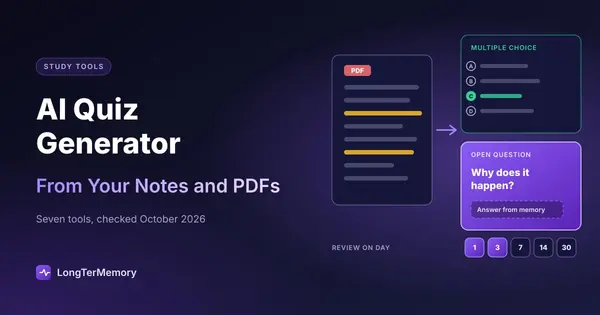
Short answer: an AI quiz generator reads your notes, slides or PDF and writes practice questions from them in seconds. For a free start, use Gemini Notebook (formerly NotebookLM) or Knowt; for many question formats from one upload, Quizgecko; and if you want questions that come back on a review schedule until you know them, LongTerMemory, whose AI quiz generator writes open or multiple-choice questions from your notes or a PDF. Whatever you use, check the questions against the source before you trust them.
Testing yourself is one of the best-supported ways to learn, but writing good questions takes as long as reading the chapter. That is the job these tools take over. This guide explains how they work, which kind of question actually helps you remember, compares seven tools with prices checked in October 2026, and gives you a workflow from PDF to exam day.
Why Quizzing Yourself Beats Re-Reading
When you re-read, the material feels familiar, and familiarity feels like knowing. A quiz removes that illusion: either you can produce the answer or you can’t.
The research is consistent. In Roediger and Karpicke’s 2006 study, students who took a practice test on a passage remembered more of it a week later than students who spent the same time re-reading it, even though the re-readers felt better prepared. Karpicke and Roediger (2008) found that repeated retrieval, not repeated study, drove long-term retention. Dunlosky and colleagues’ 2013 review of ten study techniques rated practice testing as one of only two with “high utility” (the other was spacing out your reviews).
This is the principle behind active recall, and a quiz is simply active recall in a ready-made format. The problem has always been the format: someone has to write the questions. Textbook question banks rarely match your syllabus, and writing your own from a 50-page chapter can take an evening.
How an AI Quiz Generator Works
Most tools follow the same four steps:
- You give it material. A PDF, slides, pasted notes, a web page, sometimes a YouTube video or an audio recording.
- It splits the material into chunks and identifies the key ideas, definitions, processes and facts in each one.
- A language model writes questions for those ideas, usually with the correct answer and, for multiple choice, a few plausible wrong options.
- You take the quiz and see what you missed, often with an explanation.
The difference between tools is in the details: whether questions stay grounded in your source or drift into general knowledge, which question formats you can choose, how much you can steer difficulty and focus, and what happens after the quiz. Some tools stop at a score. Others keep the questions and bring back the ones you missed.
Multiple Choice or Open Questions?
Not every question trains memory equally.
- Multiple choice tests recognition: the answer is on the screen and you pick it. It’s fast, easy to score, and close to the format of many standardized exams, which makes it good for practicing the exam itself.
- Open questions (short answer, “explain why”, “define”) test recall: you have to produce the answer from memory. That is harder, and the effort is exactly what makes the memory stronger.
Research on the testing effect finds benefits for both, but recall-based questions tend to produce more durable learning, and they’re closer to what essay exams, oral exams and real-world use demand. A practical rule: use open questions while you’re learning the material, then switch to multiple choice in the last week to practice the exam format and timing.
The Best AI Quiz Generators at a Glance
Prices in USD, as listed on each tool’s official site, help center or app store in October 2026. They change often: check before you buy.
| Tool | Free plan | Paid plans | Question types | Inputs | Review schedule | Best for |
|---|---|---|---|---|---|---|
| Gemini Notebook (formerly NotebookLM) | Yes, with a Google account | More capacity with Google AI plans | Quizzes and flashcards, difficulty from easy to hard | PDFs, Docs, slides, web pages, YouTube | No | Free quizzes grounded in your sources |
| ChatGPT | Yes, with limits | Plus $20/mo | Any format you ask for | Uploaded files, pasted text | No | Flexible, one-off question sets |
| Quizgecko | Basic plan with limits | Premium from $16/mo | Multiple choice, short answer, true/false, matching | PDFs, slides, text, audio, scans | Flashcards with spaced repetition sessions | Many formats from one upload |
| Knowt | Yes, generous | Ultra $149.99/yr or $24.99/mo | Practice tests, flashcards, Learn mode | Notes, PDFs, lecture recordings | Study modes, not a long-term scheduler | A free, Quizlet-like workflow |
| Gizmo | Yes, with limits | Subscription, price shown in app | Quiz-style flashcards | PDFs, slides, notes, YouTube | Yes (Memorise mode) | Game-like daily practice |
| Quizlet | Yes, limited practice tests | Plus $35.99/yr | Practice tests and Learn mode from your sets | Your flashcard sets | Learn mode, not a long-term scheduler | If your material is already in Quizlet |
| LongTerMemory | 7-day free trial | $48 for 4 months or $84 for 12 (Basic); $96 or $120 (Pro), one-time | Open questions, or multiple choice (4 options + explanation) | PDFs, pasted notes, Word, slides, photos, web pages | Yes, the core feature | Learning your own material for the long term |
The Tools in Detail
Gemini Notebook: Best Free Option
What it is: Google’s research notebook, called NotebookLM until July 2026. You upload sources, then generate quizzes or flashcards from the Studio panel, choosing difficulty and adding a prompt to steer the focus.
Strengths: questions are built from the sources you uploaded, which keeps them close to your syllabus, and the free plan allows 100 notebooks with up to 50 sources each.
Limits: quizzes are a one-off activity. Nothing schedules the questions you missed for later, so remembering to come back is up to you.
ChatGPT: Most Flexible
What it is: a general-purpose assistant. Upload a PDF and ask for “15 short-answer questions on chapter 3, with answers, harder than the examples in the text”, and you get exactly that.
Strengths: total control over format, difficulty and focus, and it can explain any answer you got wrong.
Limits: it can mix in facts that aren’t in your material, so grounding is your job. Questions live in a chat history, not a study system, and there’s no review schedule.
Quizgecko: Best for Question Variety
What it is: a dedicated quiz generator for students and teachers. Upload a PDF or slides, paste text, or scan a page, and it builds multiple choice, short answer, true/false and matching questions, plus flashcards and notes.
Strengths: the widest choice of formats in this list, with explanations and an AI tutor for wrong answers.
Limits: the free Basic plan is small, and the useful volume is in the paid plans.
Knowt: Best Free Workflow
What it is: a free study app close to Quizlet in look and feel, with AI that turns notes, PDFs and lecture recordings into flashcards and practice tests.
Strengths: most study modes are free, and moving from Quizlet is easy.
Limits: the free plan shows ads, and the best AI features are in Ultra. Its modes are built for drilling before a test more than for reviews spread over months.
Gizmo: Best for Daily Habit
What it is: an AI study app that turns PDFs, slides, notes and YouTube videos into quiz-style flashcards, with a Memorise mode that uses spaced repetition.
Strengths: it feels like a game, which helps if your problem is showing up every day.
Limits: the free plan has limits (for example, a wait between imports), and paid prices are shown only in the app.
Quizlet: If Your Sets Already Live There
What it is: the best-known flashcard app, with practice tests and Learn mode generated from your study sets.
Strengths: if you or your class already have sets, a practice test is one click away.
Limits: the practice tests come from flashcard sets, not directly from your PDF, and the number of tests is capped on the free plan and on basic Plus. If those limits bother you, see our list of Quizlet alternatives.
LongTerMemory: Best for Remembering Long Term
What it is: a study app that reads your PDFs, notes, documents and web pages and generates questions from them, open questions with answers or multiple choice with four options and an explanation, then schedules each question for review at growing intervals based on how well you answer. You can try it on the AI quiz generator page: paste notes or upload a PDF.
Strengths: you never write a card, you choose recall (open questions) or quick self-checks (multiple choice), and the review schedule is built in, so a question you missed in October comes back before the exam in December. You can also ask questions about your material in a chat.
Limits: it doesn’t generate true/false, matching or fill-in-the-blank questions, and it has no timed exam mode, so it isn’t the tool for rehearsing a specific exam format. There’s no permanent free plan, only a 7-day trial (one PDF of up to 5 MB and 50 pages).
How to Check AI-Generated Questions
AI tools are fast, not infallible. Before you study a generated quiz, spend five minutes on four checks:
- Accuracy. Pick five questions at random and check each answer against the page it came from. If one is wrong, check them all.
- Grounding. Questions about things your material never mentions are a sign the tool is filling in from general knowledge. Delete them, or ask for questions “only from the uploaded document”.
- Coverage. Skim the list against the chapter headings. Tools tend to over-sample the first pages and skip tables, figures and the end of long documents.
- Difficulty. If every question asks for a single word or a definition, ask for “why” and “how” questions, or questions that connect two ideas. Easy questions feel good and teach little.
Editing a generated quiz is still much faster than writing one, and the act of checking is itself a useful first pass through the material.
From PDF to Exam Day: A Simple Workflow
- Generate right after the lecture or reading. Upload the chapter or slides the same day, while the context is fresh enough to spot bad questions.
- Check and trim with the four checks above. Aim for one question per key idea, not one per sentence.
- Answer from memory first. Say or write the answer before you look. A wrong attempt followed by the correct answer still strengthens the memory.
- Bring back what you missed. Re-test missed questions the next day, then after a few days, then after a week. A tool with a review schedule does this for you; with the others, keep a list.
- Switch formats near the exam. In the last week, do timed multiple-choice or past-paper practice to rehearse the real conditions.
For the full plan around this, from the first week to the morning of the exam, see our guide on how to study for exams.
When to Choose LongTerMemory, and When Not
Choose LongTerMemory if you study from your own material (lecture slides, textbook chapters, papers, manuals), the exam is weeks or months away, and you want to remember the material after the exam too. The generated questions and the built-in review schedule cover the two parts most people skip: writing questions and coming back to them.
Choose another tool if you need true/false, matching or timed practice in a specific exam format, you want a single quiz tonight and nothing more (Gemini Notebook or ChatGPT will do it for free), or your class already shares Quizlet sets.
Go Deeper
- Active recall: techniques that work
- The testing effect explained
- How to memorize test questions and answers
- Turn a PDF into flashcards
- How AI flashcard generators work
- The best AI study tools
- The best spaced repetition apps
FAQ
Can AI make a quiz from a PDF?
Yes. Gemini Notebook, ChatGPT, Quizgecko, Knowt, Gizmo and LongTerMemory all accept PDFs. Text-based PDFs work best; scanned pages need a tool with text recognition, and tables and figures are often skipped, so check coverage.
What is the best free AI quiz generator?
For most students, Gemini Notebook: it’s free with a Google account, keeps questions close to the sources you upload, and lets you set difficulty. Knowt is a good free choice if you also want flashcards and Quizlet-style study modes.
Can I turn my handwritten notes into a quiz?
Yes, if the tool can read images. Quizgecko accepts scans, and you can photograph pages and upload them to ChatGPT. Clear handwriting and good lighting matter; check the transcription before trusting the questions.
Are AI-generated quiz questions accurate?
Usually, but not always. Errors are more common with numbers, dates, tables and topics your material only mentions in passing. Spot-check answers against the source, and prefer tools that generate only from the documents you upload.
How many practice questions should I make per chapter?
One per key idea is a good target: roughly 15 to 30 for a typical textbook chapter. More is not better if you never review them; a smaller set you come back to on a schedule beats a large one you take once.
Is a quiz generator better than flashcards?
They do the same job, retrieval practice, in different shapes. Quizzes are better for practicing exam formats; flashcards and open questions are better for daily review. Many tools now generate both.
The Bottom Line
An AI quiz generator removes the slowest part of testing yourself: writing the questions. Use a free tool like Gemini Notebook or Knowt for quick quizzes, Quizgecko when you need many question formats, and check every generated set before you study it. If your goal is to still know the material after the exam, choose questions that come back on a schedule: try the LongTerMemory quiz generator, upload a chapter and see the questions it generates during the free trial.
Prices and features checked on the official sites, help centers and app listings in October 2026. Plans change often; we update this page regularly.