How to Use Kanban to Track Study Progress (Simple Board Setup)
Set up a Kanban board for studying, use WIP limits to avoid overload, and combine it with time-boxing and spaced repetition to finish what you start.
Table of Contents
- What Is Kanban, and Why Does It Work for Studying?
- Quick Facts at a Glance
- Setting Up a Kanban Board With Study Topics
- Step 1: Break Your Syllabus Into Small Cards
- Step 2: Create Your Columns
- Step 3: Pick Your Tool
- Using WIP Limits to Prevent Over-Committing
- The Cost of Switching
- What a WIP Limit Looks Like in Practice
- How to Choose Your Limit
- Combining Kanban With Time-Boxing for Daily Study Sprints
- A Simple Daily Sprint
- A Sample Day
- The Review Column: Where Kanban Meets Memory Science
- How to Make Review Part of the Flow
- Common Mistakes (and How to Fix Them)
- A 15 Minute Kanban Setup Checklist
- Weekly Review: The Habit That Keeps the Board Honest
- Track Two Simple Numbers
- Frequently Asked Questions
- Is Kanban better than a study planner?
- How many cards should my board have?
- Can I use Kanban for group study?
- Does Kanban work for ADHD or low-energy days?
- The Bottom Line
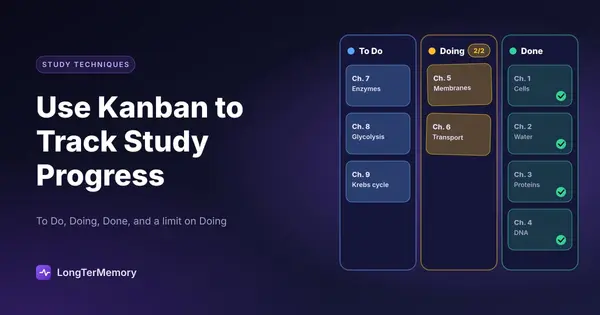
A Kanban board for studying is a simple visual system with three columns (To Do, Doing, Done) where each study topic is a card that moves left to right as you work on it. Its real power is not the board itself. It is the rule that you can only have a few cards in “Doing” at once, which forces you to finish topics instead of endlessly starting new ones.
If you have ever ended a study week with ten half-read chapters and no clear idea of what you actually finished, this post is for you. I have used Kanban with exam candidates for years, and it is one of the cheapest, lowest-effort ways to turn a vague feeling of “I am studying a lot” into hard evidence of progress.
What Is Kanban, and Why Does It Work for Studying?
Kanban is a workflow method, born in Toyota factories in the 1940s, that makes work visible and limits how much is in progress at once. Software teams adopted it widely, and surveys of agile teams regularly show it among the most popular workflow methods alongside Scrum. The good news is that the same logic fits a student’s life perfectly.
Think about how studying usually fails:
- You start too many topics and finish none.
- You cannot tell which subjects you are neglecting.
- You feel busy but have no proof of progress.
- You re-study the topics you like and avoid the ones you fear.
Kanban attacks all four problems at once. A board shows everything on one screen, so neglected topics are impossible to ignore. And the “Done” column gives you a small hit of satisfaction every time a card lands there. Psychologists often call this the progress principle: seeing small wins is one of the strongest drivers of motivation, according to research by Teresa Amabile and Steven Kramer at Harvard Business School.
Quick Facts at a Glance
| Question | Short answer |
|---|---|
| What is it? | A visual board with columns for task status |
| Minimum columns | To Do, Doing, Done |
| Key rule | Limit how many cards sit in Doing |
| Best tools | Paper sticky notes, Trello, Notion, Obsidian |
| Setup time | About 15 minutes |
| Daily upkeep | 2 to 5 minutes |
Setting Up a Kanban Board With Study Topics
Start with three columns and one card per study topic, not per subject. A card called “Biology” is useless because you can never finish it. A card called “Krebs cycle: steps and enzymes” can be finished in one or two sessions, and that is exactly what a good card looks like.
Step 1: Break Your Syllabus Into Small Cards
Take your syllabus, exam outline, or textbook table of contents and split it into chunks that take 30 to 120 minutes to study. If a card feels bigger than two sessions, split it. If you are preparing for a certification, the official exam guide usually lists domains and sub-objectives you can turn directly into cards.
Good card examples:
- “Cornell method: how the cue column works”
- “Contract law: offer and acceptance”
- “AWS VPC peering vs transit gateway”
- “Practice test 3, review all wrong answers”
Step 2: Create Your Columns
Here is a starter layout that works for most learners.
| Column | What goes here |
|---|---|
| Backlog | Every topic you will need to cover eventually |
| To Do (this week) | Topics you plan to start in the next 7 days |
| Doing | Topics you are actively studying right now (max 2 or 3) |
| Review | Topics you have covered once and need to retrieve from memory |
| Done | Topics you can recall without notes |
Notice the extra “Review” column. This is my favorite upgrade, and I will explain why in a moment.
Step 3: Pick Your Tool
You do not need an app. A wall, a door, or a sheet of paper with sticky notes works beautifully, and physically moving a card feels more satisfying than clicking. If you prefer digital, Trello is free and nearly purpose-built for this. Notion and Obsidian both have board views too. Pick whatever you will actually open every day, because the best tool is the one you use.
Using WIP Limits to Prevent Over-Committing
A WIP (work in progress) limit is a hard cap on how many cards can be in the Doing column at once, and for studying the sweet spot is two or three. When the column is full, you are not allowed to start a new topic until you move one out.
This sounds trivial, but it is the single most important rule in the whole method. Here is why it works.
The Cost of Switching
Research on task switching, including work by psychologist Gloria Mark at UC Irvine, found that after an interruption it can take over 20 minutes to fully return to a task. Every time you hop between topics, you pay a similar tax. A WIP limit reduces how often you pay it.
What a WIP Limit Looks Like in Practice
Imagine your Doing column has a limit of 3, and it already holds:
- Photosynthesis: light reactions
- Photosynthesis: Calvin cycle
- Cell respiration: glycolysis
You feel the urge to peek at genetics because it looks fun. The board says no. You have to finish or park one of those three first. That small friction is the whole point. It pushes you to complete things, and completed things are the only things that show up on exam day.
How to Choose Your Limit
| Your situation | Suggested WIP limit |
|---|---|
| Full-time student, heavy course load | 3 |
| Working professional, 1 to 2 hours a day | 2 |
| Final week before an exam | 1 |
| Easy, review-heavy subject | 3 or 4 |
If cards keep piling up in Doing, your limit is too high or your cards are too big. Lower the limit or split the cards.
Combining Kanban With Time-Boxing for Daily Study Sprints
Kanban tells you what to study, and time-boxing tells you how long to study it. Together they remove the two decisions that drain willpower: “What should I work on?” and “When can I stop?”
A Simple Daily Sprint
- Pick one card from Doing (2 minutes).
- Set a timer for a fixed block, such as 25 or 50 minutes.
- Study only that card until the timer rings.
- Move or update the card: still in Doing, or on to Review.
- Take a break of 5 to 10 minutes, then repeat.
This is essentially the Pomodoro Technique applied to a Kanban queue. Francesco Cirillo’s classic version uses 25 minute blocks, but longer blocks of 45 to 50 minutes suit deep conceptual work better. Experiment and keep what feels sustainable.
A Sample Day
| Time | Activity | Card |
|---|---|---|
| 18:00 | 50 min sprint | ”Glycolysis: steps and net ATP” |
| 18:50 | 10 min break | Walk, water |
| 19:00 | 50 min sprint | ”Calvin cycle: inputs and outputs” |
| 19:50 | 10 min wrap-up | Update board, choose tomorrow’s cards |
That wrap-up is crucial. Spending ten minutes every evening to groom your board means you start the next day with zero decision fatigue.
The Review Column: Where Kanban Meets Memory Science
A card is not truly Done when you finish reading it. It is Done when you can retrieve it from memory days later. This is where most Kanban study systems quietly fail, and where a little learning science changes everything.
Reading a chapter feels like finishing, but the forgetting curve described by Hermann Ebbinghaus shows that we lose a large share of new information within days unless we review it. A card that sits in “Done” after one read-through is a card you will probably have to relearn.
How to Make Review Part of the Flow
When you finish studying a topic, move its card to Review instead of Done. Then:
- Test yourself with questions, not re-reading (this is active recall).
- Write the date on the card.
- Come back after 1 day, 3 days, 7 days, and 21 days.
- Only move it to Done once you have recalled it correctly after a longer gap.
This is spaced repetition applied to your board. If doing the scheduling by hand sounds tedious, that is precisely the problem LongTerMemory solves. You upload your PDF or notes, it generates question and answer cards automatically, and it schedules each review at the optimal moment. Your Kanban board then shows the big picture, while the app handles the daily reviews. They complement each other well.
Common Mistakes (and How to Fix Them)
Most Kanban study boards fail for one of five predictable reasons. Here they are with fixes.
- Cards that are too big. “Chapter 7” sits in Doing for three weeks. Fix: split it into sub-topics you can finish in a session or two.
- No WIP limit. Eight cards in Doing means nothing is moving. Fix: enforce a limit of 3.
- Never updating the board. An outdated board is worse than none. Fix: do a 2 minute update at the end of every session.
- Hiding the hard stuff. You keep cherry-picking easy cards. Fix: use a rule such as “the oldest card in To Do goes first.”
- Skipping review. Done cards pile up but nothing sticks. Fix: add the Review column and schedule retrieval.
A 15 Minute Kanban Setup Checklist
Want to start today? Follow this list.
- Gather your syllabus or exam outline.
- Split it into 30 to 120 minute topic cards.
- Draw or create columns: Backlog, To Do, Doing, Review, Done.
- Set a WIP limit of 2 or 3 for Doing.
- Choose your first sprint card and start a timer.
- Schedule a 10 minute board update for tonight.
- Set up spaced review for anything that reaches the Review column.
Weekly Review: The Habit That Keeps the Board Honest
Once a week, spend 15 minutes looking at your board and asking three questions: what moved, what is stuck, and what is next. This is the habit that separates people who keep a board going for a month from people who abandon it after three days.
Pick a regular slot, such as Sunday evening, and walk through the columns from right to left. Start with Done and count the cards that landed there. It sounds small, but that count is your proof of progress, and on a hard week it is genuinely motivating to see it.
Then look at Doing. Is anything older than a week? A card that has sat there that long is telling you something. Maybe it is too large, maybe it is boring, or maybe it is hard and you are avoiding it. Whichever it is, you now know, and you can split it, schedule it first thing in the morning, or ask for help.
Finally, fill the “To Do (this week)” column for the next seven days. Be realistic. A good rule of thumb is to plan for about 70 percent of your available study time, because life always interrupts. If your week looks full to the brim, you are setting yourself up for a pile of unfinished cards and the discouragement that follows.
Track Two Simple Numbers
You do not need a fancy dashboard. Two numbers are enough:
| Metric | How to measure | What it tells you |
|---|---|---|
| Throughput | Cards moved to Done per week | Your real pace |
| Cycle time | Days a card spends in Doing | Whether cards are too big |
If throughput is steady and cycle time is short, you are in great shape. If throughput drops, look at your life that week, not just your discipline. Often the answer is a work deadline or a poor night of sleep, not a lack of willpower.
Frequently Asked Questions
Is Kanban better than a study planner?
They solve different problems. A planner assigns tasks to specific times, which breaks easily when life gets in the way. Kanban is flexible: it tracks status instead of dates, so a missed day does not wreck the system. Many learners use both, with Kanban for what and a calendar for when.
How many cards should my board have?
Between 20 and 60 cards is typical for a semester course or certification. Fewer than that and your cards are probably too big. More than that and the board gets hard to read, so keep the Backlog on a separate list.
Can I use Kanban for group study?
Yes. A shared board makes it obvious who is covering which topic, and it works nicely for dividing a syllabus among members of a study group.
Does Kanban work for ADHD or low-energy days?
Many people with attention difficulties find visual boards helpful because they reduce the mental load of remembering what to do. On low-energy days, simply pick the smallest card and do one short sprint. Moving even one card still counts.
The Bottom Line
Kanban gives your studying three things most plans lack: visibility, focus, and momentum. Set up a simple board in fifteen minutes, cap what you have in progress, work in timed sprints, and add a Review column so that “Done” actually means “remembered.”
Then let the board do its quiet work. A week from now you will be able to point at a column full of finished topics and say, with evidence, exactly how far you have come. That feeling alone makes it worth trying. And if you want the memory side handled automatically, give LongTerMemory a free try and let it turn your finished cards into a review schedule you never have to manage by hand.