How to Study with Dyslexia: Tools and Techniques That Help
Practical strategies, digital tools, and active recall adaptations for dyslexic students who want to study smarter and retain more.
Table of Contents
- Audio-Based Study Methods for Dyslexic Learners
- Text-to-Speech Tools
- Podcasts and Audio Lectures
- Study Groups and Verbal Discussion
- Digital Tools That Support Dyslexic Reading and Note-Taking
- Reading Support Apps
- Note-Taking Alternatives
- Flashcard Apps with Audio
- Active Recall Adaptations for Students with Dyslexia
- Verbal Recall Instead of Written
- Audio Flashcards
- Multiple-Choice and Recognition Practice
- Practice with Past Exam Papers
- Spacing and Short Sessions
- Building a System That Works for You
- Where LongTerMemory Can Help
- The Bottom Line
Let me say this right at the start: dyslexia does not make you less intelligent. Not even close. Some of the sharpest thinkers in history, including Richard Branson, Albert Einstein, and Steven Spielberg, have had dyslexia. What dyslexia does is make the standard way of studying, the sit-down-and-read-everything approach, genuinely harder than it needs to be.
The good news is that “the standard way” is not the only way. In fact, a lot of what we know about how people learn suggests that the standard approach is not even the best approach, dyslexia or not. The techniques that work for dyslexic learners often turn out to be the same ones that work best for everyone. The difference is that for dyslexic students, using them is not optional. It is essential.
This guide is about finding those techniques, using the right tools, and building a study system that works with your brain rather than against it.
Audio-Based Study Methods for Dyslexic Learners
One of the most important shifts a dyslexic student can make is to stop treating text as the only valid input channel. Hearing information is just as legitimate as reading it, and for many dyslexic learners, audio is actually a much more efficient and less exhausting route to understanding.
Text-to-Speech Tools
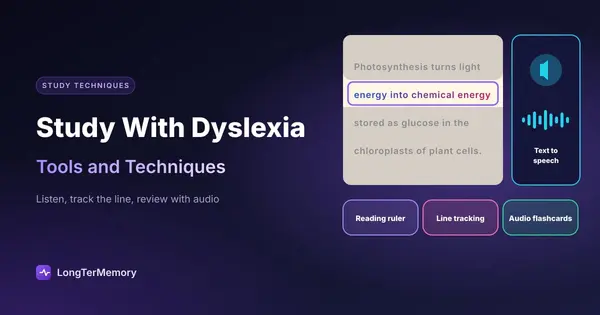
Text-to-speech (TTS) technology has gotten remarkably good in the last few years. Tools like Natural Reader, Speechify, and the built-in screen readers on most phones and computers can convert almost any text, including PDFs, web pages, and Word documents, into clear, natural-sounding audio. You can follow along with the text while listening, which combines the visual and auditory channels and tends to improve comprehension and retention.
Some tips for using TTS effectively:
- Set the speed slightly faster than feels comfortable. Research suggests that faster listening rates can actually improve focus because your brain has to engage more actively.
- Use headphones to block out distractions.
- Pause and summarize out loud after each section rather than just letting the audio wash over you passively.
Podcasts and Audio Lectures
If your subject has podcast content, recorded lectures, or YouTube explainers, use them aggressively. Listening to an expert explain something, hearing the inflection, the emphasis, the conversational framing, can make a concept click in a way that a page of text sometimes cannot.
For subjects where audio content is scarce, make your own. Recording yourself reading your notes out loud and then playing them back is a legitimate and underused study technique. The act of reading aloud forces you to slow down and actually process what you are reading, and the recordings become a personalized audio study resource.
Study Groups and Verbal Discussion
Hearing ideas explained in conversation is one of the most powerful learning modes for dyslexic students. If you have access to a study group, use it. Listening to classmates work through problems, explain concepts, and ask questions activates auditory learning in a way that solo text-based study cannot replicate.
If a formal study group is not available, consider finding a study buddy (more on this in another post) or even just explaining material out loud to yourself. The act of verbalizing is often where real understanding develops.
Digital Tools That Support Dyslexic Reading and Note-Taking
We live in a genuinely excellent time for dyslexic learners in terms of technology. Tools that would have required expensive specialist intervention a decade ago are now free or low-cost and available on any smartphone.
Reading Support Apps
OpenDyslexic is a font specifically designed to reduce the visual confusion that some dyslexic readers experience. The bottom-heaviness of the letters helps anchor them visually, reducing the tendency for letters to appear to swap or rotate. Many reading apps and browsers allow you to switch to this font.
Immersive Reader, built into Microsoft Word, OneNote, and Edge, is one of the most genuinely useful tools for dyslexic students. It can change the font, increase letter and word spacing, highlight lines, break words into syllables, and read text aloud, all in one interface. It is free if you have a Microsoft account.
Beeline Reader is a browser extension that applies a color gradient across lines of text to guide the eye from the end of one line to the beginning of the next. It sounds minor, but for people who frequently lose their place when reading, it makes a substantial difference.
Note-Taking Alternatives
If typing your notes is more comfortable than handwriting, do that. If voice-to-text is even easier, use that. Otter.ai can transcribe lectures in real time and organize them automatically. Google Docs has a built-in voice typing function that works well for note dictation.
For visual note-takers, mind mapping tools like MindMeister or even just a physical whiteboard can replace linear text notes entirely. A mind map lets you capture relationships between ideas spatially, which often maps better onto how dyslexic thinkers actually process information.
The key principle here is to use whatever format gets information out of your head and into an organized form most easily. There is no rule that says notes must be linear text.
Flashcard Apps with Audio
Anki lets you include audio clips in your flashcards. You can create cards where the front plays a recording of a question and the back plays the answer, removing text from the equation entirely if you want. You can also use LongTerMemory, which can generate flashcard-style questions from uploaded material automatically, saving the creation effort and letting you focus on reviewing.
| Tool | Primary Benefit | Free? |
|---|---|---|
| Natural Reader / Speechify | Text-to-speech for any document | Free tier available |
| Immersive Reader | Reading support built into Microsoft | Free with Microsoft account |
| Otter.ai | Lecture transcription | Free tier available |
| OpenDyslexic font | Reduces letter confusion | Free |
| Beeline Reader | Line-tracking visual aid | Free browser extension |
| Anki | Spaced repetition with audio support | Free |
Active Recall Adaptations for Students with Dyslexia
Active recall, testing yourself on material rather than re-reading it, is consistently the most effective study technique in the research literature. But the classic implementations of it, reading a question card and writing a text answer, assume a comfort with reading and writing that dyslexic students may not share. The good news is that active recall is highly adaptable.
Verbal Recall Instead of Written
Instead of writing answers to practice questions, say them out loud. Set up a scenario where you explain a concept, out loud, as if you are teaching it to someone. This is the Feynman Technique applied verbally, and it is often even more powerful than its written version because speaking forces you to organize your thoughts in real time.
You can turn this into a structured practice: read a question (or have it read to you via TTS), close your materials, and explain your answer aloud. Record yourself if you want to review later. The bar is simple: can you explain it clearly without looking? If yes, you know it. If you start stumbling, that is your signal to go back to the source.
Audio Flashcards
As mentioned above, Anki supports audio-based cards. You can also create simple flashcard sessions using nothing but your phone’s voice recorder: record a question, pause, then record the answer. Replay and pause after the question to recall before hearing the answer.
This approach removes text almost entirely from the flashcard workflow, which for some dyslexic learners dramatically reduces the cognitive load of review sessions.
Multiple-Choice and Recognition Practice
Recognition-based testing, where you see an answer and judge whether it is correct, is a lower reading-load form of active recall. Platforms like Quizlet and many subject-specific practice apps use this format. While pure recall (where you produce the answer from scratch) is generally more effective, recognition-based practice is still significantly better than passive re-reading, and it is far more accessible for dyslexic learners when reading fatigue is a factor.
Practice with Past Exam Papers
One of the best forms of active recall for any learner is working through actual past papers. For dyslexic students, the key is to engage with these under conditions that are as close to your actual exam accommodations as possible. If you are entitled to extra time or assistive technology in the exam, practice with those tools available so you build fluency using them under pressure.
Spacing and Short Sessions
This is important for all learners, but especially for dyslexic students: long, grinding study sessions tend to produce diminishing returns faster than they do for non-dyslexic learners, partly because reading fatigue accumulates. Shorter, more frequent sessions spaced over time are both more sustainable and more effective for memory consolidation.
Twenty-five minute focused sessions followed by a genuine break are often the sweet spot. The Pomodoro technique, twenty-five minutes on, five minutes off, maps well onto this. During breaks, do something completely different from reading or looking at screens.
Building a System That Works for You
There is no single correct way to study with dyslexia, because dyslexia itself manifests differently from person to person. Some people struggle mainly with decoding text quickly. Others have more difficulty with working memory. Some have both. What works brilliantly for one dyslexic learner might not be the right fit for another.
The most important thing you can do is experiment without self-judgment. Try audio-first methods for a week and notice what changes. Try replacing written notes with mind maps. Try doing your active recall sessions verbally instead of in writing. Pay attention to what feels more sustainable and what actually sticks.
And please, use your accommodations. Extra time, assistive technology, accessible format materials: these exist because the standard format creates unnecessary barriers for you. Using accommodations is not cheating. It is leveling the playing field so that your knowledge and capability are what get assessed, not your reading speed.
Where LongTerMemory Can Help
One of the most time-consuming parts of effective studying is creating good practice material, good flashcard questions, good summaries, good active recall prompts. This is also often the part that requires the most reading-intensive effort.
LongTerMemory can take your uploaded study materials (PDFs, notes, textbook chapters) and automatically generate question-answer pairs from them, cutting out the creation step entirely. For dyslexic learners, this means you can get straight to the part that actually builds memory, the retrieval practice, without having to laboriously extract questions from text yourself.
The spaced repetition scheduling built into the platform also means you do not have to manually track which material needs reviewing when. The system handles that for you, which removes one more cognitive load from your study process.
The Bottom Line
Dyslexia changes how you access information, but it does not limit how much you can learn or how well you can perform. The students who figure this out, who stop trying to force their brain into a neurotypical studying mold and instead build systems that genuinely work for them, often end up with study practices that are more intentional and more effective than those of students who never had to question the defaults.
Audio-first learning, digital accessibility tools, verbal active recall, and spaced short sessions are not workarounds. They are smart strategies. And they are available to you right now.
The only thing left to do is start using them.