How to Use Templates to Speed Up Your Study Planning
Stop rebuilding your study plan from scratch every week. Learn how templates for schedules, flashcards, and reviews remove friction from studying.
Table of Contents
- Templates for Weekly Study Schedules, Flashcard Creation, and Exam Reviews
- Weekly Study Schedule Templates
- Flashcard Creation Templates
- Exam Review Checklist Templates
- Downloading vs. Creating Your Own Study Planning Templates
- How Templates Remove Friction From Daily Study Planning Decisions
- A Simple Way to Start
- The Bottom Line
Here’s a question worth asking yourself honestly: how much of your study time is actually spent studying, and how much is spent figuring out what to study, deciding how to organize your notes, or rebuilding a weekly schedule from a blank page every single Sunday night?
For most people, the answer is uncomfortable. A meaningful chunk of study time gets eaten by decisions that don’t need to be made fresh every week. What should this week’s schedule look like? How should I format these flashcards? What does my review checklist need to cover before an exam? These are all decisions you’ve probably already made before, more than once, and rebuilding them from scratch every time is pure waste.
Templates solve this. Not in a flashy way, they’re not a new study technique or a cognitive science breakthrough. They’re a productivity fix, and a surprisingly powerful one, because they remove the friction that keeps people from studying consistently in the first place. For what to put in those templates before a test, see our exam study method.
Templates for Weekly Study Schedules, Flashcard Creation, and Exam Reviews
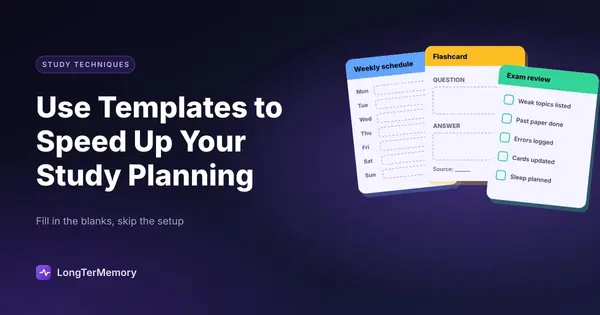
A template, in this context, is simply a reusable structure you fill in rather than recreate. The three areas where templates tend to save the most time are scheduling, flashcard creation, and exam review prep.
Weekly Study Schedule Templates
A weekly schedule template is a pre-built structure with your fixed commitments already blocked in (classes, work, sleep, meals) and clearly marked open slots for study sessions. Instead of asking “when am I going to study this week” from scratch every Sunday, you’re just filling in what goes into slots that already exist.
A useful version includes:
| Element | Purpose |
|---|---|
| Fixed commitments | Classes, work shifts, recurring obligations, blocked automatically |
| Study blocks | Pre-sized chunks (25-50 minutes) ready to be assigned a subject |
| Buffer time | Built-in slack for overruns, so one long session doesn’t wreck the rest of your day |
| Weekly review slot | A recurring block for reviewing what you covered and adjusting the coming week |
The point isn’t rigid time-blocking for its own sake. It’s that a template turns “plan my week” from an open-ended, mildly dreaded task into a five-minute fill-in-the-blanks exercise.
Flashcard Creation Templates
If you’ve ever sat down to make flashcards and found yourself second-guessing the format, question here, answer there, how much context to include, a flashcard template solves that instantly. A consistent template means every card follows the same structure, which makes review faster and more predictable.
A solid general-purpose template:
- Front: A specific, answerable question (not just a term with no context)
- Back: The answer, plus one line of context or an example
- Tag: The topic or chapter, for filtering later
Having this decided in advance means you’re not making dozens of small formatting decisions every time you sit down to create cards, you’re just filling the template with content. This matters more than it sounds like it should. Small, repeated decisions are exhausting in aggregate, and removing them is one of the easiest ways to make a study habit sustainable.
Exam Review Checklist Templates
The days before an exam are exactly the wrong time to be figuring out how to review. A reusable exam review checklist template, built once and adapted slightly for each exam, keeps that final stretch focused instead of scattered.
A useful structure walks through:
- List every topic covered, pulled from your syllabus or course outline.
- Rate your confidence on each topic (low, medium, high) based on recent practice performance.
- Rank topics by a mix of low confidence and high weight on the exam.
- Assign specific review sessions to the lowest-confidence, highest-weight topics first.
- Schedule one final light review pass the day before, focused on quick recall, not new learning.
Once you’ve built this checklist template once, using it for the next exam takes minutes instead of the scattered, anxious planning that often happens in the final week.
If you want to understand why a template works before you fill it in, read our guide to building a science-based study schedule.
Downloading vs. Creating Your Own Study Planning Templates
There’s a genuine choice here, and it’s worth thinking through rather than defaulting to whichever option is easiest to find.
Downloaded templates (from planner apps, productivity blogs, or note-taking tools) have real advantages. They’re ready immediately, they’re usually designed by people who’ve thought carefully about layout and workflow, and they save you the time of building something from a blank page. For students just starting to build planning habits, a downloaded template is a perfectly reasonable starting point.
Custom, self-built templates take longer up front but tend to fit better over time, because they’re shaped around your actual courses, your actual exam formats, and your actual habits, not a generic use case. A pre-made weekly planner template built for a nine-to-five office worker, for instance, doesn’t necessarily map well onto a student juggling five classes with wildly different weekly rhythms.
The practical answer for most people: start with a downloaded template, then modify it. Use an existing structure as your starting point rather than staring at a blank page, but don’t be afraid to cut sections that don’t apply to you or add ones that do. Within a few weeks of actual use, you’ll know exactly which parts of any template are pulling their weight and which aren’t. Revise it once you know that, and you’ll end up with something that’s genuinely yours, without having spent hours designing it from zero.
How Templates Remove Friction From Daily Study Planning Decisions
The deeper reason templates work isn’t really about time saved on any single task. A blank weekly planner saves you maybe ten minutes over a pre-built one. The real value is in decision fatigue reduction.
Every time you have to decide how to structure something, a schedule, a flashcard, a review session, you’re spending a small amount of mental energy that isn’t going toward the actual studying. Do this dozens of times a week, and it adds up to real cognitive load, the kind that makes starting a study session feel more effortful than it needs to be.
Templates convert structural decisions (how should this be organized) into content decisions (what goes in this slot). Content decisions are almost always easier and less draining, because you’re just applying knowledge you already have rather than designing a system from scratch. This is the same principle behind why habit formation research consistently shows that reducing the number of decisions required to start a behavior increases the likelihood you’ll actually do it.
There’s a secondary benefit too: consistency makes review faster. If every flashcard follows the same format, every weekly schedule has the same structure, and every exam checklist walks through the same steps, your brain spends less time re-orienting to a new layout and more time actually engaging with the content. Familiar structure becomes almost invisible, which is exactly what you want from a planning system, it should support your studying without demanding attention of its own.
A Simple Way to Start
If you don’t have any study templates in place yet, don’t try to build all three types at once. Start with whichever one addresses your biggest current friction point:
- If your weeks feel chaotic and reactive, start with a weekly schedule template.
- If making flashcards feels slow or inconsistent, start with a flashcard template.
- If exam weeks feel like scrambling, start with a review checklist template.
Build one, use it for two or three cycles, adjust what doesn’t work, and only then move on to the next. Templates that evolve from real use are far more durable than a perfectly designed system you built once and never touched again.
The Bottom Line
Templates aren’t glamorous, and they won’t teach you a single new fact. What they do is remove the small, repeated friction that quietly drains time and motivation from your study routine. Every minute you’re not spending rebuilding a schedule or reformatting a flashcard from scratch is a minute available for the thing that actually moves the needle: studying the material itself.
Build the structure once. Reuse it relentlessly. Let the template disappear into the background so your attention can go where it belongs.
It’s worth remembering that a template is never finished. The version you build this month will almost certainly need small adjustments next semester, when your course load shifts or your exam formats change. That’s not a failure of the system, it’s exactly how a good template is supposed to work: a stable starting structure that flexes around the details of your life, instead of a rigid plan you abandon the moment reality doesn’t match it.
If you’d rather skip building flashcard templates by hand altogether, LongTerMemory automatically generates structured, consistent flashcards from your uploaded notes and materials, and schedules your reviews with spaced repetition, so the only decision left is what to study next.