How to Pass the CKAD Kubernetes Developer Exam
Pass the CKAD: the 2-hour hands-on format, the Kubernetes concepts tested most, kubectl speed tricks, and how to use killer.sh and a home lab to practice.
Table of Contents
- CKAD Exam Format: Time-Pressured, Hands-On Kubernetes Tasks
- CKAD at a glance
- What "time-pressured" really means
- The environment
- Core Kubernetes Developer Concepts That Appear Most on the CKAD
- The high-frequency task types
- The kubectl speed toolkit
- How to memorize the details that the docs won't hand you
- Practice Environment Setup and killer.sh for CKAD Simulation
- Setting up a home lab
- How to use killer.sh well
- A 6-week CKAD study plan
- Exam-Day Strategy: Triage Beats Perfection
- Common Reasons Candidates Fail the CKAD
- Frequently Asked Questions
- How hard is the CKAD exam?
- What is the passing score for the CKAD?
- Can I use documentation during the CKAD?
- Should I take the CKA or CKAD first?
- Is killer.sh harder than the real CKAD?
- Remember the Details, Practice the Speed
- The Bottom Line
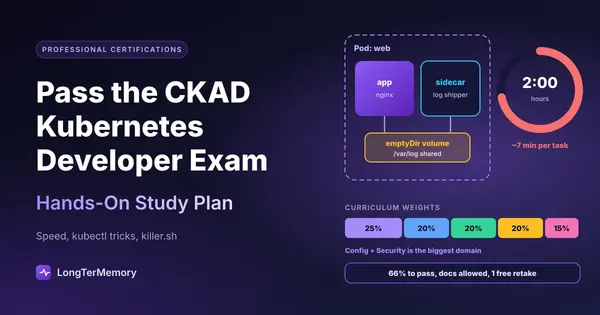
To pass the CKAD (Certified Kubernetes Application Developer), you need speed as much as knowledge: the exam gives you 2 hours for roughly 15 to 20 hands-on tasks in live clusters, and you need 66% to pass. The winning formula is to master the five curriculum domains, generate YAML with imperative kubectl commands instead of writing it by hand, learn to navigate the official Kubernetes docs fast, and finish your preparation with timed simulations such as the two killer.sh sessions included with your registration.
The CKAD is not a multiple-choice test. There’s no option D to fall back on. You get a terminal, a set of clusters, and a list of tasks like “create a Deployment with 3 replicas, expose it on port 8080, and add a readiness probe.” Either it works, or it doesn’t.
That’s exactly why so many experienced developers fail it the first time. They know Kubernetes. They’re just not fast enough with it. Let’s fix both.
CKAD Exam Format: Time-Pressured, Hands-On Kubernetes Tasks
The CKAD is a 2-hour, online-proctored, performance-based exam where you solve real tasks on real Kubernetes clusters from a command line. Each task has a weight, partial credit is possible on some tasks, and you can use the official Kubernetes documentation during the exam.
CKAD at a glance
| Detail | Value |
|---|---|
| Exam body | The Linux Foundation and CNCF |
| Duration | 2 hours |
| Format | Performance-based tasks in a remote Linux desktop |
| Number of tasks | Roughly 15 to 20 (varies) |
| Passing score | 66% |
| Allowed resources | Official Kubernetes documentation (one extra browser tab) |
| Free retake | 1 included |
| Practice simulator | 2 killer.sh sessions included |
| Certification validity | 2 years |
| Price | Around $445 (check the Linux Foundation site, discounts are frequent) |
Details like price, Kubernetes version, and allowed resources change over time, so always confirm them on the official CKAD page before you book.
What “time-pressured” really means
Do the math: 120 minutes for around 17 tasks is about 7 minutes per task, including reading the question, switching to the right cluster, doing the work, and verifying it. A single YAML indentation error that takes 6 minutes to debug can cost you a whole task.
That’s the core challenge of the CKAD. It’s less like an exam and more like a timed coding interview.
The environment
- You work in a remote desktop with a terminal and a browser for the docs.
- There are several clusters. Each task tells you which context to use, and switching with
kubectl config use-context <name>is the first thing you do. Forgetting it means solving the task on the wrong cluster for zero points. - Copy and paste works differently inside the remote desktop terminal (usually Ctrl+Shift+C and Ctrl+Shift+V). Practice it beforehand so it doesn’t surprise you.
Core Kubernetes Developer Concepts That Appear Most on the CKAD
The CKAD curriculum has five domains, and the biggest single one is application environment, configuration, and security. Here is the current breakdown (check the official curriculum on GitHub for the latest version):
| Domain | Weight | What to know cold |
|---|---|---|
| Application Environment, Configuration and Security | 25% | ConfigMaps, Secrets, ServiceAccounts, SecurityContexts, resource requests and limits, ResourceQuotas, LimitRanges, CRDs, RBAC basics |
| Application Design and Build | 20% | Container images, Jobs, CronJobs, multi-container Pods (sidecar, init containers), volumes |
| Application Deployment | 20% | Deployments, rolling updates and rollbacks, blue/green and canary patterns, Helm, Kustomize |
| Services and Networking | 20% | Services (ClusterIP, NodePort), Ingress, NetworkPolicies |
| Application Observability and Maintenance | 15% | Liveness, readiness and startup probes, logs, debugging, API deprecations, monitoring |
The high-frequency task types
Across candidate reports and simulators, a few task types show up again and again:
- Create a Pod or Deployment with specific image, labels, env vars, and resource limits.
- Inject configuration from a ConfigMap or Secret, as environment variables or a mounted volume.
- Add probes (liveness, readiness) with the exact paths, ports, and timings asked.
- Build a multi-container Pod, often a sidecar sharing an
emptyDirvolume, or an init container. - Create a Job or CronJob with a schedule, completions, or backoff limits.
- Expose an app with a Service of the right type and port mapping.
- Write a NetworkPolicy that allows traffic only from specific Pods.
- Perform a rolling update, then roll it back.
- Fix a broken Deployment (wrong image, wrong label selector, failing probe).
- Set a SecurityContext (run as a specific user, drop capabilities, read-only filesystem).
The kubectl speed toolkit
The fastest candidates almost never write YAML from scratch. They generate it with imperative commands and edit only what’s needed:
# Alias and a dry-run shortcut
alias k=kubectl
export do="--dry-run=client -o yaml"

# Generate YAML instead of writing it
k run web --image=nginx --port=80 $do > pod.yaml
k create deployment api --image=nginx --replicas=3 $do > deploy.yaml
k create job backup --image=busybox $do -- /bin/sh -c "echo done" > job.yaml
k create cronjob report --image=busybox --schedule="*/5 * * * *" $do -- date > cj.yaml

# Config and secrets in one line
k create configmap app-config --from-literal=MODE=prod
k create secret generic db-pass --from-literal=PASSWORD=s3cret

# Expose, update, roll back
k expose deployment api --port=8080 --target-port=80
k set image deployment/api nginx=nginx:1.27
k rollout undo deployment/api

# Find the right YAML fields fast
k explain pod.spec.containers.livenessProbe
A few more habits that save minutes:
- Set up vim for YAML at the start:
set expandtab tabstop=2 shiftwidth=2in~/.vimrc. - Use
k explainbefore searching the docs. It’s often faster. - Delete fast with
k delete pod x --force --grace-period=0when you need to recreate a Pod. - Verify every task:
k get,k describe, andk logstake seconds and catch silly errors.
How to memorize the details that the docs won’t hand you
You can open the docs during the exam, but searching them for every field is far too slow. The details worth having in memory:
- Which resources support imperative
createand which don’t (for example, there’s nokubectl createfor PersistentVolumeClaims or NetworkPolicies, so know where the YAML examples live in the docs) - Probe fields:
initialDelaySeconds,periodSeconds,failureThreshold - SecurityContext fields at Pod level vs. container level
- Service types and how
port,targetPort, andnodePortrelate - NetworkPolicy structure:
podSelector,policyTypes,ingress.from
Flashcards work surprisingly well for these. A card like “Which SecurityContext field drops Linux capabilities, and at what level is it set?” takes 10 seconds to review and saves minutes in the exam. Pair them with active recall and spaced repetition, and they stick.
Practice Environment Setup and killer.sh for CKAD Simulation
Practice in a real cluster every day, and save the two killer.sh sessions for the last two to three weeks, when you’re already fast. The killer.sh simulator is intentionally harder than the real exam, so a score of 50% to 60% there is usually a good sign.
Setting up a home lab
You don’t need a cloud bill to practice. Any of these work on a laptop:
| Option | Good for | Notes |
|---|---|---|
| kind (Kubernetes in Docker) | Fast, disposable clusters | Great for daily drills, multi-node possible |
| minikube | Beginners, add-ons like Ingress | Easy to start, one command |
| k3d / k3s | Lightweight clusters | Very quick startup |
| Online playgrounds | No local install | Sessions are time-limited |
For NetworkPolicies, make sure your local cluster uses a CNI that actually enforces them (many default setups don’t). Otherwise your policies will “work” while blocking nothing.
How to use killer.sh well
Your CKAD registration includes two killer.sh simulator sessions, and each one gives you access to the environment for 36 hours after activation. The questions are the same in both sessions, so plan them:
- Session 1, about 2 to 3 weeks before the exam. Take it under exam conditions: 2 hours, no pausing. Then use the remaining hours to study the detailed solutions and redo every task you missed.
- Between sessions: drill your weak domains daily with timed mini-tasks (5 to 7 minutes each).
- Session 2, a few days before the exam. Redo the whole simulation for speed. You’ll know the questions, so focus on typing, YAML generation, and context switching.
A 6-week CKAD study plan
For developers who already know containers and have used Kubernetes a little, about 6 weeks at 1 to 1.5 hours a day is realistic:
| Week | Focus | Daily practice |
|---|---|---|
| 1 | Pods, Deployments, imperative commands, kubectl setup | Create and modify resources without YAML from scratch |
| 2 | ConfigMaps, Secrets, resources, SecurityContexts, ServiceAccounts | 5 config tasks a day, timed |
| 3 | Multi-container Pods, Jobs, CronJobs, volumes | Build sidecar and init patterns from memory |
| 4 | Services, Ingress, NetworkPolicies | Debug connectivity with curl from a temp Pod |
| 5 | Probes, debugging, rollouts, Helm, Kustomize + killer.sh session 1 | Review every missed task |
| 6 | Speed drills + killer.sh session 2 | Full timed run, then light review |
If you also plan to take the CKA, the overlap is substantial. Our CKA Kubernetes administrator guide covers the cluster administration side.
Exam-Day Strategy: Triage Beats Perfection
Do the quick, high-weight tasks first, flag anything that takes longer than about 8 minutes, and come back to it at the end. With partial credit available on many tasks, a mostly correct answer on every task beats a perfect answer on half of them.
- Read the whole task first, including namespace and context.
- Switch context with the command given at the top of each task. Every time.
- Use the namespace specified (
-n <namespace>). Resources in the wrong namespace earn nothing. - Note task weights and skip low-weight, long tasks until the end.
- Verify with
k getork describebefore moving on. - Keep 10 minutes at the end for flagged tasks.
Common Reasons Candidates Fail the CKAD
Most failures come from speed and carelessness rather than missing knowledge. The usual suspects:
- Writing YAML by hand instead of generating it
- Solving tasks in the wrong context or namespace
- Spending 20 minutes on a single hard task
- Never practicing in a timed, remote-desktop-like environment
- Not knowing where key examples live in the docs (NetworkPolicy, PersistentVolumeClaim, probes)
- Skipping verification, so small typos go unnoticed
Frequently Asked Questions
How hard is the CKAD exam?
It’s challenging mainly because of the time limit. Most tasks aren’t conceptually difficult, but solving around 17 of them in 2 hours requires fast, confident kubectl skills. With 4 to 8 weeks of daily hands-on practice, it’s very achievable.
What is the passing score for the CKAD?
You need 66% to pass. Tasks have different weights, and partial credit is possible on some of them.
Can I use documentation during the CKAD?
Yes. You can use the official Kubernetes documentation in the exam browser. Check the Linux Foundation’s current list of allowed resources before your exam, as it occasionally changes.
Should I take the CKA or CKAD first?
If you’re a developer deploying applications, start with the CKAD. If you manage clusters (installation, upgrades, etcd backups, troubleshooting nodes), start with the CKA. Many people take both, since the kubectl skills overlap.
Is killer.sh harder than the real CKAD?
Yes, by design. It has more tasks and harder ones than the real exam, so lower scores there are normal. Use it to find weak spots and build speed, not to predict your exact result.
Remember the Details, Practice the Speed
The CKAD rewards two things: hands-on speed, which only comes from daily practice in a cluster, and instant recall of field names, flags, and patterns, which comes from spaced review.
LongTerMemory handles the second part for you. Upload the CKAD curriculum, your course notes, or Kubernetes doc pages as PDFs, and it generates question and answer cards automatically, then schedules them with spaced repetition so the details of probes, SecurityContexts, and NetworkPolicies stay fresh until exam day. That frees your study hours for the terminal, where they matter most. You can try it on the free trial during your first weeks of prep.
The Bottom Line
Passing the CKAD exam comes down to speed with substance. Learn the five domains, especially configuration and security (25%), generate YAML with imperative commands, practice daily in a local cluster, and use your two killer.sh sessions strategically.
On exam day, switch context every time, triage by weight, and verify before moving on. Do that, and 2 hours will feel like just enough time.