How to Use Toggl or Clockify to Track Study Time
Set up Toggl or Clockify for studying, see where your hours really go, and use the data to rebalance your schedule across subjects, with a worked example.
Table of Contents
- Toggl vs Clockify: Which One Should You Use?
- Setting Up Time Tracking Projects for Each Study Subject
- Step 1: Create One Project per Subject or Exam Domain
- Step 2: Add Tags for How You're Studying
- Step 3: Write Descriptions You Can Search
- Step 4: Set Three Rules for the Timer
- What Tracking Reveals About Where Your Hours Actually Go
- The Four Patterns to Look For
- Compare Your Estimates With Reality
- Watching Your Progress Also Changes Your Behavior
- Using Time Data to Rebalance Your Study Schedule
- A Worked Example
- Don't Forget to Check Study Modes
- Make the Change Concrete
- Your Sunday 10-Minute Review
- When Tracking Starts to Backfire
- Cut the Hours You Spend on Admin
- FAQ
- Is Toggl or Clockify better for students?
- Should I track every minute of study?
- How many hours should I be tracking each week?
- Do breaks count as study time?
- Can I just use a spreadsheet?
- How long should I keep tracking?
- The Bottom Line
To track study time with Toggl or Clockify, create one project for each subject, add a tag for each type of study (such as new material, recall and problems), and start a timer whenever you sit down. After two weeks, open the reports and compare your actual hours with your exam priorities. Both tools have a free plan that’s more than enough for one student, so this costs you nothing but a few minutes of setup.
Why bother? Because your memory of last week is unreliable. Most people who say they studied “about 20 hours” are counting the time their books were open, including the phone breaks and the twenty minutes spent choosing a highlighter color. A timer removes the guesswork. Tracking is the measuring half of exam prep; for the planning half, see our step-by-step method to study for exams.
This guide covers which tool to choose, how to set it up for studying, what the data usually reveals and how to use it to change your schedule.
Toggl vs Clockify: Which One Should You Use?
Pick Clockify if you want the most complete free plan, and Toggl Track if you prefer a slightly cleaner interface and calendar integration. For solo study, either will do the job, so don’t spend more than five minutes on this decision.
Prices and plan limits below come from each company’s pricing page in November 2026. They change often, so check before you pay for anything.
| Toggl Track | Clockify | |
|---|---|---|
| Free plan for one user | Yes | Yes |
| First paid plan | $9 per user/month (annual billing) | $3.99 per seat/month (annual billing) |
| Unlimited tracking on free | Yes | Yes |
| Projects on free | Yes | Yes, unlimited |
| Tags on free | Confirm on the pricing page | Yes |
| Pomodoro timer | Yes | Yes |
| Calendar integration | Google and Outlook | Calendar view |
| Web, mobile and desktop apps | Yes | Yes |
| Best for | A polished, minimal timer | The most features for free |
You almost certainly don’t need a paid plan. Features like billable rates, team reports and approvals exist for companies billing clients, and they add nothing to your exam preparation.
Setting Up Time Tracking Projects for Each Study Subject
The setup that works is simple: one project per subject, a small set of tags for what you were doing, and a short description for the specific topic. It takes about five minutes.
Step 1: Create One Project per Subject or Exam Domain
If you’re at university, make one project for each course. If you’re preparing for a certification, make one for each exam domain, because that’s how the exam will score you.
- University example: Organic Chemistry, Statistics, Microeconomics, Thesis
- Certification example: Ethics, Quantitative Methods, Financial Reporting, Portfolio Management
Give each project its own color. It makes the weekly chart readable at a glance.
Step 2: Add Tags for How You’re Studying
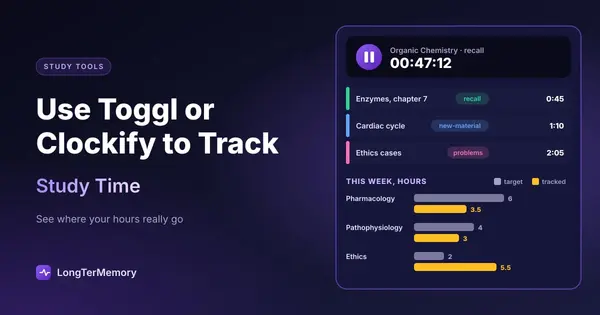
This is the step most people skip, and it’s the most valuable one. Subject tells you where your time went. Study mode tells you whether that time was any good.
| Tag | What counts |
|---|---|
new-material | Lectures, reading, watching videos |
recall | Flashcards, blurting, answering from memory |
problems | Practice questions and problem solving |
mock | Timed tests under exam conditions |
admin | Formatting notes, organizing files, planning |
Keep it to about five. If your tool or plan doesn’t offer tags, put the mode at the start of the description instead (“recall: enzymes”) and filter by that word in your reports.
Step 3: Write Descriptions You Can Search
Use something short and specific: “Chapter 7 enzymes” or “2023 past paper, section B”. Avoid “studying”. Six weeks from now, specific entries will show you which topics took far longer than you expected, and that’s useful information for the next round of planning.
Step 4: Set Three Rules for the Timer
Time data is only as honest as your habits. These rules keep it clean:
- Start the timer before you open the material, not after you’ve settled in.
- Stop it for any interruption longer than a couple of minutes. Yes, including that “quick” message.
- Log missed sessions the same day. Both apps let you add entries manually, and memory fades quickly.
Turn on the mobile app as well, so that flashcards on the train count too. Those small sessions add up, and they’re easy to undercount.
What Tracking Reveals About Where Your Hours Actually Go
For the first two weeks, change nothing. Just track. You want an honest baseline, and it will probably surprise you in at least one of these ways.
Research gives good reasons to look beyond the total. Plant and colleagues (2005) found that the sheer amount of time college students spent studying was a weak predictor of their GPA once study quality and conditions were taken into account. In other words, hours alone don’t tell you much. Hours combined with how you used them do.
The Four Patterns to Look For
| What the report shows | What it often means | What to try |
|---|---|---|
| Your favorite subject gets the most hours | You’re avoiding the harder one | Schedule the avoided subject first |
Mostly new-material, few recall or problems | You’re consuming, not practicing | Aim for at least half your time on retrieval |
admin above about 10% | Organizing has become procrastination | Cap it, or automate it |
| Sessions under 10 minutes, many per day | Constant interruptions | Run a protected block with your phone away |
Compare Your Estimates With Reality
Before the second week, write down how many hours you think each task will take. Compare them with what the timer says. Humans are bad at this: Buehler, Griffin and Ross (1994) asked students to predict when they’d finish their theses. On average they predicted about 34 days, and it took about 56.
Knowing your personal estimation error is a real advantage. If chapters regularly take you 1.5 times what you expect, you can multiply every future estimate by 1.5 and your plan suddenly becomes believable.
Watching Your Progress Also Changes Your Behavior
A meta-analysis by Harkin and colleagues (2016) covering 138 studies found that monitoring goal progress helps people reach their goals (d = 0.40), and the effect was larger when progress was physically recorded or reported. A weekly report does both. If you’d like to track more than hours, this guide on how to track your study progress covers scores and other metrics that matter, and a habit tracker is a good low-effort companion if consistency is your main problem.
Using Time Data to Rebalance Your Study Schedule
To rebalance, compare the share of hours each subject is getting with the share it deserves, based on exam weight and how weak you are in it. Then adjust next week’s plan. Do this once a week, and it takes about ten minutes.
Here’s a simple rule of thumb I use. It isn’t a scientific formula, just a quick way to turn the data into a decision:
- Take each subject’s exam weight (as a percentage).
- Multiply it by a weakness factor: 1 if you’re strong, 1.5 if you’re mixed, 2 if you’re weak. Use your latest practice scores to decide.
- Convert the results to shares of your weekly hours.
A Worked Example
Imagine a student with 12 study hours a week and three exam sections. These numbers are illustrative.
| Subject | Exam weight | Practice score | Factor | Weighted | Target hours | Tracked hours |
|---|---|---|---|---|---|---|
| Pharmacology | 40% | 55% | 2 | 80 | 6 | 3.5 |
| Pathophysiology | 35% | 68% | 1.5 | 52.5 | 4 | 3 |
| Ethics | 25% | 85% | 1 | 25 | 2 | 5.5 |
The student feels busy and productive, yet they spend the most time on the subject they’re already good at. It’s a common pattern, because studying what you know feels nice. Without the timer, this student would probably have guessed the split was about even.
The change for next week is obvious: move 2.5 hours from Ethics to Pharmacology and 1 hour to Pathophysiology.
Don’t Forget to Check Study Modes
After you’ve fixed the balance between subjects, look within each one. For instance, those 3.5 Pharmacology hours might be 3 hours of reading and 30 minutes of questions. Moving to 1.5 hours of reading and 2 hours of questions could matter as much as adding time, since practice testing has much stronger evidence behind it than re-reading. Our ranking of study methods by research evidence explains why.
Make the Change Concrete
A rebalance is only useful once it’s on your calendar. Each week, block the new hours for your weakest subject first, then fill in the rest. For a fuller approach, here’s how to do study schedule optimization, and if you like visual boards, you can also pair your timer with a Kanban study board.
Your Sunday 10-Minute Review
Run the same short routine each week so the data leads to action:
- Open the weekly report, grouped by project.
- Check your total hours against your plan.
- Filter by tag and work out the share of active study (
recall,problemsandmock). - Compare subject shares with your targets.
- Change one or two things for next week. No more than that.
- Write your practice scores next to your hours, so you can see whether the time is working.
That last step matters. If you put 8 hours into a subject and your score doesn’t move, more hours probably won’t solve it. You need a different method.
When Tracking Starts to Backfire
A timer is a tool, and it can turn into a game. Watch for these warning signs:
- You’re chasing hours rather than results. Letting the timer run while you stare at a page turns the number into a lie. Tie your weekly goal to tasks finished or scores reached.
- You compare weeks obsessively. An exam-heavy week and a work-heavy week aren’t supposed to look alike.
- Setup becomes the hobby. Twenty-seven tags and three dashboards count as
admin. - You feel constant guilt. If the numbers make you anxious, track for two weeks every couple of months instead of all the time. You’ll still get most of the insight.
Cut the Hours You Spend on Admin
Many students discover in their first report that a surprising amount of “study” time goes into writing and organizing flashcards. That’s where LongTerMemory can give you back some hours: upload your PDFs or notes and it generates questions and answers from them, then schedules your reviews automatically with spaced repetition. You move time from admin to recall, which is exactly what your report wants to see. You can try it free with one chapter and compare the time against making the cards yourself.
FAQ
Is Toggl or Clockify better for students?
For most students, Clockify is the safer free choice because its plan includes unlimited projects, tags and reports. Toggl Track is also very good and some people prefer its interface. Try one for a week, and only switch if something really bothers you.
Should I track every minute of study?
Track every deliberate session, including short ones on your phone. Don’t worry about the seconds. Rough but consistent data is far more useful than perfect data you stop collecting after four days.
How many hours should I be tracking each week?
That depends on your exam, your deadline and your starting point. Start with your baseline, then work back from the exam’s recommended total. What you do during those hours matters as much as the total.
Do breaks count as study time?
No. Stop the timer during breaks so you can see your real focused time. If you work in Pomodoro blocks, both tools have a built-in Pomodoro timer that can handle this for you.
Can I just use a spreadsheet?
Sure, and many people do. The benefit of a tracking app is that starting a timer takes one tap, and the reports are built for you. If you’d manually update a spreadsheet every day, go for it. Most people won’t.
How long should I keep tracking?
Keep going for the duration of a big exam preparation if you find it motivating. If it feels like a chore, track two weeks at the start and two weeks each month. That’s usually enough to catch bad patterns.
The Bottom Line
You can’t fix a schedule you can’t see. Set up a project for each subject and a few study-mode tags, track honestly for two weeks without changing anything, then compare where your hours went with where your exam says they should go. Most people find at least one big mismatch in the first report. Moving those hours is one of the easiest gains available, and it doesn’t require you to study a single minute more.