How to Use Voice Notes and Audio Memos for Studying Effectively
Turn commutes and spare minutes into study time. Learn how to record, explain, and transcribe voice notes, and pair them with retrieval and spaced repetition.
Table of Contents
- Why Audio Is Worth Adding to Your Study Routine
- What the Science Says
- Where Audio Falls Short
- Using Voice Notes During Commutes for Passive Study Reinforcement
- How to Build a Commute Playlist
- Turn Passive Listening Into Active Practice
- Safety Note
- Recording Your Own Explanations as a Feynman Technique Exercise
- The 5-Step Voice Feynman Method
- What to Listen For
- Make It Easier on Yourself
- Transcribing Voice Notes Into Usable Text for Review Sessions
- Free and Low-Cost Ways to Transcribe
- Turning Transcripts Into a Review Asset
- A Weekly Voice-Note Study Routine
- Mistakes to Avoid
- Tools and Setup
- Recording Tips for Clean Audio
- Organizing Your Files
- Playback Speed
- Frequently Asked Questions
- Can I learn by listening to my own recordings while I sleep?
- How long should a study voice note be?
- Is listening to lectures at 2x speed effective?
- Do voice notes work for every subject?
- The Bottom Line
Voice notes work for studying when you use them to speak and to retrieve, not just to listen. Recording your own explanations, playing them back during dead time like commutes, and turning them into text for review gives you three extra study channels you probably are not using yet. Passive listening alone is the weakest of the three.
I have a confession. Some of my best study sessions happened while I was walking to the train with a phone in my pocket. Not because walking is magic, but because I had previously recorded a few short explanations of tough concepts, and playing them back turned wasted minutes into genuine review. This guide shows you exactly how to do that, step by step.
Why Audio Is Worth Adding to Your Study Routine
Audio lets you study in moments when reading is impossible, and speaking forces you to organize ideas in a way silent review does not. Both benefits are backed by solid learning science.
What the Science Says
- The production effect. A 2010 study by MacLeod and colleagues found that words read aloud were remembered better than words read silently. Speaking adds a motor and auditory trace that silent reading lacks.
- The generation effect. Information you produce yourself sticks better than information you simply receive. Explaining a concept in your own words is generation in action.
- Dual channels. Hearing material in addition to reading it gives your brain a second route to the same memory.
- Spaced exposure. Short, repeated listens spread across days fit the spacing effect, one of the most reliable findings in memory research.
Where Audio Falls Short
Be honest about the limits. Listening to a recording while distracted is not active recall, and it will not replace testing yourself. Think of audio as reinforcement and rehearsal, not the main event.
| Study mode | Effort level | Best used for |
|---|---|---|
| Passive listening | Low | Familiarity, reinforcement |
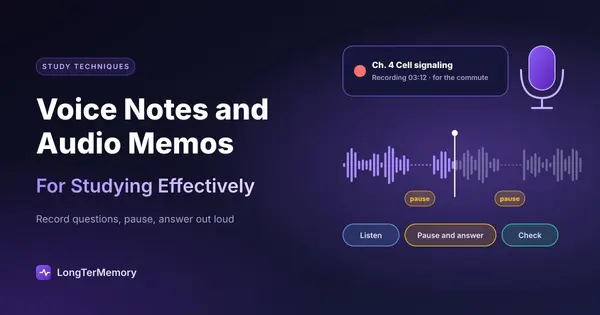
| Listening plus pausing to answer | Medium | Active retrieval on the go |
| Speaking your own explanation | High | Finding gaps in understanding |
| Transcribing and quizzing | High | Long-term retention |
Using Voice Notes During Commutes for Passive Study Reinforcement
Commutes, walks, and chores are ideal for replaying short audio summaries you have already studied. The key word is “already.” Audio is best for reviewing material you have met before, not for first exposure to hard new topics.
The average commuter spends roughly 25 to 30 minutes each way, according to US Census Bureau data, which adds up to well over 200 hours a year. Even using a fraction of that for review is a serious boost.
How to Build a Commute Playlist
- Record short clips. Aim for 1 to 3 minutes per concept. Short clips are easier to repeat and easier to find.
- Name them clearly. Use titles like “Bio 12: Krebs cycle summary” so you can pick topics fast.
- Group by exam or subject. Create one folder or playlist per course.
- Replay on a schedule. Listen to new clips the next day, then again after a few days and a week.
- Cap total length. A 20 to 30 minute playlist is plenty.
Turn Passive Listening Into Active Practice
Here is my favorite trick. Record the clip as a question followed by a pause. For example: “What are the three products of the light reactions? … (8 second pause) … ATP, NADPH, and oxygen.” During playback, you answer out loud in the silence before the answer plays. Now your commute is retrieval practice, not background noise.
Safety Note
If you are driving, keep audio hands-free and do not try to pause, record, or interact with your phone. Walking, cycling in safe conditions with one ear free, and public transit are better for interactive review.
Recording Your Own Explanations as a Feynman Technique Exercise
Recording yourself explaining a concept to an imaginary beginner is the Feynman technique with a built-in feedback loop: the playback. When you hear yourself stumble, you know exactly where your understanding is weak.
If you are new to the method, read our guide to active recall techniques, which covers the Feynman technique alongside other retrieval methods.
The 5-Step Voice Feynman Method
- Pick one concept. Small enough for a 2 to 4 minute explanation.
- Hit record. Close your notes. Explain it as if teaching a curious 14 year old.
- Use plain words and examples. If you reach for jargon, define it on the spot.
- Play it back. Note every hesitation, filler word, and moment you went vague.
- Fix the gaps and re-record. Check your notes only for the parts you missed, then try again.
What to Listen For
| Red flag in your recording | What it usually means |
|---|---|
| Long pauses | You cannot retrieve the next step |
| ”Kind of,” “sort of,” “basically” | Fuzzy understanding hidden behind filler |
| Jumping around | You have not grasped the logical order |
| Reciting definitions word for word | Memorizing, not understanding |
| Confident, smooth, simple | Likely solid, test it again in a week |
Make It Easier on Yourself
Do not aim for a polished podcast. Rough and honest is better, because polish hides gaps. A basic phone voice recorder is enough. If you feel awkward, remember nobody ever has to hear these but you. Many learners find the awkwardness fades after the third or fourth recording.
Transcribing Voice Notes Into Usable Text for Review Sessions
Audio is hard to skim, so convert your best recordings into text that you can search, edit, and turn into flashcards. Modern speech-to-text tools do this in seconds, and accuracy on clear speech is now high enough to be genuinely useful.
Free and Low-Cost Ways to Transcribe
- Built-in phone features. Many phones now transcribe voice memos automatically.
- Google Docs voice typing. Speak directly into a document while you explain.
- Open-source models like Whisper. Run locally for private, accurate transcripts.
- Note apps with transcription. Several popular note apps transcribe audio you attach.
Always skim the transcript for errors, especially technical terms, names, and numbers. A wrongly transcribed drug name or formula can plant a false memory.
Turning Transcripts Into a Review Asset
- Clean up. Remove filler words and fix mistakes.
- Highlight the key facts. Bold the terms and relationships you must remember.
- Convert to questions. Each key fact becomes “What is…?” or “Why does…?”
- Schedule retrieval. Review the questions over days and weeks.
Step three is where most people stop, because making cards by hand is slow. That is where LongTerMemory helps: paste or upload your transcript and it auto-generates question and answer cards, then schedules them with spaced repetition so you review each one just before you would forget it. You get the benefit of speaking and the discipline of long-term review without the manual busywork.
A Weekly Voice-Note Study Routine
A simple routine takes about 90 minutes a week and combines recording, listening, and testing. Here is one that works for many learners.
| Day | Activity | Time |
|---|---|---|
| Monday | Record 3 short explanations of new topics | 20 min |
| Tuesday | Commute playlist plus pause-and-answer | 20 min |
| Wednesday | Transcribe the best clip, make questions | 15 min |
| Thursday | Re-record any weak explanation | 15 min |
| Friday | Commute playlist (older plus new clips) | 20 min |
| Weekend | Quiz yourself on transcript questions | 20 min |
Adjust freely. The pattern to keep is: record, replay, transcribe, test.
Mistakes to Avoid
The biggest mistake is treating audio as a substitute for effort. Watch out for these.
- Passive-only listening. Letting clips play while you scroll your phone does little.
- Recording too much. Hour-long lectures to yourself are never replayed. Keep clips short.
- Never re-listening. A recording you do not revisit is wasted. Schedule replays.
- Learning new, hard material by ear only. Introduce difficult topics in a way that lets you pause and think, such as reading or watching with diagrams.
- Skipping the transcript step. Without text, your material is hard to search or quiz. With it, an AI quiz generator can turn a week of memos into practice questions.
- Ignoring privacy. If recordings include classmates or confidential work material, store them securely or avoid recording them.
Tools and Setup
You do not need special equipment, since a smartphone and a pair of earbuds cover nearly every need. Still, a few small choices make a real difference.
Recording Tips for Clean Audio
- Record in a quiet room. Closets full of clothes make surprisingly good sound booths.
- Hold the phone about a hand’s width from your mouth, slightly to the side to avoid pops.
- Speak at a natural pace. Slower than conversation, but not robotic.
- Do a ten second test before a long take, and listen back.
- Name each file right away, because “Recording 47” will mean nothing next week.
Organizing Your Files
A messy folder defeats the whole system. Use one naming pattern, such as Course - Topic - Date, and keep a short index note listing your clips. Back them up occasionally, since losing weeks of recordings before an exam would hurt. If you use a notes app, attach each recording to the note for that topic, so audio and text live together.
Playback Speed
Many players let you speed up audio. For review of material you know well, 1.25x to 1.5x saves time. For anything new or tricky, stay at normal speed. If you cannot follow the clip at higher speed, that is useful feedback: you may know the topic less well than you thought.
Frequently Asked Questions
Can I learn by listening to my own recordings while I sleep?
No reliable evidence supports learning new material during sleep. Sleep does help consolidate what you studied while awake, so rest well, but do not expect a recording on repeat overnight to teach you anything.
How long should a study voice note be?
One to three minutes per concept is ideal. Short clips are easy to replay, easy to label, and easy to convert into flashcards.
Is listening to lectures at 2x speed effective?
Research on sped-up lectures, including studies from UCLA, suggests comprehension holds up reasonably at moderate speeds like 1.5x, but drops at 2x for harder content, especially when you are not already familiar with the subject.
Do voice notes work for every subject?
They shine for concepts, processes, definitions, and language practice. For math or diagram-heavy subjects, pair them with written work, because you cannot hear a graph.
The Bottom Line
Voice notes and audio memos are not a magic shortcut, but they are a smart way to add retrieval, rehearsal, and review to parts of your day that currently produce nothing. Record short explanations, use them for pause-and-answer practice on the move, listen for the gaps in your own voice, and convert the best clips into text you can quiz yourself on.
Start small. Tonight, pick one concept you find tricky, hit record, and explain it in two minutes. Listen back tomorrow on your way to class or work. You might be surprised how much that tiny habit reveals.