Does Quizlet Have Spaced Repetition? What It Does in 2026
Yes, partly: Quizlet's Flashcards have a spaced repetition option on the website. Here's how it works, where it falls short, and what to use instead.
Table of Contents
- What Spaced Repetition Actually Means
- Quizlet's Study Modes, Checked Against That Definition
- Flashcards With Spaced Repetition
- Learn Mode
- Test and Match
- What Happened to Long-Term Learning?
- When Quizlet's Spacing Is Enough
- When You Need a Real Scheduler
- Quizlet vs Dedicated Spaced Repetition Apps
- How to Get Better Spacing Without Leaving Quizlet
- How to Move Your Sets to a Spaced Repetition App
- FAQ
- Is Quizlet Learn mode spaced repetition?
- Does Quizlet spaced repetition work on the app?
- Is Quizlet's spaced repetition free?
- Is Anki better than Quizlet for spaced repetition?
- What is the best free app with spaced repetition?
- The Bottom Line
Short answer: yes, partly. Since Quizlet retired its old Long-Term Learning feature, spaced repetition lives in Flashcards on the Quizlet website: after each card you rate your recall (Repeat, Hard, Okay or Easy) and Quizlet decides when to show it again, from a few minutes to four or more days later. It isn’t in the mobile apps, you can’t tune it, and Quizlet doesn’t publish the algorithm. Learn mode, the feature most people mean when they say “Quizlet”, is a different thing: it adapts within a study session but doesn’t plan your reviews over weeks.
So the honest answer depends on what you need. For a test next Friday, Quizlet is fine. For remembering a semester of material in June, or 3,000 terms for a board exam, a dedicated scheduler will do more for you. This guide explains what each Quizlet mode actually does, where the gaps are, and how to get real spaced review with or without leaving Quizlet.
What Spaced Repetition Actually Means
Spaced repetition means each card gets its own review date, set by how well you knew it last time. Easy cards drift further into the future (days, then weeks, then months); hard cards come back soon. The point is to review each fact just before you would forget it, which is the most efficient moment to strengthen the memory. The research behind it goes back to Ebbinghaus’s forgetting curve, and modern studies keep confirming that spaced practice beats massed practice for long-term retention. Our guide to the science of spaced repetition covers the evidence in detail.
A true scheduler needs three things:
- Memory across sessions. It remembers every card’s history, not only what happened in the last 20 minutes.
- Growing intervals. A card you keep getting right should come back after 3 days, then 8, then 20, then 50.
- A daily queue. You open the app and it tells you which cards are due today, across all your sets.
Keep these three tests in mind: they make it easy to see what each Quizlet feature does and doesn’t do.
Quizlet’s Study Modes, Checked Against That Definition
Here is how each mode does on the three tests, based on Quizlet’s help center and our own use in October 2026.
| Mode | What it does | Memory across sessions | Growing intervals | Daily due queue |
|---|---|---|---|---|
| Flashcards with spaced repetition (website) | You rate each card Repeat, Hard, Okay or Easy; Quizlet picks when it returns | Yes | Short: minutes to 4+ days for a single rating | Reminders when cards are due, per set |
| Learn | Adaptive questions (multiple choice, then written), repeats what you miss | Within a study goal | No visible intervals | No |
| Test | A practice test generated from the set | No | No | No |
| Match and games | Speed matching of terms and definitions | No | No | No |
Flashcards With Spaced Repetition
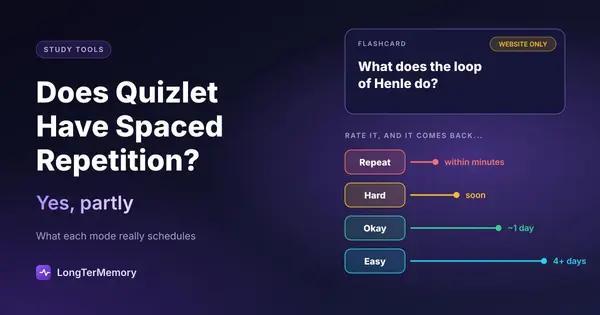
This is the closest Quizlet gets to a real scheduler. Open a set on the website, choose Flashcards, and pick spaced repetition in the options (on larger sets it may already be on). After you flip a card, you rate it:
- Repeat: you didn’t remember it. The card returns within minutes.
- Hard: you remembered it with difficulty. It returns soon.
- Okay: you remembered it. It typically returns in about a day.
- Easy: you remembered it easily. It typically returns in four or more days.
Quizlet can also send a daily reminder when cards are due. That’s a genuine spacing system, and if you use it every day it beats rereading a set the night before by a wide margin.
The limits:
- Website only. Quizlet’s help center says spaced repetition is currently available only on the website, so the phone sessions many students rely on don’t use it.
- No settings. You can’t set a target retention, change the intervals, or cap new cards per day.
- A black box. Quizlet doesn’t say which algorithm it uses, so you can’t predict how long the intervals grow after months of “Easy”.
- Set by set. You study inside one set at a time, rather than one queue that mixes every subject that’s due.
Learn Mode
Learn is adaptive drilling, not scheduling. You set a goal, Quizlet asks questions in different formats and brings back the terms you miss until you get them right. It’s one of the best ways to use Quizlet, because it forces you to recall rather than recognize, and we recommend it in our guide on how to use Quizlet effectively.
What it doesn’t do is decide that a term you nailed today should come back in 11 days. Once you finish a Learn round, nothing brings those terms back at the right time. Learn rounds are also capped on the free plan, and even Quizlet Plus ($35.99 a year) allows 20 rounds a month; unlimited rounds take Plus Unlimited at $44.99 a year.
Test and Match
Test generates a practice exam from your set: useful once a week to find gaps, but it has no memory of the result. Match and the games train fast recognition of a term and its definition. They’re fun and fine as a warm-up, but they’re not retrieval practice and they don’t schedule anything.
What Happened to Long-Term Learning?
Quizlet had a dedicated spaced repetition feature called Long-Term Learning, which recommended what to study each day based on your past answers. It was retired, and Quizlet now points users to spaced repetition in Flashcards instead. If you read an older article that recommends Long-Term Learning, that advice is out of date.
When Quizlet’s Spacing Is Enough
You don’t always need a heavy-duty scheduler. Quizlet is a reasonable choice when:
- The exam is within two or three weeks and the set has a few hundred terms or fewer.
- You study on a laptop anyway, so the website-only limit doesn’t matter.
- Your class shares sets and the convenience outweighs everything else.
- The material is mostly vocabulary or definitions, where the card format fits naturally.
In those cases, use spaced repetition in Flashcards every day and add a Learn round on the terms that keep coming back as “Repeat”. That’s a solid routine.
When You Need a Real Scheduler
The gaps start to hurt as the timeline grows and the deck gets bigger:
- Cumulative finals and long courses. You need October’s material to still be there in January, which means intervals of weeks, not days.
- Big exams. Medical boards, the bar, CPA, language certificates: thousands of cards, many months, and every wasted review is time you don’t have.
- Studying on your phone. If most of your reviews happen on the bus, a website-only feature misses most of your study time.
- Many subjects at once. One daily queue across all your decks is much easier to keep up with than a dozen separate sets.
A quick rule: if you’ll still need the material in 3 months, use a tool built for spacing. That’s where the best spaced repetition apps come in.
Quizlet vs Dedicated Spaced Repetition Apps
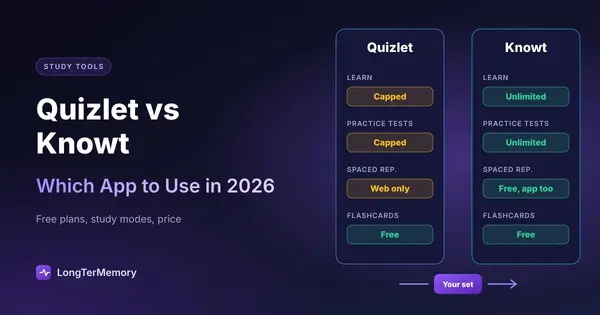
| Quizlet | Anki | Knowt | LongTerMemory | |
|---|---|---|---|---|
| Spaced repetition | Flashcards option, website only | Core feature, SM-2 or optional FSRS | Free spaced repetition mode | Core feature |
| Configurable | No | Fully | A little | Automatic |
| Works on phone | Not the spacing feature | Yes (iOS app $24.99) | Yes | Yes, iOS and Android apps |
| Card creation | You write them, or copy shared sets | You write them | You write them or generate with AI | Generated from your PDFs and notes |
| Imports Quizlet sets | n/a | Via text export | Yes, in a couple of clicks | No |
| Price | Free; Plus $35.99/yr | Free on desktop and Android | Free; Ultra $149.99/yr | 7-day trial, then one-time plans from $48 |
Prices checked on official pages in October 2026. If you’re comparing the two Quizlet-like apps directly, see our Quizlet vs Knowt breakdown.
How to Get Better Spacing Without Leaving Quizlet
If you want to stay on Quizlet, you can close part of the gap with a few habits:
- Use spaced repetition on the website every day, even for 10 minutes. Consistency matters more than session length.
- Rate honestly. “Okay” on a card you hesitated on pushes it out too far; use “Hard”.
- Split big sets. Sets of 50 to 150 terms are easier to keep current than one set of 900.
- Schedule your own expanding reviews for older sets: put a calendar reminder to revisit a finished set after 1 week, 3 weeks and 2 months, and run a Test on it. Any terms you miss go into a small “leeches” set you study daily.
- Make cards that ask questions. “What does the loop of Henle do?” beats “Loop of Henle” as a prompt, because it forces real recall.
How to Move Your Sets to a Spaced Repetition App
If you decide to switch, your work isn’t lost:
- Knowt imports Quizlet sets directly, then you can study them in its spaced repetition mode.
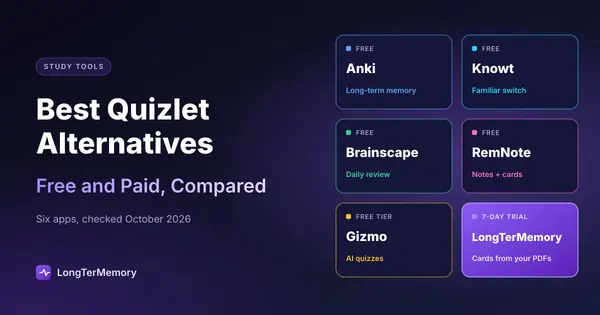
- Anki, Brainscape and RemNote: export a set you created as text from the Quizlet website, then import that text. Export works only on the website and only for your own sets.
- Starting fresh from your material: if your sets were thin in the first place, it can be faster to generate new cards from the source. An AI flashcard generator turns a chapter into questions in a couple of minutes.
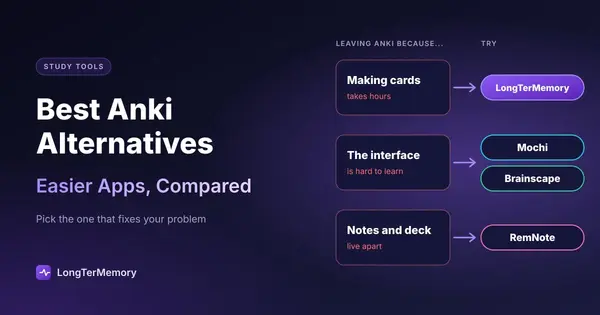
For a full comparison of where to go, see our list of the best Quizlet alternatives, and if Anki’s learning curve worries you, the Anki alternatives.
FAQ
Is Quizlet Learn mode spaced repetition?
Not in the usual sense. Learn adapts to your answers and repeats missed terms during a study goal, but it doesn’t schedule each term’s next review days or weeks ahead. The spaced repetition option is in Flashcards on the website.
Does Quizlet spaced repetition work on the app?
According to Quizlet’s help center, spaced repetition is currently available only on the Quizlet website, not in the iOS or Android apps.
Is Quizlet’s spaced repetition free?
Quizlet doesn’t clearly state which plans include spaced repetition in Flashcards, and its plans change often. Open a set on the website and check the Flashcards options on your own account. Learn rounds and practice tests are capped on the free plan.
Is Anki better than Quizlet for spaced repetition?
For long-term retention, yes: Anki schedules every card with SM-2 or the optional FSRS algorithm, works on every device and lets you tune everything. Quizlet is easier to start and better for sharing sets. Our flashcard app comparison goes deeper.
What is the best free app with spaced repetition?
Anki is the most powerful free option on desktop and Android. Brainscape and Knowt include spaced review in their free plans with less setup, and RemNote’s free plan has unlimited flashcards with scheduling built in.
The Bottom Line
Quizlet does have spaced repetition today, but it’s a light version: website only, four ratings, no settings. It’s enough for a set you need in a couple of weeks. For anything you need to remember for months, use a tool built around scheduling. And if the slowest part of your week is writing the cards in the first place, try LongTerMemory: upload a chapter during the free trial, review the questions it generates, and let it schedule every one of them on your phone or laptop.
Quizlet features checked against Quizlet’s help center in October 2026. Quizlet changes its modes and plans often; we update this page when they do.