How to Turn Handwritten Notes Into Flashcards (Scan, OCR, AI)
Turn handwritten notes and scanned pages into flashcards: how to scan them well, which OCR and AI tools read handwriting, and how to check the cards.
Table of Contents
- Step 1: Capture Pages That a Machine Can Read
- Step 2: Turn the Handwriting Into Text
- Option A: One tool reads and makes the cards
- Option B: Free OCR first, cards second
- Step 3: Check the Transcript
- Step 4: Make the Cards
- Example: One Page, Start to Finish
- Take Notes That Turn Into Cards Easily
- Handwritten Notes on a Tablet
- FAQ
- Can AI read handwritten notes?
- What's the best free way to turn handwritten notes into text?
- Can I upload photos of my notes to make flashcards?
- Should I type my notes instead?
- How do I make flashcards from a scanned textbook PDF?
- The Bottom Line
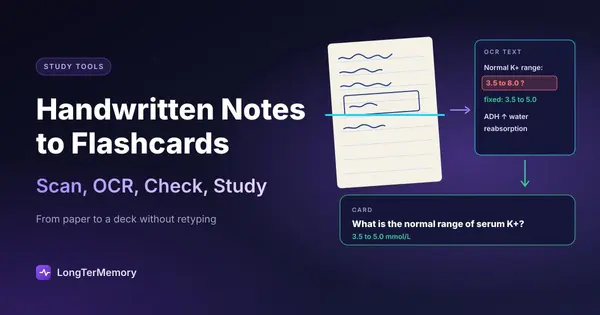
Short answer: photograph or scan your pages with a scanner app (flat page, good light, one page per shot), let a tool read the handwriting with OCR, check the transcript for misread words and numbers, then generate or write the cards from the text. You can do the reading and the card-making in one step with tools that accept photos or scans (ChatGPT, LongTerMemory, RemNote with OCR), or in two steps with a free text-recognition tool (Google Drive, Apple’s Live Text, OneNote) followed by any flashcard app. The step people skip, checking what the OCR read, is the one that decides whether your cards are right.
Handwriting is how many students take their best notes: it’s slower, so you have to summarize, and that helps memory. But a notebook can’t quiz you. This guide shows how to get from paper to a deck without retyping everything.
Step 1: Capture Pages That a Machine Can Read
OCR quality depends more on the photo than on the tool. A few minutes of care here saves an hour of corrections later.
- Use a scanner app, not the camera. Scanner modes crop the page, flatten the perspective and boost contrast. The Notes app on iPhone (“Scan Documents”), the Google Drive app on Android (“Scan”) and Adobe Scan all do this for free.
- Flat page, even light. Daylight from a window, no shadow of your phone or hand, no curve near the binding.
- One page per image. Two-page spreads reduce resolution and confuse the reading order.
- Dark ink on plain paper reads best. Pencil, light colors and dense grid paper read worst.
- Save as a multi-page PDF per lecture or chapter, so the pages stay in order.
Step 2: Turn the Handwriting Into Text
Option A: One tool reads and makes the cards
Some tools accept photos or scanned PDFs directly and do the OCR for you:
- ChatGPT accepts photos of your notes; you can ask it to transcribe them first and then make flashcards. In October 2026 OpenAI also announced that the iPhone app can capture several handwritten pages in one session and stitch them into a single PDF. See ChatGPT flashcards for prompts and the export to other apps.
- LongTerMemory accepts photos (JPG, PNG and other image formats) and PDFs, reads them, generates questions from the content and schedules them with spaced repetition.
- RemNote can run OCR on a scanned PDF in its reader (“Run OCR with AI”), then make cards from highlights or with AI. Details in RemNote PDF to flashcards.
The advantage is speed. The risk is that you never see the transcript, so a misread word goes straight into a card. If the tool shows the extracted text, read it.
Option B: Free OCR first, cards second
If you want to see and fix the text before making cards, transcribe it with a free tool first:
- Google Drive: upload the image or PDF, then open it with Google Docs. Docs creates a document with the recognized text under the image.
- Apple Live Text: on iPhone, iPad or Mac, open the photo and select the text directly, then copy it.
- Microsoft OneNote: insert the picture, right-click it and choose “Copy Text from Picture”.
These tools are built mainly for printed text, so with handwriting the results vary: try one page first. Then paste the corrected text into any AI flashcard generator or chatbot, or write the cards yourself.
Step 3: Check the Transcript
Handwriting OCR is good and getting better, but it still trips on exactly the things exams test:
| What OCR misreads | Example | Why it matters |
|---|---|---|
| Numbers | 1 and 7, 5 and 6, 0 and 6 | Doses, dates and constants become wrong answers |
| Units and symbols | µg read as ug or mg, arrows dropped | A wrong unit is a wrong answer |
| Technical terms | ”ileum” read as “ilium” | Two different body parts |
| Abbreviations you invented | ”w/o”, ”↑ BP” | The AI may expand them wrongly |
| Formulas | subscripts and fractions flattened | Unreadable or wrong equations |
| Arrows and diagrams | relationships lost | Cause and effect disappears |
A five-minute check per page is enough: scan the transcript for numbers, units and key terms and compare them with the page. If a page is hopeless (pencil, a rushed lecture), type its key points instead of fighting the OCR.
Diagrams are the one thing OCR can’t help with. For a hand-drawn cycle or anatomy sketch, take a clean photo and use image occlusion (Anki or RemNote), or write one card per step yourself.
Step 4: Make the Cards
From clean text, making cards works like any other source:
- One idea per card, phrased as a question.
- Turn your own structure into questions. If you use Cornell notes, the cue column already contains your questions: each cue becomes the front of a card and the notes beside it the back.
- Keep your shorthand out of the cards. The abbreviations that made sense in the lecture won’t in three months.
- Card what you underlined, boxed or starred first: you marked it for a reason.
If you let AI draft the cards, apply the usual checks: accuracy against the page, no list answers, no giveaways, no trivia. The full checklist is in our guide to the AI flashcard generator tools we tested, and the general method for documents in PDF to flashcards.
Example: One Page, Start to Finish
Here’s what the process looks like for one page of physiology notes on kidney function, written by hand in a lecture.
- Capture (1 minute). Scan the page with the phone’s scanner mode next to a window. The app crops it and saves it as a PDF.
- Read (1 minute). Upload the PDF to a tool that reads handwriting, or open it with Google Docs to get the text.
- Check (3 minutes). The transcript reads “Normal K+ range: 3.5 to 8.0”. The page says 5.0: the OCR took a rushed 5 for an 8. “ADH ↑ water reabsorption” came through as “ADH t water reabsorption”, with the arrow lost. Fix both, plus one misspelled term.
- Make cards (5 minutes). Six cards from the page: the normal potassium range, what ADH does and where it acts, what triggers renin release, and two “why” cards on the parts the lecturer stressed.
- Review. The cards go into the spaced repetition queue and come back tomorrow, then at growing intervals.
Ten minutes for a page, most of it on checking and choosing what to card. Retyping the same page and writing the cards by hand usually takes two or three times as long. The check in step 3 is the one that matters: without it, the wrong potassium range would have become a card you’d practice until you believed it.
Take Notes That Turn Into Cards Easily
If you know you’ll scan your notes, a few habits make the whole process smoother:
- Write questions in the margin during or right after the lecture. They become card fronts with no extra work.
- Leave space between topics so pages split cleanly.
- Box definitions and formulas, and write them more carefully than the rest.
- Date and title every page, so each scan has a clear source.
- Scan the same day. You can still read your own handwriting, and fix the transcript from memory.
Handwritten Notes on a Tablet
If you write on an iPad or a Windows tablet (GoodNotes, Notability, OneNote and similar), you already have digital pages. Many note apps have handwriting search or a convert-to-text option, and you can export pages as PDF and upload them to a flashcard tool like any scan, with better results because there’s no photo involved.
FAQ
Can AI read handwritten notes?
Yes, in most cases. Modern OCR and AI tools read clear handwriting well, and less well with pencil, cursive, poor light or dense formulas. Always check numbers and technical terms in the transcript.
What’s the best free way to turn handwritten notes into text?
Google Drive (open the scan with Google Docs), Apple’s Live Text and OneNote’s “Copy Text from Picture” are all free, though they’re built mainly for printed text. ChatGPT’s free plan also accepts photos and can transcribe them.
Can I upload photos of my notes to make flashcards?
Yes. ChatGPT and LongTerMemory accept photos directly, and RemNote can run OCR on scanned PDFs. Scanner apps that save a multi-page PDF keep a lecture’s pages together.
Should I type my notes instead?
Not necessarily. Writing by hand forces you to summarize, which helps understanding. Scanning plus a quick check takes much less time than retyping.
How do I make flashcards from a scanned textbook PDF?
The same way: make sure the PDF has selectable text (if not, run OCR), check a few pages for errors, then generate or write the cards. For long books, work one chapter at a time.
The Bottom Line
Scan carefully, let OCR do the typing, check the numbers and terms, and then make the cards. That keeps the benefits of handwriting and adds the one thing paper can’t do: bring each idea back just before you forget it. To try it, photograph a few pages of your notes and upload them to LongTerMemory during the free 7-day trial: it reads them, generates the questions and schedules the reviews.
Tool features checked on each product’s site and help pages in October 2026.