PDF to Flashcards: Turn Any PDF Into a Spaced Repetition Deck
Turn any PDF to flashcards with AI: create flashcards from textbooks, slides, and notes in minutes, then review them with spaced repetition.
Table of Contents
- Why Turn Your PDFs Into Flashcards?
- The Manual Method (And Why Most People Never Finish)
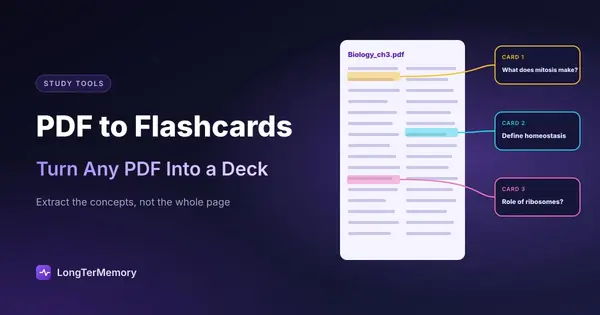
- How AI Turns a PDF Into Flashcards
- What Makes a Good Flashcard From a PDF
- A Practical PDF to Flashcards Workflow
- How to Choose a PDF to Flashcards Converter
- When This Workflow Works Best
- Common Mistakes to Avoid
- Where LongTerMemory Fits In
- Go Deeper
- Frequently Asked Questions
- The Bottom Line
Most of your best study material lives in PDFs. Textbooks, lecture handouts, certification manuals, research papers, company documentation. They are dense, searchable, and easy to store. They are also terrible for actually learning from.
Reading a PDF is passive. You scroll, you highlight, you nod along, and a week later the details have evaporated. The real learning happens when you force yourself to retrieve what you read, without the source in front of you. That is what flashcards are for.
The problem is that building a flashcard deck from a PDF by hand is exhausting. A single 40-page chapter can easily produce 80 to 120 question-and-answer pairs, and most people quit before they finish the first section.
This is where the PDF to flashcards workflow changes everything. Instead of copying and rephrasing every concept yourself, modern AI tools can read the document, extract the testable ideas, and generate a ready-to-review deck in minutes. Done well, it removes the most tedious part of studying without lowering the quality of what you actually learn.
A note on who’s writing: LongTerMemory is an AI study app that turns your own PDFs, slides and notes into practice questions and schedules them with spaced repetition, on the web, iOS and Android. The workflow below works with any tool, and we point out where ours fits and where it doesn’t.
Why Turn Your PDFs Into Flashcards?
PDFs are optimized for distribution, not for memory. They present information in a linear format that feels easy to consume but produces weak retention. Cognitive psychologists have known for decades that passive re-reading is one of the least effective study strategies available.
The alternative is active recall. When you test yourself on a concept, you strengthen the neural pathways involved in retrieving it. That retrieval practice is what makes information stick. Our guide on how the testing effect improves active learning explains the mechanism in detail, but the short version is simple: the effort of remembering is the work that creates memory.
Flashcards turn a PDF into a retrieval engine. Each card asks a single question, and each correct answer reinforces the underlying concept. The challenge has always been creating those cards. An AI converter solves that bottleneck by generating the first draft automatically, so you spend your time reviewing and refining instead of typing.
The Manual Method (And Why Most People Never Finish)
If you have ever tried to build flashcards from a textbook chapter, you know the grind. It looks like this:
- Read a section and decide what matters.
- Rephrase each key idea into a question.
- Write the answer on the reverse side.
- Repeat for every concept in the chapter.
For a 30-page document, this can take three to six hours. It is cognitively demanding because you are doing two jobs at once: understanding the material and designing good questions. Many students burn out and either abandon the deck or create low-quality cards that do not force real retrieval.
The manual method also encourages bad card design. Under time pressure, people write cards that are too long, too vague, or too dependent on context. A card like “What are the main causes of the French Revolution?” is hard to answer consistently. A card like “What financial crisis directly preceded the outbreak of the French Revolution in 1789?” is specific, testable, and far more useful.
Good flashcards require judgment and precision. Those are exactly the skills that get sacrificed when you are racing to finish a deck before an exam.
How AI Turns a PDF Into Flashcards
Modern AI study tools can ingest a PDF, identify the concepts most worth remembering, and generate question-and-answer pairs from the text. The best tools do not just summarize; they transform prose into discrete retrieval prompts.
Here is what a reliable conversion workflow looks like:
| Step | What happens | Why it matters |
|---|---|---|
| Upload PDF | The tool reads and parses the document | Text-based PDFs work best; scanned pages need OCR first |
| Extract concepts | AI identifies key definitions, facts, and relationships | Focuses on testable material instead of examples and filler |
| Generate Q&A pairs | Each concept becomes a question and answer | Creates the first draft of your deck automatically |
| Review and edit | You check each card for accuracy and clarity | Keeps you in control of quality |
| Sync to spaced repetition | Cards enter a review schedule | Reviews are timed to combat the forgetting curve |
The quality of the output depends heavily on the source PDF. Clean, well-structured documents with clear headings produce better cards than scanned images or heavily formatted slides. But even with imperfect input, an AI-generated first draft is almost always faster than starting from a blank page.
What Makes a Good Flashcard From a PDF
Not every generated card is worth keeping. A good flashcard has four characteristics:
- One concept per card. If a card asks for three definitions at once, you will not know which one you forgot.
- Specific, unambiguous questions. Vague questions produce vague answers. Be precise.
- Context-independent answers. The card should be answerable without looking at the original PDF.
- Active wording. Frame the question so it requires recall, not recognition.
For example, from a medical PDF you might extract:
- Bad card: What is diabetes? (Too broad.)
- Good card: Which hormone is deficient or ineffective in type 1 diabetes mellitus? (Specific and testable.)
When you use a conversion tool, treat the AI output as a first draft. Your job is to scan for cards that are too long, too vague, or factually questionable, and fix them before they enter your review queue. That five-minute editing step usually separates a useful deck from a frustrating one.
A Practical PDF to Flashcards Workflow
Here is a repeatable process you can use with any AI flashcard generator, including LongTerMemory.
Step 1: Choose the right PDF. Start with material you actually need to remember. Lecture notes, textbook chapters, certification guides, and technical manuals all work well. Avoid using the tool on readings you only need to skim.
Step 2: Upload and generate. Let the AI produce an initial batch of cards. Most tools allow you to control the density. A good starting point is 10 to 15 cards per dense page of text.
Step 3: Review every card. Check for accuracy first. AI can misread formatting or hallucinate details, especially with scanned PDFs. Then check for card quality. Split multi-concept cards, rewrite vague questions, and delete anything that feels like trivia.
Step 4: Add context where needed. If a concept only makes sense with an example, add one. If a term has multiple meanings, specify which one your PDF uses. This step is where your understanding of the material improves.
Step 5: Start reviewing with spaced repetition. Add the deck to a spaced repetition system. The algorithm will schedule reviews at increasing intervals, surfacing each card just before you are likely to forget it. Our article on the science of spaced repetition covers why that timing matters so much.
How to Choose a PDF to Flashcards Converter
Most tools promise to create flashcards from a PDF. Fewer do it well. Before you upload a whole textbook, test a converter on one chapter you already know and check five things:
| Criterion | What to look for |
|---|---|
| Input handling | Long PDFs, slides, and two-column layouts read correctly, with no missing sections |
| Card quality | One concept per card, specific questions, answers taken from your document |
| Editing | You can fix, split, and delete cards quickly before studying |
| Scheduling | Built-in spaced repetition, not just a shuffled list of cards |
| Privacy | Clear rules on what happens to the documents you upload |
A converter that fails two of these will cost you more time than it saves. For a side-by-side look at specific apps, see our comparison of the best flashcard apps for PDFs, from Anki and Quizlet to AI tools.
When This Workflow Works Best
This workflow is not for every document, but it shines in a few specific situations.
Certification exams. Most professional certifications come with dense PDF study guides. Converting them into flashcards lets you review the exact facts, definitions, and procedures the exam tests.
Medical and legal education. These fields rely on memorizing vast numbers of terms, protocols, and cases. An AI converter can turn a pathology chapter or a case brief into a focused review deck.
Language learning. Grammar guides and vocabulary lists in PDF format can become drill cards quickly. Pair them with active recall techniques for better retention.
Technical documentation. Engineers and developers often need to remember command syntax, configuration steps, and architectural principles. Flashcards help you keep those details accessible without re-reading the manual every time.
Research and academia. When you read papers for a thesis or literature review, extracting key findings into cards helps you remember the evidence behind each claim.
Common Mistakes to Avoid
Automation is powerful, but it is not magic. Avoid these common errors when converting PDFs to flashcards.
- Accepting every generated card. AI drafts include weak cards. Skipping the review step leads to bloated decks and poor retention.
- Making cards too complex. Long answers defeat the purpose. If a card takes more than a few sentences to answer, break it down.
- Ignoring the source. Always keep the original PDF available. When a card is confusing, go back to the context.
- Skipping spaced repetition. Flashcards without a review schedule become a pile of unused notes. The algorithm is what makes the system work.
- Starting with low-quality PDFs. Scanned images, heavy watermarks, and broken formatting reduce accuracy. Use clean documents when possible.
Where LongTerMemory Fits In
LongTerMemory was built around the idea that studying should not start with data entry. You upload a PDF, and the platform generates optimized question-and-answer packages directly from the text. The cards are designed for retrieval, not just recognition, and they feed into a spaced repetition engine inspired by proven SM-2 scheduling.
A few things make the LongTerMemory workflow especially useful for converting PDFs:
- Security-first architecture. Your documents are isolated rather than pooled in a generic cloud. That matters if you are studying copyrighted textbooks, confidential manuals, or sensitive training material.
- Google Docs integration. If your PDF started as a Google Doc or lecture notes, the Quick Q&A Generator add-on lets you generate cards without leaving your document.
- Mobile review sessions. Native iOS and Android apps let you review your deck wherever you are, so small gaps in your day become productive study time.
You can see how LongTerMemory compares to other options in our AI study tools comparison.
Go Deeper
- How to annotate PDFs for studying
- Compress your notes into one-page summaries
- The best flashcard apps compared
- The best spaced repetition apps
- Anki alternatives with less setup
- How to study for exams, step by step
Frequently Asked Questions
Can any PDF be converted to flashcards? Most text-based PDFs work well. Scanned PDFs may need OCR first. The cleaner the formatting, the better the output.
Can I turn lecture slides into flashcards? Yes. Export the slides as a PDF and convert them like any other document. Slides are short and structured, so they usually produce clean cards, but add context to any card that only makes sense next to a diagram.
How accurate are AI-generated flashcards? Accuracy is usually high for well-formatted documents, but you should always review the cards before studying. AI can misinterpret tables, footnotes, or ambiguous wording.
Is converting PDF to flashcards considered cheating? No. Creating study material from your own notes or legally obtained documents is a standard learning practice. The learning happens when you review the cards, not when they are generated.
How many flashcards should I make per page? Aim for 5 to 15 cards per page depending on density. Fewer is better than too many. Quality always beats quantity.
Do I still need to read the PDF if I turn it into flashcards? Yes. Flashcards help you remember what you read. They are not a substitute for understanding the material in the first place.
The Bottom Line
Turning a PDF to flashcards is one of the fastest ways to transform passive reading into active learning. The manual approach works, but most people do not have the time or stamina to do it well. AI-assisted generation gives you a strong first draft, your judgment turns it into a high-quality deck, and spaced repetition handles the timing.
The real value is not the flashcards themselves. It is the retrieval practice they make possible. Every time you answer a card correctly, you reinforce a memory. Every time you struggle and then check the answer, you strengthen the trace.
If you have a PDF sitting on your desktop that you have been meaning to study, try converting the first chapter today. Review the generated cards, fix the weak ones, and start a spaced repetition schedule. Within a week, you will likely remember more from that chapter than you would have retained from three passive readings.
Ready to turn your PDFs into a real study system? Try LongTerMemory and see how fast you can build a review-ready deck from the documents you already have.