How to Make Anki Flashcards With AI: 3 Methods That Work
Generate Anki cards with AI from your notes and PDFs: a ready-to-import prompt, the file headers Anki reads, cloze cards, add-ons, and the checks that matter.
Table of Contents
- Why Use AI for the Cards and Anki for the Reviews
- Method 1: Chatbot + Text Import (Recommended)
- Step 1: Give the chatbot your material and a strict prompt
- Step 2: Save the output as a .txt file
- Step 3: Import into Anki
- Optional headers worth knowing
- Cloze Cards With AI
- Method 2: AI Add-ons Inside Anki
- Method 3: Tools That Export a File for Anki
- Check Every Card Before Your First Review
- Anki Settings for AI-Generated Decks
- When Anki Isn't the Right Endpoint
- FAQ
- Can AI make Anki flashcards?
- How do I import AI-generated cards into Anki?
- Can ChatGPT make Anki cloze cards?
- Is there a free AI flashcard generator for Anki?
- Are AI-generated Anki cards accurate?
- The Bottom Line
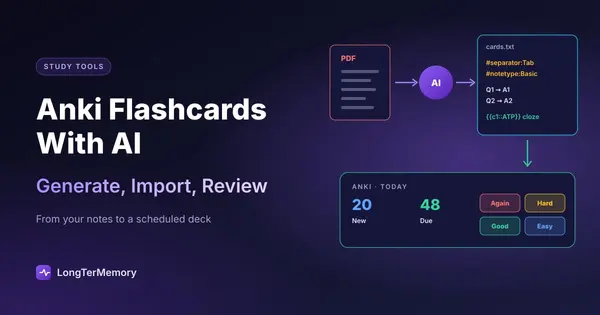
Short answer: the most reliable way to make Anki flashcards with AI is to have a chatbot (ChatGPT, Claude, Gemini) write the cards from your notes as a tab-separated text file, then import it with File > Import in Anki. Two header lines at the top of the file (#separator:Tab and #notetype:Basic) let Anki set up the import for you, and the same trick works for cloze cards. The other routes are an AI add-on inside Anki, or a tool that exports a CSV (NotebookLM, for example). Whichever you choose, check the cards before your first review: Anki will schedule a wrong card just as faithfully as a right one.
Anki is still the best free scheduler for long-term memory, but writing cards by hand is the reason many people quit it. This guide shows how to let AI do the drafting while Anki does what it’s best at: deciding when each card comes back.
Why Use AI for the Cards and Anki for the Reviews
The two halves of flashcard study need different tools:
- Making cards is a writing job: read the material, pick what matters, phrase it as a question. Language models are good at this, and a chapter that takes an hour by hand takes a few minutes.
- Reviewing cards is a scheduling job: show each card just before you’d forget it. Anki does this better than any chatbot. It tracks every card’s history and, with FSRS (available since Anki 23.10), models your memory from your own reviews.
Chatbots now make interactive decks of their own (see ChatGPT flashcards), but they don’t schedule reviews over weeks. Anki does. Combine them and you get the speed of one and the memory of the other. If you’re new to Anki, start with how to use Anki effectively from day one so the settings don’t bury you in reviews.
Method 1: Chatbot + Text Import (Recommended)
This works with any chatbot, costs nothing beyond the chatbot’s own plan, and gives you full control.
Step 1: Give the chatbot your material and a strict prompt
Attach a chapter, your lecture notes or the slides, then paste:
Make Anki flashcards from the attached material. Output only a plain text file, no commentary. First two lines exactly: #separator:Tab #notetype:Basic Then one card per line: question, a tab character, answer. Rules: one fact per card; answers under 15 words; questions that require recall, not yes/no; no card whose question contains its answer; only facts stated in the material. Make 25 cards.
Generate one chapter or lecture at a time. Long outputs drift: after 40 or 50 cards, questions get vaguer and start repeating.
Step 2: Save the output as a .txt file
Copy the output into a plain text editor and save it as biology-ch7.txt (UTF-8). Check that the separators really are tabs: some chat interfaces turn tabs into spaces when you copy. If that happens, ask for a semicolon instead and change the first line to #separator:Semicolon, or ask for a downloadable file.
Step 3: Import into Anki
In Anki on your computer, choose File > Import and select the file. Because of the header lines, Anki already knows the separator and the note type. Check three things in the import screen:
- Deck: pick the deck the cards should go to (or add a
#deck:line to the file header, which works for a deck that already exists). - Field mapping: column 1 to Front, column 2 to Back.
- Duplicates: choose what to do if a card already exists, useful when you regenerate a chapter.
Then import. The cards appear as new cards and Anki introduces them at your daily new-card limit.
Optional headers worth knowing
Since version 2.1.54, Anki reads a few more header lines at the top of a text file:
| Header | What it does |
|---|---|
#separator:Tab | Fields are separated by tabs (also Comma, Semicolon, Pipe) |
#notetype:Basic | Note type for every card (Cloze, Basic (and reversed card)…) |
#deck:Biology | Target deck, if a deck with that name already exists |
#tags:biology ch7 | Tags added to every note |
#html:true | Treat fields as HTML, for bold or line breaks |
Cloze Cards With AI
Cloze deletions (fill in the blank inside a sentence) are ideal for definitions and processes, and AI writes them well. Ask for this format:
Output a plain text file. First lines exactly: #separator:Tab #notetype:Cloze Then one note per line: a sentence from the material with the key term wrapped as {{c1::term}}. Use c1, c2 for two separate blanks in the same sentence when both matter. One idea per sentence.
A line then looks like:
The {{c1::mitochondria}} produce most of the cell's {{c2::ATP}}.
Anki creates one card per cloze number, so this line gives you two cards. Keep it to two or three blanks per sentence; a sentence with six blanks is a list in disguise.
Method 2: AI Add-ons Inside Anki
Several add-ons on AnkiWeb generate cards with a language model directly in Anki, usually with your own API key from an AI provider. They save the copy-and-paste step and can fill fields of an existing note.
Before installing one:
- Check when it was last updated and which Anki versions it supports. Add-ons break when Anki changes, and some are abandoned.
- Read the reviews on its AnkiWeb page.
- Understand the cost: with your own API key you pay the AI provider per use. For text, it’s usually small, but it adds up on whole textbooks.
- Remember that add-ons run code on your computer. Install only well-reviewed ones.
Add-ons work only in the desktop app; the cards then sync to AnkiWeb, AnkiDroid and AnkiMobile like any other card.
Method 3: Tools That Export a File for Anki
Some AI study tools generate cards from your files and let you download them:
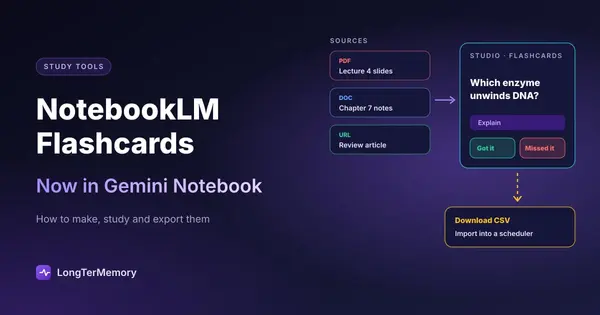
- NotebookLM (now Gemini Notebook) makes flashcards from the sources in a notebook and offers a CSV download. Import it with the separator set to Comma. See NotebookLM flashcards for the steps.
- Flashcard makers that export
.apkgor CSV exist too. Check that the export keeps one card per row and doesn’t lock it behind a paid plan before you generate a semester’s worth of cards.
The advantage over a chatbot is that these tools read long PDFs reliably and keep answers tied to your sources. The disadvantage is one more app in the chain.
Check Every Card Before Your First Review
The first review session is the right moment to catch problems, because a card you’ve reviewed five times feels true. Use Anki’s Browse window to scan the new cards before studying:
- Accuracy: compare numbers, dates, doses and definitions with the source.
- One idea per card: split any answer that’s a list.
- No giveaways: if the question contains the answer, rewrite it.
- Relevance: suspend or delete trivia the exam won’t ask.
- Your own cards: add cards for questions you got wrong in practice tests. AI can’t write those.
Plan on 10 to 15 minutes per 50 cards. It’s the best time you’ll spend on the deck. The full checklist, with common problems and fixes, is in our guide to AI flashcard generator tools.
Anki Settings for AI-Generated Decks
AI makes it easy to add 300 cards in an afternoon. Anki will then show you all of them, and the reviews multiply. A few settings keep that under control:
- New cards per day: 15 to 30 is a sustainable range for most students. 100 new cards a day becomes 1,000 reviews a week a month later.
- Turn on FSRS in the deck options (Anki 23.10 or later). It usually reaches the same retention with fewer reviews than the old SM-2 scheduler.
- Tag by source (
#tags:lecture4) so you can find and fix a batch later. - Suspend instead of deleting cards you’re unsure about, then check them against the source when you have time.
When Anki Isn’t the Right Endpoint
The chatbot-to-Anki workflow is great for a few chapters. For a whole semester of PDFs it means a lot of copying, file checks and imports, and Anki’s learning curve is real. If that’s where you are, two options:
- An easier scheduler: the best Anki alternatives compares apps with less setup.
- A tool that generates and schedules in one place: LongTerMemory reads your PDFs, slides and notes, generates questions from that material and schedules them with spaced repetition on the web, iOS and Android. It doesn’t export to Anki, so pick it instead of this workflow, not on top of it. We compare the two honestly in Anki vs LongTerMemory.
FAQ
Can AI make Anki flashcards?
Yes. Ask a chatbot to write the cards as a tab-separated text file with the #separator:Tab and #notetype:Basic header lines, then use File > Import in Anki. AI add-ons and tools that export CSV are the other options.
How do I import AI-generated cards into Anki?
Save the cards as a .txt or .csv file with one card per line and question and answer separated by a tab, comma or semicolon. In Anki desktop, choose File > Import, check the separator, deck and field mapping, and import.
Can ChatGPT make Anki cloze cards?
Yes. Ask for sentences with the key term wrapped as {{c1::term}}, and add #notetype:Cloze to the file header so Anki uses the Cloze note type.
Is there a free AI flashcard generator for Anki?
The chatbot method works with free chatbot plans, and Anki is free on desktop, Android and the web. Add-ons that use an AI provider’s API usually cost a small amount per use.
Are AI-generated Anki cards accurate?
Mostly, when the AI works from your own material, but not always. Check numbers, dates and definitions against the source before your first review, and delete anything you can’t verify.
The Bottom Line
Let AI write the first draft of your Anki cards and let Anki schedule them: a strict prompt, two header lines and File > Import are all it takes. Keep batches small, check every card once, and keep your new-card limit sane. And if you’d rather skip the files entirely, try LongTerMemory free for 7 days: upload a chapter and it generates the questions and schedules the reviews in one place.
Anki import options checked against the Anki manual in October 2026. Chatbot and add-on features change often; check the current versions before you rely on them.