How to Use Kindle Highlights for Study Review
Turn Kindle highlights into real study review: export them, convert them into active recall questions, and build a long-term library of book knowledge.
Table of Contents
- Why Highlights Alone Don't Help You Remember
- Step 1: Exporting Kindle Highlights to a Review System
- Your export options
- Clean up before you import
- Step 2: Using Highlights for Active Recall Instead of Rereading
- Four ways to convert a highlight into a question
- Add your own words
- Keep the context
- Step 3: Review on a Spaced Schedule
- Building a Long-Term Study Library From Book Highlights
- Organize by topic, not just by book
- Set a sustainable pace
- For students: textbooks and course readers
- Common Mistakes to Avoid
- Let AI Do the Conversion Work
- Frequently Asked Questions
- Can I export all my Kindle highlights at once?
- Why are some of my Kindle highlights missing from the export?
- Do highlights from PDFs work on Kindle?
- How many highlights should I turn into flashcards?
- Is reviewing highlights daily in Readwise enough?
- The Bottom Line
To use Kindle highlights for study review, export them out of the Kindle ecosystem, turn the important ones into questions you answer from memory, and review those questions on a spaced schedule. Highlights on their own are a reading log, not a study tool. The value comes from what you do with them after you close the book.
Let me guess. You’ve got a Kindle library with hundreds of highlights. Maybe thousands. Every one of them felt important when you swiped across it. And if someone asked you right now to explain three ideas from a book you finished last spring, you’d probably struggle.
That’s not a you problem. That’s a highlighting problem. Research has been pretty clear on this for over a decade, and the good news is that the fix is simple once you see it. It involves turning highlights into questions, which some of the AI study tools we tested can do for you.
Why Highlights Alone Don’t Help You Remember
Highlighting is one of the least effective study techniques, because it feels productive while asking almost nothing of your memory. In their widely cited 2013 review of learning techniques, John Dunlosky and colleagues rated highlighting and underlining as “low utility,” while practice testing and distributed practice earned the only “high utility” ratings.
Why? Three reasons:
- Highlighting is recognition, not recall. When you reread a highlight, you think “yes, I know this.” But recognizing a sentence is a different skill from producing the idea on your own.
- Highlights are out of context. Six months later, a single sentence from chapter 7 often makes no sense without the argument around it.
- Nobody reviews them. Most highlights are written once and never seen again. The Kindle doesn’t remind you they exist.
Here’s how the main ways of using highlights compare:
| Approach | Effort | Retention after a few months | Why |
|---|---|---|---|
| Highlight and never look again | Very low | Very low | No retrieval, no review |
| Reread all highlights before an exam | Medium | Low | Recognition only, crammed |
| Daily random highlight review | Low | Medium | Repetition, but passive |
| Highlights turned into questions + spaced review | Medium | High | Retrieval and spacing together |
That last row is the one we’re building toward. It combines the two techniques the research rates highest: active recall and spaced repetition.
Step 1: Exporting Kindle Highlights to a Review System
The first job is to get your highlights out of the Kindle and into a place where you can review, edit, and schedule them. There are four main ways to do it, and the right one depends on where your books came from.
Your export options
| Method | What it captures | Best for | Limitations |
|---|---|---|---|
| Kindle Notebook (read.amazon.com/notebook) | Highlights and notes from books bought on Amazon | Quick browsing and copying | No real export button, manual copying |
| Export Notebook in the Kindle app | Highlights for one book, sent by email | One book at a time | Not available for every title |
| My Clippings.txt on e-ink Kindles | Every highlight on the device, including personal documents | Sideloaded PDFs and docs | Messy text file, needs cleanup |
| Readwise and similar sync services | Automatic, ongoing sync of all Amazon highlights | Large libraries, ongoing reading | Paid subscription |
A few practical notes:
- My Clippings.txt lives in the “documents” folder when you connect an e-ink Kindle to your computer by USB. It’s the only route that includes highlights from documents you sent to the device yourself, which matters a lot for students reading PDFs of lecture notes or papers.
- Publishers set export limits. Many books cap how much you can export, often around 10 percent of the text, though it varies. If your export seems to stop partway through, that’s usually why.
- Readwise is the most popular sync tool. It connects to your Amazon account, pulls in highlights automatically, and shows you a daily review. We’ve written a separate deep dive on using Readwise to review highlights and study notes if you want the full setup.
Clean up before you import
Whatever method you use, do a quick cleanup pass first. Delete duplicate highlights (Kindle often saves a new one when you adjust a selection), drop highlights that are just quotes you liked, and keep the ones that contain a concept, a fact, or an argument you want to own.
A good rule of thumb: keep about one in three highlights. If you highlighted 90 passages in a book, 25 to 35 study-worthy ones is a healthy result.
Step 2: Using Highlights for Active Recall Instead of Rereading
The single biggest upgrade is turning each kept highlight into a question you have to answer from memory. Rereading a highlight takes 3 seconds and teaches you almost nothing. Answering a question about it takes 15 seconds and actually strengthens the memory.
This is the testing effect, one of the most replicated findings in cognitive psychology. In a well-known 2006 study, Roediger and Karpicke had students either reread a passage or take a recall test on it. A week later, the testing group remembered significantly more, despite spending less time with the text. Our guide to active recall techniques covers the research in more depth.
Four ways to convert a highlight into a question
Let’s use a real-style highlight from a psychology book:
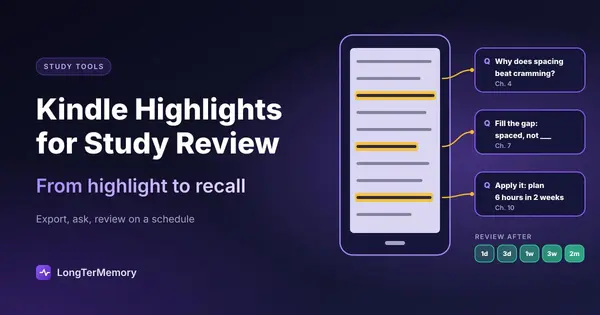
“The spacing effect shows that information is better retained when study sessions are spread out over time rather than massed together.”
Here are four question formats you could build from it:
| Format | Example |
|---|---|
| Direct question | What does the spacing effect say about how to schedule study sessions? |
| Cloze (fill the gap) | Information is better retained when study sessions are ______ rather than massed. |
| Why question | Why might spreading study sessions out lead to better retention than cramming? |
| Application question | You have 6 hours to prepare for an exam in 2 weeks. How should you split them, and why? |
Direct and cloze questions are fast to make and good for facts. Why and application questions take longer but build understanding, which is what you need for essay exams or applying ideas at work.
Add your own words
Here’s a trick that makes a big difference: rewrite the answer in your own words, not the author’s. When you reconstruct an idea yourself, you process it more deeply. This is sometimes called the generation effect, and it’s why copying highlights into a notebook verbatim helps much less than paraphrasing them.
Keep the context
Add the book title, chapter, and one line of context to every card. “Chapter 4, about why rewards backfire for creative work” turns a lonely sentence back into a connected idea.
Step 3: Review on a Spaced Schedule
Once your highlights are questions, review them at increasing intervals, so each idea comes back right before you’d forget it. This is what moves knowledge from “I read that once” to “I know that.”
A simple schedule that works for book knowledge:
| Review | When | Time per book |
|---|---|---|
| 1st | 1 day after finishing the chapter | 5 minutes |
| 2nd | 3 days later | 3 to 4 minutes |
| 3rd | 1 week later | 3 minutes |
| 4th | 3 weeks later | 2 minutes |
| 5th | 2 months later | 1 to 2 minutes |
Notice how the time drops. Once an idea is solid, reviewing it is quick. A 2006 meta-analysis by Cepeda and colleagues, pooling results from hundreds of experiments, confirmed that spaced practice beats massed practice for long-term retention, and the gap gets bigger the longer you need to remember.
You don’t need to track this by hand. Any spaced repetition app will schedule the intervals for you. If you’re curious about the underlying science, see the science of spaced repetition.
Building a Long-Term Study Library From Book Highlights
Over time, your converted highlights become a personal knowledge library: a searchable, reviewable collection of everything worth keeping from every book you read. This is where Kindle highlights go from a study trick to a genuine long-term advantage.
Organize by topic, not just by book
Books overlap. A book on habits, a book on motivation, and a book on learning science will all say things about rewards and feedback. If you tag cards by topic (for example “motivation,” “memory,” “negotiation,” “statistics”), you start to see how ideas connect across authors.
A simple structure:
- Deck or folder per subject area (psychology, finance, programming, history)
- Tags for book title and author so you can find the source
- A “conflicts” tag for places where two books disagree, which make excellent essay or discussion material
Set a sustainable pace
The biggest risk with a highlight library is overload. If you add 50 new cards from every book, you’ll burn out in a month. Some realistic numbers:
| Reading pace | New cards per book | New cards per week | Daily review time after 6 months |
|---|---|---|---|
| 1 book a month | 25 to 35 | 6 to 9 | About 5 to 10 minutes |
| 2 books a month | 20 to 30 | 10 to 15 | About 10 to 15 minutes |
| 1 book a week | 15 to 20 | 15 to 20 | About 15 to 20 minutes |
These are rough estimates, since review time depends on how hard the cards are, but the pattern holds: fewer, better cards beat more cards.
For students: textbooks and course readers
If you read textbooks or course readers on Kindle, the same process becomes a full exam strategy:
- Highlight while reading (but sparingly, one or two per page at most).
- At the end of each reading session, convert the session’s highlights into 5 to 10 questions.
- Review daily for 10 to 15 minutes.
- Before the exam, you’re not rereading 300 pages. You’re answering questions you’ve already practiced for weeks.
This approach pairs nicely with techniques for memorizing everything you read.
Common Mistakes to Avoid
Most people fail with highlights by keeping too many, converting too few, and never reviewing. Watch out for these:
- Highlighting entire paragraphs. If everything is highlighted, nothing is. Aim for the one sentence that carries the idea.
- Importing everything. A 400-card deck from one book is a recipe for skipping reviews. Curate first.
- Making vague questions. “What’s chapter 3 about?” is too broad to answer consistently. Ask about one specific idea per card.
- Only using cloze cards. They’re fast, but they can become a guessing game of missing words. Mix in why and application questions.
- Waiting until the book is finished. Convert highlights at the end of each reading session, while the context is fresh.
Let AI Do the Conversion Work
The slowest part of this whole system is step 2: turning highlights into good questions. It’s also the step most people skip, which is exactly why their highlights never stick.
That’s what LongTerMemory is built for. Paste your exported highlights or upload a PDF of your notes, and it generates question and answer pairs automatically, then schedules them with spaced repetition so each idea returns at the right moment. Instead of spending an evening writing cards for one book, you spend a few minutes reviewing and editing the generated questions. The free trial lets you try it on your current book’s highlights and see the difference before you commit.
Frequently Asked Questions
Can I export all my Kindle highlights at once?
Not directly from Amazon. The Kindle Notebook page shows them book by book. For bulk export, use a sync service like Readwise, or the My Clippings.txt file on an e-ink Kindle.
Why are some of my Kindle highlights missing from the export?
Publishers set limits on how much of a book can be exported. Once you hit that limit, further highlights stay on your device but may not appear in exports.
Do highlights from PDFs work on Kindle?
Yes, on e-ink Kindles, highlights from personal documents are saved to My Clippings.txt. They usually don’t appear in the online Kindle Notebook.
How many highlights should I turn into flashcards?
A good starting point is about one in three. Keep the ones that contain a concept, a fact, or an argument you want to remember, and skip quotes you just enjoyed.
Is reviewing highlights daily in Readwise enough?
It’s much better than never reviewing, but rereading highlights is still passive. Converting key highlights into questions and answering them from memory gives you far stronger retention.
The Bottom Line
Kindle highlights become a powerful study tool only when you export them, turn the best ones into questions, and review those questions on a spaced schedule. Highlighting is the start of the process, not the end.
Try it tonight with the book you’re reading right now: pick your five best highlights from the last chapter and write one question for each. Tomorrow, answer them without looking. You’ll feel the difference immediately.