Best Anki Alternatives in 2026: Easier Apps, Compared
The best Anki alternatives for 2026: RemNote, Mochi, Brainscape, Quizlet, Knowt and LongTerMemory, compared on price, scheduling and Anki deck import.
Table of Contents
- Why People Look for Something Other Than Anki
- The Best Anki Alternatives at a Glance
- The Alternatives in Detail
- RemNote: Best for Notes and Flashcards Together
- Mochi: Best for Anki Users Who Want Simplicity
- Brainscape: Best for Simple Daily Review
- Quizlet: Best for Ease of Use
- Knowt: Best Free, Familiar App
- LongTerMemory: Best When Card Creation Is the Problem
- When to Choose LongTerMemory, and When Not
- How to Choose in One Minute
- How to Move Your Anki Decks
- Go Deeper
- FAQ
- What is the best free alternative to Anki?
- Is there an app like Anki but easier?
- Can I import my Anki decks into another app?
- Is Anki still worth using in 2026?
- What's the best Anki alternative for medical students?
- The Bottom Line
Short answer: if you like Anki’s scheduling but not its interface, try Mochi (minimal, Markdown, imports your Anki decks) or RemNote (notes and flashcards in one place, also imports Anki decks). For a simpler app with spaced repetition in the free plan, Brainscape. For an easy, social experience, Quizlet or Knowt. And if your real problem is the hours spent making cards, LongTerMemory generates them from your PDFs and notes and schedules the reviews.
Anki is free, powerful and backed by decades of memory research, and for many people it’s still the right tool. But it has well-known friction points, and most people looking for an Anki alternative are trying to fix one of them. This guide compares six options on exactly those points, with prices checked in October 2026.
Why People Look for Something Other Than Anki
Anki’s strengths are real: the best-known spaced repetition scheduler (with FSRS available as an option since version 23.10), full offline use, deep customization, and huge shared decks, especially for medicine and languages. The complaints are just as consistent:
- Making cards takes hours. Anki has no built-in way to turn a PDF or a lecture into cards. Every card is typed, imported from a spreadsheet, or downloaded from someone else’s deck.
- The learning curve is steep. Note types, card templates, deck options, learning steps: powerful, but nothing explains them inside the app.
- Sync and mobile friction. AnkiWeb sync is free but can force a one-way sync after certain changes, and the iOS app costs $24.99 while desktop and Android are free.
- No built-in AI. AI card generation exists only through community add-ons.
If none of these bother you, stay with Anki and make it easier with our day-one setup guide. If one of them does, the right alternative depends on which one.
The Best Anki Alternatives at a Glance
Prices in USD, as listed on each tool’s site or app store in October 2026. They change often: check before you buy. Anki itself: free on desktop and Android, $24.99 one-time on iOS.
| Tool | Free plan | Paid plans | Scheduling | Imports Anki decks | AI card generation | Best for |
|---|---|---|---|---|---|---|
| RemNote | Unlimited notes and cards | Pro $96/yr; Pro with AI $216/yr | Spaced repetition | Yes (.apkg) | With Pro with AI | Notes and flashcards in one place |
| Mochi | Yes, local only (no sync) | Pro $5/mo, billed annually | Spaced repetition, FSRS optional | Yes (.apkg) | Small free allowance | Anki users who want simplicity |
| Brainscape | Yes, includes spaced repetition | Pro from $7.99/mo | Confidence-based repetition | Via CSV/text | Yes | Simple daily review |
| Quizlet | Flashcards free | Plus $35.99/yr; Unlimited $44.99/yr | Adaptive Learn mode, not a full scheduler | Via text | Yes | Ease of use, sharing |
| Knowt | Yes, generous | Ultra $149.99/yr or $24.99/mo | Quizlet-style study modes | Via CSV/text paste | Yes | A free, familiar app |
| LongTerMemory | 7-day free trial | $48 for 4 months or $84 for 12 (Basic); $96 or $120 (Pro), one-time | Spaced repetition | No | Yes, the core feature | Cards generated from your own material |
The Alternatives in Detail
RemNote: Best for Notes and Flashcards Together
What it is: a note-taking app where any line can become a flashcard, reviewed with spaced repetition and always linked back to the notes it came from.
Why switch from Anki: you stop maintaining notes and a separate deck. Concepts stay connected to their context, which helps with subjects where facts only make sense together. RemNote imports Anki .apkg decks, and imported cards go into a separate queue so they don’t flood your daily reviews. The free plan includes unlimited notes and flashcards. See our guide to using RemNote for notes and flashcards.
Downsides: it’s a whole knowledge system to learn. The free plan limits PDF annotation, and AI features need Pro with AI ($216 a year). Anki’s custom card styling doesn’t carry over.
Mochi: Best for Anki Users Who Want Simplicity
What it is: a clean, Markdown-based flashcard app with spaced repetition, and FSRS available as an alternative scheduler.
Why switch from Anki: it keeps what Anki does well (scheduling, offline use, your own cards) with a much simpler interface. It imports Anki decks, converting their formatting to Markdown, and Pro costs $5 a month billed annually.
Downsides: the free plan stores data locally only, without sync between devices. Complex Anki templates may need cleaning up before or after import. Its AI allowance on the free plan is small.
Brainscape: Best for Simple Daily Review
What it is: a flashcard app built on confidence-based repetition: after each card you rate how well you knew it from 1 to 5, and that rating decides when it returns.
Why switch from Anki: spaced repetition is included in the free plan, along with unlimited card creation and AI-generated cards, and the daily routine needs no configuration.
Downsides: there’s no direct .apkg import (move cards through a spreadsheet or text), the free plan limits the pre-made library, and the scheduler is far less configurable than Anki’s.
Quizlet: Best for Ease of Use
What it is: the most popular flashcard app, with study modes (Learn, Test, Match) and a huge library of public sets.
Why switch from Anki: almost no learning curve, easy sharing with classmates, and flashcards are free.
Downsides: Learn mode adapts to your answers but isn’t a full spaced repetition scheduler that plans each card over months, so it’s a step back for long-term retention. Learn rounds and practice tests are limited without Plus, and even basic Plus has monthly caps. If that’s a deal-breaker, see our list of Quizlet alternatives.
Knowt: Best Free, Familiar App
What it is: a free study app with Quizlet-style flashcards, Learn and practice test modes, plus AI that turns notes, PDFs and lecture recordings into study material.
Why switch from Anki: the study modes are free and the interface is friendly. To bring Anki cards over, export them to a spreadsheet and paste them into Knowt’s manual import.
Downsides: no .apkg import, ads on the free plan, and the most expensive subscription in this list if you want the AI features (Ultra, $149.99 a year).
LongTerMemory: Best When Card Creation Is the Problem
What it is: an AI study platform that reads your own material (PDFs, textbooks, lecture notes, web pages) and generates question-and-answer pairs from it, then schedules each one with spaced repetition. A Google Docs add-on generates questions as you write, and native iOS and Android apps handle the reviews.
Why switch from Anki: if you love what spaced repetition does but spend more time making cards than reviewing them, this removes the bottleneck: upload a chapter, review the generated questions, start studying. Your files stay isolated, which matters for licensed textbooks or confidential work material. Our Anki vs LongTerMemory comparison goes through the trade-offs point by point.
Downsides: it doesn’t import Anki decks and has no shared deck library. There’s no free-forever plan, only a 7-day trial; after that, plans are one-time payments for 4 or 12 months rather than a subscription.
When to Choose LongTerMemory, and When Not
Choose LongTerMemory if:
- your material is your own (lecture slides, textbooks, PDFs, notes) and making cards is what holds you back
- you want spaced repetition without configuring anything
- your material is sensitive or copyrighted
- you prefer a one-time payment to another subscription
Stay with Anki, or pick another alternative, if:
- you rely on a mature community deck, such as the big medical decks: Anki
- you need full offline use: Anki or Mochi
- you want to tune every scheduling parameter: Anki
- you want a free plan forever: Anki, RemNote, Mochi (local only), Brainscape or Knowt
How to Choose in One Minute
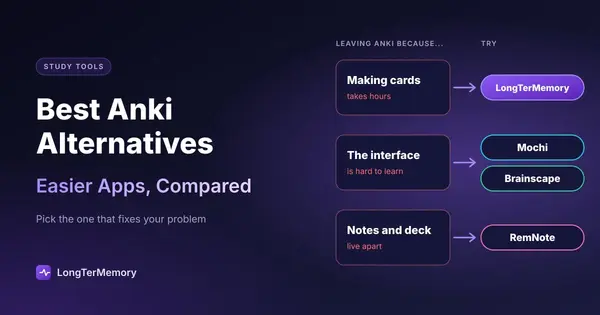
- What bothers you most about Anki?
- The interface: Mochi or Brainscape.
- Keeping notes and cards separate: RemNote.
- Making cards: LongTerMemory, or an AI flashcard generator that exports to Anki.
- Everything, you just want easy: Quizlet or Knowt.
- Do you need to keep your Anki decks? RemNote and Mochi import
.apkgfiles directly; others need a text or spreadsheet export. - Do you need long-term retention? Stay with a real spaced repetition scheduler: RemNote, Mochi, Brainscape or LongTerMemory (all compared in our guide to spaced repetition software). The research behind it is in the science of spaced repetition.
Studying for a technical certification or learning a tech stack? We compared Anki, RemNote and LongTerMemory for developers and for IT certifications. For tools beyond flashcards, see the best AI study tools.
How to Move Your Anki Decks
- To RemNote or Mochi: in Anki, export the deck as a package (
.apkg), then use the app’s import option. Formatting is simplified: custom CSS and scripts don’t carry over, so simple card templates import best. - To Brainscape, Quizlet or Knowt: export from Anki as plain text (notes in plain text), then import or paste the text, matching the separators between front and back.
- To LongTerMemory: there’s no deck import. Instead, upload the source material (the slides or chapters your deck came from) and let it generate fresh questions.
Use the move to clean up: drop cards you’ve known for months, split long cards into one fact each, and rewrite vague cards as clear questions.
Go Deeper
- The best flashcard apps compared
- How to study for USMLE Step 1
- Studying Chinese characters with Anki-style decks
- Managing Anki on a compressed USMLE timeline
- Readwise for reviewing highlights (with an Anki integration)
- The best Spanish decks and frequency lists
- Anki or LongTerMemory for pediatric board review
FAQ
What is the best free alternative to Anki?
RemNote if you want notes and flashcards together with spaced repetition and unlimited cards for free; Brainscape for a simpler app with spaced repetition in the free plan; Mochi if you want something close to Anki that works offline (its free plan doesn’t sync).
Is there an app like Anki but easier?
Mochi and Brainscape keep spaced repetition with far less configuration. Quizlet and Knowt are easier still, but their study modes are built for drilling a set rather than scheduling cards over months.
Can I import my Anki decks into another app?
Yes. RemNote and Mochi import .apkg files directly. For most other apps, export the deck from Anki as plain text and import or paste it.
Is Anki still worth using in 2026?
Yes, if you’re willing to learn it: the scheduler, offline use and shared decks are hard to beat, and FSRS made it more efficient. People switch when card creation, the interface or sync costs them more time than the reviews save.
What’s the best Anki alternative for medical students?
Most medical students stay with Anki for the shared decks. If you build your own cards from lecture slides and textbooks, RemNote (notes plus cards) or LongTerMemory (cards generated from your files) can save hours.
The Bottom Line
The best Anki alternative depends on which part of Anki you want to leave behind. For the interface, Mochi or Brainscape. For separate notes and decks, RemNote. For card creation, LongTerMemory: upload a chapter during the free trial and see the questions it generates from your own material.
Prices and features checked on the official sites and app listings in October 2026. Plans change often; we update this page regularly.