Is Anki Free on iPhone? AnkiMobile, AnkiWeb and Free Options
Anki's iPhone app costs $24.99, but you can study your cards on iOS for free. What the official apps cost, which lookalikes to avoid, and alternatives.
Table of Contents
- The Official Anki Apps and What They Cost
- Why AnkiMobile isn't free
- Free Ways to Use Anki on iPhone
- 1. AnkiWeb in Safari
- 2. Review on a laptop or Android device
- 3. Do the heavy work on desktop, light reviews on the phone
- How to Set Up AnkiWeb on Your iPhone
- Watch Out for Lookalike Apps
- Is AnkiMobile Worth $24.99?
- Free Alternatives on iPhone
- FAQ
- Is Anki free on iPhone?
- Why is Anki free on Android but not iPhone?
- Is AnkiApp the same as Anki?
- Can I use Anki on iPhone without paying?
- Is AnkiMobile a subscription?
- Can I use the same Anki deck on iPhone, Android and my computer?
- What's the best free Anki alternative for iPhone?
- The Bottom Line
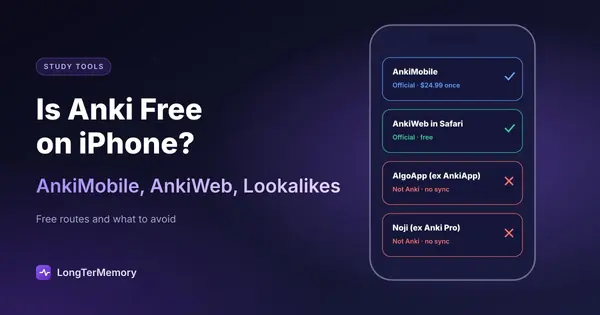
Short answer: no, the official Anki app for iPhone and iPad, AnkiMobile, is a one-time purchase of $24.99 in the US App Store. Everything else in the official Anki family is free: Anki on Windows, Mac and Linux, AnkiDroid on Android, and AnkiWeb, the sync service and website. That means you can study your cards on an iPhone for free by opening AnkiWeb in Safari, with some limits. Be careful with free apps on the App Store that have “Anki” in the name: Anki’s own documentation says apps like AnkiApp (now AlgoApp) and Anki Pro (now Noji) are made by other companies and are not part of the Anki ecosystem.
The price surprises a lot of people, because Anki is famously free everywhere else. This guide explains why it costs money on iOS, how far the free routes go, how to spot the lookalikes, and which alternatives are free on iPhone.
The Official Anki Apps and What They Cost
| App | Platform | Price | Notes |
|---|---|---|---|
| Anki | Windows, Mac, Linux | Free | The full app: create cards, settings, add-ons, import and export |
| AnkiWeb | Any browser | Free | Sync service and website for reviewing and adding cards |
| AnkiDroid | Android | Free | Open-source app maintained by volunteers |
| AnkiMobile | iPhone, iPad | $24.99 once (US) | Official iOS app; price varies by country |
These four are the official ecosystem, linked from Anki’s own website (apps.ankiweb.net). They all sync with each other through a free AnkiWeb account.
Why AnkiMobile isn’t free
Anki’s FAQ explains it: the project is run as a business, which makes accepting donations difficult, so AnkiMobile is sold to fund development, including the free desktop app and the AnkiWeb sync service it’s meant to be used with. The price is one-time, not a subscription. Over a four-year degree, $24.99 works out to about 50 cents a month.
Free Ways to Use Anki on iPhone
1. AnkiWeb in Safari
Log in at ankiweb.net in Safari and you can review your due cards and add new ones, synced with your other devices. You can also add it to your home screen for quicker access.
The limits: the website is simpler than the apps. Importing decks, add-ons and most advanced settings (including the FSRS optimizer) live in the desktop app, which syncs the changes to AnkiWeb. Media-heavy decks (images, audio) can feel slower than in an app, and you need an internet connection.
Good for: reviewing on the bus and doing everything else on a computer. Many students use exactly this setup for years.
2. Review on a laptop or Android device
If you have a Windows, Mac or Linux computer, the full Anki app is free. If you have an Android tablet or an old Android phone, AnkiDroid is free and complete. Do your reviews there and use the iPhone only through AnkiWeb when you’re away.
3. Do the heavy work on desktop, light reviews on the phone
Whatever you choose for the phone, keep card creation, imports and settings on the desktop app. Our guide to using Anki effectively from day one covers the settings worth getting right before you start, including FSRS (see FSRS vs SM-2 for why it’s worth switching on).
How to Set Up AnkiWeb on Your iPhone
A setup that costs nothing and works well for most students:
- Create a free AnkiWeb account at ankiweb.net.
- Install Anki on your computer (Windows, Mac or Linux) and log in to the same account from the Sync button. Create or import your decks there, and set them up.
- Sync from the desktop app so your collection is uploaded.
- On the iPhone, open Safari, go to ankiweb.net and log in. Tap the Share button and choose “Add to Home Screen”, so AnkiWeb opens like an app.
- Review on the phone, sync on the computer. Reviews done on AnkiWeb are saved to your account; the desktop app picks them up the next time it syncs.
Two habits keep it smooth: sync the desktop app before and after each session there, so you don’t create conflicting changes, and keep heavy decks (lots of images or audio) for the computer if the website feels slow.
Watch Out for Lookalike Apps
Search “Anki” in the App Store and you’ll find several free apps with similar names and icons. Anki’s documentation lists AnkiApp (now renamed AlgoApp) and Anki Pro (now renamed Noji) as apps made by separate groups, not related to the official Anki ecosystem, and says there are other similarly named apps.
What that means in practice:
- They don’t sync with AnkiWeb or the official desktop app. Cards you make there don’t appear in Anki, and the other way round.
- Their pricing is their own, usually free with limits and a subscription for more.
- Moving cards out can be harder. Anki’s documentation points to a community add-on for importing decks from AlgoApp and Noji into Anki.
Nothing wrong with using them if you like them, but know what you’re installing. The official iPhone app is AnkiMobile Flashcards, and Anki’s website (apps.ankiweb.net) links to it directly, which is the safest way to find it.
Is AnkiMobile Worth $24.99?
It’s worth it if:
- You’ll use Anki for more than a semester. Medical school, a language, a professional certification: a one-time $24.99 across years is cheap.
- Most of your reviews happen on the phone. The app is faster than the website, works offline, and supports the same features as the desktop for studying.
- You use image occlusion or media-heavy decks, which work better in the app.
It’s not worth it if you only review occasionally on the phone and have a computer for the rest; AnkiWeb in Safari covers that.
Free Alternatives on iPhone
If you’d rather not pay and AnkiWeb feels too limited, several spaced repetition apps have free iPhone apps:
| App | Free plan on iPhone | Imports Anki decks | Scheduling |
|---|---|---|---|
| RemNote | Unlimited notes and flashcards, synced | Yes (.apkg) | SM-2 by default, FSRS optional |
| Brainscape | Unlimited own cards, spaced repetition | As text | Confidence-based, rate 1 to 5 |
| Mochi | Free plan, local only (no sync) | Yes | Own algorithm, FSRS optional |
| Quizlet / Knowt | Free with limits or ads | As text (Knowt imports Quizlet sets) | Lighter spaced repetition modes |
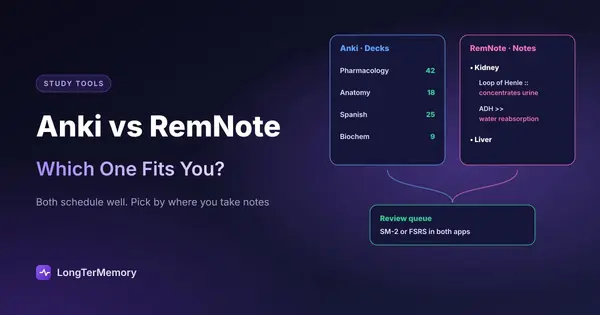
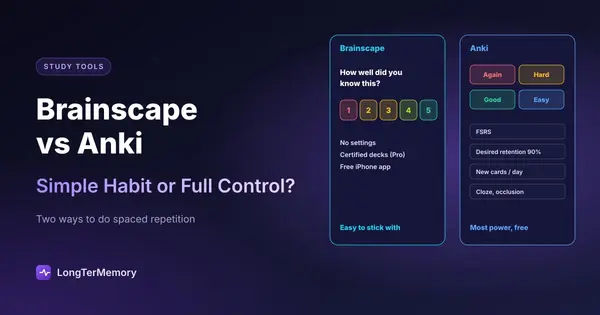
The closest experience to Anki is RemNote, which imports .apkg decks and offers FSRS; see Anki vs RemNote. For the simplest daily habit, Brainscape; see Brainscape vs Anki. The full comparison is in the best Anki alternatives. If you’re coming from Quizlet rather than Anki, see the best Quizlet alternatives.
LongTerMemory is another option if your cards come from course material: its iOS app is free to download, it generates questions from your own PDFs, slides and notes and schedules them with spaced repetition. It works on a 7-day free trial and then one-time plans from $48, and it doesn’t import Anki decks, so it suits a new course better than an existing Anki collection.
FAQ
Is Anki free on iPhone?
The official iPhone app, AnkiMobile, costs $24.99 once in the US. You can study for free on iPhone through AnkiWeb in Safari, and Anki is free on computers, Android and the web.
Why is Anki free on Android but not iPhone?
AnkiDroid is a separate open-source project maintained by volunteers. AnkiMobile is sold by the Anki project itself, and its sales fund the development of the free desktop app and AnkiWeb.
Is AnkiApp the same as Anki?
No. Anki’s documentation says AnkiApp (now AlgoApp) and Anki Pro (now Noji) are made by other groups and are not part of the Anki ecosystem. They don’t sync with AnkiWeb.
Can I use Anki on iPhone without paying?
Yes: log in to ankiweb.net in Safari to review and add cards. Settings, imports and add-ons need the desktop app.
Is AnkiMobile a subscription?
No. It’s a one-time purchase, and the price varies by country.
Can I use the same Anki deck on iPhone, Android and my computer?
Yes. All four official apps (Anki, AnkiMobile, AnkiDroid and AnkiWeb) sync through the same free AnkiWeb account, so your cards and review history follow you between devices. Lookalike apps from other companies don’t join this sync.
What’s the best free Anki alternative for iPhone?
RemNote is the closest: free iPhone app, unlimited flashcards, FSRS and Anki deck import. Brainscape is simpler, with spaced repetition in its free plan. More options are in our guide to the best spaced repetition apps.
The Bottom Line
Anki is free everywhere except the iPhone app, and even there AnkiWeb in Safari gives you free reviews. If you’ll use Anki for years, $24.99 once is a fair price for the app that funds the whole project. Avoid the lookalikes, and if you’d rather start fresh from your course material, try LongTerMemory free for 7 days: upload a chapter and review the generated questions on your phone.
Prices and app details checked on the App Store and Anki’s official site and documentation in October 2026. Prices vary by country.