Brainscape vs Anki (2026): Which Spaced Repetition App Fits You?
Brainscape vs Anki compared on scheduling, ease of use, shared decks, AI and price, with a clear pick for each kind of student and exam.
Table of Contents
- Brainscape vs Anki at a Glance
- Scheduling: Confidence-Based Repetition vs FSRS
- Ease of Use
- Making Cards
- Shared Decks
- Price
- A Week With Each App
- Who Should Choose Which
- Moving Between Them
- FAQ
- Is Brainscape better than Anki?
- Is Brainscape free?
- Does Brainscape use spaced repetition?
- Can I import Anki decks into Brainscape?
- Which is better for medical school?
- The Bottom Line
Short answer: choose Brainscape if you want spaced repetition with almost no setup: you rate each card from 1 to 5 by how confident you are, the app decides when it returns, and it looks and feels simple on every device. Choose Anki if you want the most powerful free scheduler (with FSRS), full control over settings and card types, and the huge shared decks used in medicine and languages. Brainscape is easier to start and to stick with; Anki rewards the time you put into learning it.
Both apps do real spaced repetition, which already puts them ahead of most flashcard tools. The difference is how much you want to configure, and what you’re willing to pay. Features and prices below were checked on the official sites in October 2026.
Brainscape vs Anki at a Glance
| Brainscape | Anki | |
|---|---|---|
| Scheduling | Confidence-based repetition: rate 1 to 5 | SM-2 by default, FSRS optional |
| Settings | Almost none | Many: retention, limits, steps, presets |
| Card types | Front and back, images and sound on Pro | Basic, reversed, cloze, image occlusion, custom templates |
| Shared content | Large library, including certified decks (Pro) | Shared decks on AnkiWeb, free |
| AI card creation | Yes (“100s of flashcards” free, unlimited on Pro) | Through add-ons or outside tools |
| Platforms | Web, iOS, Android | Windows, Mac, Linux, Android, iOS, web |
| Free plan | Unlimited own cards, spaced repetition, reminders | Everything, on desktop, Android and web |
| Paid | Pro from $7.99/mo on the yearly plan | iOS app $24.99 once |
Scheduling: Confidence-Based Repetition vs FSRS
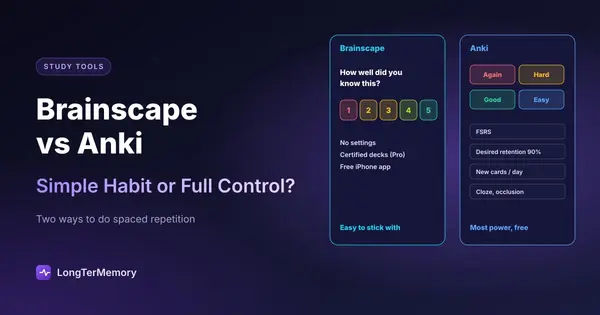
Brainscape calls its method confidence-based repetition. After you reveal the answer, you rate how well you knew it from 1 (“not at all”) to 5 (“perfectly”). Low-rated cards come back soon and keep returning until your rating rises; high-rated cards appear less and less often. There’s nothing to configure, and the 1 to 5 scale makes you think about how well you knew the card, not just whether you got it.
Anki schedules every card individually with its legacy SM-2 algorithm or, if you switch it on, with FSRS, a model that predicts how likely you are to remember each card and schedules the review when that probability reaches the target you set (90% by default). You can optimize FSRS on your own review history. We explain the difference in FSRS vs SM-2.
What that means for you: for a few hundred cards over a semester, both work well and Brainscape asks less of you. For thousands of cards over years (medical school, a language, a professional exam), Anki’s scheduler and settings make a real difference to your daily workload.
Ease of Use
Brainscape wins. Create a class, add a deck, study. The interface is clean, progress is easy to read, and reminders help you build the daily habit. It’s the app we’d give someone who has tried flashcards before and quit.
Anki takes a few evenings. Decks, presets, note types, daily limits and the four answer buttons all need some understanding, and poor early choices (too many new cards a day) come back as a pile of reviews later. Our guide to using Anki effectively from day one covers the settings that matter.
Making Cards
- Brainscape lets you type cards, import them from a spreadsheet or text, or generate them with AI from your notes. On Pro you can add images and sounds and make reverse cards.
- Anki has the richest card types: cloze deletions for definitions and processes, image occlusion for diagrams (built in), and fully custom templates. There’s no built-in AI, but you can generate cards with any chatbot and import them; see how to make Anki flashcards with AI.
If writing cards from lecture PDFs is your real bottleneck, neither app solves it fully. A tool that reads your files and generates the questions, like an AI flashcard generator, removes that step.
Shared Decks
- Brainscape has a large library of decks made by other users and “certified” decks from experts and publishers, for subjects from AP exams to languages and medicine. Pro unlocks unlimited access to certified decks and other users’ content; the free plan includes 2,500 pre-loaded cards.
- Anki’s shared decks on AnkiWeb are free and, for a few subjects, unmatched: medical students in particular use large community decks maintained for years.
Price
| You want | Brainscape | Anki |
|---|---|---|
| Your own cards with spaced repetition | Free | Free (desktop, Android, web) |
| Study on iPhone | Free app | $24.99 once (AnkiMobile) |
| Others’ and certified decks | Pro | Free |
| Images and sound on cards | Pro | Free |
| Unlimited AI card creation | Pro | Outside tools |
Brainscape Pro is listed at $7.99 a month on the yearly plan; other billing options exist and app store prices can differ. Over a four-year degree, Anki costs $0 to $24.99 in total; Brainscape costs $0 if the free plan is enough, and around $96 a year if you need Pro. If Anki’s iPhone price is the sticking point, see is Anki free on iPhone.
A Week With Each App
The difference is easiest to see with the same material: 400 cards for a pharmacology course.
With Brainscape, you create a class, add the decks (typed, imported or generated with AI) and press study. Each session mixes new cards with ones that are due, and every card asks the same question: how well did you know it, from 1 to 5? Ten minutes on the bus works fine, and the progress bar for each deck shows at a glance what’s still weak. You never touch a setting. The risk is the scale: it’s easy to rate a card 4 because you recognized the answer, and nothing stops you.
With Anki, you spend the first evening on setup: a preset with 20 new cards a day, FSRS switched on, desired retention at 90%. After that, the daily routine is one number on the main screen and four buttons. By the end of the week, cards you know well start disappearing for a few days, and the ones you missed are back the next morning. It asks more of you on day one and less on day 100.
Either works if you open it every day. The best predictor of results isn’t the app; it’s whether you’ll still be using it in two months.
Who Should Choose Which
| Your situation | Pick |
|---|---|
| First time with spaced repetition, want zero setup | Brainscape |
| Medical school, USMLE, nursing boards | Anki (shared decks, FSRS) |
| Learning a language over years | Anki |
| AP, SAT or a course with certified decks available | Brainscape |
| You study mostly on iPhone and don’t want to pay | Brainscape |
| You want cloze cards and image occlusion | Anki |
| You quit Anki before because of the settings | Brainscape |
If neither fits, the best spaced repetition apps compares six options, and the best Anki alternatives focuses on apps for people leaving Anki.
Moving Between Them
- From Anki to Brainscape: export your notes from Anki as plain text, then import the file or paste it in Brainscape, matching the separator between front and back. Formatting, media and scheduling history don’t carry over.
- From Brainscape to Anki: export your own decks from Brainscape where your plan allows, or copy the cards into a spreadsheet, save it as CSV and use File > Import in Anki.
In both directions, you start the schedule from scratch. That matters less than it sounds: the first week of reviews quickly sorts the cards you know from the ones you don’t.
FAQ
Is Brainscape better than Anki?
It’s easier, not more powerful. Brainscape is better if you want spaced repetition without setup. Anki is better if you want the strongest free scheduler, advanced card types and free shared decks.
Is Brainscape free?
Yes, with limits. The free plan includes unlimited flashcards of your own, spaced repetition and AI card creation; Pro adds unlimited certified and shared decks, images and sounds, and reverse cards.
Does Brainscape use spaced repetition?
Yes. Its confidence-based repetition schedules each card from your 1 to 5 confidence rating: low ratings bring the card back sooner, high ratings push it further out.
Can I import Anki decks into Brainscape?
Yes, as text: export your notes from Anki as plain text and import them in Brainscape. Images, card templates and review history don’t carry over.
Which is better for medical school?
Anki, for most students: the community decks, FSRS and image occlusion are hard to match. Brainscape has medical decks too and is easier, which suits students who keep abandoning Anki.
The Bottom Line
Brainscape is the simpler habit; Anki is the more powerful system. If you’ve never stuck with flashcards, start with Brainscape. If you need to remember thousands of facts for years, invest the evenings in Anki. And if building the deck is what stops you, try LongTerMemory free for 7 days: upload a chapter and it generates the questions and schedules the reviews.
Features and prices checked on brainscape.com, the Anki manual and the app stores in October 2026.