FSRS vs SM-2: Which Spaced Repetition Algorithm Should You Use?
FSRS vs SM-2 explained simply: how each algorithm schedules your cards, why FSRS usually needs fewer reviews, which apps use it, and how to switch in Anki.
Table of Contents
- Why the Algorithm Matters
- How SM-2 Works
- Where SM-2 struggles
- How FSRS Works
- FSRS vs SM-2 Side by Side
- What Changes in Your Daily Reviews
- Choosing your desired retention
- How to Switch to FSRS in Anki
- Does the Algorithm Matter More Than Your Habits?
- Which Apps Use Which Algorithm
- FAQ
- Is FSRS better than SM-2?
- What does FSRS stand for?
- What desired retention should I use in FSRS?
- Will switching to FSRS mess up my Anki deck?
- How many reviews does FSRS need to optimize?
- Does RemNote use FSRS?
- The Bottom Line
Short answer: for most people, FSRS is the better choice. SM-2 is the 1980s algorithm behind classic flashcard apps: it multiplies each card’s interval by an “ease” factor that goes up or down with your answers. FSRS (Free Spaced Repetition Scheduler) is a newer model that estimates how likely you are to remember each card and schedules the review for when that probability drops to a target you choose, 90% by default. Anki’s manual says FSRS can help you remember more material in the same amount of time, and in the open benchmark run by its developers it predicts recall more accurately than SM-2. Switch it on in Anki (version 23.10 or later), keep your desired retention around 90%, and optimize the parameters once you have a few hundred reviews.
The rest of this guide explains what each algorithm does in plain terms, where the difference shows up in your daily reviews, which apps support FSRS, and how to switch without flooding your queue.
Why the Algorithm Matters
A spaced repetition app has one job beyond showing cards: deciding when each card comes back. Too soon, and you waste time reviewing what you already know. Too late, and you’ve forgotten it and have to relearn it. The ideal moment is just before you’d forget, when recalling the card takes some effort and strengthens the memory most. The research behind this is in the science of spaced repetition.
The algorithm is the app’s guess about that moment for every card, every day. Small differences in the guess add up over thousands of cards and months of study: they decide whether your daily review is 80 cards or 120.
How SM-2 Works
SM-2 was published by Piotr Woźniak in the late 1980s for SuperMemo, one of the first spaced repetition programs. Anki has used a modified version of it since the beginning, which its manual now calls the legacy scheduler.
The idea is simple:
- Each card has an interval (days until the next review) and an ease (a multiplier, 250% by default in Anki).
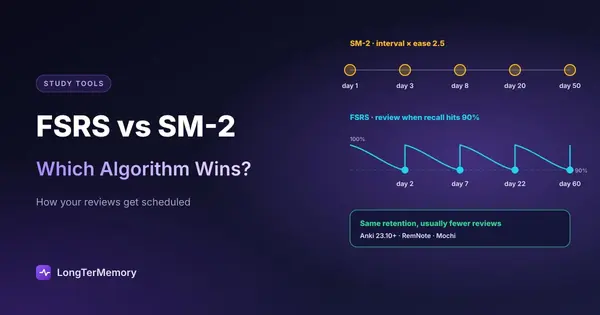
- When you answer Good, the next interval is roughly the current one times the ease: 1 day, then about 3, then about 8, then about 20.
- Easy raises the ease, Hard lowers it, and Again sends the card back to relearning and lowers the ease.
Where SM-2 struggles
- Every card starts the same. A card that’s trivial for you and one that’s hard get the same early intervals.
- “Ease hell”. Cards you fail a few times end up with a low ease and come back too often, forever, even after you’ve learned them. Many Anki users know this pile of cards that never goes away.
- No sense of your memory. SM-2 doesn’t model how likely you are to remember; it applies fixed multipliers. A card reviewed late but answered correctly is treated almost like one reviewed on time.
How FSRS Works
FSRS was developed by Jarrett Ye, building on research at MaiMemo, and by the open-spaced-repetition community. It’s built around three numbers for each card:
- Difficulty: how hard this card is for you.
- Stability: how long the memory lasts. Specifically, the number of days until your chance of recalling it drops to 90%.
- Retrievability: your chance of recalling it right now, which falls as time passes since the last review.
After each review, FSRS updates these numbers based on your answer and on how long it had been since you last saw the card. Then it schedules the next review for the day your retrievability is predicted to fall to your desired retention.
Two things make it different in practice:
- You choose the target. Instead of tuning multipliers, you set one number: the probability of remembering a card when it comes due. Anki’s default is 90%.
- It learns from you. The Optimize button fits FSRS’s parameters to your own review history, so the model reflects how fast you forget, not an average student.
FSRS vs SM-2 Side by Side
| SM-2 | FSRS | |
|---|---|---|
| Year | Late 1980s | 2022 onward, in Anki since 23.10 |
| Core idea | Multiply the interval by an ease factor | Predict recall probability, review when it hits your target |
| Main setting | Starting ease, interval modifier, steps | Desired retention (90% default) |
| Personalized | Only through each card’s ease | Parameters optimized on your review history |
| Late or early reviews | Handled crudely | Taken into account |
| ”Ease hell” | Common | Doesn’t apply (no ease factor) |
| Workload for the same retention | Higher | Usually lower |
| Available in | Anki, many older apps | Anki, AnkiDroid 2.17+, AnkiMobile, AnkiWeb; optional in RemNote and Mochi |
What Changes in Your Daily Reviews
If you switch an established Anki collection to FSRS, the typical experience is:
- Easy cards spread out further. Cards you always get right stop coming back every few weeks.
- Hard cards come back sooner, but they don’t get stuck in an endless low-ease loop.
- The daily count becomes more predictable, especially if you sometimes miss days: FSRS knows a card reviewed late was a stronger memory than one reviewed on time.
How much you save depends on your collection and your desired retention. The bigger effect is often the retention target itself: going from 90% to 95% makes reviews rise steeply, and Anki’s manual advises keeping it below 97%.
Choosing your desired retention
| Desired retention | When it fits |
|---|---|
| 80% to 85% | Large decks you want to keep warm with little time, hobbies, languages at a relaxed pace |
| 90% (default) | Most students and exams |
| 92% to 95% | The weeks before a high-stakes exam, small decks of critical facts |
Start at 90% and adjust only if the workload is clearly too high or too low.
How to Switch to FSRS in Anki
- Update Anki on every device (Anki 23.10+, AnkiMobile 23.10+, AnkiDroid 2.17+), then sync.
- Open the deck options of any deck and turn on FSRS. It applies to the whole collection.
- Leave desired retention at 0.90 for now.
- Click Optimize once you have at least a few hundred reviews, and repeat about once a month.
- Leave Reschedule cards on change off when you first switch. Turning it on can make a large number of cards due at once; Anki’s manual doesn’t recommend it at first.
The full walkthrough of the other settings (new cards per day, steps, limits) is in our guide to using Anki effectively from day one.
Does the Algorithm Matter More Than Your Habits?
No. A good algorithm saves time, but three habits matter more:
- Review every day. Any scheduler fails if you open the app once a week.
- Rate honestly. Pressing Good on a card you half remembered teaches either algorithm the wrong thing.
- Make good cards. One idea per card, a clear question, no giveaways. A bad card is hard under SM-2 and under FSRS.
That’s why we’d pick an app you’ll open daily over a slightly better algorithm in an app you avoid. Our comparison of the best spaced repetition apps weighs the scheduler against ease of use, card creation and price.
Which Apps Use Which Algorithm
- Anki: SM-2 by default; FSRS is a switch in the deck options. See also Anki vs RemNote.
- RemNote: SM-2 by default, FSRS optional, plus custom schedulers.
- Mochi: its own algorithm, with FSRS as an option.
- Brainscape: its own confidence-based repetition, where you rate each card 1 to 5. We compare it in Brainscape vs Anki.
- Quizlet: a light spaced repetition option in Flashcards on the website, algorithm not published (see does Quizlet have spaced repetition). For apps with a fuller scheduler, see our Quizlet alternatives comparison.
- LongTerMemory: schedules the questions it generates from your files with its own spaced repetition scheduler; there’s nothing to configure.
If you like Anki’s scheduling but not the rest of Anki, the best Anki alternatives lists apps that keep a real scheduler with less setup.
FAQ
Is FSRS better than SM-2?
For most users, yes. FSRS models how likely you are to remember each card and adapts to your review history, so it usually reaches the same retention with fewer reviews. Anki’s manual says it can help you remember more in the same time.
What does FSRS stand for?
Free Spaced Repetition Scheduler. It’s open source and developed by the open-spaced-repetition community.
What desired retention should I use in FSRS?
Start with the default, 90%. Lower it to 85% if reviews take too long; raise it toward 95% only for short periods before an important exam. Keep it below 97%, as Anki’s manual advises.
Will switching to FSRS mess up my Anki deck?
No. Your review history is kept. With “Reschedule cards on change” off, existing due dates stay the same and FSRS takes over from the next review of each card.
How many reviews does FSRS need to optimize?
Anki flags fewer than a few hundred reviews as too few for good parameters. Before that, the default parameters work fine.
Does RemNote use FSRS?
RemNote uses SM-2 by default and lets you switch to FSRS in its settings.
The Bottom Line
SM-2 is a sensible rule of thumb from the 1980s; FSRS is a model of your own memory. If you use Anki, turn FSRS on, keep retention at 90% and optimize once a month. Then forget about the algorithm and focus on what matters more: good cards and daily reviews. If making the cards is what slows you down, try LongTerMemory free for 7 days: it generates questions from your PDFs and notes and schedules the reviews for you.
Algorithm details checked against the Anki manual and the open-spaced-repetition project pages in October 2026.