How to Set Up Anki for Maximum Spaced Repetition Results
The Anki settings that matter most: FSRS, desired retention, daily limits and learning steps, plus shared vs self-made decks and the add-ons worth installing.
Table of Contents
- How Anki's Scheduling Actually Works (in 60 Seconds)
- The Key Settings to Change for Better Anki Performance
- 1. Turn on FSRS
- 2. Set desired retention (start at 0.90)
- 3. New cards per day: pick a number you can sustain
- 4. Maximum reviews per day: set it high
- 5. Learning and relearning steps: keep them short
- Other settings worth a look
- Quick-reference: a solid starting preset
- One Habit That Matters More Than Any Setting: Use "Again" and "Good" Honestly
- Choosing Between Anki Decks: Shared vs. Self-Made
- When a shared deck makes sense
- When to make your own
- Add-ons That Significantly Improve the Anki Experience
- Syncing and Mobile: Review Anywhere
- Common Anki Setup Mistakes
- Frequently Asked Questions
- What are the best Anki settings for spaced repetition?
- Should I use FSRS or SM-2 in Anki?
- How many new Anki cards should I do per day?
- Are shared Anki decks worth it?
- Which Anki add-ons are essential?
- Skip the Card Writing, Keep the Spaced Repetition
- The Bottom Line
To set up Anki for the best spaced repetition results, turn on the FSRS scheduler, set desired retention to about 0.90, keep new cards to a number you can sustain every day (often 10 to 20), use short learning steps such as 10m and 1h, and let FSRS optimize its parameters once you have a few hundred reviews. Then pick decks carefully and install only a handful of add-ons that save real time.
Anki is free, powerful, and famously unfriendly out of the box. Most people install it, keep the defaults, add a giant shared deck, and quit three weeks later buried under 400 reviews a day. The algorithm wasn’t the problem. The setup was.
This guide walks through the settings that genuinely change your results, the shared vs. self-made deck decision, and the add-ons worth your time. If you’ve never opened Anki before, start with our beginner’s guide to using Anki from day one, then come back here to tune it.
How Anki’s Scheduling Actually Works (in 60 Seconds)
Anki shows you a card right before it predicts you’ll forget it, and each successful review pushes the next one further into the future. Your settings control how aggressive that prediction is, how many new cards enter the system, and what happens when you fail.
Since version 23.10, Anki ships with two schedulers:
| Scheduler | How it decides intervals | Best for |
|---|---|---|
| SM-2 (legacy) | Fixed ease multipliers per card (starting at 250%) | People with old decks and habits they don’t want to change |
| FSRS | A memory model that estimates each card’s stability and difficulty from your own review history | Almost everyone else |
FSRS (Free Spaced Repetition Scheduler) was developed by Jarrett Ye and the open-source community. In the benchmarks published by the FSRS project, it predicts recall more accurately than SM-2 for the large majority of users, which in practice means fewer reviews for the same retention. Commonly reported savings are in the range of 20 to 30% of review workload at equal retention, though your mileage depends on your collection.
The Key Settings to Change for Better Anki Performance
Five settings do most of the work: the scheduler (FSRS), desired retention, new cards per day, maximum reviews per day, and learning steps. You’ll find all of them under the gear icon next to a deck, then Options. Settings are saved in presets, so you can share one preset across many decks.
1. Turn on FSRS
In the deck options, scroll to the Advanced section (FSRS) and enable it. That’s the single biggest upgrade most collections can make.
Once you have a meaningful amount of history (a few hundred reviews at minimum, ideally over 1,000), click Optimize to fit the model’s parameters to your memory. Repeat that roughly once a month as your history grows.
2. Set desired retention (start at 0.90)
Desired retention is the probability of remembering a card when it comes due. It’s the most important number in FSRS, and it’s a trade-off:
| Desired retention | What it means | Review workload |
|---|---|---|
| 0.80 | You’ll forget about 1 in 5 cards at review time | Lowest |
| 0.85 to 0.90 | The sweet spot for most learners | Moderate |
| 0.95 | Very high recall | Much higher (workload rises steeply above 0.90) |
| 0.97+ | Rarely worth it | Very high |
Use 0.90 for exam prep. Drop to 0.85 if your reviews feel unmanageable. Only go above 0.92 for a short period before a high-stakes exam where every fact counts.
3. New cards per day: pick a number you can sustain
The default is 20, and it’s a reasonable ceiling, not a target. A useful rule of thumb: each daily new card turns into roughly 5 to 10 daily reviews once the deck matures. So 20 new cards per day usually means 100 to 200 reviews per day after a month or two.
| New cards/day | Approx. daily reviews after 1 to 2 months | Daily time (about 8 s per review) |
|---|---|---|
| 10 | 50 to 100 | 7 to 14 min |
| 20 | 100 to 200 | 14 to 27 min |
| 40 | 200 to 400 | 27 to 55 min |
Choose the number that fits the time you can protect every single day, including bad days.
4. Maximum reviews per day: set it high
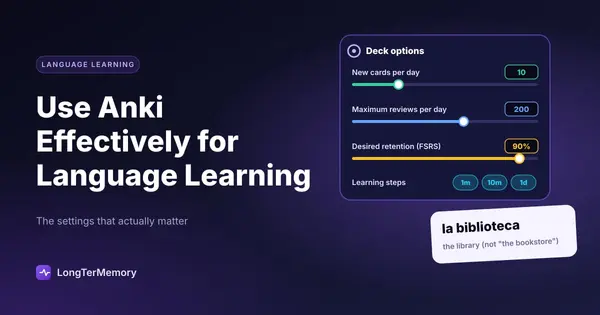
The default is 200. Here’s the counterintuitive part: set it higher than you think you need (for example 9999), and control workload with new cards instead. Capping reviews just hides a backlog. The cards still come due; you just don’t see them, so they slip past their optimal moment.
5. Learning and relearning steps: keep them short
Learning steps decide how often you see a brand-new card on day one. With FSRS, short steps work best because FSRS handles everything after the first day:
- Learning steps:
10m 1h(or just10mif you study once a day) - Relearning steps:
10m - Avoid steps of 1 day or longer when FSRS is on, since the scheduler should manage day-scale intervals itself.
Other settings worth a look
- Leech threshold (default 8 lapses): leave it, but actually fix leeches when they get tagged. A leech is almost always a badly written card.
- Bury siblings: turn on burying for new and review siblings, so a reversed card doesn’t give away its partner on the same day.
- Maximum interval: the default (100 years) is fine for long-term learning. For a single exam in 6 months, you can leave it too: FSRS already won’t waste reviews.
- Easy Days and load balancing (Anki 24.11 and later): spread reviews more evenly across the week, and mark lighter days if you have a busy schedule.
Quick-reference: a solid starting preset
| Setting | Recommended value |
|---|---|
| Scheduler | FSRS on |
| Desired retention | 0.90 |
| New cards/day | 10 to 20 |
| Maximum reviews/day | 9999 |
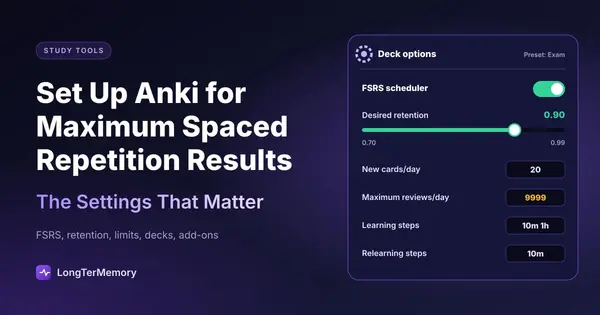
| Learning steps | 10m 1h |
| Relearning steps | 10m |
| Bury siblings | On |
| Optimize parameters | Monthly, after a few hundred reviews |
One Habit That Matters More Than Any Setting: Use “Again” and “Good” Honestly
With FSRS, grade honestly with Again and Good, and use Hard and Easy only when they’re genuinely true. The model learns from your answers. If you press “Hard” when you actually forgot, you’re telling it something false, and your intervals become unreliable.
- Again: you didn’t remember, or you remembered it wrong.
- Hard: you remembered, but with real struggle. (Not “I forgot but I almost had it.”)
- Good: you remembered with normal effort. This should be most of your answers.
- Easy: instant, effortless recall. Use it rarely.
Many experienced users simply use two buttons, Again and Good, and get excellent results.
Choosing Between Anki Decks: Shared vs. Self-Made
Shared decks save hundreds of hours of card writing, while self-made decks are remembered better and match your exact course; the best approach for most exam candidates is a hybrid. Use a high-quality shared deck as the backbone if one exists for your exam, and add your own cards for your weak spots and your course-specific content.
| Shared decks | Self-made decks | |
|---|---|---|
| Time cost | Minutes to download | Hours to dozens of hours to create |
| Quality | Excellent for famous ones, poor for random ones | As good as your card-writing skills |
| Fit to your exam | General, may include material you don’t need | Exactly your syllabus |
| Memory benefit | Lower (you didn’t process the material) | Higher (writing cards is itself learning) |
| Best use | Well-maintained decks for standardized exams (e.g. USMLE, language vocabulary) | University courses, niche certifications, your own errors |
When a shared deck makes sense
- The exam is standardized and popular (medical boards, common languages, big certifications).
- The deck is actively maintained, recently updated, and widely used. Community-maintained medical decks like the ones built for USMLE are the classic example.
- You unsuspend only what you’ve studied. Don’t release 30,000 cards on day one. Suspend everything, then unsuspend cards topic by topic as you cover them in class or in your prep resource.
When to make your own
- Your course has its own slides, emphasis, or terminology.
- You keep getting the same practice questions wrong.
- No good shared deck exists (which is the case for most university courses and smaller certifications).
The honest downside of self-made decks is time. A well-written card takes 1 to 3 minutes. A 1,000-card course deck can take 20 to 50 hours to build. That’s the gap tools like automatic card generators try to close, and we compare the options in our Anki vs. LongTerMemory comparison and in our list of Anki alternatives that take less setup.
Add-ons That Significantly Improve the Anki Experience
Install only add-ons that save time or give you useful feedback, and keep the list short: every add-on can break after an Anki update. Find them on the official AnkiWeb add-ons page (Tools, then Add-ons, then Get Add-ons in the desktop app), and always check that the add-on supports your current Anki version.
Note that several features that used to require add-ons are now built in: FSRS, Image Occlusion, and load balancing all ship with modern Anki versions. Don’t install old add-ons for them.
| Add-on type | What it does | Who it’s for |
|---|---|---|
| Review heatmap | Shows a calendar of your daily reviews and streaks | Anyone who benefits from visible consistency |
| AnkiConnect | Lets other apps (like browser extensions or note tools) create cards in Anki | People who create cards from web pages or notes |
| Advanced Browser | Adds sorting columns (like lapses or difficulty) to the card browser | Heavy users cleaning up leeches |
| Image editing / occlusion enhancements | Extra tools for diagram-heavy subjects | Medicine, anatomy, engineering |
| Hierarchical tags | Better tag navigation | Large, multi-subject collections |
A good test before installing anything: will this save me at least 10 minutes a week, or show me something that changes how I study? If not, skip it.
Syncing and Mobile: Review Anywhere
Create a free AnkiWeb account and sync across devices, so you can clear reviews on your phone during dead time. AnkiDroid is free on Android. AnkiMobile on iOS is a paid app (its revenue funds Anki’s development). Desktop remains the best place for creating and editing cards.
Short mobile sessions (5 minutes in a queue, 10 minutes on the bus) are where many people quietly clear half their daily reviews.
Common Anki Setup Mistakes
Most Anki failures come from setup decisions, not from the algorithm. Watch out for these:
- Too many new cards early. Enthusiasm in week one becomes a review avalanche in week four.
- Capping reviews instead of new cards. The backlog grows invisibly.
- Unsuspending a whole shared deck at once. You’ll see cards on topics you’ve never studied.
- Long learning steps with FSRS on. They interfere with the scheduler.
- Misusing “Hard.” It means “remembered with difficulty,” not “forgot.”
- Ignoring leeches. Rewrite or split them; don’t keep failing them for months.
- Skipping days. Spaced repetition only works if you show up. Missing a day doubles the next one.
Frequently Asked Questions
What are the best Anki settings for spaced repetition?
For most learners: FSRS on, desired retention 0.90, 10 to 20 new cards per day, maximum reviews set high (like 9999), learning steps of 10m and 1h, relearning step 10m, and parameter optimization about once a month.
Should I use FSRS or SM-2 in Anki?
FSRS for nearly everyone (the differences are explained in FSRS vs SM-2). It adapts intervals to your actual memory and usually needs fewer reviews for the same retention. Stick with SM-2 only if you have a strong reason, such as an established workflow you don’t want to change.
How many new Anki cards should I do per day?
As many as you can sustain on your busiest day. Expect each new card per day to create about 5 to 10 daily reviews over time, so 20 new cards typically means 100 to 200 reviews a day after the deck matures.
Are shared Anki decks worth it?
Yes, if the deck is well maintained and built for a standardized exam. For university courses and niche certifications, your own cards (or automatically generated ones from your materials) usually fit better.
Which Anki add-ons are essential?
None are strictly essential anymore, because FSRS and Image Occlusion are built in. A review heatmap and AnkiConnect are the most popular quality-of-life additions.
Skip the Card Writing, Keep the Spaced Repetition
Anki’s settings decide how well your cards are scheduled. But for most courses, the real bottleneck is making the cards in the first place: there’s rarely a good shared deck for your professor’s slides or your specific certification.
That’s where LongTerMemory fits in. You upload your PDFs, notes, or web pages, it generates question and answer cards automatically, and it schedules the reviews with spaced repetition for you, with no presets, steps, or add-ons to configure. The free trial lets you try it on one course and compare the hours saved with building the same deck by hand.
The Bottom Line
A good Anki setup is short: enable FSRS, set desired retention near 0.90, keep new cards at a sustainable number, never cap reviews to hide a backlog, use short learning steps, and optimize parameters as your history grows.
Then make the deck decision deliberately (shared backbone, your own cards for weak spots) and keep add-ons to the few that actually save time. Get those right, show up every day, and Anki will do exactly what it was built for: making you remember things for years.