Flashcards for Developers: Anki, RemNote or LongTerMemory?
Anki, RemNote and LongTerMemory compared for developers and engineers: which turns technical docs, code and APIs into review sessions fastest.
Table of Contents
- The Core Problem: The Content Creation Bottleneck
- 1. Anki: Powerful, Flexible and High Friction
- Strengths for technical learners
- Weaknesses for technical documentation
- 2. RemNote: Notes and Flashcards in One Workspace
- Strengths for technical learners
- Weaknesses for technical documentation
- 3. LongTerMemory: AI-Native Active Recall for Technical Material
- Key advantages for technical learners
- Side-by-Side Comparison
- Real-World Case Study: Mastering a 40-Page Framework Update
- With Anki: about 3 hours
- With RemNote: about 90 minutes
- With LongTerMemory: about 3 minutes
- Which Tool Should You Choose?
- Final Verdict
Technical fields move fast. New frameworks, updated APIs, revised system designs and shifting best practices mean engineers and technical learners are constantly absorbing dense material. The real challenge is rarely finding information. It is remembering it when it matters.
Cognitive science is clear on what works: active recall, pulling information out of memory instead of passively re-reading it, and spaced repetition, reviewing concepts at algorithmically timed intervals. The problem is that turning technical documentation into effective review material is tedious.
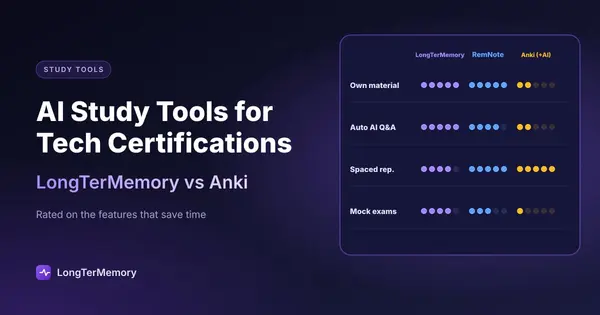
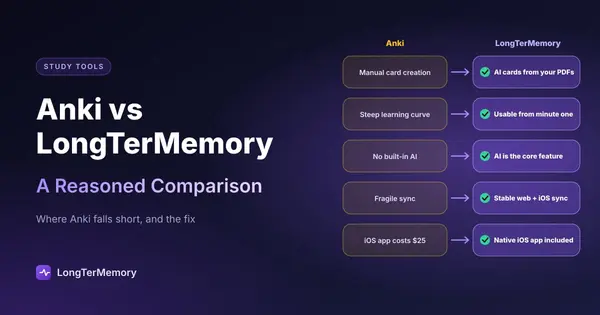
This article compares three tools that approach technical learning in different ways: Anki, the open-source classic; RemNote, the outliner-knowledge base hybrid; and LongTerMemory, the AI-native active recall platform. Each has strengths. Only one is built specifically to remove the friction of converting technical documentation into scheduled review sessions. For the general head-to-head, read our Anki vs LongTerMemory comparison; if you are preparing for an exam rather than keeping up with your stack, the guide to study tools for tech certifications fits better. For a wider list of apps like Anki, see our comparison.
The Core Problem: The Content Creation Bottleneck
Before comparing tools, it helps to name the real obstacle. When you are reading a long API guide, a system design whitepaper or a dense framework tutorial, the bottleneck is almost never the reading. It is the work that comes after: turning raw material into testable questions and answers.
[Raw documentation / web links / PDFs / code notes]
                     |
                     v
    +-------------------------------+
    |   Content creation bottleneck |  <-- manual card creation,
    +---------------+---------------+      formatting, Q&A framing
                    |
                    v
      [Active recall & spaced repetition]
                    |
                    v
        [Long-term retention]
Every tool in this comparison handles the bottom half differently. The biggest difference is how much of the top half it automates.
1. Anki: Powerful, Flexible and High Friction
Anki is the most established spaced repetition system available. It is open-source, runs locally, supports a huge library of community plugins, and lets power users customize almost every detail of the scheduling algorithm and card design.
            +-------------------------------+
            |         Anki workflow         |
            +---------------+---------------+
                            |
            +---------------+---------------+
            |                               |
            v                               v
    +---------------+             +-----------------+
    | Manual card   |             | Custom cards    |
    | formulation   |             | and plugins     |
    +-------+-------+             +---------+-------+
            |                               |
            +---------------+---------------+
                            |
                            v
            +-------------------------------+
            |   Local SRS review engine     |
            +-------------------------------+
Strengths for technical learners
- Total control. Anki stores your data locally in SQLite, works offline, and never depends on a remote server.
- Deep customization. LaTeX, syntax highlighting, custom HTML/CSS card templates and advanced scheduling scripts are all possible.
- Algorithm choice. Classic SM-2, the newer FSRS scheduler, and many community tweaks are available.
Weaknesses for technical documentation
- Manual card creation. Every question, answer, code snippet and formatting choice must be typed by hand. Converting a 40-page documentation update into a usable deck can take hours.
- High maintenance. When APIs or syntax change, every affected card must be updated manually.
- No native import. Anki cannot parse a URL, PDF or documentation page on its own. Everything moves through copy and paste.
Anki is excellent if you already have a finished deck and enjoy tuning the system. It is much less efficient when your study material lives in documentation sites, PDFs and code repositories that change constantly.
2. RemNote: Notes and Flashcards in One Workspace
RemNote combines hierarchical note-taking with built-in flashcard creation. It behaves like an outliner or knowledge base where bullet points can become review prompts using inline syntax such as >> or ::.
          +----------------------------------+
          |        RemNote workflow          |
          +----------------+-----------------+
                           |
              +------------+-------------+
              |                          |
              v                          v
      +---------------+       +------------------+
      | Nested outline|       | Manual card      |
      | note-taking   |       | syntax           |
      +-------+-------+       +---------+--------+
              |                          |
              +------------+-------------+
                           |
                           v
          +----------------------------------+
          |  Knowledge base + SRS reviews    |
          +----------------------------------+
Strengths for technical learners
- Integrated notes and cards. Flashcards live inside your notes, so each card keeps its surrounding context.
- Hierarchical organization. Nested bullets work well for layered concepts like class hierarchies, network stacks or database architectures.
- Bi-directional linking. You can connect related terms across documents, building a personal knowledge graph.
Weaknesses for technical documentation
- Manual prompt engineering. You still structure your notes and mark flashcard syntax yourself while reading.
- Document bloat. Dense technical manuals can turn into sprawling outlines that are hard to navigate.
- Limited AI automation. RemNote focuses on manual text-to-card conversion rather than end-to-end extraction from external sources.
RemNote is a strong choice if your primary goal is building a structured technical wiki where memorization is a secondary benefit. It does not solve the problem of importing and converting external documentation automatically. For a complete walkthrough of the RemNote workflow, see our guide on how to use RemNote for integrated notes and flashcards.
3. LongTerMemory: AI-Native Active Recall for Technical Material
LongTerMemory is built around a different premise: the learner should not have to manufacture flashcards from technical source material. Instead, the platform ingests URLs, PDFs, pasted text, presentation slides and even images of handwritten notes or diagrams, then uses an AI engine to extract structured question-and-answer pairs.
         +--------------------------------------+
         |       LongTerMemory workflow         |
         +------------------+-------------------+
                            |
        +-------------------+-------------------+
        |                   |                   |
        v                   v                   v
 +-------------+     +-------------+     +-------------+
 | Web links   |     | PDFs, docs  |     | OCR text    |
 | and API docs|     | and slides  |     | and code    |
 |             |     |             |     | notes       |
 +------+------+     +------+------+     +------+------+
        |                   |                   |
        +-------------------+-------------------+
                            |
                            v
         +--------------------------------------+
         |  AI engine: automated extraction     |
         |  of structured Q&A pairs             |
         +------------------+-------------------+
                            |
                            v
         +--------------------------------------+
         |  Scheduled spaced repetition sessions|
         +--------------------------------------+
Key advantages for technical learners
-
Automated Q&A extraction. Paste a documentation URL or upload a PDF, and the AI identifies core primitives, architecture patterns, key functions and exceptions. The result is a ready-to-review quiz set without manual typing. Our guide on converting a PDF to flashcards shows the same workflow step by step.
-
Frictionless workflow. Browser extensions and quick importers let you save a documentation page while you read it. The system processes the page in the background so you can keep working.
-
Science-backed spaced repetition. Generated Q&A pairs are scheduled using an adaptive SRS engine that prioritizes difficult material and extends intervals for mastered concepts.
-
Multimodal and OCR support. Diagrams, textbook pages, photographed whiteboards and slide decks can be converted into testable flashcards.
For engineers who need to turn live documentation into durable knowledge, LongTerMemory removes the administrative step that slows everything else down.
Side-by-Side Comparison
| Feature | Anki | RemNote | LongTerMemory |
|---|---|---|---|
| Primary focus | Open-source manual SRS | Outliner notes + SRS | AI automated active recall and SRS |
| Card creation speed | Slow (manual) | Medium (inline syntax) | Fast (automated AI extraction) |
| Web link / document import | No (copy-paste only) | Partial (web clipper / text import) | Native (links, PDFs, notes, slides) |
| AI Q&A generation | No (plugin-dependent) | Limited | Built-in core engine |
| Multimodal / OCR | Manual image occlusion | Image occlusion plugin | Native OCR for diagrams and slides |
| Spaced repetition algorithm | SM-2 / FSRS (configurable) | Custom exponential decay | Automated adaptive scheduling |
| Offline capability | Fully native offline | Local-first desktop app | Cloud-connected, multi-device |
| Learning curve | High (steep UI and config) | Medium (syntax rules) | Low (import and start reviewing) |
| Best for | Power users with existing decks | Note-takers building knowledge bases | Learners importing technical material |
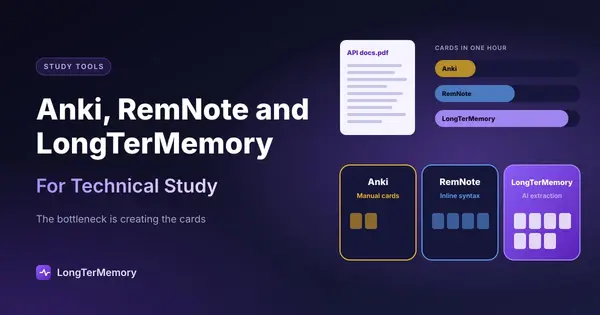
The pattern is consistent. Anki gives you maximum control if you put in the manual work. RemNote unifies notes and cards if you organize everything yourself. LongTerMemory automates the conversion step so you can spend your time reviewing instead of formatting.
Real-World Case Study: Mastering a 40-Page Framework Update
Imagine a software engineer who needs to learn a major update to a framework or library. The documentation is 40 pages of new APIs, changed behavior and revised examples. Here is how the three tools compare in practice.
With Anki: about 3 hours
- Read the documentation.
- Switch repeatedly between the browser and Anki Desktop.
- Manually write around 60 front-and-back cards covering syntax, parameters and exceptions.
- Format code blocks with HTML or custom styling.
- Result: a high-quality deck, but most of the time went into manufacturing cards.
With RemNote: about 90 minutes
- Copy sections into a new RemNote document.
- Reformat the text into a bulleted outline.
- Add card syntax to key terms and concepts.
- Result: integrated notes with built-in cards, but significant manual outlining is still required.
With LongTerMemory: about 3 minutes
- Paste the documentation URL or upload the PDF.
- The AI engine extracts architecture patterns, API details and edge cases into structured Q&A pairs.
- Start reviewing immediately on the web or mobile app.
- Result: nearly zero setup overhead. Study time is spent on actual retrieval practice.
The difference is not the quality of the science. All three tools are built on valid learning principles. The difference is how much administrative work stands between you and the review session.
Which Tool Should You Choose?
The right choice depends on your workflow and priorities.
Choose Anki if:
- You want full offline ownership of your data.
- You enjoy customizing algorithms, card templates and scheduling parameters.
- You already have a finished deck or a community deck for your subject.
- You do not mind investing hours in card creation and maintenance.
Choose RemNote if:
- You want your notes and flashcards to live in the same workspace.
- You prefer hierarchical, interconnected documents.
- You are willing to structure and mark up your own notes as you read.
Choose LongTerMemory if:
- You learn from live technical documentation, PDFs, slides, code notes or diagrams.
- You want to eliminate manual card creation without sacrificing spaced repetition.
- You need a fast, low-friction way to turn source material into scheduled reviews.
- You want mobile review sessions and a modern interface without configuration overhead.
Final Verdict
Anki, RemNote and LongTerMemory are all serious tools, but they optimize for different parts of the learning pipeline.
Anki optimizes control. RemNote optimizes note-card integration. LongTerMemory optimizes the step that wastes the most time for technical learners: turning raw documentation into active recall material.
If your goal is to master technical documentation, keep up with framework updates, or prepare for a certification without turning half your study session into data entry, LongTerMemory is the most direct path from source material to long-term retention. You supply the documentation. It supplies the questions, the schedule and the review session.
The science of spaced repetition and active recall has been settled for decades. The remaining question is how much of the setup work you want the tool to do for you.