Best Study Apps for Students in 2026: Flashcards, Notes and Focus
The best study apps for students in 2026, compared by job: flashcards (Anki, Quizlet, Brainscape), notes (Notion, Obsidian, RemNote) and focus blockers.
Table of Contents
- The Three Jobs a Study App Can Do
- Flashcard Apps: Anki, Quizlet and Brainscape Compared
- Anki: the most powerful, the steepest curve
- Quizlet: the easiest start, the weakest memory engine
- Brainscape: structure without the tinkering
- AI flashcard apps: when you have more material than time
- Note-Taking Apps: Notion, Obsidian, RemNote and More
- Notion: best for planners and project-style courses
- Obsidian: best for long-term knowledge building
- RemNote: best if you want notes and flashcards together
- What about Apple Notes, Evernote and OneNote?
- Focus Apps: Match the Tool to Your Distraction Pattern
- Phone-first distraction: Forest and Focus modes
- Browser distraction: Freedom and Cold Turkey
- Momentum problems: timers and body doubling
- How to Build a Study App Stack That Actually Works
- Three rules that keep your stack lean
- Red flags when choosing study apps
- Which Study App Should You Start With?
- Frequently Asked Questions
- What is the best free study app for students?
- Are AI study apps worth it?
- How many study apps should a student use?
- Is Quizlet or Anki better for studying?
- Turn Your Notes Into Review Without the Busywork
- The Bottom Line
The best study apps for students in 2026 are not one app but a small stack: one flashcard app to remember (Anki, Quizlet, Brainscape or an AI tool like LongTerMemory), one note-taking app to organize (Notion, Obsidian or RemNote) and one focus app to protect your attention (Forest, Freedom or your phone’s built-in Focus mode). Pick one tool per job, keep the stack to three or four apps, and choose each one based on how you actually fail: forgetting, disorganization or distraction.
I’ve tested a lot of study apps over the years, and here’s the uncomfortable truth: most students don’t have an app problem. They have a too-many-apps problem. Three flashcard apps, two note apps, a habit tracker they opened twice. Every new app promises to fix studying, and every one of them adds another place where your material lives.
So this guide is organized by job, not by hype. For each category you’ll get a comparison table, honest pros and cons, and a quick way to decide. Prices were checked in October 2026; they change often, so confirm on each app’s pricing page before you pay.
The Three Jobs a Study App Can Do
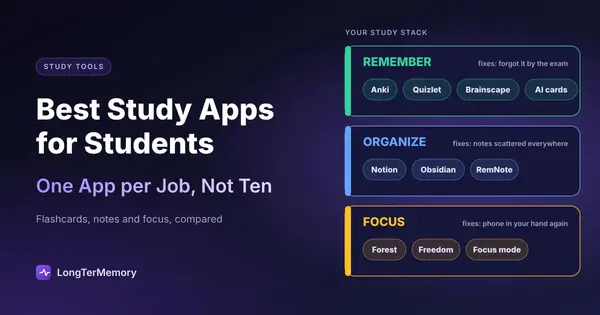
Every study app does one of three jobs: help you remember, help you organize, or help you focus. Apps that claim to do all three usually do one well and the other two halfway.
| Job | What it fixes | Typical apps |
|---|---|---|
| Remember | ”I studied it, then forgot it by the exam” | Anki, Quizlet, Brainscape, LongTerMemory |
| Organize | ”My notes are scattered and I can’t find anything” | Notion, Obsidian, RemNote, OneNote |
| Focus | ”I sit down to study and end up on my phone” | Forest, Freedom, Cold Turkey, Focus modes |
Start with the job that costs you the most points. If you understand everything in class but blank on test day, you need a memory app first. If you spend 20 minutes hunting for last week’s lecture notes, start with organization. If you can’t get through 25 minutes without checking your phone, no flashcard app will save you until you fix focus.
Flashcard Apps: Anki, Quizlet and Brainscape Compared
Flashcard apps are the highest-impact category because they combine active recall with spaced repetition, the two study techniques with the strongest research support. In Dunlosky and colleagues’ 2013 review of ten popular study techniques, practice testing and distributed practice were the only two rated “high utility”. A good flashcard app does both for you.
The big difference between apps is not the cards. It’s who writes the cards and who decides when you review them.
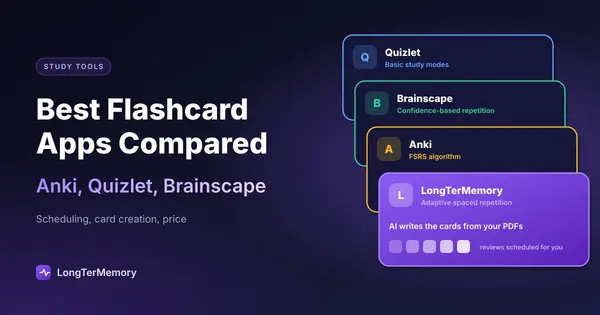
| App | Free plan | Paid price | Scheduling | Card creation | Best for |
|---|---|---|---|---|---|
| Anki | Full app free on desktop, Android, web | iOS app $24.99 one-time | SM-2 or FSRS (optional) | Manual, or shared decks | Medical, language and law students who want full control |
| Quizlet | Basic sets and flashcards | Plus $35.99/year | Learn mode, limited on free plan | Manual, huge library of public sets | Quick vocabulary and class sets |
| Brainscape | Spaced repetition included | Pro from $7.99/month | Confidence-based repetition | Manual, plus expert decks | Students who want structured pre-made decks |
| LongTerMemory | 7-day free trial | Basic $48 per 4 months, Pro from $96 (one-time payments) | Automatic spaced repetition | AI generates Q&A from your PDFs and notes | Students with lots of their own material and little time |
Anki: the most powerful, the steepest curve
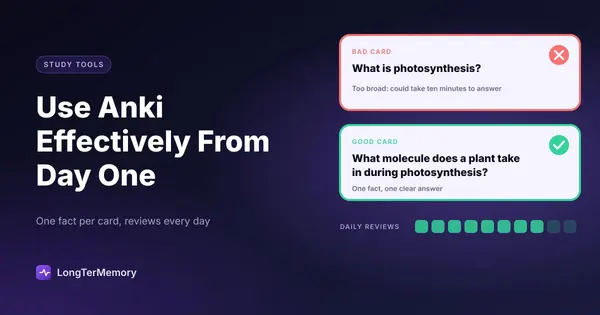
Anki is free (except on iOS), open source and endlessly customizable. Its optional FSRS scheduler, available since version 23.10, can cut review load compared to the old algorithm for the same retention. The catch is setup time: you write your own cards or trust someone else’s deck, and the interface feels like 2008. If you’re going down this road, our guide to using Anki effectively from day one will save you a week of trial and error.
- Choose it if: you have a big, stable syllabus (USMLE, languages, bar exam) and you enjoy tuning settings.
- Skip it if: you want to start reviewing today without learning a tool first.
Quizlet: the easiest start, the weakest memory engine
Quizlet wins on speed. Millions of public sets mean someone has probably already made cards for your textbook chapter. But the free plan limits Learn mode rounds, and public sets are often wrong or written for a different course. It’s great for a vocabulary quiz on Friday, less great for retaining material until a final in May. If that sounds familiar, see our comparison of the best Quizlet alternatives.
Brainscape: structure without the tinkering
Brainscape asks you to rate your confidence from 1 to 5 after each card and repeats low-confidence cards sooner. It’s simpler than Anki and more scientific than Quizlet, and its certified decks are useful for standardized subjects. You still create your own cards for course-specific material.
AI flashcard apps: when you have more material than time
The newest category generates the cards for you. You upload a PDF, lecture notes or a web page, and the app turns it into question and answer pairs, then schedules them. This is where LongTerMemory fits. Its strength is the hours it saves: a 40-page chapter can become a review deck in minutes instead of an evening. Its limit is that, like every AI tool, you should skim the generated questions and delete the ones you don’t need.
For a deeper look at this category, read our comparison of the best AI study tools, and for scheduling algorithms specifically, our ranking of spaced repetition apps.
Note-Taking Apps: Notion, Obsidian, RemNote and More
The best note-taking app is the one where you’ll actually find your notes three months later. Look at three things: how fast you can capture during a lecture, how easily you can search and link notes, and whether the app helps you turn notes into review material.
| App | Free plan | Paid price | Strength | Weakness for studying |
|---|---|---|---|---|
| Notion | Generous free plan for individuals | Plus about $10/month (annual) | Databases, templates, course dashboards | Slow offline, easy to over-design |
| Obsidian | Free, all core features | Sync add-on about $4/month (annual) | Local Markdown files, linked notes, plugins | Setup time, no built-in flashcards without plugins |
| RemNote | Free plan with core features | Pro $96/year | Notes and flashcards in the same place | Interface takes a while to learn |
| OneNote | Free with a Microsoft account | Included in Microsoft 365 | Free-form pages, handwriting, often provided by schools | Weak search structure for large courses |
| Apple Notes / Google Keep | Free | Free | Fast capture | Not built for long courses |
Notion: best for planners and project-style courses
Notion shines when you want a dashboard: a database of courses, assignments with due dates, linked lecture pages. Students who love planning tend to love it. The risk is spending your study time building the perfect system instead of studying. Pick a simple template and stop customizing after one evening.
Obsidian: best for long-term knowledge building
Obsidian stores everything as plain Markdown files on your device, so your notes outlive any company. Its links and graph view make it strong for thesis work, research and subjects where ideas connect across courses. It pairs well with methods like the Zettelkasten system.
RemNote: best if you want notes and flashcards together
RemNote lets you mark a line in your notes as a flashcard while you write. That removes the “I’ll make cards later” step that most students never get to. We covered the workflow in detail in our guide to turning RemNote notes into flashcards.
What about Apple Notes, Evernote and OneNote?
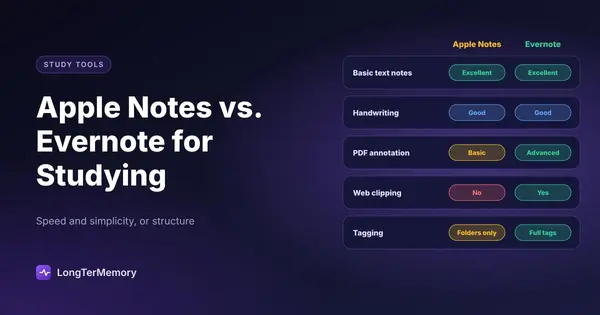
They’re fine for capture, weaker for review. If you’re choosing between the classic options, our Apple Notes vs Evernote comparison breaks it down. The key point: whatever app holds your notes, the notes only become memory when you test yourself on them.
Focus Apps: Match the Tool to Your Distraction Pattern
The right focus app depends on where your distraction comes from: your phone, your browser, or your own urge to switch tasks. A blocker that targets the wrong source is just another app you’ll ignore.
| Your distraction pattern | What helps | Apps to try |
|---|---|---|
| You pick up your phone “for a second” | A visible cost to leaving the session | Forest, built-in Focus mode (iOS) or Digital Wellbeing (Android) |
| You drift to YouTube or social media on your laptop | Hard blocking of specific sites | Freedom, Cold Turkey, LeechBlock (free browser extension) |
| You start, then lose momentum after 15 minutes | Timed work blocks with breaks | Any Pomodoro timer, Focusmate (body doubling) |
| You procrastinate before you even start | Smaller first tasks and accountability | Focusmate, a study partner, a written plan for the session |
Phone-first distraction: Forest and Focus modes
Forest grows a virtual tree while you stay off your phone and kills it if you leave the app. It sounds silly, and it works for many students because the loss is visible. We wrote a full guide on using Forest to study without phone distraction. Before you buy anything, though, try your phone’s free built-in Focus or Digital Wellbeing settings: they can silence notifications and hide apps on a schedule.
There’s also research suggesting that the phone itself matters, not just the notifications. In a 2017 study by Ward and colleagues, participants whose phones were in another room did better on working memory tests than those with the phone face down on the desk. The simplest focus app is a different room.
Browser distraction: Freedom and Cold Turkey
If your laptop is the problem, use a blocker that blocks sites across browsers and can’t be turned off with one click. Freedom works across devices with a subscription; Cold Turkey has a one-time paid version for desktop. LeechBlock is a free extension if you only use one browser.
Momentum problems: timers and body doubling
Some students don’t get distracted by anything specific; they just fade. A 25 or 50 minute timer gives the session an end, which makes it easier to start. Body doubling, studying alongside someone else live or on video, adds gentle accountability. Here’s our guide on using body doubling to improve study focus.
How to Build a Study App Stack That Actually Works
A working stack has one app per job, a clear path from notes to review, and nothing you open less than once a week. Here are three stacks that cover most students.
| Student type | Remember | Organize | Focus |
|---|---|---|---|
| High school or first-year college, many small tests | Quizlet or Brainscape | Google Docs or OneNote | Phone Focus mode |
| Pre-med, nursing, law or language learner, big cumulative exams | Anki or LongTerMemory | Obsidian or Notion | Forest + site blocker |
| Busy student or working professional with lots of PDFs | LongTerMemory | Notion or RemNote | Pomodoro timer + Focusmate |
Three rules that keep your stack lean
- One home for your material. Decide where lecture notes, slides and readings live. Everything else pulls from there.
- A weekly bridge from notes to review. Once a week, turn new notes into flashcards or questions. If this step never happens, an app that generates questions automatically is worth paying for.
- Delete apps you haven’t opened in two weeks. An unused app isn’t neutral; it’s a reminder that you “should” be using it.
Red flags when choosing study apps
- The app shows streaks and points but never tests you on your own material.
- You need more than 30 minutes of setup before your first useful review.
- Your notes or cards can’t be exported. If the company shuts down, your work disappears.
- The free plan hides the core feature (scheduled review) behind a paywall after a few sessions.
Which Study App Should You Start With?
If you can only install one app, make it a memory app, because forgetting is the problem that costs the most points on exams. Research on the forgetting curve suggests that without review we lose a large share of new material within days, and no amount of beautiful notes changes that.
Use this quick decision guide:
- You have a fixed list of facts and enjoy tinkering: Anki.
- You need cards for a quiz this week and a public set exists: Quizlet.
- You want ready-made, structured decks: Brainscape.
- You have more PDFs and notes than time to turn them into cards: an AI tool like LongTerMemory.
- Your notes are the mess: Notion for structure, Obsidian for depth, RemNote for notes plus cards.
- Your phone is the mess: Forest or your built-in Focus mode, then a site blocker for the laptop.
Frequently Asked Questions
What is the best free study app for students?
Anki is the most capable free option for memorization on desktop and Android. For notes, Obsidian and Notion both have strong free plans. For focus, your phone’s built-in Focus or Digital Wellbeing settings cost nothing.
Are AI study apps worth it?
They’re worth it when the bottleneck is creating study material, not understanding it. If you spend hours each week writing flashcards from PDFs, an AI generator gives that time back. Always review the generated questions, since AI can include details you don’t need.
How many study apps should a student use?
Three or four at most: one to remember, one to organize, one to focus, and optionally a calendar. More apps mean more switching and more places where material gets lost.
Is Quizlet or Anki better for studying?
Anki is better for long-term retention because its spaced repetition schedule is stronger and fully free on desktop. Quizlet is faster for short-term quizzes thanks to its library of public sets. Our flashcard apps comparison covers both in more depth.
Turn Your Notes Into Review Without the Busywork
Most stacks break at the same point: the bridge between notes and review. You take good notes, you mean to make flashcards, and the exam arrives first.
LongTerMemory closes that gap. Upload your lecture PDFs, slides or notes, and it generates question and answer cards automatically, then schedules every card with spaced repetition so it comes back right before you’d forget it. You skip the hours of manual card writing and spend that time actually reviewing. The free trial is enough to load a full course and see how much faster your weekly review becomes.
The Bottom Line
Forget the hunt for one perfect app. Build a small stack: a flashcard app that tests you on a schedule, a note app where you’ll find things again, and a focus tool aimed at your real distraction. Choose each one for the way you actually fail, give it two weeks, and delete whatever you don’t use. The best study tools are the ones that disappear into a routine you keep.